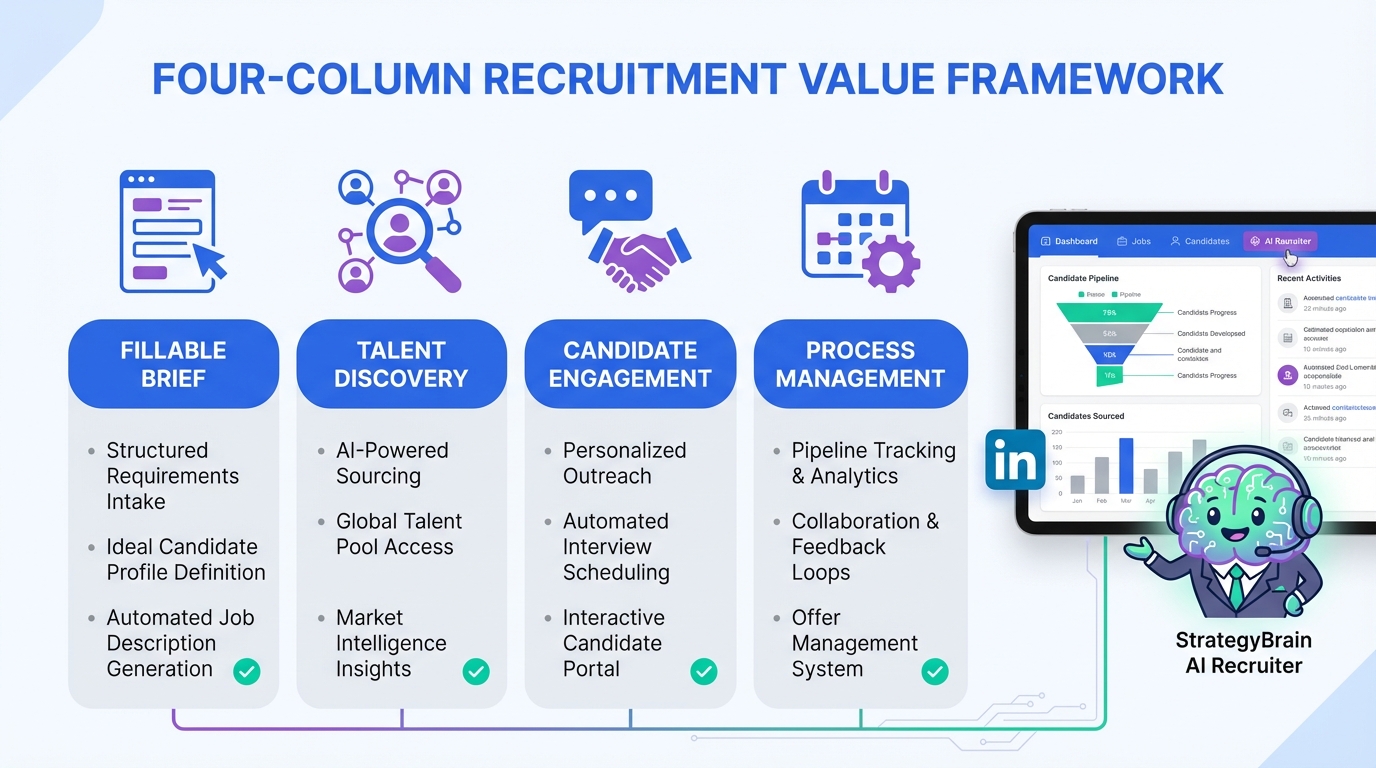
Freeware recruitment software can help you move faster, but it will not automatically prove your impact. The most credible way to articulate recruiter value is to anchor your work to four outcomes: defining a fillable brief, finding talent the client cannot reach alone, converting identified people into real candidates, and managing the process so offers get accepted. In this guide, I keep that four pillar framework and show how to operationalize it with free applicant tracking software and an AI assistant like StrategyBrain AI Recruiter for LinkedIn outreach and follow up. This article is about communicating and systematizing value, not a vendor by vendor ATS review.
Why freeware recruitment software does not equal value
I have met many recruiters who can describe their tasks but struggle to describe their value. That gap gets worse when the conversation turns into speed and price. Tools matter, but the tool is not the value. The value is the outcome you create for the business.
Freeware recruitment software and ATS software free tiers are useful because they give you structure. A free applicant tracking software setup can capture notes, stages, and decisions. However, if you only use it as a storage bin for resumes, you will still look interchangeable. The goal is to use even a basic system to document the four outcomes below in a way a hiring manager can understand and repeat.
Pillar 1: Define a fillable brief
The first pillar is diagnostic work. Skilled recruiters help the client define the brief, and that is not a formality. Many clients start by asking for a clone of the person who left, even when the business has changed and the role has changed. Your value is asking the questions that expose what is actually needed, calibrating expectations, and shaping a job definition that is fillable.
How to operationalize this pillar with free applicant tracking software
- Create an intake record in your ATS for the role and treat it as the source of truth for the brief.
- Capture decision constraints as structured fields, not only in free text notes. Examples include location, compensation range, must have skills, and interview steps.
- Log changes when the client adjusts scope, seniority, or salary. This becomes evidence of your advisory impact.
Intake checklist you can copy
- Problem to solve: What business outcome must this hire improve in the first 90 days?
- Non negotiables: Which 3 skills are truly required, and which are preferences?
- Compensation reality check: What range is approved, and what is flexible?
- Process design: How many interviews, who decides, and what is the timeline?
- Fillability test: If we search LinkedIn for this profile today, do we see enough reachable candidates?
Where StrategyBrain AI Recruiter fits naturally
When the brief is clear, StrategyBrain AI Recruiter can use your LinkedIn search criteria to start consistent outreach and handle the first wave of questions about role, company, compensation, and benefits. In practice, that means your diagnostic work shows up as consistent messaging quality, not just a nice intake document.
Pillar 2: Find people the client cannot find
Finding people is often glossed over, but it is central. Your value is not only screening applicants from job boards. Those candidates can be part of the mix, but the premium outcome is finding candidates the client cannot reach alone through your database, networking, search, and headhunting.
What to track so the value is visible
If you use freeware recruitment software, you can still make this pillar measurable by tracking source and reachability. You do not need a paid analytics module to do this well.
- Source type: inbound applicant, referral, direct search, LinkedIn outreach.
- Reason they were not inbound: not actively applying, niche skill set, geography, confidentiality.
- Search notes: keywords used, titles excluded, and why.
Where StrategyBrain AI Recruiter fits naturally
On LinkedIn, the difference between identifying a profile and actually reaching them is the outreach and follow up. StrategyBrain AI Recruiter is designed to automate connecting and initial messaging, then continue the conversation and follow up 24/7 in the candidate native language. That supports this pillar because it increases the number of reachable conversations without requiring you to manually message at scale.
Pillar 3: Bring candidates to the hiring table
Finding people is not the same as recruiting them. The client has LinkedIn and can see profiles. The value is converting awareness into a real hiring conversation. That is nuanced work: positioning the opportunity, handling objections, and advocating for the client in a way that earns trust.
How to show this pillar inside ATS software free workflows
- Create a stage called “Engaged” that is separate from “Sourced” and “Applied”.
- Log the reason for engagement in a consistent format. Examples include compensation alignment, remote policy, growth path, or mission fit.
- Capture objections as tags so you can report patterns back to the client.
Practical messaging framework
- Context: Why you reached out to them specifically.
- Opportunity: What problem the role solves and why it matters.
- Proof: One credible detail about team, product, or impact.
- Permission: Ask if they are open to a short conversation.
Where StrategyBrain AI Recruiter fits naturally
In my experience, the hardest part to do consistently is the follow up cadence and the Q and A loop. StrategyBrain AI Recruiter can introduce the job, answer common questions about the role and compensation, confirm interview interest, and collect resumes and contact details from interested candidates. It does not replace your judgment on fit, but it can replace a large portion of repetitive LinkedIn back and forth so you can focus on the human parts that actually move decisions.
Pillar 4: Manage the process to acceptance
The craft of managing the process still determines whether a candidate is offered and accepts. Successful recruitment is not only sourcing. It is matching and then guiding both sides through each step. This is where recruiters quietly create outcomes: resurrecting a candidate who was put off by an interview, negotiating salary expectations, preventing counteroffer losses, and keeping momentum.
Process management fields to add to your freeware recruitment software
- Next action owner: client, candidate, recruiter.
- Next action date: a specific date, not “soon”.
- Risk flag: compensation gap, counteroffer risk, slow feedback, interview experience issue.
- Decision log: why the candidate advanced or was rejected.
Where StrategyBrain AI Recruiter fits naturally
Even after interest is confirmed, candidates still ask questions and timelines still slip. StrategyBrain AI Recruiter can keep communication responsive across time zones and languages, which reduces drop off caused by silence. When the candidate shares a resume or contact details, the system captures them so you can move quickly into your screening and interview coordination.
Quick comparison: What to track in a free ATS
This is not a vendor comparison. It is a tracking comparison. If you want your free applicant tracking software to support your value story, track outcomes, not only stages.
| Value pillar | What to track | Proof you can show a client | Where AI Recruiter helps |
|---|---|---|---|
| Define the brief | Intake answers, scope changes, process steps | Clear role definition and fewer late stage resets | Uses your brief to answer candidate questions consistently |
| Find people | Source type, search notes, reachability reason | Pipeline beyond inbound applicants | Automates LinkedIn connecting and outreach at scale |
| Bring to table | Engaged stage, objections, engagement reason | Conversion from profile to conversation | Handles follow up and Q and A, collects resumes and contacts |
| Manage process | Next action owner and date, risk flags, decision log | Faster decisions and fewer drop offs | 24/7 multilingual messaging reduces silence driven churn |
A copy paste scorecard to articulate your value
If you want to stop competing on price and speed, you need a simple way to speak with passion, pride, and credibility about what you actually do. Here is a scorecard I have used to keep the conversation grounded in outcomes. You can paste this into your ATS notes or a client update.
Recruiter value scorecard
- Brief clarity: We aligned on must have skills, compensation boundaries, and a fillable profile.
- Market reality: We adjusted expectations based on reachable talent in the target location and seniority.
- Non inbound pipeline: We built a shortlist from direct search and outreach, not only applicants.
- Engagement: We converted passive profiles into real conversations by handling objections and follow up.
- Process control: We kept momentum with clear next steps, risk flags, and negotiation support.
When you pair this with freeware recruitment software, you get a record of decisions. When you pair it with StrategyBrain AI Recruiter, you also get consistent LinkedIn outreach and candidate communication that scales without losing the human tone you set in the brief.
FAQ
Is freeware recruitment software enough for a small team?
Yes, if your goal is basic tracking and consistent process. The limitation is usually not the free applicant tracking software itself, but whether you track outcomes like engagement reasons, objections, and risk flags that prove recruiter value.
What is the difference between “finding” and “recruiting” candidates?
Finding is identifying who the candidate is. Recruiting is getting that person to the hiring table by building interest, answering questions, and managing follow up until they agree to interview.
Can ATS software free tiers replace LinkedIn outreach tools?
Most ATS free tiers focus on tracking, not outreach. You can track LinkedIn sourced candidates in an ATS, but outreach and follow up typically require a separate workflow or an automation tool.
How does StrategyBrain AI Recruiter help with LinkedIn recruiting?
It automates connecting with candidates that match your search criteria, introduces the opportunity, answers common questions about the role and compensation, confirms interview interest, and collects resumes and contact details from interested candidates.
Does AI Recruiter decide whether a candidate is qualified?
No. It identifies willingness to communicate or interview and gathers information like resumes and contact details. Final qualification against job requirements remains the recruiter responsibility.
Can AI Recruiter communicate in multiple languages?
Yes. It supports multilingual candidate communication and can respond around the clock, which helps reduce delays and misunderstandings in global hiring.
How do I prove value to a client who says “we can just use LinkedIn ourselves”?
Bring the conversation back to outcomes: defining a fillable brief, reaching candidates they cannot reach, converting profiles into interviews, and managing the process so offers are accepted. Then show your tracking evidence from your ATS and your engagement workflow.
What should I avoid when positioning my services?
Avoid competing primarily on price and speed. Position your work as diagnostic, market informed, and process critical, and use your system records to make that visible.
Conclusion
Freeware recruitment software is useful, but it is not the story. The story is the four outcomes you create: a fillable brief, access to talent the client cannot reach, conversion from profile to interview, and process management that leads to acceptance. If you want to be able to articulate your value with credibility, set up your free applicant tracking software to track those outcomes, then use tools like StrategyBrain AI Recruiter to scale the repetitive LinkedIn outreach and follow up while you focus on judgment, advocacy, and closing.
Next step: copy the intake checklist and the value scorecard into your workflow today, then audit one open role and make sure each pillar has at least one concrete proof point you can show in your next client update.