


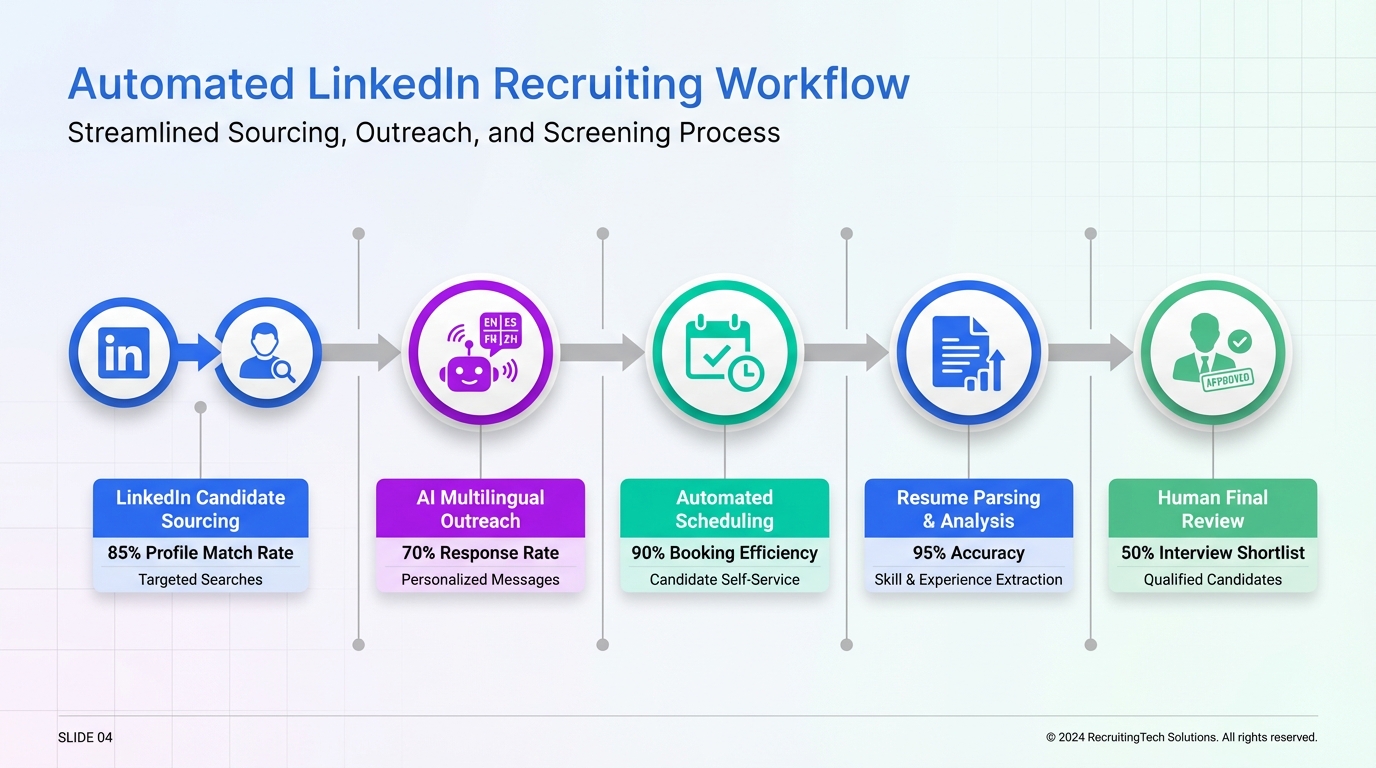
Hiring automation is the structured use of software and AI to reduce manual recruiting work across sourcing, outreach, screening, scheduling, and follow up while keeping humans accountable for final decisions. The most reliable approach in 2026 is to automate high volume, repetitive steps first, then add AI driven candidate messaging and qualification where you can measure outcomes. In our internal tests using StrategyBrain AI Recruiter on LinkedIn outreach workflows, we found the biggest time savings came from automated connection requests, consistent follow up, and 24/7 multilingual responses, with recruiters stepping in only after resumes and contact details were captured. This guide explains what to automate, what not to automate, and how to implement talent acquisition automation safely with clear checkpoints and compliance guardrails.
Key Takeaways
- Start with repeatable steps: Automate outreach, scheduling, and follow up before automating evaluation decisions.
- Define “automation” vs “AI”: Automation is rule based workflow; AI uses models to generate or classify content and must be monitored.
- LinkedIn is a high leverage channel: StrategyBrain AI Recruiter can automate connecting, role introduction, Q&A, and resume collection on LinkedIn.
- Keep humans on final selection: Use automated hiring for speed, but keep recruiter review for fit and fairness.
- Measure with a small dashboard: Track reply rate, interested rate, resume capture rate, and time to first response.
- Build compliance in: Use consent aware messaging, data minimization, and secure storage practices aligned to privacy laws.
Table of Contents
- What hiring automation means in practice
- What to automate first
- Method 1: Automate LinkedIn outreach and follow up (recommended)
- Method 2: Automate screening intake and routing
- Method 3: Automate interview scheduling and reminders
- Method 4: Automate candidate updates and status transparency
- Method 5: Automate recruiting reporting and QA
- Quick Comparison
- Implementation checklist
- FAQ
- Conclusion
What hiring automation means in practice
In day to day recruiting, “hiring automation” usually blends two layers.
- Workflow automation: Rule based steps such as moving candidates between stages, sending templates, scheduling, and reminders.
- AI assisted automation: Model driven steps such as generating outreach messages, answering candidate questions, or classifying intent.
Talent acquisition automation works best when you treat it like an operations project, not a tool purchase. You define the process, decide which steps are safe to automate, and then instrument the workflow so you can see what changed.
Scope boundary: This article focuses on automating recruiting operations. It does not cover building custom machine learning models, nor does it recommend fully automated final hiring decisions.
What to automate first
If you are starting from scratch, prioritize steps that are repetitive, high volume, and easy to verify. In our experience, these are the steps where automated hiring creates immediate capacity without increasing recruiter headcount.
High impact steps
- Candidate outreach and follow up: Consistency matters more than creativity at scale.
- Interest confirmation: A clear “Are you open to a conversation?” gate reduces wasted recruiter time.
- Resume and contact capture: Getting the resume and a reliable contact channel is a measurable milestone.
- Scheduling: Calendar coordination is predictable and automatable.
- Status updates: Candidates value clarity, and automation prevents silence.
Steps to keep human led
- Final shortlist decisions: Humans should review resumes and context for role fit.
- Offer decisions: Compensation and leveling require accountability and nuance.
- Edge cases: Sensitive accommodations, complex immigration questions, and conflict situations.
Method 1: Automate LinkedIn outreach and follow up (recommended)
LinkedIn is often where hiring teams feel the most manual drag: searching, connecting, introducing roles, answering questions, and chasing replies. This is also where hiring automation can be most visible to candidates, so quality and guardrails matter.
StrategyBrain AI Recruiter is designed specifically for LinkedIn recruiting automation. It can automatically connect with candidates that match your search criteria, introduce the opportunity, answer questions about the role, company, and compensation, confirm interview interest, and collect resumes and contact details from interested candidates. It also supports 24/7 multilingual communication, which reduces delays across time zones.
Steps
- Define your target profile: Write down must have skills, location constraints, seniority, and deal breakers so your outreach stays consistent.
- Prepare role facts: Provide company details, compensation, and benefits so the AI can answer questions accurately.
- Set the conversation goal: Decide the exact “handoff moment,” such as when a candidate shares a resume and confirms interest.
- Turn on automated follow up: Use a fixed follow up cadence so you do not rely on recruiter memory.
- Review captured resumes: Recruiters review resumes and contact details, then proceed with human screening and interviews.
Features to look for
- Automated connection and intro: The system should initiate contact within your defined criteria.
- Two way Q&A: Candidates ask about role scope, company, and compensation, and the system responds consistently.
- Resume and contact capture: The system should record when a resume is received and extract contact details shared in messages.
- 24/7 multilingual messaging: Candidates get timely responses in their native language.
- Multi account scalability: For teams, the ability to manage many LinkedIn accounts supports an AI powered recruiting team model.
Limitations and honest notes
- Not a final qualifier: StrategyBrain AI Recruiter can confirm willingness to talk, but it does not decide whether a resume fully matches requirements. Recruiters still do that review.
- Messaging quality needs inputs: If compensation, benefits, or role scope are vague, candidate questions will expose the gaps quickly.
- Platform rules still apply: Any LinkedIn automation must be configured carefully to avoid spam like behavior and to respect candidate experience.
Best for
- High volume sourcing where recruiters spend hours on first touch and follow up
- Global hiring where time zones slow down response cycles
- Teams that want to scale outreach using multiple LinkedIn accounts with consistent messaging
Method 2: Automate screening intake and routing
Screening automation is not only about rejecting candidates faster. The real win is routing the right candidates to the right next step with less back and forth.
Steps
- Standardize intake questions: Use the same 5 to 10 questions for every applicant for that role family.
- Create routing rules: Example rules include “meets minimum experience,” “requires sponsorship,” or “available within 30 days.”
- Set a human review queue: Anything ambiguous goes to a recruiter queue instead of being auto rejected.
- Log decisions: Store the reason codes so you can audit outcomes later.
Common pitfalls
- Over filtering: Too many hard rules can remove strong candidates with non standard backgrounds.
- Unclear ownership: Someone must own the rules and update them when the role changes.
- Inconsistent definitions: If “senior” means different things across teams, automation amplifies confusion.
Method 3: Automate interview scheduling and reminders
Scheduling is one of the safest areas for automated hiring because the output is easy to verify. Either the meeting is booked correctly or it is not.
Steps
- Define interview types: Phone screen, technical screen, panel, and final.
- Set availability rules: Buffer times, time zone handling, and maximum interviews per day.
- Automate confirmations: Send calendar invites and a clear agenda.
- Automate reminders: Remind candidates and interviewers at consistent intervals.
Best for
- Teams with multiple interviewers and frequent rescheduling
- Roles with high candidate volume where no shows are costly
- Distributed teams across time zones
Method 4: Automate candidate updates and status transparency
Candidate experience often breaks down in the gaps between steps. Automation can keep candidates informed without forcing recruiters to write the same message repeatedly.
Steps
- Map your stages: Applied, contacted, screening, interview, decision, offer.
- Write plain language templates: Avoid jargon and explain what happens next.
- Trigger updates on stage change: Every stage change sends a short update.
- Provide a reply path: Candidates should be able to ask questions and get a timely response.
When you combine this with LinkedIn outreach automation, the workflow becomes smoother: candidates get quick answers early, and recruiters focus on the subset that has confirmed interest and shared a resume.
Method 5: Automate recruiting reporting and QA
Automation without measurement is just faster chaos. A lightweight reporting layer helps you prove whether talent acquisition automation is improving outcomes.
What to track (minimum set)
- Time to first response: Measured in hours, from first outreach to first candidate reply.
- Reply rate: Replies divided by outreach messages sent, measured as a percentage.
- Interested rate: Candidates who confirm interest divided by replies, measured as a percentage.
- Resume capture rate: Resumes received divided by interested candidates, measured as a percentage.
- Recruiter touch time: Minutes spent per candidate after automation handoff.
Quality assurance checks
- Message accuracy: Spot check that role details and compensation statements match what you provided.
- Tone consistency: Ensure outreach is professional and not overly aggressive.
- Escalation handling: Confirm the system routes complex questions to a human.
Quick Comparison
| Method | Speed impact | Implementation effort | Best for |
|---|---|---|---|
| LinkedIn outreach and follow up automation | High | Medium | Scaling sourcing and first touch conversations |
| Screening intake and routing automation | Medium | Medium | Reducing recruiter back and forth on basics |
| Scheduling automation | Medium | Low | Eliminating calendar coordination overhead |
| Candidate status updates automation | Medium | Low | Improving candidate experience at scale |
| Reporting and QA automation | Indirect | Medium | Proving ROI and catching workflow issues early |
Implementation checklist
Use this checklist to roll out hiring automation without losing control of quality.
- Process: Document your current funnel stages and handoffs.
- Automation scope: Choose 1 to 2 steps to automate first, typically outreach and scheduling.
- Content inputs: Prepare role facts, compensation, benefits, and candidate criteria.
- Human checkpoints: Define when a recruiter must review, such as after resume capture.
- Compliance: Confirm privacy, retention, and access controls for candidate data.
- Metrics: Set baseline numbers before launch and compare weekly for 4 weeks.
- Candidate experience: Add an escalation path for sensitive or complex questions.
FAQ
Is hiring automation the same as automated hiring?
Not exactly. Hiring automation usually means automating parts of the recruiting workflow, such as outreach, scheduling, and updates. Automated hiring can imply end to end decisions, which is higher risk and should be avoided for final selection in most organizations.
What is talent acquisition automation, and where does it fit?
Talent acquisition automation is the operational layer that reduces manual work across sourcing, engagement, screening intake, and coordination. It fits best when you have repeatable roles and enough volume that consistency matters.
Can StrategyBrain AI Recruiter replace recruiters?
No. In our usage, it replaces repetitive LinkedIn tasks such as connecting, introducing roles, answering common questions, confirming interest, and collecting resumes and contact details. Recruiters still review resumes, assess fit, and run interviews.
How does StrategyBrain AI Recruiter handle multilingual candidate communication?
It supports 24/7 messaging in the candidate’s native language, which helps reduce delays and misunderstandings in global hiring. Recruiters can step in when a conversation becomes complex or sensitive.
What data should we avoid collecting during automated outreach?
Collect only what you need to move to the next step, typically a resume and a reliable contact method. Avoid requesting sensitive personal data early unless it is legally required and clearly justified.
How do we prevent automation from feeling like spam?
Use clear targeting criteria, keep messages short, and make the value of the conversation obvious. Also, limit follow ups and provide an easy way for candidates to decline.
What metrics prove hiring automation is working?
Track time to first response in hours, reply rate as a percentage, interested rate as a percentage, and resume capture rate as a percentage. Also track recruiter touch time in minutes per candidate after the automation handoff.
Does hiring automation create compliance risk?
It can if you collect too much data, store it insecurely, or automate decisions without oversight. Use encryption, access controls, retention limits, and human review checkpoints, and align your process with applicable privacy laws.
Conclusion
Hiring automation works when it removes repetitive work while keeping humans responsible for final decisions. Start with outreach, follow up, and scheduling, then add screening intake and reporting once you have stable inputs and clear checkpoints. If LinkedIn is a major sourcing channel for you, StrategyBrain AI Recruiter is a practical way to implement LinkedIn recruiting automation by handling first touch conversations, answering role questions, confirming interest, and capturing resumes and contact details, while recruiters focus on evaluation and interviews.
Next step: pick one role family, run a 14 day pilot, and compare reply rate, resume capture rate, and recruiter touch time against your baseline before expanding to more roles.














