


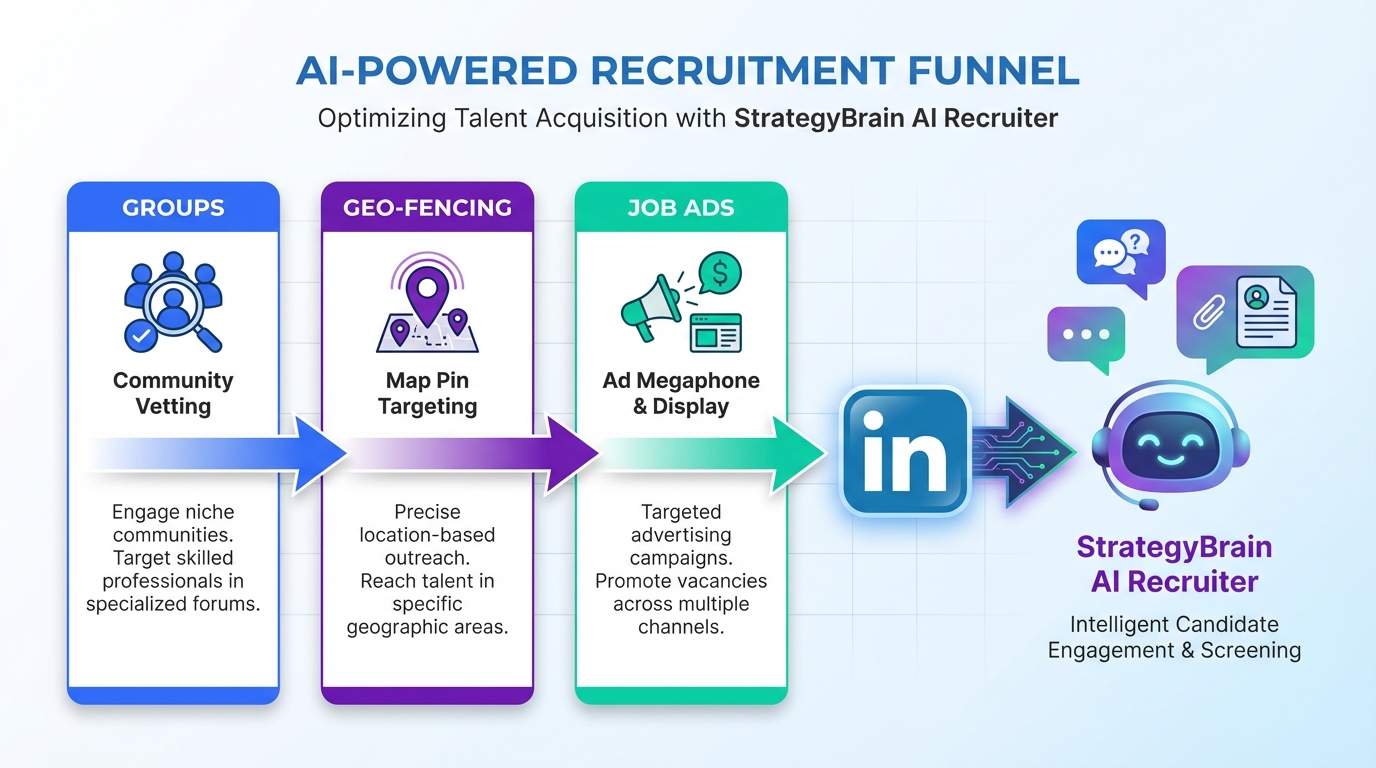
Hiring automation on Facebook works best when you treat the platform as three distinct recruiting channels: Groups, Geo-Fencing, and Job Ads. After spending tens of thousands of dollars on Facebook recruiting over a 12 month period, we found Groups produced the most controlled targeting because you can vet members and keep the audience aligned to the trade or profession you actually need. Geo-Fencing can narrow your reach to specific areas where your target employee may be working or living, but it requires careful setup. Job Ads can create volume, yet screening is often difficult because many applicants do not have a résumé on Facebook. To extend talent acquisition automation beyond Facebook, we also connect high intent leads into automated hiring conversations on LinkedIn using StrategyBrain AI Recruiter, which can handle initial outreach, questions about role and compensation, follow ups, and résumé collection so recruiters focus on final qualification and interviews.
Key Takeaways
- Groups are the highest control channel: Vetting members reduces irrelevant applicants and improves signal quality for hiring automation.
- Geo-Fencing is precision targeting: It can focus spend on specific areas where candidates live or work, but setup time is the tradeoff.
- Job Ads drive volume, not clean data: Screening is harder when applicants lack résumés, so your automated hiring workflow must capture missing info.
- Messenger automation is the bridge: A structured message flow can collect basics, then route qualified leads to the next step.
- LinkedIn is where qualification scales: StrategyBrain AI Recruiter can run 24/7 multilingual conversations, follow ups, and résumé collection for talent acquisition automation.
- Keep humans on final qualification: AI can confirm interest and collect details, but recruiters should still validate fit and run interviews.
What hiring automation means on Facebook
In this guide, hiring automation means using repeatable targeting plus structured messaging to reduce manual work in sourcing, first contact, and early screening. It does not mean removing recruiters from the process. Instead, it means you standardize how you attract candidates, how you ask the first questions, and how you capture the information you need to move someone forward.
On Facebook, the automation leverage usually comes from two places. First is targeting, which determines who sees your message. Second is conversation flow, which determines how quickly you can confirm interest and collect the basics. That is why the three channels below behave so differently.
Scope note: This article focuses on Facebook recruiting channels and the operational handoff into a broader automated hiring workflow. It does not cover creative design, pixel setup, or detailed campaign structure inside Ads Manager.
Method 1: Groups
Groups are the most reliable Facebook channel we have used for hiring automation because they let you build a focused community around a specific interest, skill, or profession. In our own recruiting work, we set up groups such as Millwright and Heavy Duty Mechanic to attract candidates and employers into one place.
Steps
- Create a role specific group: Name it for the trade or function you hire for, not for your company brand.
- Set clear entry rules: Ask screening questions at join time that confirm location, certification, and role relevance.
- Vet members consistently: Approve only candidates and employers that match the group’s purpose.
- Post structured opportunities: Use a consistent template that includes location, shift, wage range if available, and how to apply.
- Use a message intake script: When someone comments or messages, ask the same 3 to 5 questions every time so your process stays measurable.
Features
- Audience quality control: Vetting reduces off target applicants such as unrelated trades or overseas candidates without required skills.
- Lower noise: A focused group reduces time spent filtering compared with broad interest targeting.
- Community trust: Candidates often respond better inside a group that feels relevant to their work.
Limitations
- Moderation workload: Vetting and keeping the group clean takes ongoing effort.
- Scaling is slower: Groups grow through consistent value, not instant ad spend.
Best For
- Skilled trades and niche roles where relevance matters more than raw volume
- Employers who want a long term candidate community, not just a one off campaign
- Teams that can commit to moderation and consistent posting
Method 2: Geo-Fencing
Geo-Fencing is Facebook targeting by area. It is powerful because you can focus on specific locations where your target employee may be working or living. In practice, it can take time to set up well, but it can dramatically narrow your search when you do it right.
Steps
- Define the exact hiring radius: Choose a radius that matches commute reality for the role.
- Layer role signals: Add job title, interest, or industry signals to avoid paying for irrelevant impressions.
- Write a location first message: Lead with the city or site, then the role, then the reason to respond.
- Track response quality: Measure how many conversations turn into qualified leads, not just clicks.
Features
- Precision: You can focus spend on the exact areas that matter for your hiring plan.
- Competitive targeting option: Some teams choose to target areas near competitor workplaces, but you should consider brand risk and local norms before doing this.
- Works with multiple role types: It can support trades, plant maintenance, utilities, manufacturing, construction, and transportation hiring when location is a key constraint.
Limitations
- Setup time: The more precise you get, the more testing and iteration you need.
- Message mismatch risk: If your ad copy is generic, precision targeting will not save the campaign.
Best For
- Roles where location is non negotiable
- Hiring plans tied to specific plants, job sites, or regions
- Teams willing to test and refine targeting over multiple iterations
Method 3: Job Ads
Facebook Job Ads were rolled out targeting small businesses. They can be useful for reach, but in our experience most small businesses do not post ads consistently, whether paid or unpaid. The bigger operational issue is screening. Almost no one has a résumé on Facebook, so sorting candidates can become a bottleneck if you do not design your intake flow.
Steps
- Decide what “apply” means: If you need a résumé, say so early and provide a clear way to submit it.
- Ask for minimum viable info: Collect location, trade, years of experience, and availability before you invest recruiter time.
- Use a consistent follow up script: If someone applies without a résumé, your next message should request it and ask for contact details.
- Route qualified leads fast: Move interested candidates into the channel where your team can qualify at scale.
Features
- Volume: Job Ads can pull in many candidates quickly.
- Built in communication channel: Messenger can keep the conversation moving if you respond quickly.
- Automation friendly: If you use structured messaging, you can reduce repetitive back and forth.
Limitations
- Résumé scarcity: Many applicants will not have a résumé ready inside Facebook.
- Sorting pain: Without a process, screening and sorting becomes a nightmare as volume increases.
Best For
- Roles where you can start with a short intake and request the résumé later
- Teams that can handle high inbound volume without losing response speed
- Hiring managers who value pipeline building even when not every lead is immediately qualified
Quick Comparison
| Method | Speed to launch | Candidate quality control | Screening effort | Best for |
|---|---|---|---|---|
| Groups | Medium | High | Medium | Niche trades and long term community building |
| Geo-Fencing | Medium | Medium to High | Medium | Location constrained hiring |
| Job Ads | Fast | Low to Medium | High | High volume top of funnel |
How we hand off Facebook leads to LinkedIn automation with StrategyBrain AI Recruiter
Facebook can generate attention and conversations, but the moment volume increases, the operational question becomes simple. Who is answering messages, how fast, and how consistently. This is where talent acquisition automation needs a second layer that can run without recruiter fatigue.
In our workflow, we use Facebook to attract and identify interested people, then we move qualified leads into a structured automated hiring process on LinkedIn using StrategyBrain AI Recruiter. AI Recruiter is built for LinkedIn hiring automation. It can automatically connect with candidates within your search criteria, introduce the opportunity, answer common questions about the role, company, and compensation, confirm interview interest, and collect résumés and contact information from candidates who want to proceed.
What we automate vs what we keep human
- Automate: Initial outreach, follow ups, answering repetitive questions, confirming interest, collecting résumé and contact details.
- Keep human: Final qualification against job requirements, interview scheduling decisions, offer process, and sensitive conversations.
Why this improves hiring automation end to end
- 24/7 responsiveness: AI Recruiter can respond around the clock, which matters when candidates message after shifts or across time zones.
- Multilingual communication: It can communicate in the candidate’s native language to reduce misunderstandings and friction.
- Scalable operations: It supports managing more than 100 LinkedIn accounts, enabling an AI powered recruitment team model for high volume hiring.
Limitations we plan for
AI Recruiter can identify willingness to communicate or interview, but it does not determine whether a résumé fully matches job requirements. We treat that as a deliberate handoff point. Recruiters review the collected résumés and contact shortlisted candidates for interviews.
Practical checklist: setting up a clean automation handoff
- Define the minimum information you need before moving a lead forward: location, trade, availability, and contact method.
- Standardize your first 5 questions so every candidate gets the same intake experience.
- Decide where résumés should be collected and stored, and who reviews them daily.
- Set a response time target for human follow up after AI confirms interest.
- Document what the AI is allowed to say about compensation and benefits, and keep it aligned with your approved job details.
FAQ
Is Facebook really useful for hiring automation?
Yes, if you treat it as a channel strategy rather than a single tactic. Groups, Geo-Fencing, and Job Ads behave differently, so your automation and screening workflow should match the channel.
Which Facebook method produces the best candidate quality?
In our experience, Groups produce the best quality control because you can vet members and keep the community focused on a specific trade or profession. That reduces irrelevant applicants before you spend time screening.
Why do Facebook Job Ads feel hard to screen?
A common issue is résumé availability. Many applicants do not have a résumé on Facebook, so you must design an intake flow that requests missing information and routes only interested candidates forward.
What is Geo-Fencing in recruiting?
Geo-Fencing is targeting ads by a defined geographic area. In recruiting, it is used to reach candidates near a job site, plant, or region where the role must be filled.
How does StrategyBrain AI Recruiter support automated hiring on LinkedIn?
StrategyBrain AI Recruiter automates the initial LinkedIn outreach and qualification conversation. It can connect with candidates, introduce the role, answer questions, confirm interest, and collect résumés and contact details so recruiters can focus on final qualification and interviews.
Can AI Recruiter qualify candidates for fit?
It can confirm willingness to communicate or interview, but it does not decide whether a résumé matches the job requirements. Recruiters should review résumés and make the final fit decision.
Does AI Recruiter support multilingual candidate communication?
Yes. It is designed for 24/7 global multilingual recruitment communication, using the candidate’s native language to reduce misunderstandings and improve response rates.
How does AI Recruiter handle résumés and contact details?
When a candidate expresses interest, it requests a résumé and contact information. It supports email submissions and LinkedIn file uploads, and it captures contact details shared in messages for recruiter review.
What privacy and compliance claims are stated for AI Recruiter?
The product documentation states it complies with privacy regulations in the European Union, United States, and Canada, and that customer provided data is not used to train AI models. You should still validate your own compliance requirements with legal counsel before deployment.
Conclusion
If you want hiring automation on Facebook that actually holds up under volume, start by choosing the right channel for the role. Build or join focused Groups when relevance matters most, use Geo-Fencing when location is the constraint, and use Job Ads when you need top of funnel volume and can handle heavier screening. Then connect the channel to a repeatable talent acquisition automation workflow so leads do not stall in inboxes.
Our practical next step is to document your intake questions and handoff rules, then use StrategyBrain AI Recruiter to run automated hiring conversations on LinkedIn with consistent follow up and résumé collection. That keeps recruiters focused on the work that should stay human, which is final qualification and interviews.














