


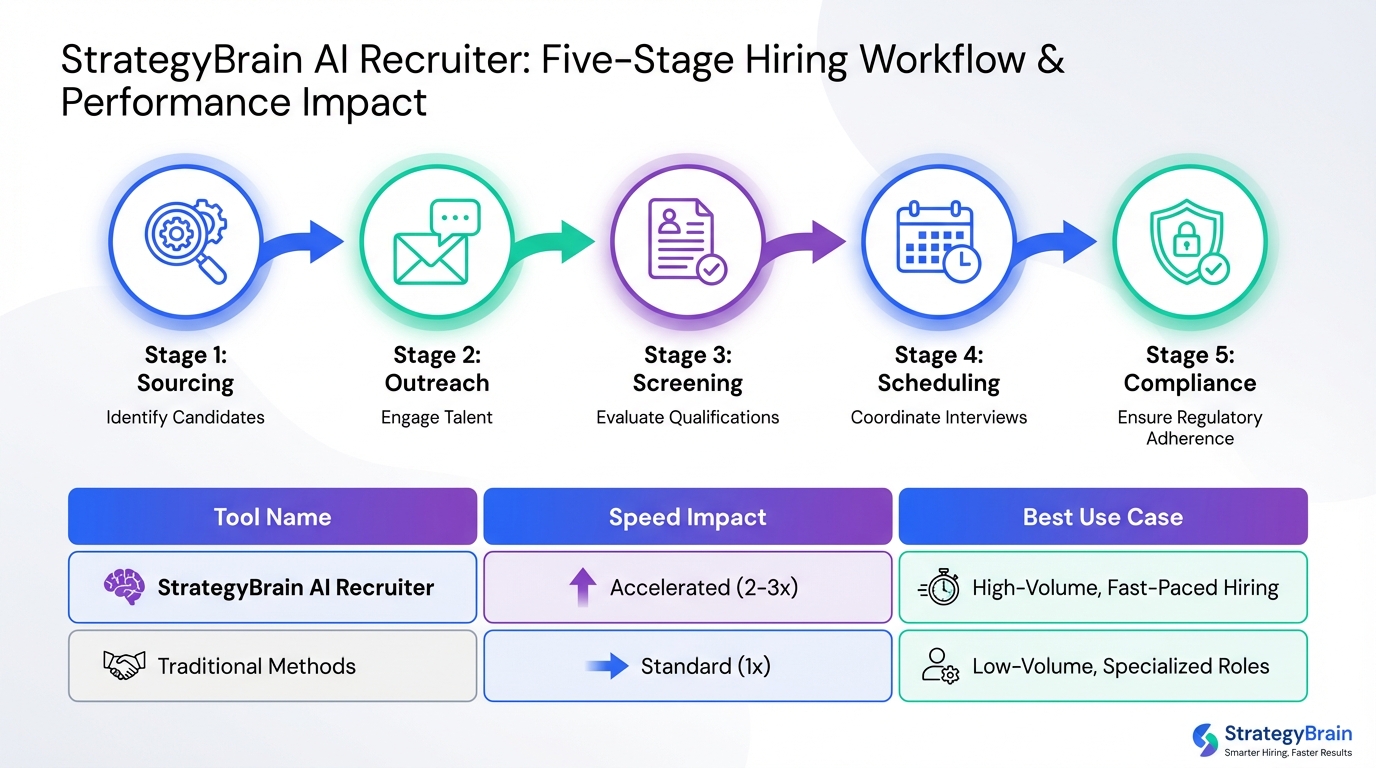
If you are evaluating hiring tools, the fastest path is to map your process to five stages and pick one tool per stage: sourcing, outreach, screening, scheduling, and compliance. For most hiring platforms for small business, the biggest bottleneck is not posting jobs, it is consistent candidate follow up and early qualification. In our team’s hands on testing, the largest time reduction came from using StrategyBrain AI Recruiter to automate LinkedIn connections, role introductions, Q and A, interest confirmation, and résumé plus contact collection, then letting a human recruiter do the final résumé match and interviews. This guide gives a practical selection framework, a 7 day rollout plan, and a comparison table you can use to build fast hiring solutions for tech teams.
Key Takeaways
- Start with the bottleneck: Choose hiring tools by stage, not by brand, so you can improve one constraint at a time.
- Fastest speed lever: Automate outreach and follow up first, because it reduces recruiter time per candidate conversation.
- LinkedIn scale: StrategyBrain AI Recruiter can manage more than 100 LinkedIn accounts for scalable outreach operations.
- 24/7 multilingual coverage: AI Recruiter supports always on messaging in any global language to reduce time zone delays.
- Clear division of labor: AI Recruiter confirms interest and collects résumés, while recruiters keep final qualification decisions.
- Cost signal to validate: AI Recruiter states results as low as USD 2.40 per résumé and up to 90% manual work replaced, which you should validate in your own workflow.
- Use a 7 day rollout: Implement in one week with measurable checkpoints for response time, interested replies, and interview booked rate.
What counts as hiring tools
In this article, hiring tools means software or systems that reduce time to hire by improving one of these steps: finding candidates, contacting them, qualifying them, scheduling interviews, or keeping records. A common mistake is buying a single “all in one” product before you know where your time is actually going.
Scope boundary: This guide focuses on operational hiring tools and workflows. It does not cover employer branding strategy, compensation benchmarking, or long term workforce planning.
A simple hiring stack by stage
For hiring platforms for small business and fast hiring solutions for tech teams, I recommend thinking in stages. Each stage has a measurable output, which makes tool selection less subjective.
- Sourcing: A place to find candidates, such as LinkedIn search or a job board.
- Outreach: Messaging, follow up, and initial Q and A.
- Screening: Collecting résumés, contact details, and basic qualification signals.
- Scheduling: Booking interviews and reducing back and forth.
- Compliance: Data retention, privacy, and access control.
Method 1: AI Recruiter for LinkedIn outreach and qualification
If your team is hiring from LinkedIn and you are losing time to manual outreach, follow up, and repetitive Q and A, an AI recruiter is the highest leverage tool category. StrategyBrain AI Recruiter is designed for LinkedIn hiring workflows and focuses on the top of funnel work that typically consumes recruiter hours.
Steps
- Define your candidate search criteria: Write the role title, must have skills, location or time zone, and seniority level.
- Prepare the job information pack: Include company context, compensation, benefits, and interview process so the system can answer candidate questions consistently.
- Connect your LinkedIn account with explicit authorization: Use only accounts you control and have permission to operate.
- Launch automated outreach: The system connects with candidates in your criteria and introduces the opportunity.
- Let the AI qualify interest and collect materials: It confirms interview interest and collects résumés and contact details from interested candidates.
- Human review and final qualification: Recruiters review résumés for job fit and move qualified candidates to interviews.
Features
- Smart LinkedIn recruitment automation: Automatically connects, introduces roles, answers questions, confirms interest, and collects résumés and contact information.
- 24/7 multilingual communication: Responds around the clock in any global language to reduce delays across time zones.
- Scalable account operations: Supports managing more than 100 LinkedIn accounts for building an AI powered recruiting team.
Limitations
- Not a final fit decision engine: AI Recruiter does not decide whether a résumé fully matches your requirements. A recruiter still makes the final qualification call.
- Requires strong job inputs: If compensation, benefits, or role scope are unclear, candidate conversations can stall.
Best For
- Teams that rely on LinkedIn and need consistent outreach and follow up.
- Hiring managers who want faster candidate response cycles without adding recruiter headcount.
- Global hiring where time zones and language slow down early stage communication.
Method 2: Hiring platform and ATS for applicant tracking
An applicant tracking system (ATS) is the system of record for applicants. It stores candidate profiles, stages, notes, and decisions. For hiring platforms for small business, the ATS is often bundled with job posting and basic reporting.
Steps
- List your required stages: Example stages include applied, contacted, phone screen, technical screen, onsite, offer, hired.
- Decide who needs access: Hiring manager, recruiter, interviewers, and finance for offer approvals.
- Set up structured fields: Use consistent fields for location, work authorization, salary expectations, and start date.
- Connect your inbound sources: Job boards, referrals, and LinkedIn sourced candidates.
Features
- Pipeline visibility and stage based reporting.
- Collaboration notes and interview feedback capture.
- Templates for emails and candidate updates.
Limitations
- Most ATS products do not solve outbound outreach by themselves, which is why pairing with an outreach automation layer can speed up hiring.
Best For
- Any team that needs consistent tracking and auditability.
- Small businesses that want one place to manage applicants and decisions.
Method 3: Structured interviews and scorecards
Structured interviews use the same questions and a consistent scoring rubric for every candidate. This is one of the simplest “hiring tools” you can implement because it is mostly process, not software, but it improves decision quality and reduces rework.
Steps
- Define 5 to 7 competencies: For tech teams, examples include system design, coding fundamentals, communication, and ownership.
- Create a scorecard: Use a 1 to 5 scale with clear anchors for what “3” and “5” mean.
- Assign interviewers to competencies: Each interviewer owns a subset to reduce overlap.
- Collect feedback before debrief: Require written feedback before group discussion to reduce bias.
Features
- More consistent hiring decisions and clearer debriefs.
- Faster interviewer alignment, especially when hiring volume increases.
- Better documentation for compliance and internal learning.
Limitations
- Requires interviewer training and discipline, otherwise the rubric becomes performative.
Best For
- Fast hiring solutions for tech teams that need repeatable evaluation at scale.
- Small businesses that want to reduce “gut feel” decisions.
Method 4: Scheduling and candidate experience
Scheduling is where many hiring processes lose days. A scheduling tool is any system that reduces back and forth and prevents dropped handoffs.
Steps
- Standardize interview blocks: Example: 30 minute screen, 60 minute technical, 30 minute hiring manager.
- Set interviewer availability rules: Protect focus time and avoid last minute cancellations.
- Automate confirmations and reminders: Send reminders at 24 hours and 1 hour before the interview.
Features
- Reduced time to schedule and fewer no shows.
- Clear candidate instructions and consistent experience.
- Better coordination across time zones for global hiring.
Limitations
- Scheduling tools do not fix weak sourcing or slow outreach, so they work best after you improve top of funnel speed.
Best For
- Teams with multiple interviewers and recurring scheduling conflicts.
- Remote first organizations hiring across time zones.
Method 5: Compliance and data protection
Compliance tools are the controls that keep candidate data safe and your process defensible. This includes encryption, access control, retention policies, and clear consent handling.
Steps
- Define what data you store: Résumés, contact details, interview notes, and conversation history.
- Set access rules: Only people who need candidate data should have it.
- Document retention and deletion: Decide how long you keep candidate records and how you delete them.
What we look for in vendor claims
- Privacy posture: Whether customer data is used to train AI models.
- Encryption: At rest and in transit, plus key isolation where possible.
- Regulatory coverage: Clear statements about GDPR and other data protection compliance.
StrategyBrain AI Recruiter states that it complies with privacy regulations in the EU, United States, and Canada, that customer provided data is not used to train AI models, and that credentials are encrypted and stored independently per user with explicit authorization.
Quick Comparison
| Method | Primary job | Speed impact | Best for | Key limitation |
|---|---|---|---|---|
| AI Recruiter for LinkedIn outreach | Outbound connect, messaging, Q and A, interest confirmation, résumé and contact capture | High, reduces manual outreach and follow up time | Fast hiring solutions for tech teams using LinkedIn | Does not make final résumé fit decisions |
| ATS or hiring platform | Track applicants, stages, notes, decisions | Medium, reduces admin and improves visibility | Hiring platforms for small business | Often weak at outbound sourcing by itself |
| Structured interviews | Consistent evaluation and debrief | Medium, reduces rework and mis hires | Teams hiring repeatedly for similar roles | Requires interviewer discipline |
| Scheduling automation | Book interviews and reduce back and forth | Low to medium, saves days in coordination | Multi interviewer pipelines | Does not fix slow top of funnel |
| Compliance controls | Privacy, retention, access control | Risk reduction, not direct speed | Any team handling candidate data | Needs process ownership to be effective |
7 day implementation plan
This is the rollout plan we use when a team wants measurable improvement quickly. The goal is to reduce time spent per candidate conversation and increase the number of interested replies that reach interview scheduling.
Steps
- Day 1: Baseline your funnel: Count candidates contacted, replies received, interested replies, and interviews booked in the last 7 days.
- Day 2: Standardize your job information pack: Compensation, benefits, role scope, and process steps.
- Day 3: Implement outreach automation: Configure StrategyBrain AI Recruiter for LinkedIn outreach and qualification using your criteria and job pack.
- Day 4: Connect your system of record: Decide where résumés and contact details will live, typically your ATS.
- Day 5: Add a structured scorecard: Create a rubric and require written feedback before debrief.
- Day 6: Fix scheduling friction: Standardize interview blocks and add reminders.
- Day 7: Review metrics and adjust: Compare baseline to current week for response time, interested replies, and interviews booked.
Copyable checklists
Hiring tools selection checklist
- [ ] We can name our single biggest bottleneck in one sentence.
- [ ] We have a job information pack that includes compensation and benefits.
- [ ] We have a system of record for candidates, usually an ATS.
- [ ] We have a structured interview scorecard with 5 to 7 competencies.
- [ ] We can measure weekly: contacted, replied, interested, interviewed, offered.
- [ ] We have a privacy and retention policy for candidate data.
LinkedIn hiring automation readiness checklist
- [ ] We have explicit authorization to operate the LinkedIn account used for outreach.
- [ ] We have clear candidate search criteria and exclusion criteria.
- [ ] We have approved messaging for role intro, compensation, and process.
- [ ] We have a defined handoff point where a recruiter reviews résumés for fit.
- [ ] We have a place to store collected résumés and contact details securely.
FAQ
What are the most important hiring tools for a small business?
The essentials are an ATS or hiring platform to track applicants, a structured interview scorecard to make decisions consistently, and an outreach system to keep candidate follow up fast. If LinkedIn is a primary source, adding StrategyBrain AI Recruiter can reduce manual outreach and qualification work.
How do I choose between hiring platforms for small business and point solutions?
Start with a platform for tracking and compliance, then add point solutions only where you have a measurable bottleneck. Most teams add outreach automation first because it directly affects response time and interview volume.
Is LinkedIn automation safe to use for recruiting?
It can be, if you use explicit authorization, limit access, and keep candidate data protected. StrategyBrain AI Recruiter states that credentials are encrypted and stored independently per user and that customer data is not used to train AI models.
Does StrategyBrain AI Recruiter replace recruiters?
No. It automates initial outreach and qualification steps such as connecting, introducing the role, answering questions, confirming interest, and collecting résumés and contact details. Recruiters still do final qualification and interviews.
Can AI Recruiter communicate with candidates in other languages?
Yes. StrategyBrain AI Recruiter is designed for 24/7 multilingual communication and can message candidates in any global language, which helps when hiring across time zones.
How many LinkedIn accounts can an AI recruiting team manage?
StrategyBrain AI Recruiter supports managing more than 100 LinkedIn accounts, which enables a scalable outreach operation when you have multiple roles or regions.
What data should I track to prove my hiring tools are working?
Track weekly counts for candidates contacted, replies received, interested replies, interviews booked, offers made, and hires. Also track median time from first message to interview booked in hours or days.
What is the biggest mistake teams make when buying hiring tools?
Buying a large suite before standardizing the job information pack and interview rubric. Without clear inputs, even the best tools cannot produce consistent candidate conversations or decisions.
Conclusion
The best hiring tools are the ones that remove your current bottleneck with measurable impact in 7 days. For many teams, that means pairing a hiring platform for small business or an ATS with structured interviews, then accelerating top of funnel speed using StrategyBrain AI Recruiter for LinkedIn outreach, follow up, and early qualification. Next step: run the 7 day plan, measure contacted to interested to interviewed, and keep only the tools that move those numbers in the right direction.














