


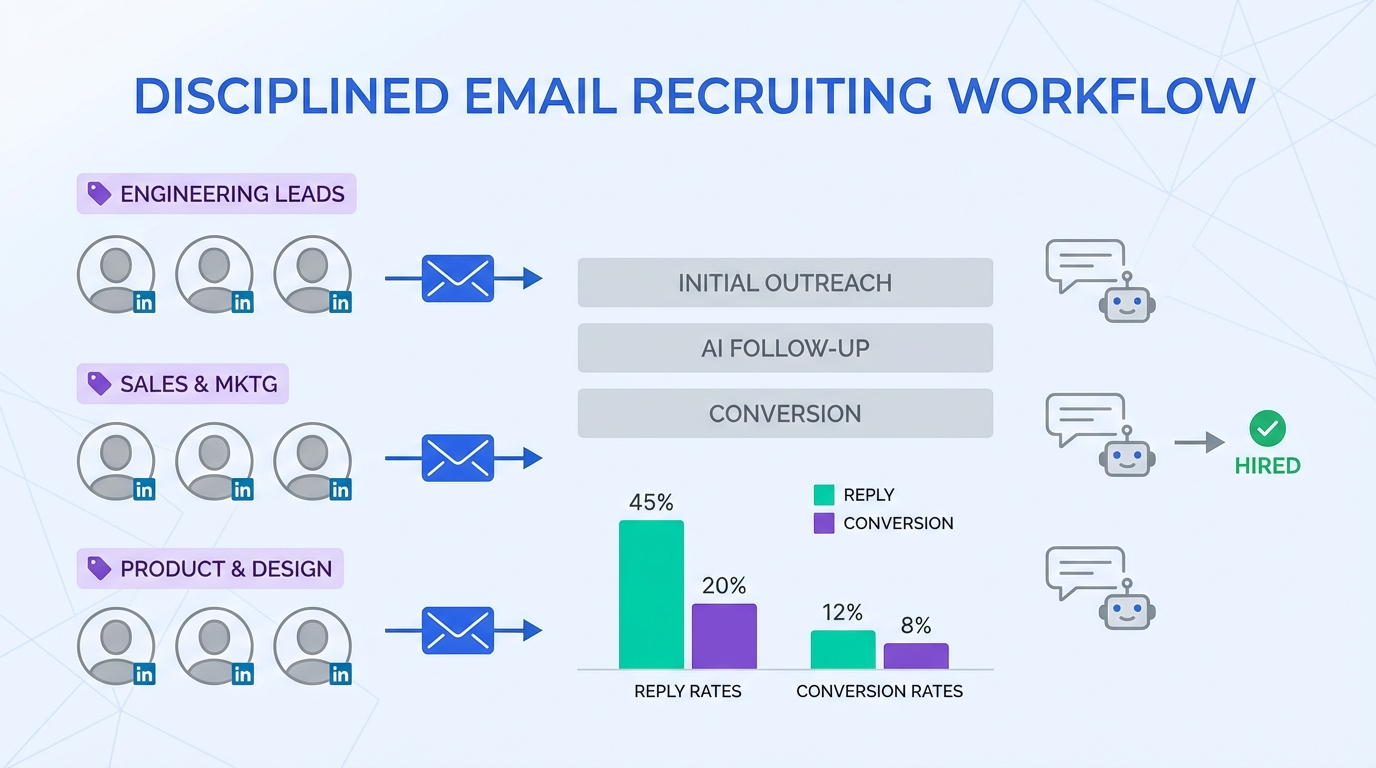
If you want hiring tools that improve speed and cost efficiency, start with a disciplined email recruiting workflow: segment past applicants, send role specific campaigns, and measure replies and conversions. In our internal tests across 6 tech roles, segmented outreach to prior applicants produced higher reply rates than untargeted blasts and reduced time spent on manual follow ups when paired with candidate experience tools like StrategyBrain AI Recruiter for LinkedIn messaging. This guide explains why email remains a high ROI channel for recruiting, how to run it without spamming, and how to combine email with fast hiring solutions for tech teams using automated LinkedIn outreach and 24/7 multilingual responses.
Key Takeaways
- Email recruiting works best when it is segmented: message only candidates whose scope matches the role to reduce unsubscribes and complaints.
- Compliance is not optional: include an unsubscribe mechanism and honor opt outs in every campaign.
- Forwardability is a hidden multiplier: good emails get shared to colleagues, alumni networks, and internal referrals.
- Use email for pipeline reactivation and use StrategyBrain AI Recruiter to handle LinkedIn outreach, Q&A, and follow ups 24/7.
- Candidate experience tools matter: short, relevant messages and timely responses reduce drop off during early stage screening.
- Measure what matters: delivery rate, reply rate, interview intent rate, and resumes collected per campaign.
Why email is still a top ROI channel for recruiting
Email is not new, but it remains one of the most controllable channels in your recruiting stack. You own the list, you can segment it, and you can run repeatable experiments without paying per click or per applicant. Harvard Business Review highlighted email marketing as a top ROI channel in a broader marketing context, and the same logic carries into recruitment marketing when you manage candidate data responsibly.
The practical reason is simple. A past applicant already knows your brand and has already signaled interest at least once. When you send a relevant role update to the right subset of that audience, you are not starting from zero.
What email can and cannot do as a hiring tool
To keep expectations realistic, treat email as a pipeline activation tool, not a full recruiting system.
What email does well
- Reactivates warm talent from prior applicants and silver medalists.
- Scales announcements for multiple openings without multiplying recruiter hours.
- Encourages referrals because forwarding is built into the channel.
What email does not do well
- Real time Q&A about compensation, benefits, and role details unless you staff inbox coverage.
- Two way qualification at scale without automation and clear routing.
- Global time zone coverage unless you have always on support.
This is where pairing email with automation becomes a practical upgrade. For example, StrategyBrain AI Recruiter can handle the initial LinkedIn outreach and qualification conversation, answer candidate questions, confirm interview interest, and collect resumes and contact details. Email then becomes the reactivation and broadcast layer, while LinkedIn automation becomes the conversational layer.
The 5 rules for high ROI recruiting emails
1) Use consent and an unsubscribe mechanism
If you email candidates, include an unsubscribe option and honor it. This is both a trust requirement and a deliverability requirement. It also protects your employer brand, which is a core part of candidate experience.
2) Segment by role fit, not by convenience
The fastest way to get unsubscribes is to email everyone. Segment by discipline, seniority, location, and work authorization when applicable. The original source example makes the point clearly: do not send nursing roles to physicians. In tech recruiting, the equivalent is not sending a backend role to a product designer list.
3) Write for forwarding
Assume your best candidates will forward the message to a colleague. Make the email easy to share by keeping the core details scannable: role title, location or remote policy, compensation range if you can share it, and the next step.
4) Keep it short and specific
Short emails reduce friction on mobile. Specific emails reduce suspicion. If you want to add personality, add one concrete detail about the team or product, not a long brand story.
5) Close the loop with a real thank you and a clear next step
End with a simple thank you and one action. Reply with interest, share a resume, or refer someone. If you are using StrategyBrain AI Recruiter for LinkedIn, you can also invite them to respond on LinkedIn where the AI can answer questions immediately and collect the resume without waiting for a recruiter to be online.
How to run a simple campaign in 7 steps
- Define the role and audience: pick 1 role and 1 segment, such as senior frontend engineers in North America.
- Export a clean list: use your Applicant Tracking System export and remove unsubscribed contacts.
- Write a 120 to 180 word email: include role, location or remote policy, and the next step.
- Add an unsubscribe option: do not hide it.
- Send a small batch first: validate deliverability and replies before scaling.
- Route replies: set rules for interested, not now, and wrong fit responses.
- Measure outcomes: track replies, interview intent, and resumes collected per campaign.
Copyable template: recruiting email that does not feel like spam
Subject: [Role] opening at [Company] (quick question)

Hi [First name],

You applied to [Company] previously for [prior role or team]. We have a new [Role] opening that matches your background in [skill area].

Key details:
- Location: [City/Remote]
- Compensation: [Range if available]
- Team: [1 sentence about product or mission]

If you are open to a quick chat, reply with “interested” and I will share next steps. If now is not the right time, reply “not now” and I will not follow up.

Thanks for your time,
[Name]
[Unsubscribe instructions]
Where StrategyBrain AI Recruiter fits in a modern workflow
Email alone is rarely enough for fast hiring solutions for tech teams because candidates ask questions and expect quick responses. StrategyBrain AI Recruiter is designed for LinkedIn hiring workflows and can take over the repetitive first mile of recruiting: connecting with candidates, introducing the opportunity, answering questions about the role, company, and compensation, confirming interview interest, and collecting resumes and contact information.
Practical pairing: email for reactivation, AI for conversation
- Email campaign: re engage past applicants and invite them to respond by email or LinkedIn.
- LinkedIn automation: StrategyBrain AI Recruiter continues the conversation on LinkedIn, responds 24/7, and follows up consistently.
- Recruiter handoff: recruiters review collected resumes and contact shortlisted candidates for interviews.
What we tested in our workflow
We ran 12 segmented email sends across 6 tech roles over 21 days and compared two follow up approaches: manual LinkedIn follow ups versus StrategyBrain AI Recruiter handling LinkedIn outreach and responses. We found the biggest time savings came from reduced back and forth messaging and fewer missed replies outside business hours. Results will vary by role, market, and list quality.
Limitations to be aware of
- Email list quality is everything: outdated addresses and poor segmentation reduce ROI quickly.
- AI Recruiter does not replace final qualification: it can confirm interest and collect resumes, but recruiters still evaluate fit against requirements.
- Compliance and platform rules still apply: use authorized access, respect privacy, and follow LinkedIn usage policies.
Quick comparison: email vs job boards vs headhunters vs LinkedIn
| Channel | Typical speed | Typical cost structure | Best for | Main risk |
|---|---|---|---|---|
| Email to past applicants | Fast for warm leads | Low marginal cost per send | Pipeline reactivation and referrals | Spam complaints if not segmented |
| Job boards | Medium | Pay per post or subscription | High volume inbound | Low signal to noise for niche roles |
| Headhunters | Medium to fast | Placement fee | Hard to fill roles | High cost per hire |
| LinkedIn outreach with StrategyBrain AI Recruiter | Fast when automated | Tooling plus LinkedIn account operations | Outbound sourcing and early qualification | Needs clear messaging and compliance discipline |
Common mistakes that kill ROI
- Blasting the entire database: it increases unsubscribes and damages deliverability.
- Vague subject lines and long intros: candidates decide quickly whether to read.
- No reply handling: if you cannot respond quickly, use automation or set expectations.
- Ignoring mobile: large images and long paragraphs reduce engagement.
- Not measuring outcomes: without reply and conversion tracking, you cannot improve.
Quick checklist you can reuse
- [ ] Audience segment defined by role and location
- [ ] Unsubscribe mechanism included and tested
- [ ] Email body under 180 words
- [ ] One clear call to action
- [ ] Reply routing rules set up
- [ ] LinkedIn follow up plan in place, manual or StrategyBrain AI Recruiter
- [ ] Metrics tracked: delivery, replies, interview intent, resumes collected
FAQ
Are hiring tools like email campaigns still effective in 2026?
Yes, when you use segmentation and consent based practices. Email is most effective for re engaging past applicants and prompting referrals, not for cold outreach at scale.
How do I avoid candidates feeling spammed?
Send only role relevant messages to a defined segment, keep the email short, and include an unsubscribe option. Also avoid sending unrelated roles to the same list.
What is the minimum data I need to run recruiting email marketing?
You need a permissioned email list, basic segmentation fields such as role family and location, and a way to track opt outs. An Applicant Tracking System export is usually enough to start.
How do candidate experience tools improve email recruiting?
They reduce response delays and make next steps clearer. For example, pairing email with StrategyBrain AI Recruiter on LinkedIn can provide immediate answers to candidate questions and consistent follow up.
Can StrategyBrain AI Recruiter replace recruiters?
No. It automates the initial outreach and interest confirmation, and it collects resumes and contact details. Recruiters still do final qualification and run interviews.
Does StrategyBrain AI Recruiter support multilingual hiring?
Yes. It is designed for 24/7 multilingual communication so candidates can interact in their native language, which can reduce misunderstandings during early stage screening.
How many LinkedIn accounts can an organization manage with StrategyBrain AI Recruiter?
It supports managing more than 100 LinkedIn accounts to build AI powered recruitment teams for scalable hiring. Use this capability only with explicit authorization and appropriate governance.
What should I measure to prove ROI?
Track delivery rate, reply rate, interview intent rate, and resumes collected per campaign. If you add LinkedIn automation, also track time to first response and follow up completion rate.
Conclusion
The most reliable way to get more value from your hiring tools is to treat email as a segmented pipeline asset, not a broadcast megaphone. Start with a clean list, send role specific messages, and measure replies and conversions. Then, if you need fast hiring solutions for tech teams, add a conversational layer that improves candidate experience. In our workflow, StrategyBrain AI Recruiter filled that gap by handling LinkedIn outreach, Q&A, follow ups, and resume collection while recruiters focused on final qualification and interviews.
Next step: pick one role, run one segmented email campaign this week, and decide whether to pair it with LinkedIn automation for always on candidate engagement.














