


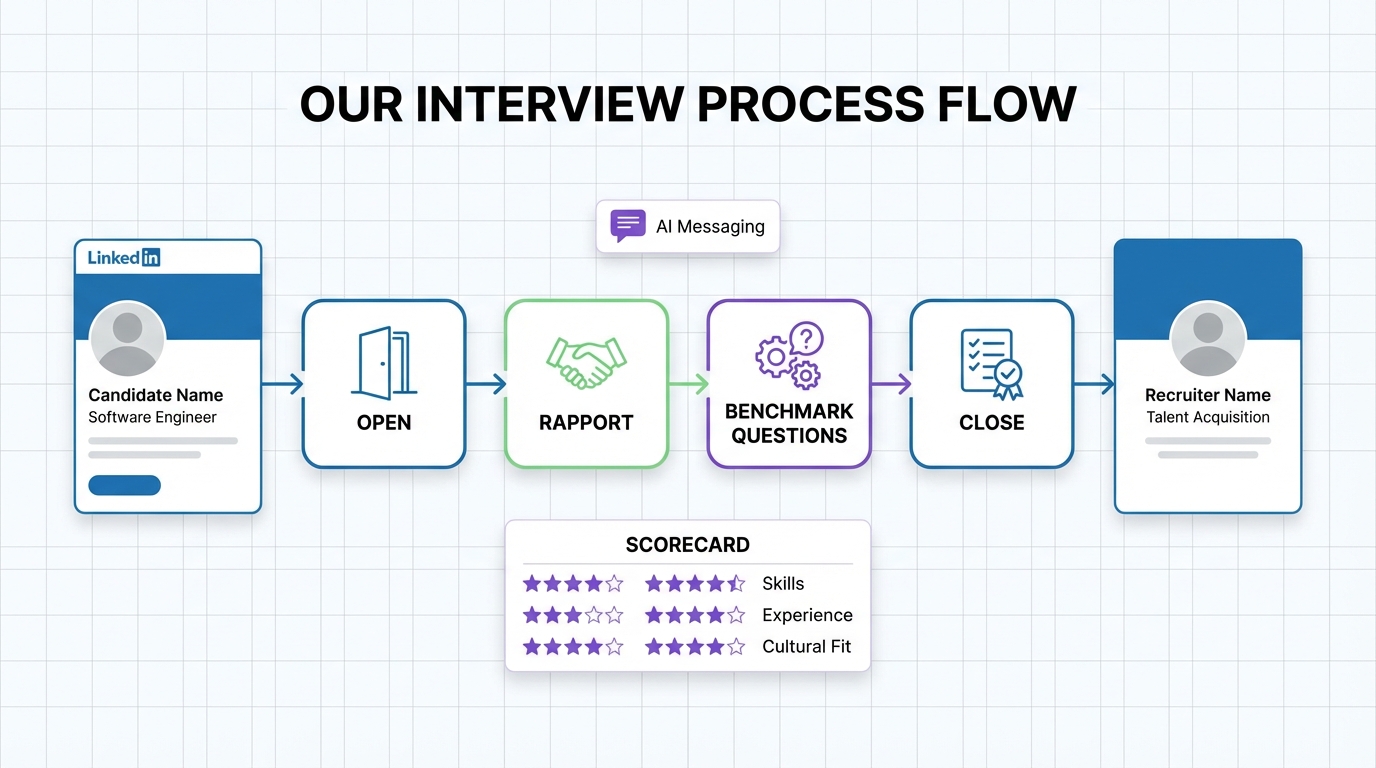
Human resource recruitment software helps you run a consistent, legally safer interview process by standardizing interview stages, question sets, scoring, and follow ups. A reliable structure is a four part interview flow: (1) open the interview, (2) build rapport, (3) ask planned questions against a benchmark, and (4) close with clear next steps. This article shows how to operationalize that flow inside popular HR systems, and where StrategyBrain AI Recruiter fits by automating early LinkedIn outreach and pre qualification so your team can spend interview time on evidence based evaluation instead of repetitive messaging.
Table of Contents
Key Takeaways
- Best baseline structure: Use a 4-part interview flow (open, rapport, questions, close) to reduce variance between interviewers.
- What does HR software do: It enforces stages, stores scorecards, timestamps decisions, and keeps an audit trail for compliance reviews.
- Consistency beats improvisation: Ask the same core questions for each candidate and score against a predefined benchmark.
- Candidate experience is measurable: Clear agendas and next steps reduce drop off and improve acceptance rates.
- Where StrategyBrain AI Recruiter helps: It automates LinkedIn connecting, initial messaging, Q and A, and resume and contact collection so recruiters can focus on interviews.
- Practical guardrail: Keep a “do not ask” checklist in your interview kit to reduce legal risk.
What does HR software do in interviewing
When people ask “what does HR software do,” they often think only about job postings or applicant tracking. In interviewing, human resource recruitment software typically supports four operational needs: workflow control, evaluation consistency, documentation, and communication.
- Workflow control: Define stages such as screen, interview 1, interview 2, and final decision, then require completion before moving forward.
- Evaluation consistency: Use structured scorecards so each interviewer rates the same competencies using the same scale.
- Documentation and audit trail: Store notes, timestamps, and decision reasons in one place for later review.
- Communication: Send interview invites, reminders, and next step messages with templates.
Many popular HR systems cover these basics. The gap we see in real hiring teams is not the lack of features, but the lack of a simple interview structure that everyone follows. The four part system below is designed to be easy to train, easy to audit, and easy to run inside your existing tools.
Part 1: Open the interview
The opening sets the tone and reduces candidate anxiety. In practice, the goal is to welcome the candidate, explain why you are meeting, and outline the structure so they know what to expect.
Steps
- Greet and welcome: Confirm names, thank them for their time, and introduce your role.
- State the purpose: Explain what you are evaluating and what the candidate can learn in return.
- Explain the structure: Share the agenda and timing, including when they can ask questions.
How to run this in human resource recruitment software
- Interview agenda template: Save a standard agenda in your interview stage so every interviewer uses the same outline.
- Time box fields: Add a required field for planned duration, for example 30 minutes or 60 minutes, so scheduling stays consistent.
- Role brief: Attach a one page role summary to the interview event so candidates and interviewers align on scope.
Limitations
Software can standardize the opening, but it cannot fix an interviewer who rushes or multitasks. If you see repeated negative feedback, treat it as a training issue, not a tooling issue.
Part 2: Build rapport
Rapport is not small talk for its own sake. It is a way to create a respectful environment where candidates give clearer, more complete answers. It also protects your employer brand because candidates judge your organization by how they are treated.
Techniques that work
- Introduce yourself clearly: Name, role, and what you will cover.
- Use attentive body language: Eye contact and active listening without staring or interrupting.
- Use the candidate’s first name appropriately: Occasional use is enough.
- Share a brief personal context: A short example of your own work can make the conversation more natural.
- Use light humor carefully: Only if it is inclusive and professional.
- Take notes transparently: Tell the candidate you are taking notes so you do not miss details.
Where StrategyBrain AI Recruiter fits before rapport
Rapport starts earlier than the interview. If the first contact is slow or inconsistent, candidates arrive skeptical. StrategyBrain AI Recruiter can handle the initial LinkedIn connection, introduce the opportunity, answer common questions about the role, company, and compensation, and confirm interview interest. When the candidate reaches a human interviewer, the conversation begins with context and momentum rather than cold outreach.
Limitations
Rapport cannot be automated end to end. AI can support early communication, but the interviewer still owns tone, respect, and clarity during the live conversation.
Part 3: Ask questions with a benchmark
This is where many teams lose consistency. Interviewers often focus on questions but do not plan them as a system. A better approach is to define a benchmark first, then ask questions that produce evidence against that benchmark. Every candidate should face the same core questions for the same role level.
Steps
- Define the benchmark: Choose 4 to 6 competencies, then define what “meets expectations” looks like for each.
- Choose question types: Mix behavioral, competency, and role specific questions to reduce blind spots.
- Ask consistently: Keep the core set stable across candidates, then use follow ups for clarification.
- Score immediately: Rate each competency right after the interview while details are fresh.
Question categories you can map into your scorecard
Below is a practical set of categories you can use to organize your interview kit. The goal is not to ask every type in every interview, but to ensure coverage across the hiring process.
- Credential verification: Confirm facts that matter for the role.
- Experience verification: Validate what the candidate actually did and what outcomes they owned.
- Opinion and judgment: Explore how they think and decide.
- Problem solving: Use a case or scenario relevant to the job.
- Behavioral: Ask for past examples with context, action, and result.
- Competency: Test specific skills tied to the benchmark.
Legal and ethical guardrails
Do not ask questions that are unrelated to job performance and could trigger discrimination risk. Keep a “do not ask” checklist in your interview kit and train interviewers to redirect if a candidate volunteers sensitive information.
- Examples of sensitive areas: national origin, citizenship, religion, age, marital or family status, gender, affiliations, race or ethnicity, arrest record, disabilities.
How human resource recruitment software supports this stage
- Structured scorecards: Require a rating for each competency before submission.
- Calibration visibility: Compare interviewer scores side by side to spot outliers.
- Audit trail: Keep notes and scores attached to the candidate record with timestamps.
Pain points we see in real teams
- Untrained interviewers: They improvise, which increases variance and weakens decision quality.
- Inconsistent benchmarks: Different interviewers optimize for different “ideal candidates.”
- Late scoring: Waiting until the end of the day reduces accuracy and increases bias.
Part 4: Close the interview
The close is where you protect candidate experience and your employer brand. It is also where you reduce follow up churn by setting expectations clearly.
Steps
- Invite candidate questions: Answer honestly and keep the tone positive.
- Explain next steps: Share the decision timeline and what the candidate should expect next.
- Thank them: Close with appreciation and clarity.
How StrategyBrain AI Recruiter reduces drop off after the close
Even strong candidates can go quiet if follow ups are slow. StrategyBrain AI Recruiter provides 24/7 multilingual responses and timely follow up messaging across time zones, which helps maintain engagement between stages. It can also collect resumes and contact details from interested candidates during early LinkedIn conversations so scheduling and coordination are faster once the interview process begins.
Limitations
Do not oversell the role or company. If the job has constraints, state them clearly. Trust is a conversion lever in hiring, and it is also a retention lever after the hire.
Quick Comparison: Manual vs software supported vs AI assisted
| Approach | What it improves | What still breaks | Best for |
|---|---|---|---|
| Manual interview process | Flexibility and speed for small teams | Inconsistent questions, weak documentation, uneven candidate experience | Low volume hiring with 1 to 2 interviewers |
| Human resource recruitment software workflow | Stages, scorecards, templates, audit trail | Still depends on interviewer training and timely follow up | Teams that need consistency across multiple interviewers |
| AI assisted front end with StrategyBrain AI Recruiter | LinkedIn outreach, Q and A, interest confirmation, resume and contact capture, 24/7 multilingual follow up | Final qualification and hiring decision still require human review | High volume sourcing and global hiring across time zones |
Copyable templates you can paste into your system
Interview agenda template
- 0 to 3 minutes: Welcome, introductions, purpose
- 3 to 8 minutes: Role overview and context
- 8 to 40 minutes: Structured questions and follow ups
- 40 to 55 minutes: Candidate questions
- 55 to 60 minutes: Next steps and close
Scorecard skeleton (1 to 5 scale)
- Competency 1: Evidence notes, score 1 to 5
- Competency 2: Evidence notes, score 1 to 5
- Competency 3: Evidence notes, score 1 to 5
- Competency 4: Evidence notes, score 1 to 5
- Overall recommendation: Strong yes, yes, mixed, no, strong no
“Do not ask” reminder for interviewer kits
Only ask questions that relate directly to the candidate’s ability to perform the job. If sensitive topics come up, redirect to job relevant criteria and document only what is necessary for evaluation.
FAQ
What is human resource recruitment software in plain terms?
Human resource recruitment software is a system that helps HR teams manage hiring workflows, from sourcing and screening through interviews and offers. In interviewing, it typically standardizes stages, scorecards, and communication templates.
What does HR software do that spreadsheets cannot?
Spreadsheets can track candidates, but HR software usually adds permissions, audit trails, standardized scorecards, and automated messaging. Those features reduce inconsistency and make hiring decisions easier to review later.
Do popular HR systems include interview scorecards?
Many popular HR systems include scorecards or evaluation forms, but the value depends on whether your team uses a consistent benchmark. A simple 4-part interview structure makes those scorecards more reliable.
How do I keep interviews consistent across multiple interviewers?
Use the same core question set for the same role level, score against the same competencies, and require interviewers to submit scores immediately after the interview. Human resource recruitment software helps enforce those steps.
Can StrategyBrain AI Recruiter replace interviews?
No. StrategyBrain AI Recruiter automates early LinkedIn outreach and pre qualification tasks such as connecting, introducing the role, answering questions, confirming interest, and collecting resumes and contact details. Final qualification and hiring decisions still require human review.
How does StrategyBrain AI Recruiter help with global hiring?
It provides 24/7 multilingual candidate communication, which helps maintain responsiveness across time zones. That reduces delays between stages and can improve candidate engagement.
What should I do if candidates complain about the interview experience?
Review the opening and closing steps first, because unclear agendas and vague next steps are common causes. Then check whether interviewers are using the same benchmark and question set, and retrain where needed.
How do I reduce legal risk in interviews?
Train interviewers on job related questioning and keep a “do not ask” checklist in the interview kit. Also store structured notes and scorecards in your system so decisions are evidence based and reviewable.
Conclusion
If you want interviews that are fairer, easier to run, and easier to defend, start with a simple structure you can repeat. The four part system open, rapport, questions against a benchmark, and close maps cleanly into human resource recruitment software and works across most popular HR systems. Next, tighten consistency with scorecards and a “do not ask” checklist. If your bottleneck is sourcing and early engagement, add StrategyBrain AI Recruiter to automate LinkedIn outreach, candidate Q and A, and resume and contact collection so your recruiters can spend their time where it matters most, in high quality interviews and final evaluation.














