


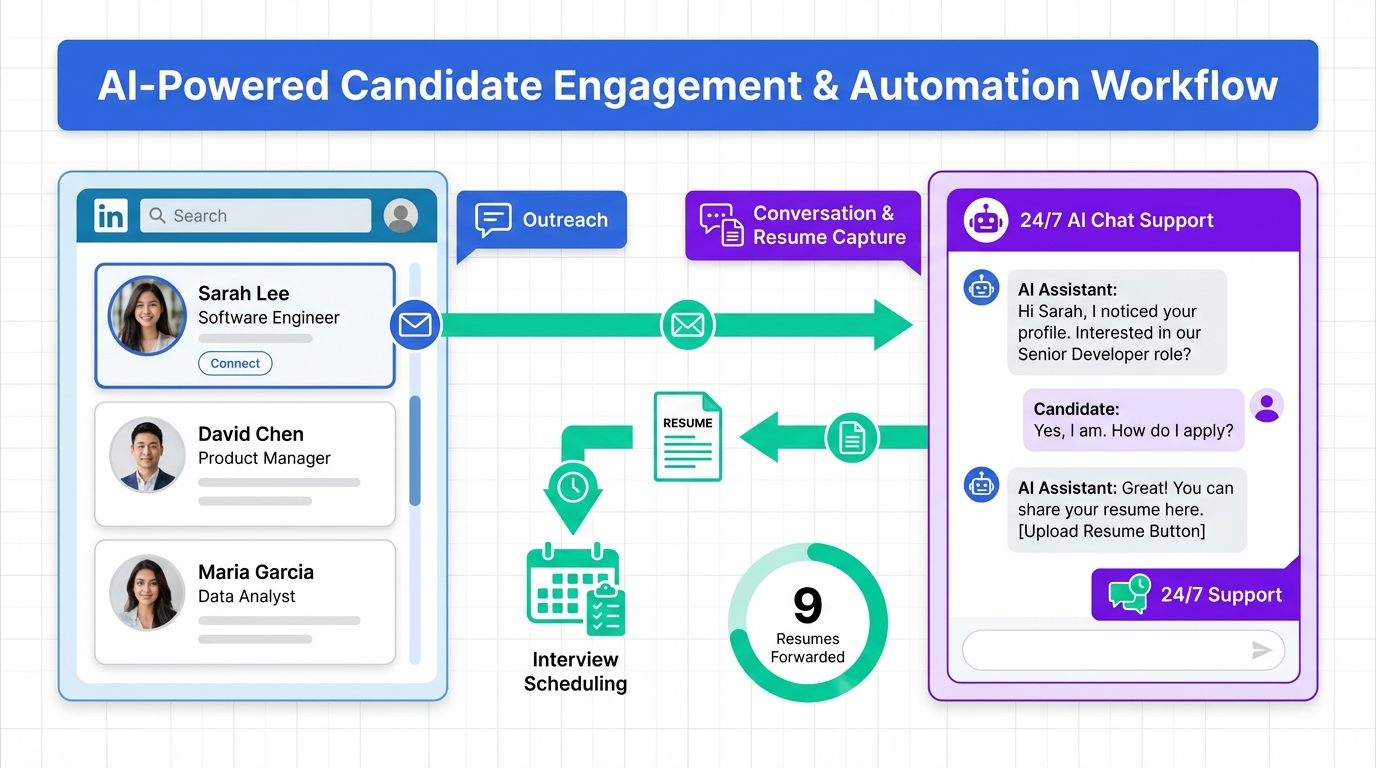
Human resource recruitment software helps teams keep candidates engaged, track progress, and reduce manual follow ups during long searches. In this Remcan case study, a four month Controller search succeeded because the recruiter maintained consistent candidate communication, shared nine resumes with the client, and prioritized fit and reliability over industry background. We also show how pairing employee information software with StrategyBrain AI Recruiter can automate early LinkedIn outreach, answer candidate questions 24/7 in any language, and capture resumes and contact details so recruiters can focus on interviews and final qualification. This article focuses on the workflow and documentation practices, not on comparing vendors or listing top HR software by price.
Case summary: Remcan Controller search
Remcan, a full service national railway contractor, needed a Controller who was confident, reliable, and skilled. The assignment was led by recruiter Karen Epp, who had more than 20 years of experience recruiting for accounting and finance roles.
The search took 4 months. During that time, the recruiter kept candidates updated frequently to maintain interest and reduce drop off. Nine resumes were forwarded to the client. One candidate stood out because she was genuinely interested in the role and the construction industry, even though she had no prior experience in the sector. She was hired because she had the right experience and fit well with the team.
What changed in the market and why it mattered
The case highlights a candidate centric market where hiring practices had to evolve. The client had heavy workloads and travel, plus the added burden of processing candidates. In practical terms, that means the bottleneck was not only sourcing. It was also communication cadence, status updates, and keeping the process moving without losing strong people.
In our experience implementing recruiting workflows, long cycle searches fail most often when the team cannot answer basic candidate questions quickly, cannot coordinate next steps, or cannot keep a clean record of what was promised and when. That is exactly where human resource recruitment software and employee information software become operational tools, not just admin systems.
A practical workflow using human resource recruitment software
Below is a reproducible workflow you can run inside most human resource recruitment software. The goal is to reduce candidate uncertainty and recruiter context switching while keeping the hiring manager informed.
Step 1: Define the role and decision criteria
- Write a one page role brief that includes must have skills, nice to have skills, and non negotiables.
- Define what “fit” means in observable terms, such as travel tolerance, stakeholder style, and reporting cadence.
- Set a service level agreement for response time, such as candidate messages answered within 24 hours.
Step 2: Build a pipeline that matches the real process
Configure stages that reflect how decisions are made, not generic labels. For a Controller search, a typical pipeline is:
- New lead
- Outreach sent
- Two way conversation started
- Interested and available
- Resume received
- Hiring manager review
- Interview scheduled
- Offer and close
Step 3: Run a communication cadence that prevents drop off
The Remcan case worked because the recruiter checked in frequently. In software terms, that means you need scheduled touchpoints and templated updates that still feel personal.
- Status update after each internal milestone, such as “resume shared” or “interview feedback pending.”
- Clear next step and timing in every message.
- One owner for candidate communication, even if multiple stakeholders are involved.
Step 4: Present shortlists with context, not just resumes
Nine resumes were forwarded in this case. To make that volume manageable, attach structured notes to each profile:
- Why this person is in the shortlist
- What risk exists and how to validate it
- What the candidate cares about, such as growth, stability, or compensation clarity
Step 5: Close the loop and document outcomes
When a candidate is hired despite lacking direct industry experience, document the decision logic. This improves future hiring and reduces bias driven rejections.
Where StrategyBrain AI Recruiter fits in the process
In the Remcan story, the recruiter’s differentiator was consistent candidate engagement over a 4 month timeline. StrategyBrain AI Recruiter is designed to protect that engagement at scale, especially when LinkedIn is a primary sourcing channel and recruiters are juggling multiple searches.
What it automates on LinkedIn
StrategyBrain AI Recruiter is an automated AI powered recruitment tool built specifically for LinkedIn hiring. It can automatically connect with candidates within your targeted search criteria, introduce the opportunity, learn about the candidate’s situation, answer questions about the role, company, and compensation, confirm interview interest, and collect resumes and contact information from interested candidates.
How it supports global hiring
When searches expand across time zones, response time becomes a competitive advantage. StrategyBrain AI Recruiter provides 24/7 candidate messaging and can communicate in any global language using the candidate’s native language. That reduces misunderstandings and keeps momentum when your team is offline.
How it captures resumes and contact details
- If a candidate sends a resume, the system marks it as received.
- It supports email submissions and LinkedIn file uploads.
- Contact details shared in LinkedIn messages, such as email or phone number, are captured and displayed in the system.
Scope boundary: what it does not do
StrategyBrain AI Recruiter identifies willingness to communicate or interview. It does not determine whether a resume fully matches job requirements. Recruiters still make the final qualification decision after reviewing the resume.
Operational impact you can plan for
Based on product documentation, StrategyBrain AI Recruiter can replace up to 90% of manual LinkedIn recruiting work and can lower LinkedIn recruiting costs to as little as USD 2.40 per resume. Treat these as planning inputs and validate against your own workflow, role type, and message volume.
What to record in employee information software
Employee information software is usually discussed as a system of record after hire. In practice, it also supports better recruiting decisions when you standardize what you capture during the search and what you hand off at onboarding.
For long cycle roles like Controller, record the following fields consistently:
- Candidate motivation summary in 2 sentences
- Compensation expectations and what was communicated
- Availability and notice period
- Key risks and validation plan
- Decision rationale for the final hire
This documentation makes your human resource recruitment software more than a resume repository. It becomes a decision trail that is useful for compliance, internal alignment, and future hiring calibration.
Copyable checklist for long cycle hiring
- [ ] Role brief approved with must haves, nice to haves, and non negotiables
- [ ] Pipeline stages match the real decision process
- [ ] Candidate response time target set to 24 hours
- [ ] Weekly status update sent to active candidates
- [ ] Shortlist includes structured notes, not only resumes
- [ ] Final decision rationale documented in employee information software
- [ ] If using LinkedIn, StrategyBrain AI Recruiter configured with job details, compensation, benefits, and search criteria
- [ ] Resume and contact capture process tested end to end
FAQ
What is human resource recruitment software in practical terms?
Human resource recruitment software is the system used to manage sourcing, candidate communication, pipeline stages, and hiring decisions. In day to day work, it should reduce manual follow ups and make handoffs between recruiter and hiring manager predictable.
How is employee information software different from recruitment software?
Employee information software is a system of record for employee data, such as personal details, job history, and onboarding documentation. Recruitment software focuses on pre hire workflow, but the two should share consistent fields so the hiring decision and onboarding handoff are traceable.
Why did the Remcan search take 4 months?
The case describes a slow moving search in a candidate centric market, with the client balancing heavy workloads and travel while processing candidates. The recruiter mitigated risk by maintaining frequent communication and keeping candidates engaged.
How many resumes were shared with the client in this case?
Nine resumes were forwarded to the client during the search. One candidate stood out and was hired based on experience and team fit.
Can a candidate be hired without prior industry experience?
Yes, if the role’s core competencies and team fit are strong and the hiring team has a clear plan to ramp industry context. In this case, the hired candidate had no prior experience in the sector but showed genuine interest and fit.
How does StrategyBrain AI Recruiter help with LinkedIn recruiting?
It automates early stage LinkedIn work such as connecting with candidates, introducing the role, answering questions about the role and compensation, confirming interest, and collecting resumes and contact details. Recruiters then focus on reviewing resumes and conducting interviews.
Does StrategyBrain AI Recruiter replace recruiters?
No. It automates repetitive outreach and early qualification steps, but it does not decide whether a resume matches job requirements. Recruiters still make final screening and hiring decisions.
How does StrategyBrain AI Recruiter handle privacy and security?
According to product documentation, it complies with privacy regulations in the EU, United States, and Canada, does not use customer provided data to train AI models, and encrypts LinkedIn credentials. Candidate information is encrypted and isolated using customer specific keys.
What should I look for when evaluating top HR software for recruiting?
Start with workflow fit rather than feature count. Confirm that the system supports your pipeline stages, reporting needs, and communication cadence, and that it can integrate with your employee information software for a clean handoff after hire.
Conclusion and next steps
This Remcan case shows that long searches can still succeed when candidate communication is consistent, shortlists are presented with context, and the hiring team stays aligned. Human resource recruitment software provides the structure to run that process, while employee information software preserves the decision trail for onboarding and future hiring.
If LinkedIn is a major sourcing channel for you, the next step is to pilot StrategyBrain AI Recruiter on one role. Configure it with the job details, compensation, benefits, and candidate search criteria, then measure two outcomes: response time to candidate questions and the number of resumes and contact details captured for recruiter review.














