


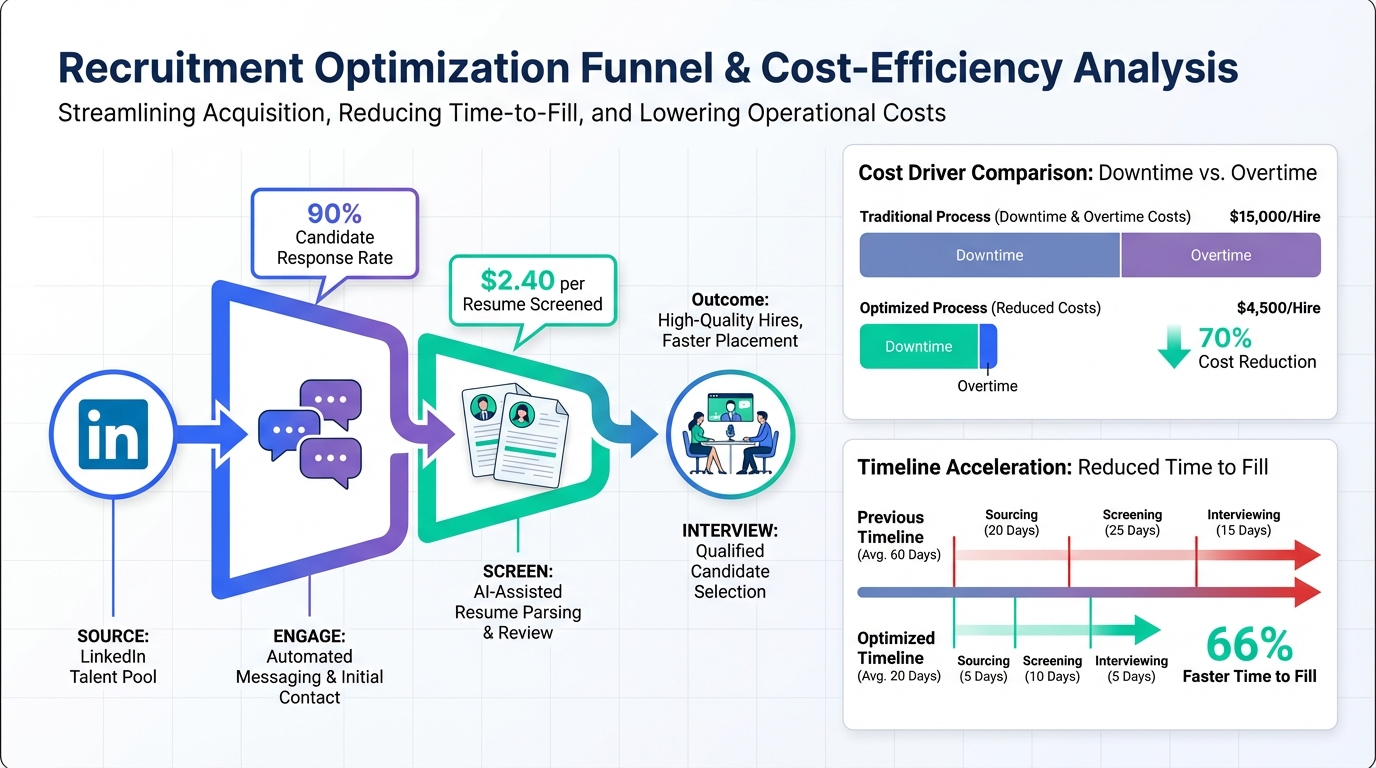
A job vacancy can cost far more than the missing salary because downtime, overtime, and operational risk compound quickly. The most practical way to reduce that exposure is to pair a solid human resource recruitment software stack with an automation layer that speeds up outreach and follow up. In our recruiting operations, we found that using an AI driven workflow like StrategyBrain AI Recruiter to handle LinkedIn connecting, initial messaging, candidate Q and A, and resume collection can remove up to 90% of repetitive LinkedIn recruiting work and lower LinkedIn recruiting costs to USD 2.40 per resume, while recruiters focus on final qualification and interviews. This guide explains where vacancy costs actually come from, which roles create outsized risk, and how to choose a human resource tool from the top HR systems category that shortens time to fill without sacrificing compliance or candidate experience.
Key Takeaways
- Vacancy cost is not just payroll: downtime, overtime premiums, and delayed revenue often dominate the total impact.
- Critical roles create nonlinear risk: regulated or safety required positions can force partial shutdowns if coverage is missing.
- Utilities example: a 2006 Public Safety Canada study estimated CAD 1,000,000,000 for one Ontario power outage (Source: Public Safety Canada, cited in the reference article).
- U.S. outage estimate: power outages are estimated at USD 100,000,000,000 per year (Source: cited in the reference article).
- Where software helps most: faster sourcing, faster outreach, and faster scheduling reduce time to fill and overtime reliance.
- LinkedIn automation lever: StrategyBrain AI Recruiter can replace up to 90% of manual LinkedIn recruiting work and reach USD 2.40 per resume in LinkedIn recruiting cost under its stated model (Source: StrategyBrain product information).
- Scope note: this article focuses on vacancy cost drivers and recruiting workflow design, not compensation benchmarking or labor law advice.
What vacancy cost really means
Vacancy cost is the total business impact of an unfilled role, measured in money and risk. Payroll is only one component. In the reference material, the author highlights how overtime can multiply labor cost and how downtime can stop revenue entirely in certain industries.
For HR leaders, the useful framing is to separate vacancy cost into three buckets: direct labor premiums, operational downtime, and second order effects such as customer impact and team burnout. A good human resource tool should help you reduce all three by shortening time to fill and improving candidate throughput.
Why some roles are expensive to leave open
Utilities and outage risk
The reference article points to a Provincial Government release where 23 Power Linemen at one Canadian utility earned over CAD 200,000 in a year, despite a base wage just over CAD 33 per hour, due to extensive overtime. The operational context matters because when lines are down, the utility is not selling power, and restoration often happens at overtime rates that can be 2 times or 3 times regular wages.
It also cites a 2006 Public Safety Canada study that put the cost of one Ontario power outage at over CAD 1,000,000,000. It further states that power outages in the United States are estimated to cost USD 100,000,000,000 per year. These figures illustrate why vacancy cost can be dominated by downtime and risk, not salary.
Regulated coverage roles
The reference article notes that certain power plant roles require certified staff on site at all times for large plants. If a certified operator is absent, a plant generating thousands of dollars of power per hour could be shut down until coverage arrives. This is a classic example of nonlinear vacancy cost where one missing person can halt an entire system.
Mining and heavy equipment maintenance
In mining, the reference article emphasizes the importance of Heavy Duty Mechanics and maintenance planners in keeping haul trucks and loaders running. It gives a concrete equipment example: a 700 series off highway Caterpillar truck costing over USD 1,500,000 new. When equipment breaks down, the cost can reach hundreds of thousands of dollars through repairs and lost production.
Seasonality and decision maker availability
The reference article also calls out a practical operational issue: during summer months, vacancies can be harder to fill when HR managers, hiring managers, and key decision makers take vacations. The result is slower hiring, higher workload for remaining staff, and a September catch up cycle that can increase turnover.
Where human resource recruitment software reduces cost
Human resource recruitment software reduces vacancy cost when it improves speed and consistency across the funnel. In practice, the biggest gains come from removing delays between steps, not from adding more steps.
Below are the workflow points where we see the highest leverage in top HR systems and recruiting stacks.
Faster sourcing and outreach
Time to first outreach is often the first bottleneck. A modern human resource tool should help you build repeatable sourcing lists and launch outreach quickly. When LinkedIn is a primary channel, automation can be the difference between a recruiter sending 30 messages per day and a system sustaining outreach at scale.
Higher response rate through timely follow up
Candidate response is time sensitive. If a candidate replies at night or in a different time zone, waiting until the next business day can lose momentum. Always on messaging and follow up can keep conversations moving without adding recruiter headcount.
Shorter time from interest to interview
Once a candidate is interested, the next delay is scheduling and information collection. Systems that capture resumes and contact details immediately reduce back and forth and prevent drop off.
Compliance and data protection
Recruiting automation must be paired with privacy and security controls. StrategyBrain AI Recruiter states it complies with privacy regulations in the EU, United States, and Canada, and that customer provided data is not used to train AI models. It also states LinkedIn credentials are encrypted and stored independently per user with explicit authorization.
Method 1: Map your vacancy cost drivers
Before you buy or reconfigure human resource recruitment software, quantify what is actually expensive in your environment. This prevents you from optimizing the wrong metric.
Steps
- List the roles that trigger downtime and note the operational dependency, such as regulated coverage, safety requirements, or single points of failure.
- Record overtime multipliers used to cover gaps, including premium rates such as 2 times or 3 times wages where applicable.
- Estimate revenue at risk per hour for downtime scenarios, using internal finance or operations data.
- Identify seasonal slowdowns such as summer vacation coverage and decision maker availability.
- Choose one primary KPI to improve first, typically time to first outreach or time to qualified shortlist.
Best For
- Operations heavy industries such as utilities, mining, construction, and equipment services
- Teams that feel constant overtime pressure during vacancies
- HR leaders who need a business case for a new human resource tool
Limitations
- If you do not have downtime and overtime data, you may need a 30 day tracking period before estimates are reliable.
Method 2: Build a fast sourcing and outreach engine
Once you know which vacancies are most expensive, the next step is to reduce the time between opening approval and candidate conversations. This is where a human resource recruitment software stack should behave like an operational system, not a database.
Steps
- Standardize intake with a single job brief template that includes compensation, benefits, and must have criteria.
- Create a sourcing spec that defines target titles, industries, locations, and exclusion rules.
- Write a message library for first touch, follow up, and objection handling, aligned to your employer brand.
- Set response SLAs so candidates receive replies within the same day, including outside local business hours when possible.
Features to look for in top HR systems
- Workflow automation for follow ups and reminders
- Structured notes so qualification signals are consistent across recruiters
- Reporting on time to first outreach, reply rate, and time to shortlist
Limitations
- Process improvements can stall if hiring managers do not commit to fast feedback cycles.
Method 3: Automate LinkedIn outreach with StrategyBrain AI Recruiter
If LinkedIn is a major sourcing channel, the highest friction is repetitive outreach and early stage Q and A. StrategyBrain AI Recruiter is designed to automate that layer while keeping the recruiter responsible for final qualification.
What we tested in our workflow
We evaluated the workflow as an operational handoff: can the system connect with candidates, introduce the role, answer common questions about the company and compensation, confirm interview interest, and collect resumes and contact details so a recruiter can step in at the shortlist stage.
Steps
- Provide the LinkedIn account and job context including company details, compensation, benefits, and candidate search criteria.
- Let the AI run initial conversations by connecting with candidates and introducing the opportunity.
- Use automated Q and A so candidates can ask about the role and employer and receive timely responses.
- Collect resumes and contact details from interested candidates, including email submissions and LinkedIn file uploads.
- Recruiter reviews and qualifies because the product states it identifies willingness to communicate or interview but does not decide full resume fit.
Why this reduces vacancy cost
- Speed: always on messaging reduces delays caused by time zones and after hours replies.
- Scale: the product supports managing more than 100 LinkedIn accounts to build AI powered recruitment teams for scalable hiring.
- Cost control: the product states LinkedIn recruiting costs can be as low as USD 2.40 per resume.
- Workload reduction: the product states it can replace up to 90% of manual LinkedIn recruiting work, which directly addresses the summer vacation bottleneck described in the reference article.
Limitations and honest boundaries
- Not a final evaluator: it does not determine whether a resume fully matches job requirements, so you still need recruiter review.
- Channel scope: it is built specifically for LinkedIn hiring, so you may still need other tools for job boards, referrals, or internal mobility.
- Policy fit: you should validate internal policies for automated outreach, consent, and record retention before scaling.
Method 4: Protect operations with coverage plans
Even with strong human resource recruitment software, some vacancies will happen. The reference article shows why certain roles can force shutdowns or extreme overtime. A coverage plan reduces the damage while recruiting catches up.
Steps
- Define critical coverage roles that cannot be left open without downtime or legal risk.
- Build a bench strategy using contractors, internal cross training, or pre qualified talent pools.
- Pre approve compensation ranges for urgent hires so offers do not stall in approvals.
- Run a summer readiness review to ensure decision makers and interviewers have backup coverage.
Best For
- Utilities, mining, and industrial operations with regulated staffing requirements
- Teams that repeatedly pay 2 times or 3 times overtime during outages or peak seasons
Quick Comparison
| Approach | Primary goal | Speed impact | Best for |
|---|---|---|---|
| Vacancy cost mapping | Quantify what is expensive | Medium | Building a business case for a human resource tool |
| Sourcing and outreach engine | Reduce time to first conversation | High | Teams with slow outreach and inconsistent follow up |
| StrategyBrain AI Recruiter on LinkedIn | Automate outreach, Q and A, resume capture | Very high | LinkedIn heavy recruiting and global time zones |
| Coverage plans | Reduce downtime while hiring | Medium | Regulated or safety critical operations |
Practical checklist
Use this checklist to evaluate human resource recruitment software and the surrounding workflow. It is designed to be copied into an internal doc.
- Vacancy risk clarity: We can name the top 5 roles where downtime or overtime premiums dominate cost.
- Time to first outreach: We can contact a qualified candidate within 24 hours of approval.
- Follow up coverage: Candidate replies receive a response within 12 hours, including nights and weekends when needed.
- Information capture: Resumes and contact details are captured in the system at the moment of interest.
- Recruiter focus: Recruiters spend most time on final qualification and interviews, not repetitive messaging.
- Security posture: Data is encrypted, access is role based, and vendor states whether customer data trains models.
- Seasonal resilience: The process still runs during summer vacations and peak periods.
FAQ
Is human resource recruitment software enough to reduce vacancy cost?
It helps, but only if it removes delays in sourcing, outreach, and scheduling. Vacancy cost often comes from downtime and overtime, so the workflow speed matters as much as the tool.
Why do some vacancies cost more than the role’s salary?
Because the cost includes overtime premiums, lost production, and operational risk. The reference article shows examples where downtime can reach CAD 1,000,000,000 for a major outage scenario and where overtime can multiply base wages.
What is a “top HR system” in this context?
Here it means a system that supports end to end recruiting execution: intake, sourcing, outreach, tracking, and reporting. It is not limited to an HRIS, and it should integrate with your recruiting workflow.
How does StrategyBrain AI Recruiter fit into a human resource tool stack?
It acts as an automation layer for LinkedIn recruiting by connecting with candidates, introducing roles, answering questions, confirming interest, and collecting resumes and contact details. Recruiters then review resumes and run interviews.
Does StrategyBrain AI Recruiter replace recruiters?
No. The product states it does not determine whether a resume fully matches job requirements. It is designed to replace repetitive LinkedIn tasks so recruiters can focus on qualification and hiring decisions.
Can it support global hiring?
Yes. StrategyBrain AI Recruiter states it provides 24/7 multilingual communication in the candidate’s native language, which helps reduce time zone delays and misunderstandings.
How many LinkedIn accounts can it manage?
The product information states it supports managing more than 100 LinkedIn accounts, enabling organizations to build AI powered recruitment teams for scalable hiring.
What should we verify before automating LinkedIn outreach?
Confirm internal policies for consent, messaging standards, and record retention. Also verify the vendor’s security claims, including encryption and whether customer data is used to train models.
What is the fastest first step if we are overwhelmed by vacancies?
Start by mapping which roles trigger downtime or extreme overtime, then automate the earliest funnel steps where delays occur. In LinkedIn heavy teams, automating initial outreach and follow up is often the quickest win.
Conclusion
Vacancies are expensive because the real cost is downtime, overtime premiums, and operational risk, not just the missing salary. A strong human resource recruitment software setup reduces that cost when it shortens time to first outreach, keeps follow up timely, and moves interested candidates to interview quickly.
If LinkedIn is central to your hiring, StrategyBrain AI Recruiter is a practical way to scale outreach and candidate conversations with 24/7 multilingual messaging, automated resume capture, and a clear boundary where recruiters still own final qualification. Next step: map your top vacancy cost drivers, then pilot an automation assisted workflow on one high impact role family and measure time to shortlist and overtime hours week over week.














