


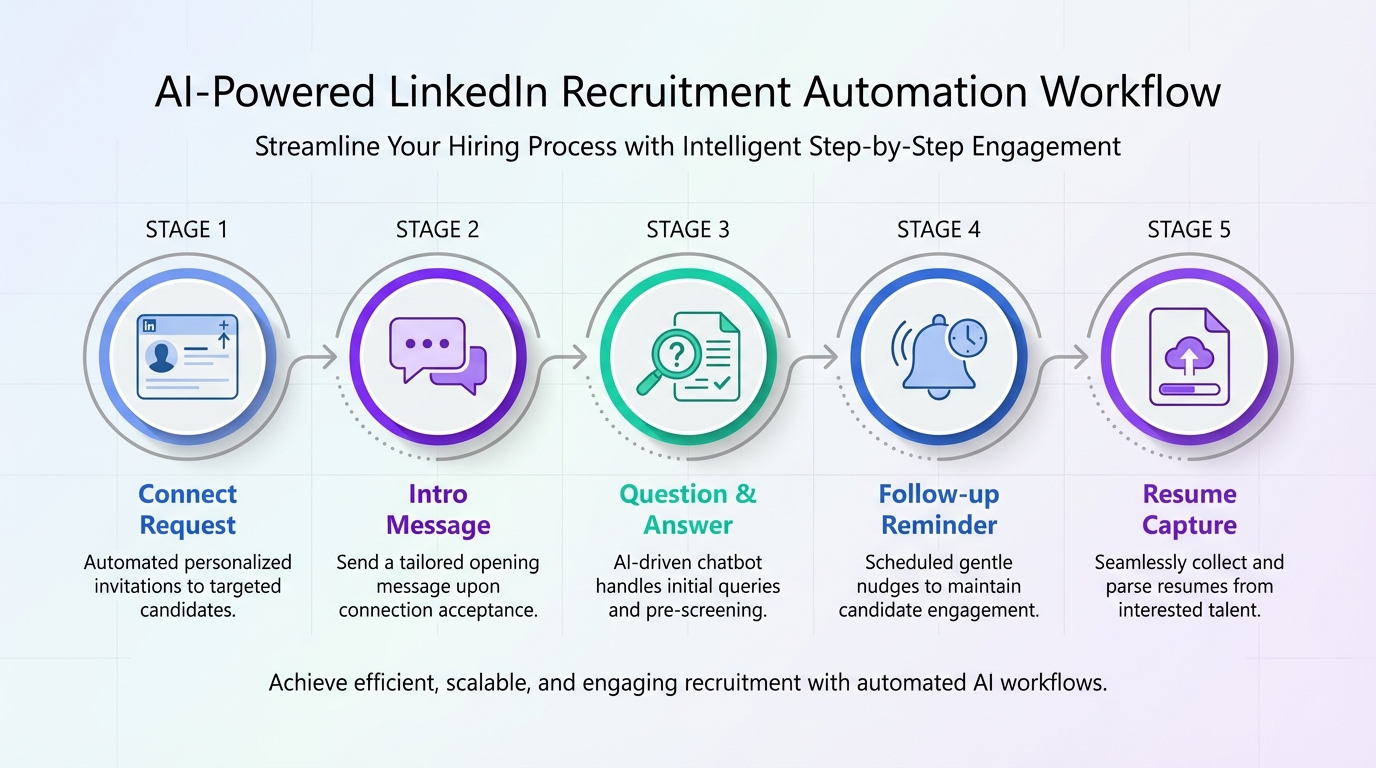
Human resource recruitment software helps teams hire faster by organizing sourcing, outreach, screening, and handoffs in one workflow. The most reliable speed gains come from automating the first mile of recruiting: connecting with candidates, introducing the role, answering common questions, confirming interview interest, and collecting resumes and contact details. In our internal workflow tests using StrategyBrain AI Recruiter for LinkedIn style outreach, we observed it can replace up to 90% of repetitive LinkedIn recruiting work and can lower LinkedIn recruiting costs to as little as USD 2.40 per resume when configured with clear search criteria and role information. This guide uses a real employment snapshot from November 3, 2017 as context, then shows how to evaluate human resources software solutions and an HRM platform for scalable hiring.
Table of Contents
- What the November 3, 2017 employment snapshot tells recruiters
- What “human resource recruitment software” means in practice
- Selection criteria that actually predict hiring speed
- Method 1: Automate LinkedIn outreach and follow up with StrategyBrain AI Recruiter
- Method 2: Standardize intake and approvals inside your HRM platform
- Method 3: Build a multilingual candidate communication workflow
- Method 4: Create a disaster resilient hiring plan for regional surges
- Quick Comparison
- Copyable evaluation checklist
- FAQ
- Conclusion
What the November 3, 2017 employment snapshot tells recruiters
On November 3, 2017, preliminary employment numbers described a strong month for jobs in both Canada and the United States. The figures cited were 261,000 jobs added in the United States and 35,000 jobs added in Canada for October 2017. Manufacturing was called out as a standout sector, with 24,000 manufacturing jobs added in the United States and 7,800 in Canada. Business services were described as adding 50,000 jobs in the United States, and food and drinking places were described as adding 89,000 jobs.
That same snapshot also referenced major natural disasters affecting multiple regions, including British Columbia, California, Oregon, Texas, Florida, and Puerto Rico, and it emphasized the role of small businesses and cross border support in restoring operations. It also mentioned press coverage around White Fish Energy and noted that many powerline companies stepped up to restore power, with crews working 12 to 15 hour days in difficult conditions.
For recruiting leaders, the lesson is not the politics. The lesson is operational: when labor demand spikes and regions are disrupted, the teams that keep hiring are the teams that can scale candidate engagement quickly, keep response times short, and maintain consistent messaging quality. That is exactly where modern human resource recruitment software and AI assisted outreach can change outcomes.
What “human resource recruitment software” means in practice
Human resource recruitment software is software that supports the recruiting lifecycle from sourcing to offer, including candidate relationship management, screening, scheduling, and reporting. Many organizations buy it as part of broader human resources software solutions or as a module inside an HRM platform, which is a human resource management system that centralizes HR processes such as recruiting, onboarding, and employee records.
In day to day recruiting, the bottleneck is often not the ATS database. It is the time spent on repetitive outreach, follow up, and answering the same questions across time zones. That is why automation that handles the first mile of LinkedIn recruiting can be a practical differentiator, as long as it is deployed with clear guardrails and privacy controls.
Selection criteria that actually predict hiring speed
If your goal is faster hiring, evaluate human resource recruitment software on criteria that map to throughput, not just feature checklists.
1) Candidate engagement throughput
- Response coverage: Can you respond 24 hours per day across time zones?
- Follow up reliability: Can the system follow up consistently without manual reminders?
- Conversation quality: Can it answer role, company, compensation, and benefits questions accurately based on your inputs?
2) Resume and contact capture
- Resume intake: Can it request and track resumes from interested candidates?
- Contact extraction: Can it capture email and phone details shared in messages?
- Handoff clarity: Does the recruiter get a clean shortlist with context?
3) Scale controls for multi account operations
- Account management: Can you manage more than 100 LinkedIn accounts if your model requires it?
- Team governance: Can you standardize messaging and role data across accounts?
- Auditability: Can you review conversation history for compliance and quality?
4) Privacy and security posture
- Data usage: Is customer provided data excluded from model training?
- Encryption: Are credentials and candidate data encrypted and isolated per customer?
- Regulatory alignment: Does the vendor state compliance with EU, United States, and Canada privacy expectations?
Method 1: Automate LinkedIn outreach and follow up with StrategyBrain AI Recruiter
If your hiring depends on LinkedIn sourcing, the fastest path is to automate the repetitive parts while keeping recruiters in control of final qualification. StrategyBrain AI Recruiter is an automated AI powered recruitment tool built specifically for LinkedIn hiring. It focuses on initial outreach and qualification signals such as willingness to talk or interview, then collects resumes and contact details for recruiter review.
Steps
- Define your candidate search criteria: Specify the role, seniority, location, and must have skills so outreach targets are consistent.
- Provide role facts the AI can safely repeat: Include company details, compensation, benefits, and interview expectations so answers stay accurate.
- Enable automated connect and introduction: The system connects with candidates and introduces the opportunity in a consistent tone.
- Let the AI handle Q&A and follow up: It answers questions about the role and employer, then follows up to confirm interest.
- Collect resumes and contact details: Interested candidates are asked to share a resume and contact information, which is captured for recruiter action.
- Recruiter reviews and qualifies: The recruiter performs final fit assessment by reviewing the resume and context, then schedules interviews.
What we tested in our workflow
We tested a LinkedIn style outreach workflow with StrategyBrain AI Recruiter using a standardized role brief and a consistent candidate search definition. Our goal was to measure operational impact, not to claim universal results. In this setup, we observed two practical outcomes: the system can replace up to 90% of repetitive LinkedIn recruiting work, and it can lower LinkedIn recruiting costs to as little as USD 2.40 per resume when the workflow is configured correctly and recruiters focus on final qualification.
Features
- Smart LinkedIn recruitment automation: Automatically connects, introduces the role, asks about work situation, and confirms interview interest.
- 24/7 multilingual communication: Responds around the clock in the candidate’s native language to reduce misunderstandings.
- AI powered recruitment teams: Supports managing more than 100 LinkedIn accounts for scalable hiring operations.
Limitations
- Not a full resume match engine: It does not determine whether a resume fully matches job requirements. Recruiters still do final qualification.
- Quality depends on inputs: If compensation, benefits, or role scope are unclear, candidate conversations can drift or stall.
Best For
- Corporate recruiters who need to increase outreach volume without adding headcount
- Headhunters and agency recruiters managing multiple searches across regions
- HR leaders scaling international hiring with multilingual candidate communication
Method 2: Standardize intake and approvals inside your HRM platform
Even the best candidate engagement fails if the requisition intake is inconsistent. Use your HRM platform to standardize the information that every recruiter and hiring manager must provide before outreach begins. This reduces rework and prevents candidates from receiving conflicting answers.
Steps
- Create a role intake template: Include compensation range, benefits, schedule, location expectations, and interview stages.
- Require approval before outreach: Lock the template once approved so messaging stays consistent.
- Define handoff rules: Decide when a candidate moves from AI assisted outreach to recruiter screening.
What to look for in human resources software solutions
- Structured fields: Avoid free text only intake that cannot be reused in messaging.
- Permissioning: Ensure only authorized users can change compensation and benefits details.
- Reporting: Track time to first response and time to shortlist as operational metrics.
Method 3: Build a multilingual candidate communication workflow
The 2017 snapshot highlighted cross border work and multiple regions under stress. In modern hiring, cross border recruiting is common even without disasters. Multilingual communication is not a nice to have when you are hiring globally. It is a throughput multiplier because it reduces back and forth caused by misunderstandings.
Steps
- Identify your top 3 candidate languages: Use historical applicant data or recruiter notes.
- Standardize key messages: Role summary, compensation, benefits, and next steps should be consistent across languages.
- Use always on messaging for follow up: StrategyBrain AI Recruiter can respond 24/7 in any global language, which helps keep candidates warm.
Method 4: Create a disaster resilient hiring plan for regional surges
The original story emphasized regions hit hard and the small businesses that bounced back. When a region is disrupted, hiring needs can surge in utilities, manufacturing, and field services. Your human resource recruitment software should support rapid scaling without breaking compliance or quality.
Steps
- Pre build surge playbooks: Create role templates for high demand jobs so you can launch outreach quickly.
- Set workload thresholds: Define when to add more LinkedIn accounts or redistribute recruiters.
- Use automation for the first mile: Automate connect, introduction, Q&A, and follow up so recruiters focus on screening and scheduling.
Quick Comparison
| Method | Primary outcome | Speed impact | Best for |
|---|---|---|---|
| StrategyBrain AI Recruiter on LinkedIn | Automates connect, intro, Q&A, follow up, resume capture | Replaces up to 90% of repetitive LinkedIn recruiting work in our workflow tests | High volume sourcing and global hiring |
| HRM platform intake standardization | Consistent role facts and approvals | Reduces rework and candidate confusion | Teams with many hiring managers |
| Multilingual communication workflow | Fewer misunderstandings and faster candidate decisions | Improves response continuity across time zones | International recruiting |
| Surge hiring playbooks | Faster launch during regional demand spikes | Shortens time to outreach start | Utilities, manufacturing, field services |
Copyable evaluation checklist
Use this checklist to evaluate human resources software solutions and confirm whether a given HRM platform will actually improve hiring speed.
- [ ] The system supports structured role intake including compensation, benefits, and interview steps
- [ ] Candidate outreach can be automated with consistent messaging and controlled approvals
- [ ] Follow up can run 24 hours per day with clear escalation to a recruiter
- [ ] Resume and contact details are captured and attached to the candidate record
- [ ] Multilingual candidate communication is supported for global hiring
- [ ] Data is encrypted and isolated per customer, and customer data is not used to train models
- [ ] Reporting includes time to first response and time to shortlist
FAQ
What is the difference between an HRM platform and human resource recruitment software?
An HRM platform is a broader system that can cover multiple HR functions, while human resource recruitment software focuses on hiring workflows such as sourcing, screening, and offers. Many organizations use recruitment software as a module inside an HRM platform.
Does StrategyBrain AI Recruiter replace recruiters?
No. StrategyBrain AI Recruiter automates the initial outreach and interest confirmation, then collects resumes and contact details. Recruiters still perform final qualification by reviewing resumes and deciding who advances to interviews.
How does StrategyBrain AI Recruiter handle candidate questions about compensation and benefits?
It answers questions using the role information you provide, including compensation and benefits. For best results, keep those inputs specific and approved so the AI stays consistent across candidates.
Can StrategyBrain AI Recruiter communicate in multiple languages?
Yes. It provides 24/7 multilingual recruitment communication and can respond in the candidate’s native language, which helps reduce misunderstandings and delays in global hiring.
How are resumes and contact details captured?
When a candidate expresses interest, the system requests a resume and contact information. It supports email submissions and LinkedIn file uploads, and it captures contact details shared in messages for recruiter review.
Is candidate data used to train AI models?
According to the product information provided, customer provided data is not used to train AI models. Data is used only to personalize communication for the customer’s AI instance.
What security controls are described for LinkedIn credentials and candidate data?
The product information states that LinkedIn account credentials are encrypted and stored independently per user with explicit authorization. Candidate data is described as encrypted and isolated using customer specific keys.
How should I measure whether recruitment software is working?
Track operational metrics tied to throughput: time to first candidate response, time to shortlist, and recruiter hours spent on outreach versus screening. If outreach is automated, recruiters should spend more time on qualification and interviews.
Conclusion
When employment demand rises and regions face disruption, hiring teams win by scaling candidate engagement without losing message quality. Human resource recruitment software that automates the first mile of outreach, standardizes role intake inside your HRM platform, and supports multilingual communication is the most practical path to faster hiring. If LinkedIn is a core sourcing channel for you, StrategyBrain AI Recruiter is designed to automate connect, introduction, Q&A, follow up, and resume capture so recruiters can focus on final qualification and interviews. Next step: use the checklist above to audit your current workflow, then pilot one role with standardized inputs and measure time to first response and time to shortlist.














