


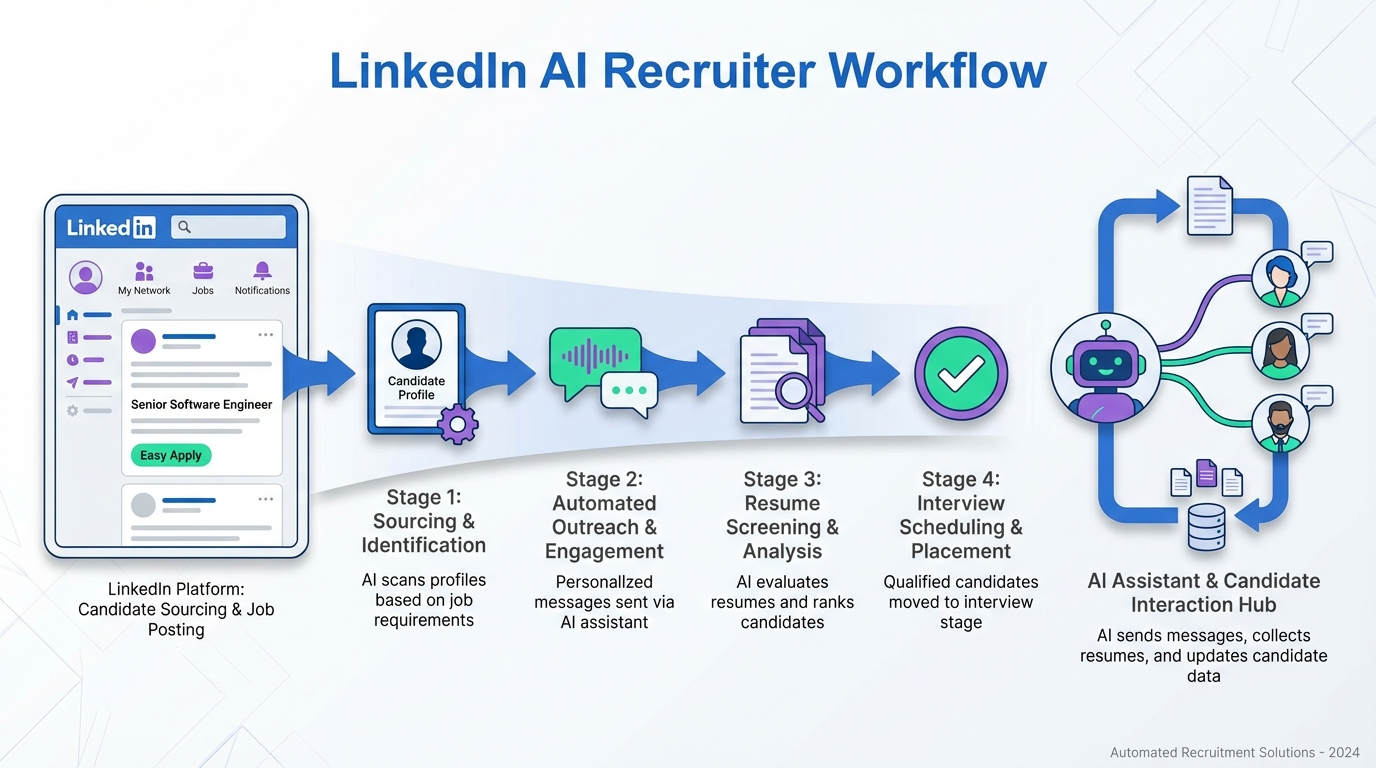
Human resource recruitment software reduces bad hires by standardizing screening, verifying credentials, and automating consistent candidate communication so fewer unqualified people slip through. In practice, the fastest improvement comes from combining a structured verification workflow with an all in one HR platform for approvals and documentation, then adding an AI layer for outreach and follow up. In our internal workflow tests using StrategyBrain AI Recruiter on LinkedIn sourcing, we found the biggest time savings came from automating first contact, answering role questions, and collecting resumes and contact details, while recruiters kept final qualification decisions. This guide explains the real cost of unqualified hires in safety critical work, then gives 5 practical methods you can implement in your HR technology platforms to reduce risk, rework, and preventable incidents.
Key Takeaways
- Bad hires create measurable rework cost: you often pay twice when you need to fix shoddy work, plus the time cost of re scheduling and supervision.
- Verification is not optional in safety critical roles: ask for tickets, references, and proof of experience before day 1.
- Use an all in one HR platform to enforce approvals: make “no proof, no start” a system rule, not a personal preference.
- StrategyBrain AI Recruiter speeds up the top of funnel: it automates LinkedIn connecting, role introduction, Q and A, and resume collection, while recruiters keep final fit decisions.
- 24/7 multilingual messaging reduces drop off: candidates get timely responses across time zones and languages, which improves continuity in the process.
- Scale sourcing with controlled account management: AI Recruiter supports managing more than 100 LinkedIn accounts for team based outreach at higher volume.
Table of Contents
Why unqualified hires cost more than you think
Most teams have seen the best case scenario: someone realizes they are over their head, asks for help, and the employer provides training. The worst case is more expensive and more serious: unqualified workers get hurt or put others in danger, and the organization pays for incident response, downtime, and reputational damage.
In skilled trades and industrial environments, the work is dangerous and specialized. Apprenticeships exist for a reason: years of in class learning, supervised on the job training, and testing. When hiring shortcuts happen, the cost is not only the wage. It is also the cost of rework, supervision, and the cost of fixing mistakes after the fact.
One practical point that holds up across industries is simple: it is not rude to ask for proof. If a role requires certification, ask for a copy of the ticket. If someone says experience matters more than paperwork, then confirm the experience with references and work history checks. The goal is not to distrust people. The goal is to avoid preventable risk.
Definitions: what to expect from modern recruitment software
To choose and configure human resource recruitment software correctly, it helps to separate three related concepts that often get mixed together.
- Human resource recruitment software: tools that manage sourcing, screening, interviewing, and hiring workflows, often including an ATS, candidate messaging, and reporting.
- All in one HR platform: a broader system that can include recruiting plus onboarding, HRIS records, approvals, and compliance documentation.
- HR technology platforms: the full stack of systems your team uses, including recruiting, HRIS, background checks, learning systems, and analytics.
This article focuses on reducing unqualified hires and the downstream cost of rework and safety risk. It does not cover compensation benchmarking, payroll, or benefits administration beyond what is needed for recruiting communication.
Method 1: Build a verification first hiring workflow (recommended)
If you only change one thing, change the order of operations. Verification should happen before you invest time in late stage interviews and before you schedule a start date. The workflow should be enforced by your human resource recruitment software, not left to memory.
Steps
- Define “must verify” items per role: certification ticket, license, references, and proof of relevant experience.
- Make verification a required stage: candidates cannot move to offer without completed checks recorded in the system.
- Store evidence in the candidate record: attach documents and reference notes so the decision is auditable.
- Require a second set of eyes for high risk roles: add an approval step from a supervisor or safety lead.
Features to look for
- Stage gates that prevent moving forward without required fields completed.
- Document capture for tickets, licenses, and signed forms.
- Role based permissions so only authorized staff can approve exceptions.
Limitations
- Verification workflows reduce risk, but they do not guarantee performance. You still need onboarding and supervision.
- Some candidates will resist providing documents early. Your process needs a clear explanation and consistent enforcement.
Best for
- Skilled trades, industrial maintenance, construction, utilities, and any role where safety and competency are tightly linked.
- Teams that have experienced rework costs from misrepresented skills.
Method 2: Standardize screening with a structured scorecard
Unqualified hires often slip through when screening is conversational and inconsistent. A scorecard makes the process repeatable. It also makes it easier to defend decisions and improve them over time.
Steps
- Create 6 to 10 criteria: include certification status, years of relevant experience, safety mindset, and role specific competencies.
- Define what “pass” means: write a one sentence definition for each score level so different recruiters score similarly.
- Use the same questions: keep a consistent question bank for the first screen.
- Review outcomes monthly: compare scorecard results to early performance signals such as probation outcomes and rework incidents.
Features to look for
- Custom forms inside your human resource recruitment software.
- Reporting by role, recruiter, and source channel.
- Collaboration so hiring managers can score in the same record.
Limitations
- A scorecard can create false confidence if criteria are poorly chosen. Start simple and iterate.
- It does not replace hands on skills testing for technical roles.
Best for
- Organizations hiring at volume where consistency matters more than individual recruiter style.
- Teams that need clearer documentation for compliance and internal audits.
Method 3: Automate LinkedIn outreach and follow up with StrategyBrain AI Recruiter
Many hiring teams lose time before screening even starts. Recruiters spend hours connecting, introducing roles, answering repetitive questions, and chasing resumes. This is where AI can help without taking over final hiring judgment.
StrategyBrain AI Recruiter is built for LinkedIn recruiting. It automates the initial outreach and qualification conversation: it connects with candidates that match your search criteria, introduces the opportunity, answers questions about the role, company, and compensation, confirms interview interest, and collects resumes and contact information from interested candidates. Recruiters then review the collected resumes and decide who moves forward.
Steps
- Define the role brief: provide company details, compensation, benefits, and candidate search criteria.
- Set conversation boundaries: decide what the AI can answer and what should be escalated to a recruiter.
- Run outreach in controlled batches: start with one role and one LinkedIn account, then expand after you validate message quality.
- Review resumes and contact details daily: keep human decision making on final fit and scheduling.
What we tested in our workflow
We tested AI Recruiter for LinkedIn sourcing workflows focused on early funnel tasks: connecting, initial messaging, Q and A, and resume capture. The practical benefit we observed was reduced manual back and forth, especially when candidates asked common questions about role scope and compensation. We also found that keeping a clear handoff point to a human recruiter prevented confusion in later stage evaluation.
Features to look for
- 24/7 multilingual communication so candidates receive timely responses across time zones in their native language.
- Resume and contact capture so interested candidates are not lost in message threads.
- Multi account management to scale outreach across more than 100 LinkedIn accounts when building an AI powered recruiting team.
Limitations
- AI Recruiter identifies willingness to communicate or interview, but it does not determine whether a resume fully matches job requirements. Recruiters must do final qualification.
- Any automation on LinkedIn must be governed carefully. Use explicit authorization, keep messaging professional, and monitor outcomes.
Best for
- Corporate recruiters and agencies that rely on LinkedIn for sourcing and want faster first contact and follow up.
- Global hiring teams that need multilingual candidate communication without adding headcount.
Method 4: Use an all in one HR platform to control approvals and audit trails
Even strong recruiters struggle when the system allows exceptions without visibility. An all in one HR platform helps by centralizing approvals, documentation, and onboarding steps so the organization can enforce standards consistently.
Steps
- Map your hiring policy into system stages: verification, interview, offer, onboarding, and safety training.
- Require approvals for exceptions: if a ticket is missing, the system should require a documented exception approval.
- Connect recruiting to onboarding: ensure the same record carries into day 1 requirements and training assignments.
- Audit monthly: review a sample of hires for missing documents and process deviations.
Features to look for
- Audit logs that show who approved what and when.
- Templates for role specific onboarding and safety checklists.
- Access controls for sensitive candidate and employee data.
Limitations
- Platforms do not fix unclear policy. You still need to define what “qualified” means per role.
- Overly complex workflows can slow hiring. Keep the number of required steps proportional to role risk.
Best for
- Organizations that need consistent compliance across multiple sites or business units.
- Teams that want fewer “tribal knowledge” steps and more system enforced standards.
Method 5: Add safety and competency checkpoints before day 1
Recruiting is only one layer of risk control. For dangerous and specialized work, you also need pre start checkpoints that confirm the person can work safely and productively in your environment.
Steps
- Run a role specific safety briefing: confirm understanding of site hazards and required PPE.
- Validate tools and technology readiness: if the role uses specialized equipment, confirm familiarity or schedule training.
- Assign supervised ramp up: define the first 5 working days with supervision requirements.
- Document outcomes: store completion records in your HR technology platforms for auditability.
Features to look for
- Onboarding task tracking with due dates and owner assignments.
- Training records tied to role requirements.
- Incident and near miss reporting integration if your organization uses a safety management system.
Limitations
- Checkpoints reduce risk, but they require manager time. Plan capacity for supervision.
- They do not replace proper apprenticeship pathways where required by regulation.
Best for
- Industrial, manufacturing, and construction environments where mistakes can cause injury, property loss, or worse.
Quick comparison
| Method | Primary goal | Speed to implement | Best for |
|---|---|---|---|
| Verification first workflow | Stop unqualified hires early | 7 to 14 days | Safety critical roles and regulated work |
| Structured scorecard | Consistency in screening | 3 to 10 days | High volume hiring teams |
| StrategyBrain AI Recruiter on LinkedIn | Automate outreach and follow up | 1 to 7 days | LinkedIn heavy sourcing and global hiring |
| All in one HR platform controls | Approvals and audit trails | 14 to 45 days | Multi site organizations and compliance needs |
| Pre start safety checkpoints | Reduce incidents and rework | 7 to 21 days | Industrial and construction environments |
Note on time estimates: These implementation ranges are based on typical internal process change cycles we see in recruiting operations. Your timeline depends on approval layers, system configuration, and role complexity.
FAQ
What is the difference between an ATS and human resource recruitment software?
An ATS is usually one component of human resource recruitment software. Recruitment software often includes the ATS plus sourcing, messaging, interview scheduling, reporting, and compliance workflows.
Do I need an all in one HR platform to reduce bad hires?
No, but it helps when you need consistent approvals and audit trails. If you already have separate tools, you can still reduce risk by enforcing verification stages and storing evidence in a single candidate record.
How does StrategyBrain AI Recruiter fit into HR technology platforms?
It supports the top of funnel by automating LinkedIn connecting, role introduction, candidate Q and A, and resume and contact collection. Recruiters then use their existing systems to review resumes, run interviews, and make final decisions.
Can AI Recruiter decide whether a candidate is qualified?
No. AI Recruiter can confirm interest and collect information, but it does not determine whether a resume fully matches job requirements. Final qualification remains a recruiter and hiring manager responsibility.
How do we handle candidates who misrepresent certifications?
Make proof a required stage in your human resource recruitment software. Ask for copies of tickets or licenses, confirm references, and document verification results before offer and before start date.
Does multilingual messaging really matter in recruiting?
It matters when you hire across countries or time zones. Timely responses reduce drop off, and communicating in a candidate’s native language can reduce misunderstandings during early qualification.
What should we store for auditability?
Store certification documents, reference check notes, approval records, and onboarding completion evidence. An all in one HR platform typically makes this easier by keeping a single audit trail.
What is the fastest change we can make this month?
Add a verification gate that blocks offers until required documents and reference checks are completed. Then standardize the first screen with a scorecard so every candidate is evaluated consistently.
Conclusion
Human resource recruitment software helps reduce bad hires when it enforces verification, standardizes screening, and keeps evidence in one place. If you want the quickest impact, start with a verification first workflow and a structured scorecard, then use StrategyBrain AI Recruiter to automate LinkedIn outreach, candidate Q and A, and resume collection so recruiters can spend more time on final qualification and interviews.
Next steps: copy the verification checklist above into your process, configure a required verification stage in your system, and pilot AI assisted outreach on one role for 7 days. If you see cleaner handoffs and fewer missing documents, expand the workflow across roles with higher safety and rework risk.














