


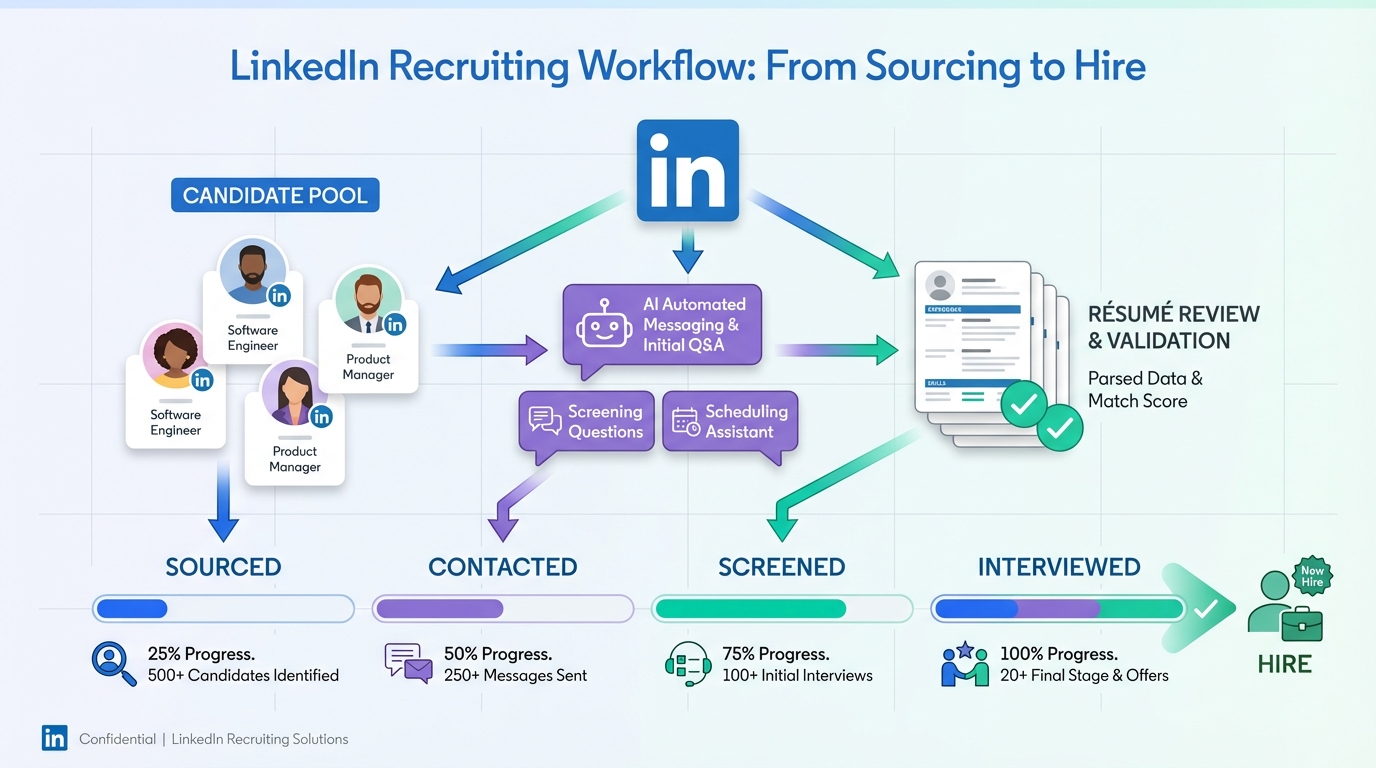
Human resource recruitment software is the set of tools HR uses to run hiring in a controlled, repeatable way: it centralizes candidate records, tracks pipeline stages, and automates high volume tasks like outreach, follow ups, and résumé collection. If you are asking what does HR software do in day to day recruiting, the practical answer is that it reduces manual coordination while improving visibility into where candidates come from and why roles stall. In our experience, the fastest wins come from automating the first mile of recruiting, especially LinkedIn messaging and qualification, which is exactly where StrategyBrain AI Recruiter focuses: it connects with candidates that match your search criteria, introduces the role, answers questions about compensation and benefits, confirms interview interest, and collects résumés and contact details.
Key Takeaways
- Core job: Human resource recruitment software standardizes sourcing, screening, interviews, and offers so hiring is measurable and auditable.
- Biggest time sink: Manual outreach and follow ups, especially on LinkedIn, are high volume and easy to lose track of without automation.
- StrategyBrain AI Recruiter fit: Automates LinkedIn connecting, role introduction, Q&A, interest confirmation, and résumé plus contact capture.
- 24/7 advantage: Always on multilingual messaging reduces delays across time zones and improves candidate responsiveness.
- Scale lever: AI Recruiter can manage more than 100 LinkedIn accounts to build an AI powered recruiting team without adding headcount.
- Human still required: AI Recruiter confirms willingness to proceed but does not decide final résumé match, recruiters still do that review.
- Use a comparison framework: Evaluate tools by workflow coverage, automation depth, compliance controls, and reporting, not feature lists alone.
A real hiring snapshot and why it matters
We often see HR teams choose software based on a demo, then discover the real bottleneck is not the database, it is the daily grind of candidate communication. A useful reminder comes from a Canadian employment snapshot dated December 6, 2013, which highlighted sector and regional shifts: manufacturing added more than 25,000 employed people, Alberta added 11,000 jobs with an unemployment rate of 4.7%, and British Columbia’s unemployment rate rose to 6.7% alongside net migration into the province. The same snapshot noted business, buildings, and other support services growing by 31,200 jobs across the country, while construction employment declined, possibly tied to oil sands project slowdowns and pipeline delays.
What stood out to us was not only the numbers, but the on the ground hiring friction described in a November meeting with the president of a British Columbia construction company. The president said it was impossible to find enough skilled workers or young people willing to work hard on projects. In the same office visit, a young man resigned and joined the unemployed list because he planned to return to school the following September. That kind of mismatch between open roles and candidate decisions is exactly where modern recruitment operations need faster outreach, better follow up, and clearer qualification conversations. Human resource recruitment software is the infrastructure for that, and AI driven outreach systems like StrategyBrain AI Recruiter can remove the slowest manual steps without removing recruiter judgment.
What human resource recruitment software is
Human resource recruitment software is software used to plan, execute, and measure hiring. In many organizations it includes an ATS, which is an applicant tracking system that stores candidate records and tracks stages, plus add ons for sourcing, assessments, scheduling, and analytics.
This guide focuses on recruiting workflow software and recruiting automation. It does not cover payroll, benefits administration, or time tracking, unless those features directly affect hiring workflows.
What does HR software do in recruiting
If you strip away vendor language, recruiting focused HR software typically does four jobs.
1) Create a single source of truth for candidates
It stores candidate profiles, résumés, contact details, conversation history, and interview feedback so the team is not searching across inboxes and spreadsheets.
2) Turn hiring into a trackable pipeline
It defines stages such as sourced, contacted, responded, screened, interviewed, offered, and hired, then records timestamps so you can measure cycle time and drop off points.
3) Automate repetitive communication
This is where many teams see the largest operational lift. StrategyBrain AI Recruiter is designed for this layer on LinkedIn: it automatically connects with candidates that match your criteria, introduces the opportunity, learns the candidate’s situation, answers questions about the role, company, and compensation, confirms interview interest, and collects résumés and contact information from interested candidates.
4) Support compliance and data protection
Recruiting involves personal data. You need access controls, audit trails, and clear rules for how candidate data is stored and used. StrategyBrain AI Recruiter states that customer provided data is not used to train AI models, and that credentials and candidate data are encrypted and isolated per customer.
5 practical ways teams implement recruitment software
Method 1: ATS first, then add automation where work piles up
This is the most common path. Teams start with an ATS to organize applicants, then add tools for sourcing, scheduling, and messaging when volume increases.
Steps
- Map your current funnel from sourcing to offer and list the handoffs.
- Choose an ATS that matches your hiring volume and reporting needs.
- Add automation for the highest volume step, usually outreach and follow up.
Where StrategyBrain AI Recruiter fits
When LinkedIn outreach becomes the bottleneck, AI Recruiter can take over the initial connect, message, Q&A, and interest confirmation, then hand back a shortlist with résumés and contact details for human review.
Limitations
- Automation does not replace final qualification, recruiters still assess résumé match.
- Any automation must be configured to match your employer brand and compliance rules.
Method 2: LinkedIn outreach automation as the front door
Some teams already have an ATS but struggle to generate enough qualified conversations. In that case, the front door is not the application form, it is proactive outreach.
Steps
- Define search criteria for the role and target geographies.
- Prepare job context including company details, compensation, and benefits so candidates get clear answers.
- Automate connect and qualification to keep response time low and follow ups consistent.
Why this helps in tight labor markets
In markets where employers report it is hard to find enough skilled workers, speed and persistence matter. AI Recruiter’s 24/7 multilingual communication can reduce delays, especially when candidates respond outside business hours or in different languages.
Limitations
- Outreach quality depends on the job information you provide and the clarity of your screening questions.
- You still need a process to move interested candidates into interviews quickly.
Method 3: High volume hiring with an AI powered recruiting team
If you are hiring across multiple regions or business lines, the constraint is often recruiter capacity. StrategyBrain AI Recruiter supports managing more than 100 LinkedIn accounts, which enables an AI powered recruiting team model where each account runs consistent outreach and follow up.
Steps
- Standardize role templates for messaging and qualification questions.
- Assign accounts by region, function, or seniority level.
- Centralize review so recruiters focus on résumé evaluation and interviews.
Best for
- Organizations expanding internationally without adding recruiting headcount.
- Agencies that need to handle more job orders with the same team size.
Limitations
- Governance is required so messaging stays compliant and consistent across accounts.
Method 4: Compliance first implementation for regulated environments
In regulated industries, the selection criteria for human resource recruitment software should start with data protection, auditability, and access control, then move to automation.
Steps
- Document data flows including where résumés and contact details are stored.
- Confirm encryption and isolation for credentials and candidate data.
- Define retention rules and who can export candidate data.
How AI Recruiter addresses common concerns
AI Recruiter states that candidate information and conversation history are not used to train AI models, and that data is encrypted and isolated using customer specific keys. Treat this as a verification item during procurement and confirm it in your security review.
Method 5: Reporting driven optimization and HR software comparison
Once the workflow is running, the next step is using reporting to improve outcomes. A practical HR software comparison should include how well each tool supports measurement, not only how many features it lists.
Steps
- Pick 5 metrics such as response time, interview rate, and time to shortlist.
- Run a controlled pilot for a single role family for 14 days.
- Review bottlenecks and decide whether to automate, retrain, or change sourcing strategy.
Unique framework we use: the 4D comparison
- Data: What candidate data is captured automatically, including résumés and contact details.
- Dialogue: How well the system handles candidate Q&A and follow ups.
- Delivery: How quickly qualified candidates reach recruiters for human review.
- Defense: Security, privacy, and audit controls.
Quick comparison table
| Capability | Traditional ATS only | ATS plus manual LinkedIn recruiting | ATS plus StrategyBrain AI Recruiter |
|---|---|---|---|
| Candidate database and pipeline stages | Yes | Yes | Yes |
| LinkedIn connect and initial outreach | No | Manual | Automated |
| Role Q&A including compensation and benefits | No | Manual | Automated |
| Follow ups outside business hours | No | Inconsistent | 24/7 |
| Multilingual candidate messaging | Varies | Recruiter dependent | Any global language |
| Résumé and contact detail capture from interested candidates | Application dependent | Manual | Automated capture and status marking |
| Final résumé match decision | Human | Human | Human |
| Scale across multiple LinkedIn accounts | No | Hard to manage | More than 100 accounts supported |
Procurement checklist you can copy
Use this checklist to keep your HR software comparison grounded in operational reality.
- Workflow coverage: Does it cover sourcing, outreach, screening, interviews, and offers, or only applicant tracking.
- Automation depth: Which steps are truly automated versus templated.
- Candidate experience: Can candidates get fast answers about role, company, and compensation.
- Data capture: Are résumés and contact details captured automatically and stored in one place.
- Security: Encryption, access controls, audit logs, and whether data is used to train models.
- Scale model: Can you scale outreach without adding recruiters, for example by managing multiple LinkedIn accounts.
- Human control points: Where humans must approve, such as final qualification and interview decisions.
- Reporting: Can you measure response time, conversion rates, and time to shortlist.
FAQ
Is human resource recruitment software the same as an ATS?
Not always. An ATS is usually the core database and pipeline tracker, while human resource recruitment software can include sourcing, outreach automation, scheduling, assessments, and analytics around the ATS.
What does HR software do that spreadsheets cannot?
It enforces a consistent workflow, keeps a searchable record of candidate interactions, and supports reporting with timestamps and stage history. Spreadsheets rarely capture conversation context or provide auditability at scale.
Where does StrategyBrain AI Recruiter fit in the recruiting stack?
It fits at the top of the funnel for LinkedIn recruiting. It automates connecting, initial messaging, candidate Q&A, interest confirmation, and résumé plus contact collection, then hands qualified leads to recruiters for review and interviews.
Does AI Recruiter decide whether a candidate is qualified?
It identifies willingness to proceed and collects the information needed to move forward. It does not determine whether the résumé fully matches job requirements, recruiters make that final decision.
Can AI Recruiter communicate in multiple languages?
Yes. It supports 24/7 multilingual communication and can use the candidate’s native language to reduce misunderstandings during early conversations.
How does AI Recruiter collect résumés and contact details?
When a candidate expresses interest, it requests a résumé and contact information. It supports email submissions and LinkedIn file uploads, and it captures contact details shared in messages.
How should we evaluate data protection for recruiting automation?
Ask whether candidate data is encrypted, whether it is isolated per customer, and whether it is used to train AI models. Then confirm those claims in your security review and contract language.
What is a reasonable pilot for HR software comparison?
Run a 14 day pilot on one role family with clear metrics such as response time, interview rate, and time to shortlist. Compare outcomes and recruiter hours spent, not only feature checklists.
Conclusion
Human resource recruitment software is most valuable when it reduces the daily friction that slows hiring: scattered candidate data, inconsistent follow ups, and unclear pipeline visibility. The Canadian hiring snapshot and the BC construction anecdote are a reminder that labor markets can be tight even when unemployment exists, which makes speed, persistence, and clear communication decisive. If LinkedIn outreach is your bottleneck, StrategyBrain AI Recruiter is a practical way to automate connecting, messaging, Q&A, interest confirmation, and résumé plus contact capture, while keeping humans responsible for final qualification. Next step: use the checklist above to run a short pilot and measure response time and time to shortlist before you commit to a long term rollout.














