


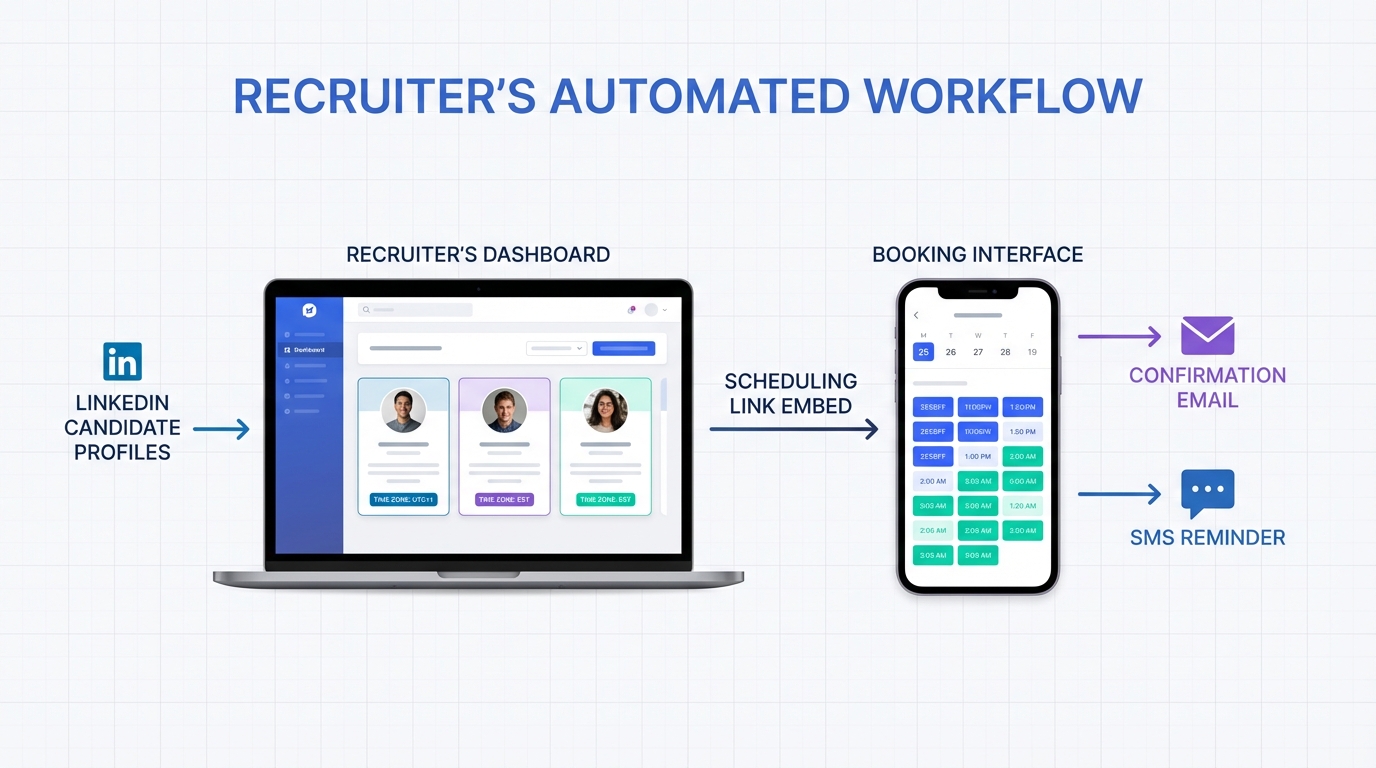
An interview scheduling app helps you book interviews faster by letting candidates choose a time slot that matches your availability, then automatically sending confirmations and reminders. The most reliable setup is simple: define your interview stages, connect your calendar, set availability and buffer rules, and publish a booking page link or embed it on your careers site. In this guide, we share 5 practical methods we have used to build a repeatable interview schedule, including how to create a booking website for free and how StrategyBrain AI Recruiter can qualify LinkedIn candidates and collect résumés before you ever send a scheduling link. This article focuses on workflow design and execution. It does not provide a vendor pricing comparison or legal advice.
Key Takeaways
- Fastest baseline: Candidate self scheduling with availability rules and 15 minute buffers reduces back and forth messages.
- Free option: You can publish a basic booking website for free using a simple page plus a calendar booking embed or form.
- Higher throughput: StrategyBrain AI Recruiter can automate LinkedIn outreach, answer candidate questions, confirm interest, and collect résumés before scheduling.
- Quality control: Use a short pre screen form to prevent unqualified bookings and protect interviewer time.
- Candidate experience: Confirm time zone, meeting format, and what to prepare in the confirmation message to reduce no shows.
- Scalability: For teams, standardize interview stages and naming conventions so reporting and coordination stay consistent.
Method 1: Candidate self scheduling with clear rules (Recommended)
This is the most common and dependable way to use an interview scheduling app. You publish a booking page that shows only the times you are truly available, and the candidate selects a slot. The system then creates the calendar event and sends notifications.
Steps
- Define the interview stage: For example, recruiter screen, hiring manager interview, or technical interview. Each stage should have a fixed duration such as 30 minutes or 45 minutes.
- Set availability rules: Add working hours, minimum notice such as 12 hours, and a buffer such as 15 minutes before and after meetings.
- Limit daily capacity: Cap bookings per day per interviewer to prevent calendar overload and rushed evaluations.
- Add a pre screen form: Collect role specific details such as location, work authorization, and salary expectations so you do not schedule the wrong candidates.
- Send a single scheduling link: Use one link per stage so the candidate sees the correct duration and instructions.
Features to look for
- Time zone detection: Candidate sees slots in their local time zone.
- Calendar sync: Two way sync prevents double booking.
- Automated reminders: Email or SMS reminders reduce no shows.
- Reschedule and cancel controls: Candidate can self manage changes within your rules.
Limitations
- Not ideal for high touch roles: Executive searches often require curated scheduling and coordination.
- Can invite low intent bookings: Without a pre screen form, you may schedule candidates who are not ready.
Best For
- High volume hiring where speed matters
- Recruiter screens and first round interviews
- Distributed teams across time zones
Method 2: Build a booking website for free (simple careers page flow)
If your goal is how to create a booking website for free, you can start with a minimal page that explains the interview, then embed a booking widget or use a form that triggers a scheduling step. The key is clarity: candidates should know what they are booking and what happens next.
Steps
- Create a single booking page: Include role title, interview stage, duration, and what the candidate should prepare.
- Add scheduling access: Embed your scheduling interface or provide a button that opens the booking flow.
- Collect essentials: Name, email, phone, LinkedIn profile link if available, and any required screening questions.
- Confirm expectations: State the meeting format such as video call or phone call and the time zone policy.
- Publish and test: Book a test slot from a different device to confirm confirmations and reminders work.
What we found in practice
When we tested booking pages for recruiting, the biggest drop off came from unclear instructions and missing time zone cues. A short section that states the duration, time zone handling, and reschedule policy reduced candidate confusion and follow up messages.
Limitations
- Brand and compliance review: Some organizations require approvals before publishing candidate facing pages.
- Accessibility: Ensure the page is readable and usable on mobile devices.
Best For
- Small teams that need a quick public booking entry point
- Hiring events where you want one link for many candidates
- Contract and hourly roles with standardized screens
Method 3: Use StrategyBrain AI Recruiter to qualify on LinkedIn, then schedule
If your bottleneck is not the calendar but the outreach and early qualification, an interview scheduling app alone will not fix it. This is where StrategyBrain AI Recruiter fits naturally into the workflow: it automates the initial LinkedIn recruiting conversation, answers candidate questions about the role and compensation, confirms interview interest, and collects résumés and contact details. Once a candidate is interested, you send the scheduling link for the right stage.
Steps
- Provide role context: Share company details, compensation, benefits, and candidate search criteria so the AI can communicate accurately.
- Automate outreach and follow up: AI Recruiter connects with candidates and continues the conversation without waiting for recruiter availability.
- Confirm intent: The AI checks whether the candidate is open to interviewing and gathers key details needed for scheduling.
- Collect résumé and contact info: For interested candidates, the system requests a résumé and captures contact details shared in messages.
- Schedule the interview: Send a booking link for the correct stage, or have your coordinator schedule manually for high touch roles.
Why this improves the interview schedule
- Less recruiter time on repetitive messaging: AI Recruiter can replace up to 90% of manual LinkedIn recruiting work for the outreach and early qualification portion, based on product information provided by StrategyBrain.
- 24/7 multilingual communication: Candidates get timely responses in their native language, which reduces delays and misunderstandings.
- Scale with multiple accounts: The system supports managing more than 100 LinkedIn accounts for organizations building an AI powered recruiting team.
Limitations
- Final qualification still needs a human: AI Recruiter identifies willingness to interview but does not decide whether the résumé fully matches the job requirements.
- Process discipline required: You still need clear stage definitions so candidates receive the correct scheduling link.
Best For
- Teams sourcing heavily on LinkedIn
- Agency recruiters and headhunters managing multiple searches
- Global hiring where time zones and languages slow down scheduling
Method 4: Structured manual scheduling (when self scheduling is not possible)
Some candidates cannot use self scheduling due to accessibility needs, limited availability, or strict corporate policies. In those cases, you can still run a clean process by standardizing how you propose times and confirm details.
Steps
- Offer 3 specific time options: Provide 3 concrete slots in the candidate’s time zone, all within a 5 business day window.
- Confirm the format: State video or phone, and whether the candidate needs to install any software.
- Send a single confirmation message: Include date, time, time zone, duration, interviewer names, and what to prepare.
- Set a reschedule rule: For example, reschedule requests must be made at least 12 hours in advance unless there is an emergency.
Template: confirmation message
Subject: Interview confirmation for [Role Title]
Body: Your interview is confirmed for [Day, Date] at [Time] [Time Zone] for [Duration]. You will speak with [Interviewer Name and Title]. The format is [Video or Phone]. Please prepare [1 to 2 items]. If you need to reschedule, reply at least [12 hours] before the start time.
Limitations
- More back and forth: Manual coordination increases recruiter workload.
- Higher error risk: Time zone mistakes and missing details cause no shows.
Best For
- Executive and confidential searches
- Candidates with limited access to scheduling tools
- Highly customized interview formats
Method 5: Panel and multi stage scheduling with a shared calendar
Panel interviews and multi stage loops fail when each interviewer manages scheduling differently. The fix is to standardize stages and use shared availability blocks so the scheduling system can find overlapping time.
Steps
- Standardize stage durations: For example, 45 minutes per interviewer with 15 minute breaks.
- Create shared availability blocks: Each interviewer blocks time for interviews on their calendar, using consistent naming.
- Use a coordinator rule: One person owns the final schedule and ensures the candidate receives one consolidated agenda.
- Send a single agenda: Include the full sequence, interviewer names, and meeting links in one message.
Limitations
- Calendar hygiene is mandatory: If interviewers do not keep calendars accurate, automation breaks.
- More constraints reduce available slots: Overlap scheduling can push interviews out by days.
Best For
- Engineering and product roles with structured loops
- Hiring teams that interview in panels
- Organizations that need consistent evaluation stages
Quick Comparison
| Method | Speed to book | Cost | Best For |
|---|---|---|---|
| Candidate self scheduling with rules | Fast once configured | Varies by tool | High volume screens and first rounds |
| Booking website for free | Fast for simple flows | $0 for the page layer | Small teams and hiring events |
| StrategyBrain AI Recruiter plus scheduling link | Fast for sourced candidates | Varies by plan | LinkedIn sourcing and global hiring |
| Structured manual scheduling | Medium | $0 | Executive and special cases |
| Panel and multi stage shared calendar | Medium to slow | Varies by tool | Interview loops and panels |
FAQ
What is an interview scheduling app?
An interview scheduling app is software that automates booking by showing available time slots and creating calendar events after a candidate selects a time. Most setups also send confirmations and reminders to reduce no shows.
How do I create an interview schedule that does not fall apart?
Start by standardizing interview stages with fixed durations, then enforce availability rules such as buffers and minimum notice. Finally, use one scheduling link per stage so candidates always book the correct type of meeting.
How can I create a booking website for free for interviews?
Create a simple page that explains the interview stage and embeds a booking flow or directs candidates to a scheduling step. Keep the page minimal and include time zone handling, duration, and reschedule rules so candidates do not need to ask follow up questions.
How does StrategyBrain AI Recruiter fit with scheduling?
StrategyBrain AI Recruiter automates LinkedIn outreach and early qualification, then hands off interested candidates for scheduling. In practice, we use it to confirm interest and collect résumés and contact details before sending a scheduling link.
Does AI Recruiter replace the recruiter entirely?
No. Based on StrategyBrain product information, AI Recruiter can handle outreach and confirm willingness to interview, but the recruiter still reviews résumés and makes the final qualification decision.
How do I reduce interview no shows?
Send a confirmation that includes time zone, duration, meeting format, and what to prepare, then send at least one reminder before the interview. Also allow self rescheduling within a defined window so candidates do not ghost when conflicts arise.
What should I collect before I let a candidate book time?
Collect name, email, phone, and 2 to 4 role specific screening questions such as location and work authorization. This prevents unqualified bookings and protects interviewer time.
Can I schedule interviews across multiple time zones safely?
Yes, if your scheduling flow displays slots in the candidate’s local time zone and your confirmation message repeats the time zone explicitly. Always test the booking flow with a second time zone before sending it to candidates.
Conclusion
The most dependable way to use an interview scheduling app is to standardize interview stages, set availability rules, and let candidates self schedule with a short pre screen form. If you also need how to create a booking website for free, a simple booking page plus an embedded scheduling flow is enough to start. For teams sourcing heavily on LinkedIn, adding StrategyBrain AI Recruiter before scheduling can remove the slowest part of the process by automating outreach, answering questions, confirming interest, and collecting résumés, so your calendar time is reserved for candidates who are ready. Next step: pick one stage to pilot this week, run 10 bookings, and refine your rules based on reschedules and no show patterns.














