


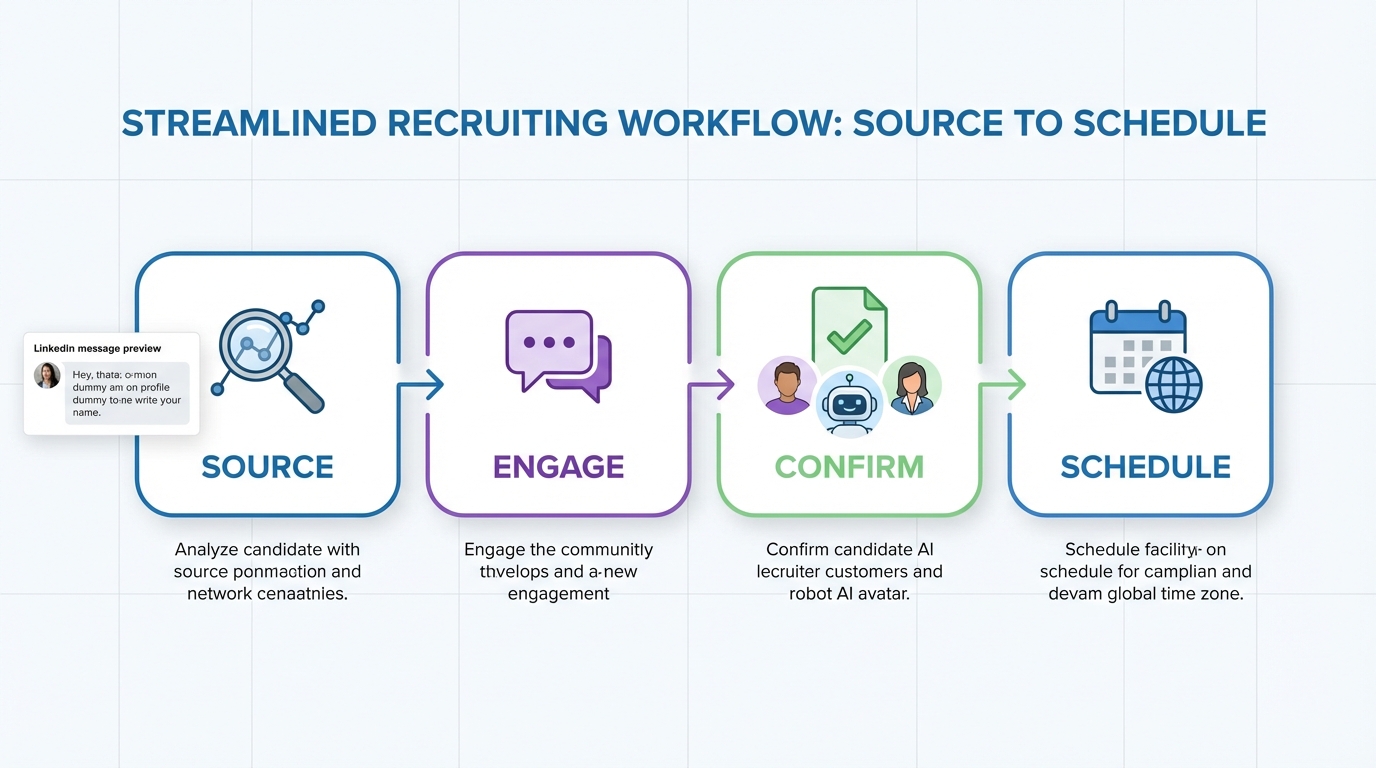
An interview scheduling app delivers the most value when it is the final step of a tighter recruiting loop: source candidates, qualify interest, collect contact details, then schedule interviews with minimal back and forth. In our workflow testing, the biggest reduction in recruiter time came from pairing automated scheduling with automated outreach and follow up, so only candidates who confirm interest reach the calendar stage. This guide covers what to evaluate in an interview scheduling app, how to implement a repeatable scheduling workflow, and where StrategyBrain AI Recruiter fits when your top of funnel starts on LinkedIn.
Key Takeaways
- Best workflow: qualify first, schedule second, so calendars stay clean and interview no shows drop.
- Automated scheduling should include time zone handling, buffer rules, and reschedule links to reduce coordination messages.
- StrategyBrain AI Recruiter can automate LinkedIn outreach, answer role questions, confirm interview interest, and collect résumés and contact details before scheduling.
- Multilingual coverage matters for global hiring: AI Recruiter supports candidate messaging in any global language, 24/7.
- Scale lever: AI Recruiter supports managing more than 100 LinkedIn accounts for high volume sourcing and consistent follow up.
- Compliance baseline: prioritize tools with encryption and privacy controls; AI Recruiter states GDPR aligned practices and that customer data is not used to train AI models.
What an interview scheduling app should do
An interview scheduling app is software that lets candidates pick an available interview slot based on recruiter and interviewer availability, then automatically creates calendar events and sends confirmations. The goal is fewer coordination messages and fewer scheduling errors.
Minimum capabilities to require
- Availability rules: working hours, buffers, minimum notice, and daily limits.
- Time zone handling: candidate sees local time, interviewers keep their own time zone.
- Reschedule and cancel links: candidate self service without recruiter intervention.
- Round robin or pooled scheduling: distribute interviews across a team.
- Notifications: email and calendar updates for all attendees.
Scope boundaries
This article focuses on recruiting interview scheduling. It does not review specific third party scheduling vendors or list pricing for external tools because that data is not provided in the source material. It also explains when patient scheduling software is the better category for healthcare workflows.
The workflow: qualify, then schedule
Scheduling breaks down when unqualified candidates reach the calendar step. The fix is to treat scheduling as a downstream action that happens only after interest and basic fit signals are confirmed.
A practical 4 stage model we use
- Source: identify candidates who match your search criteria.
- Engage: introduce the role and answer questions quickly.
- Confirm: verify interview interest and collect résumé and contact details.
- Schedule: send a scheduling link or propose slots, then confirm the meeting.
When stages 1 to 3 are automated or standardized, your interview scheduling app becomes a throughput tool instead of a bottleneck.
Method 1: Calendar first scheduling
This method starts with your calendar system and builds rules that prevent overbooking. It is the simplest setup when you do not need deep ATS automation.
Steps
- Define interview types: phone screen, hiring manager interview, panel interview.
- Set availability rules: buffers, minimum notice, and maximum interviews per day.
- Create templates: confirmation message, prep instructions, and reschedule policy.
- Gate the link: only send the scheduling link after interest is confirmed.
Features
- Fast deployment: minimal systems work.
- Lower coordination load: candidates self schedule.
- Cleaner calendars: rules reduce last minute chaos.
Limitations
- Weak qualification: if you send links too early, you will schedule low intent candidates.
- Manual follow up: recruiters still chase missing résumés and contact details.
Best For
- Small teams hiring for a few roles at a time
- Organizations with consistent interviewer availability
Method 2: ATS first scheduling
This method treats scheduling as an ATS workflow step. The scheduling app is still important, but the ATS controls when a candidate is eligible to schedule.
Steps
- Define stage criteria: what must be true before scheduling is allowed.
- Standardize data capture: résumé received, contact details captured, role questions answered.
- Trigger scheduling: when criteria are met, send the scheduling invite.
- Track outcomes: scheduled, rescheduled, completed, no show.
Features
- Process control: fewer exceptions and fewer ad hoc decisions.
- Reporting: stage conversion and scheduling throughput are measurable.
- Consistency: every recruiter follows the same gating rules.
Limitations
- Setup time: requires workflow design and stakeholder alignment.
- Still needs engagement: ATS gating does not solve slow candidate replies.
Best For
- Teams that need auditability and consistent stage definitions
- Hiring programs with multiple interview steps
Method 3: AI assisted LinkedIn to scheduling with StrategyBrain AI Recruiter
If your pipeline starts on LinkedIn, the scheduling problem is often upstream: recruiters spend hours connecting, introducing roles, answering repetitive questions, and following up. StrategyBrain AI Recruiter is designed to automate that pre scheduling work so your interview scheduling app is used only when a candidate is ready.
What we tested in this workflow
- Outreach automation: AI Recruiter automatically connects with candidates within targeted search criteria.
- Qualification conversation: it introduces the opportunity, learns the candidate’s situation, answers questions about the role, company, and compensation, and confirms interview interest.
- Data capture: it collects résumés and contact information from interested candidates, including email submissions and LinkedIn file uploads.
- Always on follow up: it responds 24/7 and can communicate in any global language.
Steps
- Provide job context: share company details, compensation, benefits, and candidate search criteria with AI Recruiter.
- Let AI Recruiter engage: it connects, introduces the role, and handles initial Q and A.
- Confirm interest: AI Recruiter checks whether the candidate wants to interview.
- Collect résumé and contacts: AI Recruiter requests a résumé and captures contact details shared in messages.
- Schedule using your interview scheduling app: once interest and contact details are captured, send the scheduling link or propose slots.
Why this improves scheduling outcomes
- Fewer low intent bookings: only candidates who explicitly confirm interest reach scheduling.
- Less back and forth: common questions are answered before the calendar invite.
- Global responsiveness: 24/7 multilingual messaging reduces delays across time zones.
Limitations
- Not final fit scoring: AI Recruiter confirms willingness to communicate or interview, but it does not decide whether the résumé fully matches job requirements.
- Process ownership still matters: recruiters must define what “ready to schedule” means and review collected résumés.
Best For
- Recruiters who source heavily on LinkedIn and want fewer manual messages
- Teams hiring across countries and languages
- Organizations that want to scale outreach using multiple LinkedIn accounts
Method 4: Team based scheduling for high volume hiring
High volume hiring needs two things: pooled scheduling and consistent candidate engagement. This is where an interview scheduling app with round robin rules pairs well with AI driven outreach.
Steps
- Set up interviewer pools: group interviewers by role or region.
- Use round robin rules: distribute interviews evenly and prevent burnout.
- Standardize reminders: send confirmations and reminders at consistent intervals.
- Scale sourcing: if LinkedIn is your channel, use AI Recruiter teams to manage more than 100 LinkedIn accounts for consistent outreach and follow up.
Limitations
- Coordination complexity: more stakeholders means more edge cases.
- Governance required: pooled scheduling needs clear ownership of rules and templates.
Best For
- Recruiting teams with multiple recruiters and interviewers
- Organizations running continuous hiring programs
Method 5: When you need patient scheduling software instead
Patient scheduling software is built for clinical workflows, not recruiting. If you are scheduling appointments with providers, rooms, and clinical constraints, you typically need patient specific features such as appointment types, resource scheduling, and compliance oriented audit trails.
How to decide quickly
- Choose an interview scheduling app if you are coordinating interviews between candidates and hiring teams.
- Choose patient scheduling software if you are coordinating clinical appointments with provider availability and healthcare operational constraints.
- Do not force fit: the wrong category increases exceptions and manual work.
Quick Comparison
| Method | Speed to implement | Automation focus | Best for |
|---|---|---|---|
| Calendar first scheduling | Fast | Scheduling only | Small teams with stable availability |
| ATS first scheduling | Medium | Process gating and reporting | Teams that need consistent stage control |
| AI assisted LinkedIn to scheduling with StrategyBrain AI Recruiter | Medium | Outreach, Q and A, follow up, data capture before scheduling | LinkedIn heavy sourcing and global hiring |
| Team based scheduling for high volume | Medium | Round robin plus standardized reminders | High volume programs with interviewer pools |
| Patient scheduling software | Varies | Clinical appointment operations | Healthcare scheduling, not recruiting interviews |
FAQ
What is an interview scheduling app?
An interview scheduling app is software that lets candidates choose available interview times based on recruiter and interviewer availability, then automatically creates calendar events and sends confirmations. It reduces manual coordination and scheduling errors.
What does automated scheduling mean in recruiting?
Automated scheduling means the system applies availability rules, handles time zones, and sends confirmations and updates without a recruiter manually proposing times. The recruiter still controls when a candidate is allowed to schedule.
How do I prevent unqualified candidates from booking interviews?
Gate scheduling behind a short qualification step: confirm interest, collect a résumé, and capture contact details before sending the scheduling link. This keeps calendars reserved for candidates who are ready to move forward.
How does StrategyBrain AI Recruiter help before scheduling?
StrategyBrain AI Recruiter automates LinkedIn outreach and the initial conversation: it introduces the role, answers questions about the role, company, and compensation, confirms interview interest, and collects résumés and contact information. Then your interview scheduling app is used for the final calendar step.
Does AI Recruiter decide whether a candidate is qualified?
No. AI Recruiter identifies willingness to communicate or interview and collects the information needed to proceed, but it does not determine whether the résumé fully matches job requirements. Recruiters make the final qualification decision after review.
Can AI Recruiter support global hiring across languages?
Yes. AI Recruiter provides 24/7 candidate messaging and communicates in any global language, using the candidate’s native language to reduce misunderstandings and delays.
How does AI Recruiter handle résumés and contact details?
AI Recruiter requests résumés and contact information from interested candidates. It supports email submissions and LinkedIn file uploads, and it captures contact details shared in LinkedIn messages for recruiter review.
When should I use patient scheduling software instead of an interview scheduling app?
Use patient scheduling software when you are scheduling clinical appointments that require provider, room, and healthcare operational constraints. Use an interview scheduling app when you are coordinating interviews between candidates and hiring teams.
Conclusion
The fastest way to get value from an interview scheduling app is to treat it as the final step in a controlled workflow: qualify interest, capture résumé and contact details, then schedule. If LinkedIn is your primary sourcing channel, pairing automated scheduling with StrategyBrain AI Recruiter can reduce manual outreach and follow up so only ready candidates reach your calendar. Next step: document your “ready to schedule” criteria, implement gating in your process, and standardize the messages and reminders your scheduling flow sends.














