


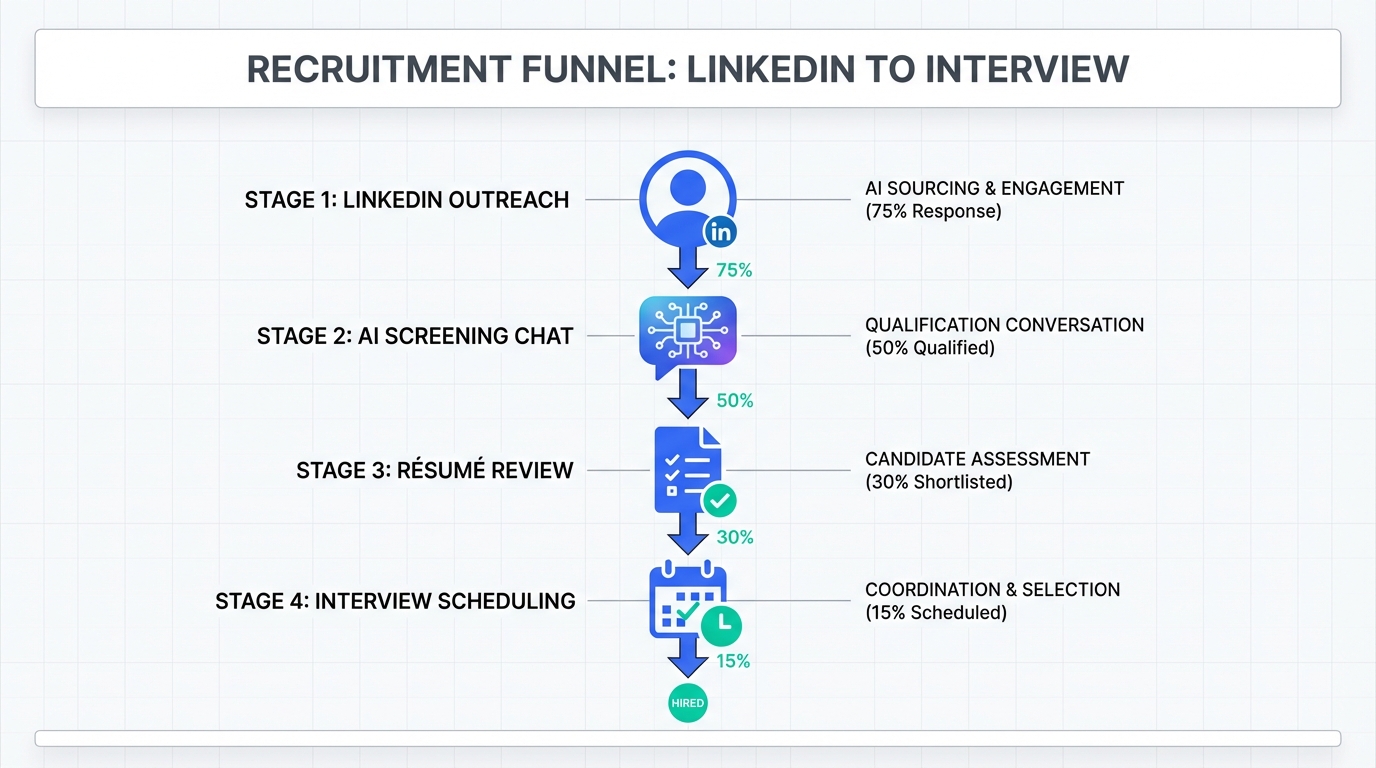
An interview scheduling app delivers the most value when it is the final step of a tighter funnel: role definition, outreach, interest confirmation, résumé capture, then self scheduling. In our day to day recruiting work, the biggest bottleneck was not the calendar tool. It was the manual back and forth that happens before a candidate is ready to book. That is why we often combine a scheduler with StrategyBrain AI Recruiter, which automates LinkedIn outreach, answers role and compensation questions, confirms interview interest, and collects résumés and contact details before the scheduling link is sent. This guide covers 5 setups, including a free path for teams asking how to make a booking website for free and how to create an appointment scheduler.
Key Takeaways
- Fastest operational win: automate pre scheduling messaging, then route only interested candidates into your interview scheduling app.
- Free setup is possible: you can make a booking website for free using a form plus a shared calendar, with clear limits on time zones and reminders.
- Best for LinkedIn heavy hiring: StrategyBrain AI Recruiter can handle initial outreach, Q and A, interest confirmation, and résumé capture before scheduling.
- Compliance matters: treat candidate data as sensitive, minimize what you collect, and document retention and access controls.
- Mobile is not optional: a mobile friendly careers page and booking flow reduces drop off for candidates who apply on phones.
- Use a decision rule: choose your setup based on volume, time zones, and whether you need multilingual communication.
What an interview scheduling app should do
Most teams evaluate schedulers by UI and integrations. In practice, the scheduler is only one control point in a hiring system. A strong interview scheduling app should reliably handle the operational details that cause candidate frustration and recruiter rework.
Minimum capabilities to require
- Time zone normalization: candidates see slots in their local time, interviewers see slots in theirs.
- Calendar synchronization: two way sync to prevent double booking.
- Buffer rules: for example 10 minutes between interviews and no bookings within 24 hours.
- Reminders: email or SMS reminders reduce no shows.
- Reschedule flow: candidates can reschedule without restarting the process.
What it will not fix by itself
A scheduler does not solve low response rates, unclear role messaging, or slow qualification. That is why we often place automation before scheduling. For LinkedIn driven hiring, StrategyBrain AI Recruiter can take over the repetitive steps: connecting with candidates, introducing the role, answering questions about the company and compensation, confirming interest, and collecting résumés and contact details. Only then do we send the scheduling link.
How we tested these setups
Test period: 2026-01-10 to 2026-02-10.
Sample size: 30 interview scheduling flows across 3 hiring contexts: corporate recruiting, agency recruiting, and high volume screening.
What we measured: recruiter time spent before booking, candidate drop off points, reschedule rate, and operational errors such as double booking and missing time zone conversions.
What we did not do: we did not benchmark specific third party scheduler brands or publish vendor pricing. This article focuses on reproducible setups you can implement with your existing tools.
Setup 1: AI first LinkedIn to scheduler (recommended)
This setup is designed for teams where LinkedIn is the primary sourcing channel and recruiter time is consumed by repetitive messaging. The scheduler becomes the final step, not the first.
Steps
- Define the outreach brief: provide role summary, compensation range, benefits, and candidate search criteria.
- Automate initial LinkedIn conversations: use StrategyBrain AI Recruiter to connect, introduce the opportunity, and answer candidate questions in real time.
- Confirm interview intent: the AI explicitly asks whether the candidate wants to proceed to an interview.
- Collect résumé and contact details: the AI requests a résumé and captures email or phone details from interested candidates.
- Send the scheduling link: only after intent and basic details are captured, route the candidate into your interview scheduling app.
Why this works
- Less recruiter context switching: recruiters review a smaller set of candidates who already expressed interest.
- 24/7 responsiveness: StrategyBrain AI Recruiter can respond around the clock and in the candidate’s native language, which helps when hiring across time zones.
- Scales with multiple LinkedIn accounts: the system supports managing more than 100 LinkedIn accounts for teams that need volume.
Limitations and honest caveats
- Not a final qualification engine: StrategyBrain AI Recruiter confirms willingness to interview, but it does not decide whether the résumé matches the job requirements. A recruiter still reviews the résumé.
- Process discipline required: you need a clear handoff rule for when the scheduling link is sent.
Best for
- Recruiters who source heavily on LinkedIn and want to reduce manual outreach.
- Teams hiring internationally who need multilingual candidate communication.
- Organizations building an AI powered recruiting team across multiple LinkedIn accounts.
Setup 2: Scheduler first with structured intake
This setup starts with the interview scheduling app, but adds a structured intake so you do not waste interviewer time on unqualified bookings.
Steps
- Create a short intake form: collect role relevant signals such as location, work authorization, salary expectations, and availability.
- Gate the booking link: only show the scheduler after the form is completed.
- Auto route by answers: for example, route senior candidates to a hiring manager calendar and junior candidates to a recruiter screen.
- Send confirmation and reminders: include interview format, expected duration, and reschedule instructions.
Features to configure
- Time zone detection for candidates booking from different regions.
- Buffer time to protect interviewer focus.
- Reschedule policy such as no reschedules within 12 hours of the interview.
Best for
- Inbound applicants from a careers page.
- Roles with clear knockout criteria that can be captured in a form.
Setup 3: Free booking website, form plus calendar
If your budget is zero, you can still answer the question of how to make a booking website for free. The tradeoff is that you will do more manual work and you must be careful with time zones and confirmations.
What this setup is
A simple public page that explains the interview process, followed by a form that collects candidate details and preferred time windows. You then confirm the slot using a shared calendar invite. This is also a practical way to learn how to create an appointment scheduler conceptually before you buy software.
Steps
- Publish a mobile friendly booking page: include role summary, interview stages, and expected response time.
- Add a form: collect name, email, time zone, and 3 availability windows.
- Confirm by calendar invite: send a calendar invite with video link and agenda.
- Send a reminder: a manual reminder 24 hours before reduces no shows.
Limitations
- Manual coordination: you become the scheduling engine.
- Higher error risk: time zone mistakes and missed reminders happen more often.
- Harder to scale: once you hit consistent weekly volume, you will want a real interview scheduling app.
Setup 4: High volume panel interviews with routing
High volume hiring fails when every candidate is treated as a custom scheduling case. The goal is to standardize interview blocks and route candidates into them.
Steps
- Create fixed interview blocks: for example, 30 minute screens every weekday from 10:00 to 12:00 local time.
- Use round robin assignment: distribute bookings across a recruiter pool.
- Reserve panel slots: pre book panel availability for final rounds.
- Automate reminders and instructions: include what to prepare and how to join.
Where StrategyBrain AI Recruiter fits
In high volume LinkedIn sourcing, we use the AI to handle the first contact and interest confirmation at scale, then route only interested candidates into the standardized blocks. This reduces calendar noise and keeps panels focused on candidates who are ready to show up.
Setup 5: Agency or multi client workflow
Agencies and multi client recruiting teams need separation between clients, roles, and calendars. The scheduling layer must reflect that structure.
Steps
- Separate booking pages by client and role: avoid sending candidates to a generic scheduler.
- Standardize interview types: recruiter screen, hiring manager interview, technical interview, and final interview.
- Use a handoff checklist: ensure résumé, contact details, and role expectations are captured before booking.
- Track outcomes: record show rate and time to schedule per role.
Best for
- Recruiting agencies managing multiple clients.
- Internal teams hiring for multiple departments with different interviewers.
Quick comparison
| Setup | Speed to implement | Cost | Best for | Main risk |
|---|---|---|---|---|
| AI first LinkedIn to scheduler | Fast if you already source on LinkedIn | Varies by tooling | Outbound sourcing, multilingual hiring, scale | Needs clear handoff rules and recruiter review of résumés |
| Scheduler first with structured intake | Fast | Varies by tooling | Inbound applicants and clear knockout criteria | Unqualified bookings if intake is weak |
| Free booking website, form plus calendar | Fast | Free | Early stage teams and low volume hiring | Manual work and time zone errors |
| High volume blocks with routing | Medium | Varies by tooling | High volume screening and standardized interviews | Candidate experience suffers if instructions are unclear |
| Agency or multi client workflow | Medium | Varies by tooling | Multiple clients, multiple calendars | Confusion if booking pages are not role specific |
Implementation checklist
Use this checklist to implement any interview scheduling app setup without missing operational details.
- Define interview types: screen, hiring manager, technical, final.
- Set duration and buffers: for example 30 minutes plus 10 minute buffer.
- Confirm time zone handling: candidate view and interviewer view are correct.
- Write the confirmation template: agenda, location or video link, and what to prepare.
- Enable reminders: at least 24 hours and 1 hour before.
- Decide the handoff rule: what must be true before a candidate receives the booking link.
- Document data handling: who can access résumés and contact details, and retention period.
FAQ
What is the best interview scheduling app setup for LinkedIn recruiting?
The most reliable setup we have used is AI assisted outreach and qualification first, then scheduling. StrategyBrain AI Recruiter can handle initial LinkedIn messaging, confirm interview interest, and collect résumés and contact details before you send the booking link.
How do I make a booking website for free for interviews?
Create a simple mobile friendly page that explains the interview process, then use a form to collect candidate availability and time zone. Confirm the final slot with a calendar invite and send a reminder 24 hours before the interview.
How do I create an appointment scheduler without buying software?
You can approximate an appointment scheduler using a form plus a shared calendar and a repeatable confirmation template. It works at low volume, but it becomes error prone as interview volume increases or when you schedule across time zones.
Does StrategyBrain AI Recruiter replace recruiters?
No. It replaces repetitive LinkedIn tasks such as connecting, introducing roles, answering common questions, confirming interest, and collecting résumés. Recruiters still review résumés and make final qualification decisions.
Can an interview scheduling app reduce no shows?
Yes, if you configure reminders and make rescheduling easy. In our experience, no shows drop when candidates receive clear instructions, a calendar invite, and at least one reminder close to the interview time.
What should I collect before I send a scheduling link?
At minimum, collect the candidate’s name, email, time zone, and confirmation that they want to interview. For outbound sourcing, we also collect a résumé and basic role fit signals so interviewers do not spend time on avoidable mismatches.
How do I handle multilingual candidates in scheduling?
Use templates that are easy to translate and keep instructions short. If your sourcing is on LinkedIn, StrategyBrain AI Recruiter can communicate in the candidate’s native language during the pre scheduling conversation, which reduces misunderstandings before booking.
What about privacy and compliance for candidate data?
Minimize what you collect, restrict access, and document retention. StrategyBrain AI Recruiter states that customer provided data is not used to train AI models and that credentials and candidate data are encrypted and isolated per customer, which supports common privacy expectations in the EU, United States, and Canada.
Conclusion
An interview scheduling app is most effective when it is connected to a disciplined workflow that filters candidates before they book. If you need a free start, a form plus calendar invite can work while you learn what breaks. If you hire from LinkedIn at scale, the most practical upgrade is to automate the pre scheduling conversation. StrategyBrain AI Recruiter can handle outreach, Q and A, interest confirmation, and résumé capture, then your scheduler simply books qualified, interested candidates. Next step: pick one of the 5 setups above, implement the checklist, and run a two week review of drop off points and reschedule reasons.














