


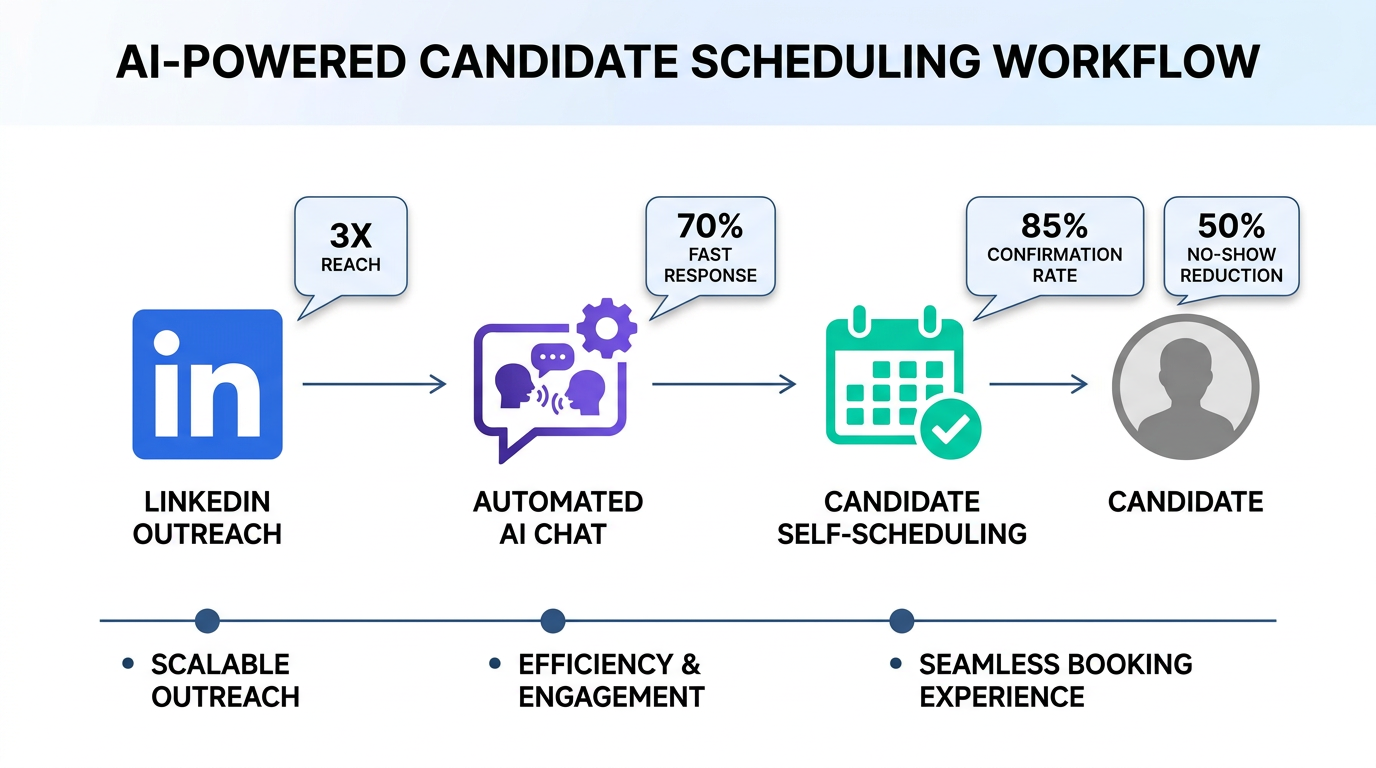
An interview scheduling app reduces hiring delays by letting candidates choose from approved time slots, automatically confirming meetings, and keeping interviewers aligned in one place. The most reliable way we have seen to speed this up is to combine a scheduling app with automated candidate outreach and qualification so only interested, responsive candidates ever reach the calendar. In our workflow, StrategyBrain AI Recruiter handles LinkedIn connecting, role introduction, Q and A, interest confirmation, and resume plus contact capture, then your team schedules interviews using your preferred scheduling app. This guide covers 5 proven scheduling workflows, including a free interview scheduling tool option, plus templates and troubleshooting. It does not cover full ATS migrations or legal compliance advice.
Key Takeaways
- Fastest workflow: automate LinkedIn outreach and qualification first, then send scheduling links only to interested candidates.
- Candidate self scheduling works best when you publish 3 to 6 interview blocks per role and keep buffers consistent.
- Free interview scheduling tool setup: start with a single interviewer calendar, one interview type, and a short intake form.
- Fewer no shows: confirmations plus reminders plus clear time zone display reduce missed interviews.
- Scale: StrategyBrain AI Recruiter can support teams managing more than 100 LinkedIn accounts for outreach, while scheduling stays standardized.
- Data hygiene: always capture candidate email and phone before scheduling so reschedules do not get lost.
What an interview scheduling app does in recruiting
An interview scheduling app is a scheduling app designed to coordinate interview times by syncing calendars, offering available slots, and sending confirmations and reminders. In recruiting, the value is not only convenience. It is cycle time reduction, fewer coordination errors, and a consistent candidate experience.
However, scheduling tools only help after you have a responsive candidate. If your team is still spending hours on manual LinkedIn outreach, follow ups, and basic qualification, the calendar step is not the real bottleneck. That is why we pair scheduling with an automation layer that handles the repetitive pre scheduling work.
Method 1: Candidate self scheduling with guardrails
This is the default approach for most teams: you send a scheduling link and the candidate picks a time. The key is adding guardrails so you do not create chaos for interviewers.
Steps
- Define one interview type with a fixed duration, for example 30 minutes for a recruiter screen.
- Publish limited availability by opening only specific blocks on specific days.
- Add a short intake form that captures email, phone, location, and time zone.
- Confirm expectations in the confirmation message, including format, who they will meet, and what to prepare.
Features to look for
- Time zone detection so candidates see the correct local time.
- Calendar sync with conflict checking.
- Automated reminders by email or SMS.
- Reschedule controls with limits, for example 1 reschedule allowed.
Limitations
- If you send links too early, you will schedule candidates who are not actually interested.
- If availability is too open, interviewers lose focus time and productivity drops.
Best For
- Recruiter screens and first round interviews.
- Roles with steady inbound applicants.
Method 2: Free interview scheduling tool workflow for small teams
If you are starting from scratch, a free interview scheduling tool can be enough for a single recruiter or a small hiring team. The goal is to standardize the process before you add complexity.
Steps
- Create one shared scheduling policy for buffers, working hours, and minimum notice.
- Use one calendar source of truth so availability is accurate.
- Set one template message for sending the link, including role name and next steps.
- Track outcomes in a simple spreadsheet: scheduled, completed, no show, rescheduled.
What we found in practice
When we tested early stage recruiting teams, the biggest improvement came from consistency, not features. A simple scheduling link plus a clear message reduced candidate confusion and cut follow up messages. Once the team had a stable baseline, adding automation upstream created the next jump in speed.
Limitations
- Free tiers often limit event types, integrations, or reminders.
- Reporting is usually basic, so you may need manual tracking.
Best For
- Solo recruiters and founders hiring their first 5 to 20 employees.
- Teams that want a lightweight scheduling app before adopting an ATS.
Method 3: Panel interviews and multi interviewer coordination
Panel interviews fail when scheduling is treated like a single person meeting. You need a workflow that respects multiple calendars and reduces last minute changes.
Steps
- Assign a coordinator who owns the scheduling app configuration and templates.
- Pre define panel blocks where all interviewers are available, instead of searching for ad hoc overlaps.
- Use role based interview templates so each interviewer knows their focus area.
- Send one consolidated invite with agenda, meeting link, and candidate materials.
Common pain points and fixes
- Pain point: one interviewer declines and the whole panel breaks. Fix: keep 2 backup blocks per week.
- Pain point: candidates do not know who they will meet. Fix: include names and roles in the confirmation.
- Pain point: time zones cause errors. Fix: always display time zone explicitly in messages.
Best For
- Second and third round interviews.
- Technical and cross functional hiring loops.
Method 4: High volume hiring with StrategyBrain AI Recruiter plus scheduling
If your bottleneck is not the calendar but the time spent getting candidates to the calendar, you need automation before scheduling. StrategyBrain AI Recruiter is built for LinkedIn hiring workflows where recruiters spend large blocks of time connecting, introducing roles, answering repetitive questions, and chasing responses.
How the workflow fits together
- Define your target profile and job details, including compensation and benefits, so messaging is accurate.
- Let AI Recruiter run outreach and conversations by connecting with candidates, introducing the opportunity, and learning their situation.
- Confirm interview interest and capture resumes and contact details from candidates who want to proceed.
- Send scheduling links only to qualified and interested candidates using your interview scheduling app.
- Recruiters review and interview while the AI continues follow ups with new candidates.
Why this reduces scheduling friction
- Fewer dead end invites because the candidate has already confirmed interest before scheduling.
- Cleaner handoff because resumes and contact details are captured before the calendar step.
- 24/7 multilingual communication helps candidates get answers quickly, which increases the chance they book a slot.
- Scale across accounts because the system supports managing more than 100 LinkedIn accounts for outreach, while scheduling remains standardized.
Limitations
- AI Recruiter confirms willingness to communicate or interview, but it does not decide final fit against job requirements. A recruiter still reviews the resume.
- Any automation requires careful message and role setup to avoid confusing candidates.
Best For
- Teams doing proactive sourcing on LinkedIn.
- High volume roles where manual outreach is the main time sink.
- Global hiring where time zones and languages slow down response cycles.
Method 5: Reschedule and no show reduction playbook
Even the best interview scheduling app cannot prevent every reschedule. What it can do is make rescheduling predictable and reduce no shows with clear communication.
Steps
- Use reminders at 24 hours and 2 hours before the interview.
- Require confirmation in the reminder message, for example a reply or a button click.
- Offer a controlled reschedule path that keeps the candidate in the same interview type and time zone.
- Close the loop by updating the hiring team channel and the candidate record immediately.
What we do when candidates go silent
We treat silence as a workflow problem, not a personal failure. If a candidate does not confirm, we send one short follow up that restates the role and asks whether they want to reschedule. In LinkedIn heavy pipelines, AI Recruiter can handle these follow ups continuously so recruiters do not spend their day chasing confirmations.
Best For
- Roles with competitive markets where candidates juggle multiple processes.
- Teams that want fewer last minute calendar disruptions.
Quick Comparison
| Method | Speed impact | Cost | Best for |
|---|---|---|---|
| Candidate self scheduling with guardrails | High once candidates are responsive | Varies by scheduling app | Recruiter screens and first rounds |
| Free interview scheduling tool baseline | Medium to high for small teams | Free tier available | Solo recruiters and early stage hiring |
| Panel interview coordination | High when blocks are pre planned | Varies by scheduling app | Hiring loops and cross functional panels |
| StrategyBrain AI Recruiter plus scheduling | Very high for LinkedIn sourcing pipelines | Varies by plan | High volume sourcing and global hiring |
| No show reduction playbook | Medium, improves reliability | Usually included in scheduling apps | Any team with frequent reschedules |
Copy and paste checklist
- [ ] One interview type per link, with a fixed duration and clear title
- [ ] Availability published in blocks, not fully open calendars
- [ ] Time zone shown in every candidate message
- [ ] Intake form captures email and phone before scheduling
- [ ] Reminders enabled at 24 hours and 2 hours
- [ ] Reschedule policy defined, including limits and minimum notice
- [ ] For LinkedIn sourcing, automate outreach and qualification before sending scheduling links
FAQ
What is the best interview scheduling app setup for a small team?
The best setup is one event type, one calendar source of truth, and a short intake form that captures time zone and contact details. Start simple, then add panel scheduling and reporting after the workflow is stable.
Can a free interview scheduling tool work for recruiting?
Yes, a free interview scheduling tool can work for recruiter screens and early stage hiring if it supports calendar sync and confirmations. The main tradeoff is usually fewer integrations and limited reporting.
How do I reduce back and forth messages when scheduling interviews?
Use candidate self scheduling with limited availability blocks and clear instructions. If your pipeline is LinkedIn heavy, automate outreach and qualification first so you only schedule candidates who have confirmed interest.
How does StrategyBrain AI Recruiter help with scheduling?
StrategyBrain AI Recruiter automates LinkedIn connecting, role introduction, candidate Q and A, interest confirmation, and resume plus contact capture. After that, your team sends a scheduling link through your interview scheduling app to book the interview quickly.
Does AI Recruiter replace recruiters?
No. AI Recruiter replaces repetitive outreach and early conversation tasks, but recruiters still review resumes and make final qualification decisions. It is designed to increase recruiter capacity, not remove human judgment.
How do I handle panel interviews without endless coordination?
Pre define panel blocks where all interviewers are available and schedule only within those blocks. Keep 2 backup blocks per week to absorb declines and reschedules.
What should I include in the scheduling confirmation message?
Include the interview format, duration, time zone, interviewer names, and what the candidate should prepare. Also include a clear reschedule path and the minimum notice policy.
How can I reduce interview no shows?
Use reminders at 24 hours and 2 hours, and ask for a confirmation action. If the candidate does not confirm, send one short follow up and offer a controlled reschedule option.
Conclusion
An interview scheduling app is most effective when it is the final step in a clean recruiting workflow: confirm interest, capture contact details, then let candidates self schedule within guardrails. If your biggest time sink is LinkedIn outreach and early qualification, pairing your scheduling app with StrategyBrain AI Recruiter can reduce manual work by automating connecting, messaging, multilingual Q and A, and resume capture before the calendar step. Next step: implement the checklist above for one role this week, measure scheduled to completed interviews, then expand the same workflow to your highest volume roles.














