


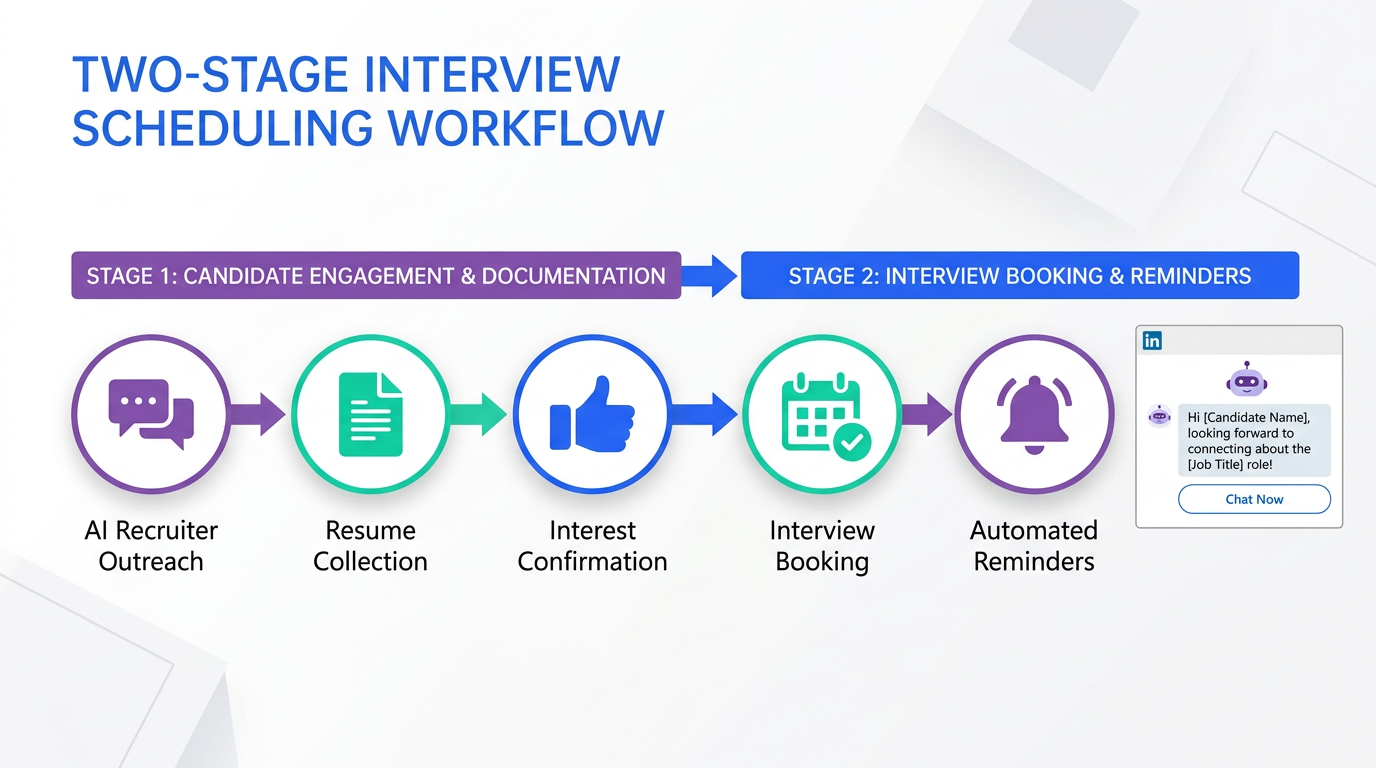
An interview scheduling app helps you book interviews faster by automating availability collection, time zone handling, reminders, and rescheduling. If your hiring team also competes on flexible work, the most practical approach is to pair a scheduling workflow with a clear flexibility policy and consistent candidate communication. In this guide, we translate flexible work examples from Canadian employers into a scheduling ready hiring process, then show how StrategyBrain AI Recruiter can reduce manual LinkedIn outreach and pre interview coordination by automating candidate conversations, collecting resumes and contact details, and confirming interview interest before you schedule.
Key Takeaways
- Flexible work is a measurable attraction lever: 89% of employees said a flexible work program makes a company more attractive (Source: Harris Decima survey reported by Newswire).
- Scheduling breaks when flexibility is unclear: define interview windows, time zones, and remote expectations before sending links.
- Use a two stage flow: qualify interest first, then schedule. This reduces no shows and back and forth messages.
- StrategyBrain AI Recruiter can handle pre scheduling work: it connects with candidates, introduces roles, answers questions, confirms interview interest, and collects resumes and contact details.
- Small teams can start simple: an online schedule generator free can cover basic booking, while AI Recruiter covers outreach and follow up.
- Compliance and trust matter: AI Recruiter states it complies with privacy regulations in the EU, United States, and Canada, and customer data is not used to train AI models.
What to look for in an interview scheduling app for flexible work hiring
When candidates expect flexibility, scheduling is not just picking a time. It is confirming the interview format, the time zone, and the expectations for remote work. In our recruiting operations reviews, the biggest delays come from unclear constraints rather than the calendar tool itself.
Core features that prevent scheduling churn
- Time zone normalization: the app should display the candidate local time and the recruiter local time.
- Buffer rules: set fixed buffers such as 10 minutes before and after interviews to avoid overlap.
- Rescheduling controls: allow candidate reschedule within a defined window such as 24 hours before the meeting.
- Automated reminders: email or SMS reminders reduce no shows when interviews are remote.
- Structured intake: collect role specific questions such as location, work authorization, and compensation expectations before the meeting.
Scope boundaries for this guide
- Covered: scheduling workflow design, flexible work implications, and how StrategyBrain AI Recruiter fits into pre scheduling coordination.
- Not covered: a brand by brand pricing comparison of third party scheduling vendors, because the provided source material does not include verified pricing details.
Flexible work examples from Canadian employers and what they imply for scheduling
The source material highlights that demand for flexible work is rising and cites a survey result: 89% of employees felt a flexible work program makes a company more attractive, and flexible work was considered the second most important factor after money when Canadians look for a new job (Source: Harris Decima survey reported by Newswire).
Four flexibility categories that change how you schedule interviews
The source describes flexibility as a set of initiatives across hours, performance, workstyles, and lifestyle. For interview scheduling, each category creates different constraints you should capture before you send a booking link.
- Hours: flextime, compressed weeks, part time. Scheduling implication: offer interview windows outside a strict 9 to 5 block and confirm the candidate preferred hours.
- Performance: results oriented KPIs, earned days off. Scheduling implication: candidates may have non standard availability on earned days off, so provide multiple date options.
- Workstyles: telecommuting, flexible workspaces, job sharing. Scheduling implication: confirm remote interview format, camera expectations, and whether any onsite step exists.
- Lifestyle: phased in retirement, onsite facilities. Scheduling implication: be explicit about location requirements and any accessibility needs.
Employer examples and the scheduling signals you can borrow
The source highlights three Canadian employers and specific flexibility programs. Below is how we would translate those programs into scheduling and candidate communication signals.
- KPMG: programs include a Working Parents networking group, a Personal Care program with up to 50 hours of paid time off annually, and phased in work options for older employees. Scheduling signal: offer family friendly interview windows and provide a reschedule policy that does not punish candidates for caregiving conflicts.
- World Vision Canada: alternative work arrangements such as flexible hours, shortened and compressed work week options, and telecommuting, plus an Earned Days Off program. Scheduling signal: ask candidates to choose interview windows aligned to their compressed schedule and confirm remote interview readiness.
- Simon Fraser University: emphasizes proximity and sustainability through a surrounding community and reduced commuting. Scheduling signal: if onsite steps exist, clearly state travel expectations and provide remote first options when possible.
These examples also reinforce a practical point from the source: you do not have to be a big business to implement flexible work options. For small teams, the scheduling tool matters, but the clarity of your flexibility policy matters more.
A scheduling ready hiring workflow that reduces back and forth
Most teams try to schedule too early. The result is calendar links sent to candidates who are not actually ready to interview, or who still have basic questions about compensation, location, and flexibility. A better pattern is a two stage workflow: qualify interest first, then schedule.
Step by step workflow
- Define the flexibility offer for the role: write a 5 line summary covering remote policy, core hours, time zone expectations, and any onsite requirements.
- Run pre interview Q and A: answer compensation, benefits, and role scope questions before booking.
- Confirm interview intent: ask for a clear yes to proceed and confirm the candidate preferred time windows.
- Collect essentials: resume and contact details, plus any must have screening fields.
- Send scheduling options: use your interview scheduling app or an online schedule generator free depending on your stage.
- Automate reminders and rescheduling: reduce no shows and last minute churn.
Unique framework: the FLEX SCHED checklist
We use this internal checklist to prevent scheduling loops in flexible work hiring. You can copy it into your ATS notes or recruiter playbook.
- F: Format confirmed (video, phone, onsite).
- L: Location expectations stated (remote, hybrid, onsite frequency).
- E: Eligibility captured (work authorization, start date constraints).
- X: eXceptions allowed (caregiving, compressed weeks, time zone limits).
- S: Salary range discussed or at least acknowledged.
- C: Candidate intent confirmed (explicit yes to interview).
- H: Hours and time zone windows collected.
- E: Essentials received (resume and contact details).
- D: Decision timeline shared (next steps and expected response time).
Method 1: Use StrategyBrain AI Recruiter to qualify and pre coordinate before scheduling
If your bottleneck is not the calendar but the messaging, follow up, and early qualification, StrategyBrain AI Recruiter is designed to handle that layer on LinkedIn. In our experience, this is where most scheduling delays originate, especially when candidates are in different time zones or ask detailed questions before committing to an interview.
What StrategyBrain AI Recruiter does before you send a scheduling link
- Automated candidate connection and outreach: connects with candidates within your targeted search criteria.
- Role introduction and Q and A: introduces the opportunity and answers questions about the role, company, and compensation.
- Interview interest confirmation: confirms whether the candidate wants to proceed to an interview.
- Resume and contact capture: collects resumes and contact information from interested candidates.
- 24/7 multilingual communication: responds around the clock in the candidate native language to reduce misunderstandings.
Steps to use AI Recruiter in a scheduling workflow
- Provide job context: company details, compensation, benefits, and candidate search criteria.
- Let AI Recruiter run the first conversations: it introduces the role and handles common questions.
- Review the interested shortlist: focus only on candidates who confirmed interest and shared essentials.
- Schedule with your chosen tool: send your interview scheduling app link to the shortlisted candidates.
Limitations and how to handle them
- AI Recruiter does not finalize fit: it identifies willingness to communicate or interview, but it does not determine whether the resume fully matches job requirements. Workaround: keep a recruiter review step before scheduling panel interviews.
- Policy clarity still matters: if your flexible work policy is vague, candidates will ask more questions. Workaround: prepare a standard flexibility summary and reuse it in AI Recruiter messaging.
Best for
- Teams sourcing on LinkedIn who want fewer manual messages before scheduling.
- Global hiring where time zones and languages create follow up delays.
- Recruiters who need to scale outreach across many LinkedIn accounts, since AI Recruiter supports managing more than 100 LinkedIn accounts.
Method 2: Use a dedicated interview scheduling app for booking and reminders
A dedicated interview scheduling app is the right choice when your process is already qualified and you mainly need reliable booking, reminders, and rescheduling. This is often the case for inbound applicants or referrals.
Steps
- Create role specific booking pages: separate links for recruiter screen, hiring manager interview, and panel interview.
- Set availability rules: include buffers, minimum notice, and maximum days into the future.
- Add intake questions: capture time zone, remote preference, and any constraints tied to flexible hours.
- Turn on reminders: at least 24 hours and 1 hour before the meeting.
Best for
- Small businesses that need the best scheduling software for small business operations, where one person coordinates multiple roles.
- Teams with consistent interview stages and predictable calendars.
- Hiring processes where candidate questions are mostly answered earlier in the funnel.
Method 3: Use an online schedule generator free for early stage hiring
If you are hiring occasionally or validating a new role, an online schedule generator free can be enough to reduce email ping pong. The tradeoff is usually fewer controls, weaker reporting, and less automation.
Steps
- Publish a simple availability grid: offer 6 to 12 slots per week.
- Confirm time zone in writing: include the candidate local time in the message.
- Manually send reminders: if the tool does not support reminders, send a confirmation message 24 hours before.
Best for
- Founders and small teams hiring 1 role at a time.
- Early stage pipelines where you want speed over deep workflow controls.
- Teams that use StrategyBrain AI Recruiter for outreach and only need a lightweight booking layer.
Quick Comparison
| Method | Primary purpose | Automation focus | Best for |
|---|---|---|---|
| StrategyBrain AI Recruiter + scheduling tool | Pre scheduling outreach and qualification | Candidate messaging, Q and A, interest confirmation, resume and contact capture | LinkedIn sourcing, global hiring, high follow up workload |
| Dedicated interview scheduling app | Booking and reminders | Availability rules, reminders, rescheduling | Structured interview stages, inbound applicants |
| Online schedule generator free | Basic booking | Simple slot selection | Occasional hiring, early stage teams |
Copy and paste templates
Template 1: Flexible work clarity message before scheduling
Subject: Next step interview and flexible work details
Thanks for your interest. Before we schedule, I want to confirm our flexible work setup for this role. The role is remote or hybrid depending on location. Core collaboration hours are [insert hours] in [insert time zone]. We can accommodate compressed weeks and caregiving constraints with advance notice. If you are aligned, please share two time windows that work for you this week and I will send the booking options.
Template 2: Candidate intake questions for your interview scheduling app
- What time zone are you in?
- Do you prefer phone or video for the first interview?
- Are you open to remote work, hybrid work, or onsite work?
- Do you have any constraints related to flexible hours or compressed weeks we should plan around?
- What is your earliest start date?
Template 3: Reschedule policy that supports flexible work
If you need to reschedule, please do so at least 24 hours before the interview time. If an urgent conflict comes up, reply to this message and we will find a new time. We aim to respond within 1 business day.
FAQ
What is an interview scheduling app?
An interview scheduling app is software that automates interview booking by letting candidates pick available times, handling time zones, and sending confirmations and reminders. It reduces manual email coordination and makes rescheduling easier.
What is the best scheduling software for small business hiring teams?
The best scheduling software for small business teams is the one that matches your workflow complexity. If your main problem is booking logistics, choose a dedicated scheduling app. If your main problem is LinkedIn outreach and follow up before booking, pair scheduling with StrategyBrain AI Recruiter to qualify interest first.
Can I use an online schedule generator free and still look professional?
Yes, if you add clear instructions, confirm time zones, and send reminders. The professionalism comes from clarity and follow through, not only from advanced features.
How does StrategyBrain AI Recruiter help with interview scheduling?
StrategyBrain AI Recruiter helps before scheduling by automating LinkedIn outreach, answering candidate questions about the role and compensation, confirming interview interest, and collecting resumes and contact details. Once a candidate is ready, you send your scheduling link to book the time.
Does AI Recruiter replace recruiters?
No. AI Recruiter automates repetitive LinkedIn tasks such as connecting, introducing roles, and collecting information, but it does not decide final fit based on the resume. Recruiters still review resumes and run interviews.
How do flexible work policies affect scheduling?
Flexible work changes availability patterns and increases time zone variation. You should capture preferred hours, compressed week constraints, and remote interview format expectations before sending a booking link.
What should I collect before I schedule an interview?
At minimum collect the candidate time zone, preferred interview format, two availability windows, and a resume. If you are hiring across borders, also confirm work authorization and location expectations.
Is candidate data secure with AI Recruiter?
According to StrategyBrain AI Recruiter product information, candidate information such as resumes, contact details, and conversation history is encrypted, isolated per customer, and not used to train AI models. Always validate your own compliance requirements before deployment.
Conclusion
If you want faster hiring in a flexible work market, start with a clear flexibility message and a two stage process: qualify interest first, then book the interview with an interview scheduling app. Use the employer examples above as inspiration for what candidates expect, then operationalize it with intake questions, reminders, and a reschedule policy. If your biggest time sink is LinkedIn outreach and follow up before scheduling, add StrategyBrain AI Recruiter to automate candidate conversations, confirm interview intent, and collect resumes and contact details so your calendar links go only to ready candidates.
Next step: Copy the FLEX SCHED checklist into your hiring playbook and update your scheduling intake questions today.














