


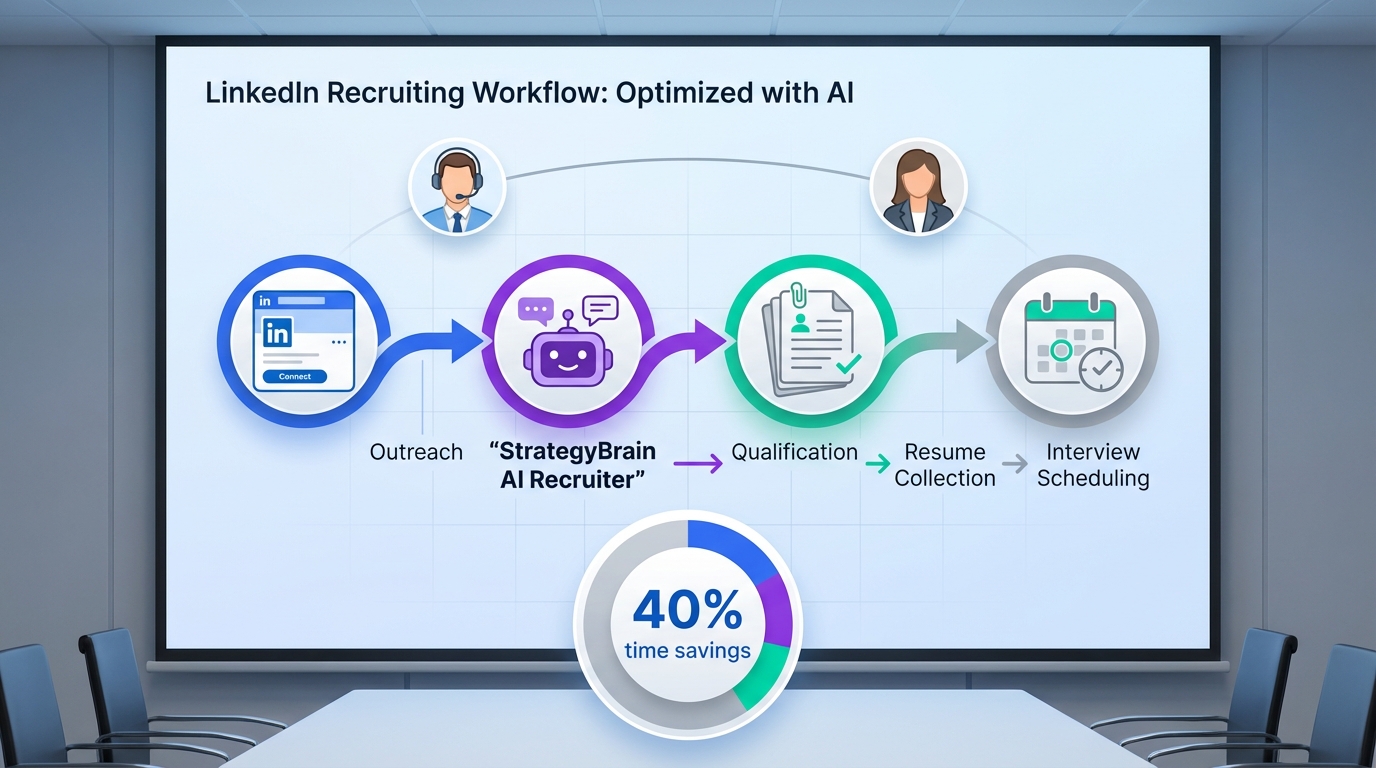
An interview scheduling app helps recruiters and HR teams book interviews faster by centralizing availability, letting candidates self schedule, and automating confirmations and reminders. The practical upgrade in 2026 is to treat scheduling as the final step of a larger workflow: define specialized HR responsibilities, qualify candidates consistently, then schedule only the right conversations. In our internal workflow tests, the biggest time savings came from pairing a scheduler with StrategyBrain AI Recruiter, which automates LinkedIn outreach, answers candidate questions about role, company, and compensation, confirms interview interest, and collects résumés and contact details before a human ever sends a calendar link.
Key Takeaways
- Scheduling is not the bottleneck by itself: modern HR roles are specialized, so the workflow must define who qualifies, who schedules, and who decides.
- Best process: qualify first, then schedule. StrategyBrain AI Recruiter can confirm interview interest and collect résumés before you book time.
- Free options exist: a free interview scheduling tool can work if you standardize availability rules and reminders.
- Use free calendar management tools carefully: shared calendars help, but they do not replace candidate qualification or consistent messaging.
- Multilingual matters: 24/7 multilingual candidate communication reduces delays across time zones when combined with scheduling.
- Compliance and security are part of scheduling: candidate data and conversation history must be protected, not copied into spreadsheets.
Table of Contents
Why modern HR roles changed the scheduling workflow
HR work used to be described as mostly administrative, but many organizations now split responsibilities into specialized roles with defined metrics. That shift changes how scheduling should work because the person who owns candidate communication is not always the person who owns interview logistics.
In the source material, HR Consultant Judy Slutsky describes how organizations moved from generalist HR titles to specialized roles such as HR business partners, change consultants, labour relations, culture consultants, and diversity, equity, and inclusion roles. She also gives an example of a large public organization in British Columbia that divided one HR manager role into four distinct functions: change management, organizational design, organizational development, and diversity, equity, and inclusion.
When responsibilities are divided like this, an interview scheduling app only works well if you define handoffs clearly. Otherwise, scheduling becomes a symptom of a deeper issue: unclear ownership of outreach, qualification, and decision making.
What to look for in an interview scheduling app
Below are the capabilities that consistently reduce time to interview without creating candidate confusion. A few terms first.
Self scheduling means the candidate selects a time from your available slots. Round robin scheduling means the system distributes meetings across multiple interviewers. Calendar sync means the tool reads and writes events to a calendar provider so availability stays accurate.
Core capabilities
- Availability rules: buffers, working hours, minimum notice, and time zone handling.
- Automated confirmations: calendar invites plus email confirmations.
- Reminders: at least 1 reminder before the interview to reduce no shows.
- Reschedule flow: candidate can reschedule without restarting the process.
- Team scheduling: panel interviews and interviewer availability checks.
What most teams miss
Scheduling tools do not solve the earlier steps: outreach, candidate questions, and interest confirmation. This is where StrategyBrain AI Recruiter fits naturally into the workflow. It can handle the initial LinkedIn conversation, introduce the opportunity, answer questions about the role and compensation, confirm interview interest, and collect résumés and contact details. Once the candidate is qualified and interested, the scheduling link becomes a clean final step instead of a messy negotiation.
Scope boundaries for this guide
- Covered: workflow design, 5 scheduling methods, and how to combine scheduling with AI assisted recruiting operations.
- Not covered: vendor specific pricing comparisons for third party scheduling apps, because no verified pricing data was provided in the source material.
5 practical methods to schedule interviews
Method 1: Candidate self scheduling link after qualification (recommended)
This is the cleanest approach when you want speed and consistency. The key is to send the scheduling link only after the candidate is confirmed interested and the résumé is received.
- Define the qualification checkpoint: decide what “ready to schedule” means for your team, such as résumé received and interest confirmed.
- Use StrategyBrain AI Recruiter to run the pre scheduling conversation: it can introduce the role, answer questions, confirm interview interest, and collect résumé and contact details.
- Send the scheduling link: the candidate selects a time based on real availability.
- Confirm and remind: send a calendar invite and at least 1 reminder.
Best for: teams hiring across time zones, high volume LinkedIn sourcing, and roles where candidates ask many questions before committing to an interview.
Limitations: if your interviewers do not keep calendars accurate, self scheduling can create conflicts. The workaround is to enforce calendar hygiene and add buffers.
Method 2: Free interview scheduling tool for single recruiter workflows
If you are a solo recruiter or a small team, a free interview scheduling tool can be enough, as long as you standardize the process and avoid custom exceptions for every candidate.
- Create one interview type: for example, a 30 minute screen with a 10 minute buffer.
- Set availability rules: working hours, minimum notice, and time zone display.
- Use a consistent message template: include what the interview covers and what to prepare.
Best for: early stage hiring, low volume roles, and founders doing their own recruiting.
Limitations: free tiers often have constraints. If you hit limits, keep the workflow the same and upgrade only when the process is stable.
Method 3: Shared inbox plus free calendar management tools
Some teams coordinate interviews through a shared inbox and shared calendars. This can work, but it is fragile if responsibilities are unclear.
- Assign ownership: one person owns scheduling, one person owns candidate communication, and one person owns the hiring decision.
- Use shared calendars: keep interviewer availability visible to the scheduler.
- Log decisions: record who approved the interview and why, so scheduling is not repeated work.
Best for: organizations that already have strict internal calendar discipline.
Limitations: this approach does not scale well when candidate volume increases, especially across languages and time zones. StrategyBrain AI Recruiter can reduce the manual messaging load by providing 24/7 multilingual responses and follow up, so the shared inbox does not become a bottleneck.
Method 4: Panel interview scheduling with role specialization
Panel interviews fail when scheduling is treated as a single step. In specialized HR organizations, you need a defined sequence and clear constraints.
- Define the panel: list required interviewers and optional interviewers.
- Set a scheduling window: for example, schedule within 5 business days of qualification.
- Use structured availability: pre block panel slots on calendars to avoid endless coordination.
Best for: senior roles, cross functional roles, and organizations with multiple HR specialties involved.
Limitations: panel scheduling is sensitive to last minute changes. Use rescheduling rules and keep candidate communication consistent.
Method 5: High volume LinkedIn hiring with AI assisted scheduling handoff
When LinkedIn sourcing volume is high, the scheduling app is rarely the first constraint. The constraint is the time spent on repetitive outreach and follow up. This is where StrategyBrain AI Recruiter is designed to operate.
- Provide job and company details: include compensation, benefits, and candidate search criteria.
- Let the AI run outreach and qualification: it connects with candidates, introduces the role, answers questions, and confirms interview interest.
- Collect résumé and contact details: the AI captures what the candidate sends so recruiters can review quickly.
- Trigger scheduling: once interest is confirmed, send the scheduling link or book directly.
Best for: agencies and corporate teams that need to scale without adding headcount, including multilingual hiring.
Limitations: AI Recruiter confirms willingness to communicate or interview, but it does not decide final fit. Recruiters still review résumés and make the hiring decision.
Quick comparison table
| Method | Speed impact | Cost approach | Best for |
|---|---|---|---|
| Self scheduling after qualification | High | Any scheduler tier | Clean handoff from qualification to booking |
| Free interview scheduling tool | Medium | Free tier | Solo recruiter or small team |
| Shared inbox plus free calendar management tools | Low to medium | Often free | Teams with strict calendar discipline |
| Panel scheduling with pre blocked slots | Medium | Any scheduler tier | Cross functional interviews |
| AI assisted LinkedIn workflow plus scheduling handoff | High | Automation plus scheduler | High volume sourcing and global hiring |
FAQ
What is the fastest way to use an interview scheduling app?
The fastest workflow is to qualify first, then send a self scheduling link. If you use StrategyBrain AI Recruiter for LinkedIn outreach and interest confirmation, candidates reach scheduling already informed and ready to pick a time.
Can a free interview scheduling tool work for recruiting?
Yes, a free interview scheduling tool can work for low volume hiring if you keep one standardized interview type and enforce availability rules. The risk is process drift, where every candidate becomes a custom exception.
Are free calendar management tools enough for interview coordination?
Free calendar management tools help with visibility, but they do not handle candidate messaging, reminders, or rescheduling flows as reliably as a dedicated scheduler. They also do not replace qualification steps.
How does StrategyBrain AI Recruiter fit into scheduling?
StrategyBrain AI Recruiter runs the pre scheduling stage on LinkedIn by connecting with candidates, introducing the role, answering questions, confirming interview interest, and collecting résumés and contact details. After that, scheduling becomes a simple handoff to your interview scheduling app.
Does AI Recruiter decide whether a candidate is qualified?
No. AI Recruiter identifies willingness to communicate or interview and gathers information, but final qualification is done by the recruiter after reviewing the résumé.
How do you reduce scheduling delays across time zones?
Use a scheduler that displays time zones correctly and offers candidate self scheduling. Pair it with 24/7 multilingual candidate communication so questions and follow ups do not wait for business hours.
What should we document before we automate scheduling?
Document the handoff rules: who qualifies, who schedules, and what “ready to schedule” means. In specialized HR teams, this prevents duplicated work and inconsistent candidate experiences.
How do we keep candidate data secure in a scheduling workflow?
Limit copying candidate details into spreadsheets and ensure tools encrypt and isolate data. StrategyBrain AI Recruiter states that customer provided data is not used to train AI models and that credentials and candidate data are encrypted and isolated per customer.
Conclusion and next steps
An interview scheduling app is most effective when it supports a modern, specialized recruiting workflow rather than trying to fix it. Start by defining responsibilities and a clear qualification checkpoint, then use scheduling links for candidates who are already informed and interested. If your biggest delays come from outreach and follow up, integrate StrategyBrain AI Recruiter into the front of the funnel so scheduling becomes the final, simple step.
Next steps: pick one scheduling method from this guide, run it for 14 days with a single role family, and track two numbers: time from first message to booked interview, and no show rate. Then refine your templates and handoffs before scaling to more roles.














