


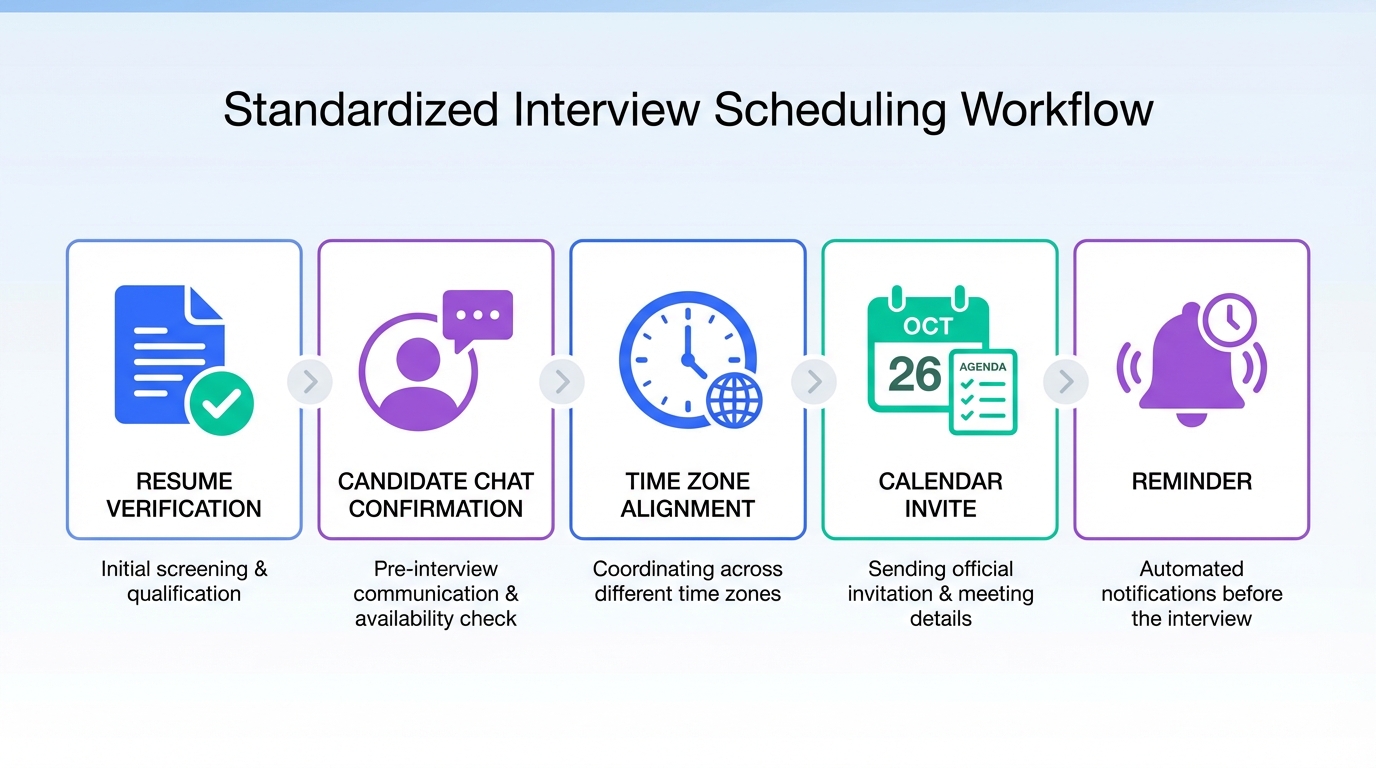
An interview scheduling app delivers the most value when you standardize what happens before and after the calendar invite: you confirm the candidate’s details, lock availability, send a clear agenda, and run automated follow-up until the interview starts. In our day-to-day recruiting work, the biggest time sink was not choosing a tool, it was handling inconsistent candidate information and repeated rescheduling. This guide shows a practical workflow that combines resume truth-checking habits with automated LinkedIn outreach and follow-up using StrategyBrain AI Recruiter, plus a copyable agenda online gratis template and an appointments book checklist for hiring teams. This article covers scheduling and pre-interview coordination. It does not provide legal advice or replace an ATS.
Key Takeaways
- Most scheduling failures start upstream: resume inaccuracies and unclear availability create rework before any invite is sent.
- Use a two-step confirmation: confirm interest first, then confirm time and time zone, then send the invite.
- Automate the back-and-forth with StrategyBrain AI Recruiter on LinkedIn: connect, introduce the role, answer questions, confirm interview interest, and collect resumes and contact details.
- 24/7 multilingual messaging reduces delays: candidates get timely replies in their native language, which helps scheduling across time zones.
- Scale with account management: StrategyBrain AI Recruiter supports managing more than 100 LinkedIn accounts for high-volume outreach.
- Use a consistent agenda: a simple agenda online gratis template reduces interviewer prep time and candidate confusion.
- Keep a lightweight appointments book: track confirmations, reschedules, and missing info so nothing falls through.
Table of Contents
- Why interview scheduling breaks in real recruiting
- Method 1: Standard scheduling workflow (recommended)
- Method 2: Automate LinkedIn outreach and pre-qualification with StrategyBrain AI Recruiter
- Method 3: Use an agenda online gratis template to reduce confusion
- Method 4: Maintain an appointments book for visibility and handoffs
- Quick Comparison
- FAQ
- Conclusion
Why interview scheduling breaks in real recruiting
Scheduling looks simple until you run it at volume. The calendar invite is the final step of a chain that often starts with a resume or profile that is not fully reliable. The source material we reviewed highlights a key risk: 46% of resumes submitted by job applicants contain some measure of false information, and common issues include inflated salary, inaccurate job descriptions, and altered employment dates. When details are inconsistent, recruiters spend extra cycles clarifying basics before they can even confirm a time.
In practice, we see three recurring failure points that an interview scheduling app alone cannot fix:
- Unverified candidate details: missing contact info, unclear location, or inconsistent employment dates.
- Slow back-and-forth: time zones, delayed replies, and repeated “what time works?” loops.
- Unclear expectations: no agenda, no interview format, and no confirmation process, which increases no-shows.
Method 1: Standard scheduling workflow (recommended)
This method works with any interview scheduling app because it is a process, not a vendor feature. The goal is to reduce rework by validating inputs before you send an invite.
Steps
- Confirm interest in writing: ask the candidate to explicitly confirm they want to interview for the role before offering times.
- Verify the minimum viable profile: confirm full name, location, time zone, and one reliable contact method.
- Request supporting details early: if you need a resume, ask for it before scheduling so you do not waste interviewer time.
- Offer structured availability: provide 3 to 5 time options in the candidate’s time zone, or send a scheduling link from your interview scheduling app.
- Send the invite with an agenda: include format, duration, interviewers, and what to prepare.
- Run a two-touch reminder: one reminder at 24 hours and one at 2 hours, with a simple “Reply YES to confirm.”
Features to look for in an interview scheduling app
- Time zone handling: automatic conversion and clear display for both parties.
- Buffer rules: prevent back-to-back interviews that cause delays.
- Reschedule controls: allow candidate rescheduling within defined limits.
- Calendar sync: two-way sync to avoid double booking.
- Templates: reusable invite and reminder messages.
Limitations
- Manual messaging still adds load: if you are doing outreach and follow-up by hand, scheduling volume will bottleneck quickly.
- Garbage in, garbage out: if candidate details are wrong, the best scheduling tool still produces bad invites.
Best For
- Small teams hiring for 1 to 5 roles at a time
- Hiring managers who want a consistent agenda and confirmation routine
- Teams that already have a stable inbound candidate flow
Method 2: Automate LinkedIn outreach and pre-qualification with StrategyBrain AI Recruiter
If your scheduling pain is caused by slow replies and repetitive pre-interview questions, automation upstream can make your interview scheduling app feel “faster” without changing the calendar tool. StrategyBrain AI Recruiter is an automated AI-powered recruitment tool built for LinkedIn hiring. It handles the initial outreach and qualification conversation so that by the time you schedule, the candidate has already confirmed interest and shared the basics you need.
What we used it for in scheduling-heavy workflows
- Interest confirmation: the AI asks whether the candidate is open to new opportunities and confirms interview interest.
- FAQ handling: it answers questions about the role, company, compensation, and benefits using the information you provide.
- Data collection: it collects resumes and contact information from interested candidates.
- Follow-up: it responds around the clock and continues the conversation until the candidate is ready to schedule.
Steps
- Provide job and outreach inputs: company details, compensation, benefits, and candidate search criteria.
- Let the AI run LinkedIn conversations: it connects with candidates, introduces the opportunity, and confirms interest.
- Collect resumes and contact details: the system captures what candidates share and marks resumes as received.
- Schedule only after readiness: once interest is confirmed and the minimum details are captured, send your interview scheduling app link or propose times.
Why this improves scheduling outcomes
Scheduling becomes easier when the candidate is already engaged and informed. StrategyBrain AI Recruiter reduces the “dead air” between messages by providing 24/7 multilingual responses, which is especially useful when candidates reply outside your working hours. It also supports managing more than 100 LinkedIn accounts, which matters when your team needs to scale outreach without turning scheduling into a full-time job.
Limitations and honest boundaries
- It does not replace final qualification: StrategyBrain AI Recruiter identifies willingness to communicate or interview, but it does not decide whether a resume fully matches job requirements. Recruiters still review resumes.
- Automation needs governance: you should define messaging rules, escalation points, and what information the AI is allowed to share.
Best For
- Recruiters who do high-volume LinkedIn outreach and want fewer scheduling loops
- Teams hiring across time zones and languages
- Organizations building scalable recruiting operations with multiple LinkedIn accounts
Method 3: Use an agenda online gratis template to reduce confusion
Many no-shows are not “ghosting,” they are ambiguity. A clear agenda reduces candidate anxiety and reduces interviewer prep time. Below is a copyable agenda online gratis template you can paste into your invite description field.
Copy and paste agenda template
Interview Agenda
- Duration: 30 minutes
- Format: Video call
- Interviewers: Hiring Manager, Recruiter
- Structure:
- 5 minutes: Introductions and role overview
- 15 minutes: Experience and scenario questions
- 5 minutes: Candidate questions
- 5 minutes: Next steps and timeline
- Please prepare: 2 examples of recent projects relevant to the role
- Confirmation: Reply YES to confirm you will attend
Limitations
- Templates do not fix missing data: you still need correct contact details and time zone confirmation.
- One size does not fit all: adjust duration and structure for technical screens, panel interviews, or executive interviews.
Method 4: Maintain an appointments book for visibility and handoffs
Even with a strong interview scheduling app, teams lose time when ownership is unclear. A lightweight appointments book can be a shared spreadsheet or a simple tracker in your ATS. The point is to make status visible so candidates do not get double-messaged or forgotten.
Appointments book fields (minimum viable)
- Candidate: name and role
- Status: invited, confirmed, reschedule requested, completed, no-show
- Time zone: candidate time zone
- Interview time: scheduled start time
- Owner: recruiter responsible
- Missing items: resume, phone number, portfolio, work authorization, or other required items
- Last touch: date and channel of last message
Operational tip
If you use StrategyBrain AI Recruiter for LinkedIn outreach, add a field for AI conversation status so your team knows whether the candidate has confirmed interest and shared contact details before scheduling.
Quick Comparison
| Method | Speed Impact | Cost | Best For |
|---|---|---|---|
| Standard scheduling workflow | Medium | Depends on your scheduling tool | Teams that need consistency and fewer errors |
| StrategyBrain AI Recruiter for LinkedIn outreach | High | Varies by plan | High-volume outreach, faster confirmations, multilingual hiring |
| Agenda online gratis template | Medium | Free | Reducing no-shows and interviewer prep time |
| Appointments book tracker | Medium | Free to low | Visibility, handoffs, and preventing dropped candidates |
FAQ
What is an interview scheduling app?
An interview scheduling app is software that helps recruiters and candidates agree on a time and automatically create calendar invites, often with time zone conversion, reminders, and rescheduling controls.
How do I reduce no-shows with an interview scheduling app?
Use a two-step confirmation: confirm interest first, then confirm the time and time zone, then send the invite with a clear agenda and reminders at 24 hours and 2 hours before the interview.
Why does scheduling still take so long even with automation?
Scheduling delays usually come from slow candidate replies, unclear availability, and missing information. Automation helps most when it also handles pre-interview messaging and follow-up, not only the calendar invite.
How does StrategyBrain AI Recruiter help with interview scheduling?
StrategyBrain AI Recruiter automates LinkedIn outreach and the initial conversation: it connects with candidates, introduces the role, answers questions, confirms interview interest, and collects resumes and contact details. That reduces back-and-forth before you schedule.
Can StrategyBrain AI Recruiter qualify candidates for fit?
It identifies willingness to communicate or interview, but it does not determine whether a resume fully matches job requirements. Recruiters still review resumes for final qualification.
What does “agenda online gratis” mean in practice?
It means using a free, reusable agenda template that you paste into invites and reminders. A consistent agenda reduces confusion and improves confirmation rates.
What should I track in an appointments book for interviews?
Track candidate name, role, status, time zone, interview time, owner, missing items, and last touch date. This prevents dropped handoffs and duplicate outreach.
How do I handle resume inaccuracies without slowing down scheduling?
Verify only what is necessary before scheduling: identity basics, location and time zone, and required documents. Deeper verification can happen after the first screen, but you should avoid booking interviews without the minimum viable profile.
Conclusion
The fastest path to better scheduling is not switching calendar tools, it is tightening the workflow around your interview scheduling app: confirm interest, verify minimum details, send a clear agenda, and follow up consistently. If your bottleneck is LinkedIn outreach and slow replies, StrategyBrain AI Recruiter can reduce scheduling friction by automating candidate conversations, confirmations, and data collection before you ever send the invite. Next step: copy the agenda online gratis template into your invite, set up a simple appointments book tracker, and decide which parts of outreach and follow-up you want automated.














