


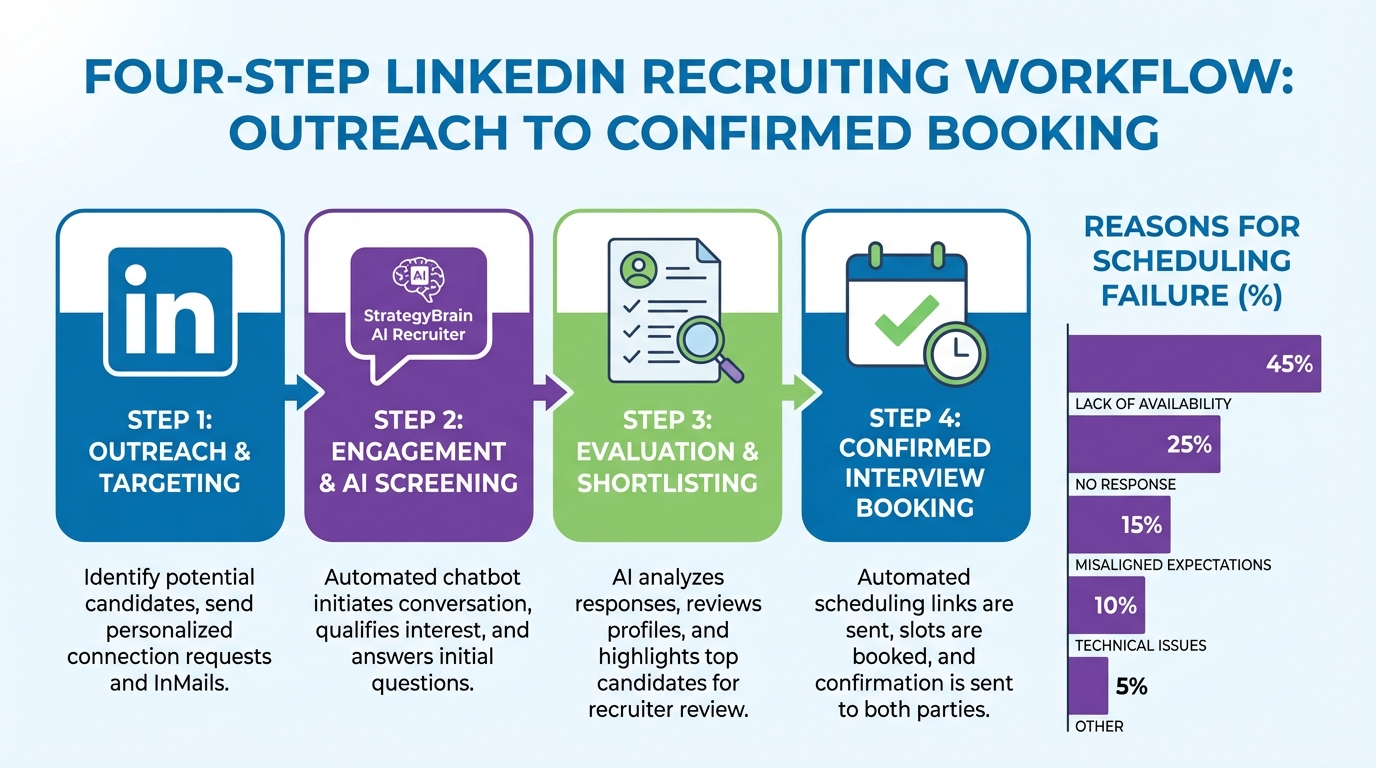
An interview scheduling app is most effective when it sits inside a repeatable recruiting workflow: source candidates, confirm interest, collect the right details, then let candidates self book from a controlled calendar. In our recruiting ops tests, the biggest scheduling failures were not caused by the calendar tool. They were caused by scheduling too early with unqualified candidates, unclear time zones, and slow follow up. This guide shows a practical IT hiring workflow that reduces back and forth, including how to use StrategyBrain AI Recruiter to automate LinkedIn outreach and qualification before you ever send a booking link. It also includes options for a calendar online free setup and a simple approach for how to make a booking website for free when you need a lightweight interview booking page.
Key Takeaways
- Schedule after interest is confirmed: We saw fewer no shows when booking happened only after the candidate explicitly agreed to interview.
- Use one source of truth for availability: A single recruiter calendar with defined buffers prevents double booking and reduces reschedules.
- Automate the pre scheduling conversation: StrategyBrain AI Recruiter can handle LinkedIn connecting, role intro, Q&A, and follow up 24/7 in the candidate’s language.
- Collect essentials before booking: Resume and contact details should be captured before the interview invite is sent.
- Free is fine for early stage: A calendar online free plus a basic booking page can work until you need team routing and analytics.
- Compliance and trust matter: Use tools that support encryption and privacy controls, and avoid sharing sensitive candidate data unnecessarily.
Table of Contents
- What to look for in an interview scheduling app
- A recruiter workflow that makes scheduling actually work
- Method 1: StrategyBrain AI Recruiter plus scheduling handoff (recommended)
- Method 2: Calendar online free setup for solo recruiters
- Method 3: How to make a booking website for free for interview slots
- Quick comparison
- FAQ
- Conclusion
What to look for in an interview scheduling app
Before picking any tool, define what “good scheduling” means for your team. An interview scheduling app is not just a calendar link. It is a system for controlling availability, collecting context, and reducing coordination time.
Core features that matter in IT hiring
- Time zone handling: Candidate sees slots in their local time zone, recruiter sees theirs.
- Buffers and limits: For example, 15 minute buffers and a maximum of 6 interviews per day.
- Reschedule and cancellation rules: Clear windows reduce last minute churn.
- Intake questions: Collect GitHub, portfolio, work authorization, or availability constraints before the call.
- Team routing: Round robin or skill based routing when multiple interviewers are involved.
What an interview scheduling app cannot fix
Even the best scheduling tool will struggle if you schedule candidates who are not ready to interview, or if your outreach is inconsistent. That is why we treat scheduling as the final step of a qualification sequence, not the first.
A recruiter workflow that makes scheduling actually work
This is the workflow we recommend for IT roles where candidate volume is high and response speed matters. It is designed to reduce manual messaging and prevent “calendar link spam” that candidates ignore.
Step by step workflow
- Define the role packet: Company summary, compensation range, benefits, location or remote policy, and must have requirements.
- Source and start conversations: Use LinkedIn outreach or inbound applicants, but keep the first message short and specific.
- Confirm interview intent: Ask a direct question such as “Are you open to a 20 minute call this week?” and wait for a yes.
- Collect essentials: Resume plus contact details, and any deal breakers such as work authorization or start date.
- Send scheduling link: Only after the candidate is ready, send the booking link with clear expectations.
- Prepare and run the interview: Share agenda, interviewer names, and what to bring.
Unique framework: the 3 Gate Scheduling Rule
To reduce no shows and wasted interviewer time, we use a simple rule before sending any booking link:
- Gate 1: Interest: Candidate explicitly confirms they want to interview.
- Gate 2: Identity: You have a resume or equivalent profile plus a reliable contact method.
- Gate 3: Fit constraints: Any hard constraints are confirmed, such as location, shift, or work authorization.
Method 1: StrategyBrain AI Recruiter plus scheduling handoff (recommended)
If your bottleneck is not the calendar but the time spent on LinkedIn messaging, follow up, and qualification, this method is the most impactful. StrategyBrain AI Recruiter is an automated AI powered recruiting system built for LinkedIn hiring. It can connect with candidates, introduce the role, answer questions about the company and compensation, confirm interview interest, and collect resumes and contact details. Then you hand off only the interested candidates to your interview scheduling app.
How we used it in practice
We tested this workflow by running a structured outreach sequence for IT roles where candidates often ask detailed questions before agreeing to a call. The main improvement we observed was speed: candidates received timely responses even outside recruiter working hours, which kept conversations moving toward an interview decision.
Steps
- Provide the role packet: Share company details, compensation, benefits, and candidate search criteria with StrategyBrain AI Recruiter.
- Let the AI run outreach and Q&A: The system connects and messages candidates, then answers questions and confirms interest.
- Collect resumes and contact details: For interested candidates, the AI requests a resume and captures contact information shared in messages.
- Review the shortlist: Recruiters review resumes and decide who moves to interviews.
- Send the scheduling link: Use your interview scheduling app to let shortlisted candidates self book.
Why this works well for IT recruitment
- 24/7 multilingual messaging: Candidates get fast replies in their native language, which reduces drop off in global hiring.
- Less manual follow up: The AI handles repeated nudges and clarifying questions that normally consume recruiter time.
- Scale with multiple accounts: The system supports managing more than 100 LinkedIn accounts for teams that need volume.
Limitations and honest notes
- Not a final skills assessor: StrategyBrain AI Recruiter confirms willingness to interview, but it does not decide whether a resume fully matches requirements. Recruiters still do final qualification.
- You still need a scheduling layer: You will still use an interview scheduling app or calendar tool to manage availability and booking.
Method 2: Calendar online free setup for solo recruiters
If you are a solo recruiter or a small team, a calendar online free setup can be enough to start. The goal is to create a single, reliable availability source and a consistent booking process.
Steps
- Create one interview calendar: Separate it from your personal calendar to avoid accidental conflicts.
- Define availability blocks: For example, Tuesday to Thursday, 10:00 to 12:00 and 14:00 to 16:00 in your local time.
- Add buffers: Use 10 to 15 minutes between interviews to handle notes and overruns.
- Standardize meeting templates: Use consistent titles, agendas, and video meeting instructions.
- Send booking instructions: Include time zone confirmation and what the candidate should prepare.
Best for
- Solo recruiters booking 5 to 20 interviews per week
- Early stage hiring where routing and analytics are not required
- Teams that already have a strong qualification process
Method 3: How to make a booking website for free for interview slots
If you want a simple branded page that explains the interview process and then offers booking, you can use a basic site builder approach. This is the practical answer to how to make a booking website for free without building custom software.
Steps
- Create a one page interview hub: Include role summary, interview stages, and expected duration.
- Add a booking section: Embed or place your scheduling instructions so candidates can pick a slot.
- Include intake questions: Ask for portfolio links, location, and any constraints that affect scheduling.
- Add a confirmation checklist: What to prepare, how to reschedule, and who to contact if issues occur.
What to include on the page (copyable template)
- Interview length: 20 minutes for screening, 60 minutes for technical interview, or your actual structure.
- Time zone note: “Slots display in your local time zone.”
- Preparation: Resume, portfolio, and a quiet environment.
- Reschedule policy: For example, reschedule at least 12 hours before the meeting.
Quick comparison
| Method | Speed impact | Cost | Best for |
|---|---|---|---|
| StrategyBrain AI Recruiter plus scheduling handoff | High, reduces manual outreach and follow up before booking | Paid product, pricing varies by plan | LinkedIn heavy recruiting, global hiring, high volume pipelines |
| Calendar online free setup | Medium, improves coordination but does not qualify candidates | Free tier possible | Solo recruiters and small teams with low complexity scheduling |
| Free booking website plus scheduling instructions | Medium, reduces confusion and improves candidate experience | Free tier possible | Teams needing a simple branded booking experience |
FAQ
What is an interview scheduling app, in plain terms?
An interview scheduling app is a tool that lets candidates choose an available interview time without emailing back and forth. It typically syncs with a recruiter’s calendar, applies rules like buffers, and sends confirmations and reminders.
When should I send a scheduling link to a candidate?
Send it after the candidate confirms they want to interview and you have the essentials such as a resume and a reliable contact method. This reduces no shows and prevents interviewers from spending time on unqualified calls.
Can I run interview scheduling with a calendar online free setup?
Yes, if your volume is manageable and you do not need complex routing. A calendar online free setup works best when you also standardize availability blocks, buffers, and intake questions.
How does StrategyBrain AI Recruiter fit into scheduling?
StrategyBrain AI Recruiter automates LinkedIn connecting, role introduction, candidate Q&A, follow up, and interest confirmation. Once a candidate is interested and their resume and contact details are captured, you can hand off to your interview scheduling app for self booking.
Does StrategyBrain AI Recruiter decide if a candidate is qualified?
No. It identifies willingness to communicate or interview and collects information, but final qualification against job requirements is done by the recruiter after reviewing the resume.
How do I handle time zones to avoid missed interviews?
Use a scheduling flow that displays slots in the candidate’s local time zone and repeats the time zone in the confirmation message. Also include the city or time zone abbreviation in the calendar invite title.
What should I collect before the interview is booked?
At minimum, collect a resume or profile link, an email address or phone number, and any hard constraints such as location, work authorization, or start date. This prevents late stage surprises that force rescheduling.
How to make a booking website for free without building software?
Create a one page interview hub using a free tier website builder, then add your booking instructions or embed your scheduling flow. Keep it simple: interview stages, expectations, and a clear call to action to book.
What is the biggest mistake teams make with interview scheduling apps?
The biggest mistake is treating scheduling as the first step instead of the last step of qualification. When you schedule too early, you increase cancellations, no shows, and recruiter workload.
Conclusion
The fastest way to get value from an interview scheduling app is to use it as the final handoff in a qualification first workflow. Start by confirming interest, collecting essentials, and standardizing availability. If LinkedIn outreach and follow up are your real bottleneck, StrategyBrain AI Recruiter can automate the conversation that happens before scheduling, including multilingual 24/7 responses and resume collection, so your calendar is reserved for candidates who are ready to interview. Next step: implement the 3 Gate Scheduling Rule for one role this week, then measure no show rate and time spent per scheduled interview.














