


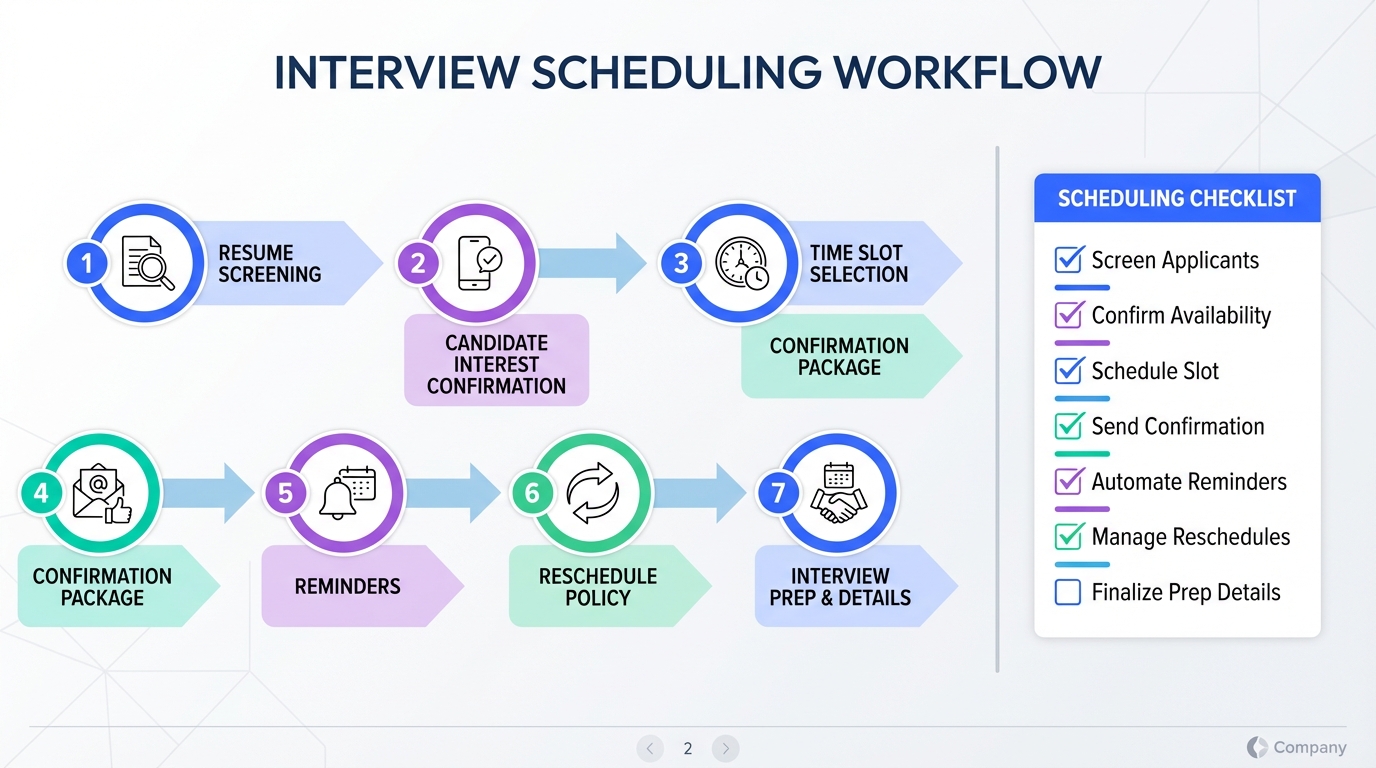
An interview scheduling app saves the most time when you treat scheduling as the final step of a repeatable hiring flow, not the first. In our experience, the fastest path is to standardize resume screening signals, pre qualify candidate interest, and collect contact details before you offer time slots. That reduces reschedules and eliminates long message threads. This article covers a 7 step workflow you can implement today, plus a copyable checklist and a quick comparison of scheduling approaches. Scope note: we focus on process and decision points, not a brand by brand tool review, and we do not include any external links.
What to look for in an interview scheduling app
Before you choose the best schedule app free option or a paid platform, define what “good” means for your hiring team. An interview scheduling app is scheduling software designed to coordinate interview times across candidates and interviewers, typically with availability rules, confirmations, and reminders.
Minimum requirements for recruiting
- Time zone handling so candidates see local time and interviewers see their own time.
- Buffer rules such as 10 minute gaps between interviews and no meetings after a cutoff time.
- Round robin assignment for multi interviewer teams, or at least a clear ownership model.
- Reschedule and cancellation controls with a defined window such as 12 hours notice.
- Automated confirmations and reminders to reduce no shows.
Nice to have if you hire at volume
- Pre screen questions that collect role critical details before booking.
- Calendar conflict detection across multiple calendars per interviewer.
- Interview kit support such as structured scorecards and consistent interview agendas.
When “best scheduling software for service business” is not enough
Service business scheduling tools are optimized for appointments with customers. Recruiting scheduling has extra constraints: multiple interviewers, candidate privacy, and a need to qualify interest before you spend interviewer time. If your bottleneck is candidate outreach and follow up, you may need automation earlier in the funnel, not only a calendar tool.
A 7 step interview scheduling workflow
This workflow is designed to reduce back and forth messages and prevent late stage surprises. We use it as a checklist in weekly hiring operations.
Step 1: Define the “schedule ready” criteria
- Write down the minimum requirements for the role, including must have skills and must have work authorization or location constraints.
- Decide what evidence counts, such as a portfolio, certification, or specific project outcomes.
- Set a single rule for when a candidate is allowed to schedule, such as “meets 3 of 4 must haves and confirms interest.”
Step 2: Standardize resume screening signals
Resume screening is where most scheduling waste begins. If you schedule too early, you create interviewer load and reschedules. If you screen too slowly, you lose candidates. Use a consistent rubric so different recruiters make similar decisions.
Step 3: Collect missing information before you send time slots
Before you offer availability, collect the details that commonly cause rescheduling: location, compensation expectations, notice period, and interview format constraints. This is also where you confirm the candidate’s preferred email and phone number for reminders.
Step 4: Confirm interest in an interview, not just interest in the job
Many candidates are open to hearing more but are not ready to commit to a time. Ask a direct question that requires a clear yes or no. If the answer is yes, you move to scheduling. If the answer is not yet, you set a follow up date.
Step 5: Offer structured time windows
Instead of asking “when are you free,” offer 2 or 3 time windows. This is where an interview scheduling app helps, because it can enforce buffers and prevent double booking. Keep the windows aligned to interviewer capacity, such as “Tuesday 10:00 to 12:00” and “Thursday 14:00 to 16:00.”
Step 6: Send a confirmation package
Once booked, send a single message that includes interview format, expected duration in minutes, who they will meet, and what to prepare. This reduces last minute confusion and improves show rates.
Step 7: Close the loop with reminders and a reschedule policy
Set reminders at consistent intervals, such as 24 hours and 2 hours before the interview. Also define a reschedule policy, such as “reschedule allowed up to 12 hours before start time.” The policy matters because it protects interviewer time and sets expectations.
Resume screening tips that reduce scheduling churn
The source material we reviewed emphasized five practical resume screening habits. We use the same principles because they reduce false positives, which directly reduces wasted interview scheduling.
1: Check for organization and clarity
A resume does not need a flashy design, but it should be readable and logically ordered. When the layout is confusing or roles are out of sequence, we treat it as a risk signal for communication and organization. That does not mean an automatic rejection, but it does mean we ask clarifying questions before scheduling.
2: Treat buzzwords as a prompt to verify evidence
Keyword heavy resumes can pass automated filters while hiding weak experience. We look for skills shown in context, such as what the candidate built, shipped, or improved. If the resume lists “leadership” or “strategy,” we look for a concrete example before we book time.
3: Reduce unqualified applicants by tightening the job post
When job postings are vague, you get more applications from people who are not a fit. Precision in duties, expectations, and required skills reduces the volume of resumes you have to screen and the number of interviews you have to reschedule later.
4: Prioritize accomplishments with numbers
We move faster when a resume includes measurable outcomes, such as revenue earned, costs reduced, time saved, or number of clients managed. Numbers are not everything, but they help you decide who is worth scheduling first.
5: Ask for a cover letter when the role needs communication skills
A customized cover letter can reveal motivation and clarity of thought. If communication is core to the role, we request it and use it as a pre scheduling signal. It is also a way to reduce interviews that end early due to misaligned expectations.
Where StrategyBrain AI Recruiter fits before scheduling
Many teams buy an interview scheduling app and still feel stuck because the real bottleneck is earlier: outreach, follow up, and collecting the information needed to schedule. This is where StrategyBrain AI Recruiter can reduce scheduling friction by handling the repetitive pre scheduling work on LinkedIn.
What we use it for in the scheduling pipeline
- Automated LinkedIn outreach and follow up that connects with candidates matching your search criteria and starts the initial conversation.
- Interest confirmation by asking whether the candidate is open to interviewing, not only open to learning more.
- Answering common role questions about the job, company, compensation, and benefits so candidates are informed before they schedule.
- Collecting resumes and contact details from interested candidates so scheduling can happen without extra back and forth.
- 24/7 multilingual messaging so candidates in different time zones can respond and get timely replies, which keeps scheduling momentum.
Operational limits and how we handle them
StrategyBrain AI Recruiter can confirm willingness to communicate or interview, but it does not decide final fit against your full requirements. We still review resumes ourselves before scheduling panel interviews. That division of labor keeps quality control with the hiring team while removing the repetitive messaging load.
Scaling note for high volume hiring
If you run multiple roles or geographies, StrategyBrain AI Recruiter supports managing more than 100 LinkedIn accounts to build an AI powered recruiting team. In practice, that means you can increase the number of candidates who reach “schedule ready” status without adding recruiter headcount, then use your interview scheduling app to book time efficiently.
Quick comparison of scheduling approaches
This table compares approaches rather than specific vendors, because pricing and feature details vary by product and change over time.
| Approach | Speed impact | Cost | Best for | Main limitation |
|---|---|---|---|---|
| Manual scheduling by email | Slow | $0 per month | Very low volume hiring | High back and forth and time zone errors |
| Interview scheduling app only | Medium to fast | Varies by vendor | Teams with clear inbound candidates | Does not solve outreach and pre qualification |
| Scheduling app plus pre screen workflow | Fast | Varies by vendor | Most recruiting teams | Requires discipline and consistent templates |
| StrategyBrain AI Recruiter plus scheduling app | Fastest for LinkedIn led pipelines | Varies by plan | Outbound LinkedIn hiring and global roles | Recruiters still review resumes for final fit |
Templates you can copy
Schedule ready checklist
- Candidate meets minimum requirements for the role.
- Candidate confirms interest in interviewing.
- Resume is received and readable.
- Contact details are confirmed for reminders.
- Time zone is confirmed.
- Compensation expectations are not a surprise.
- Interview format and duration are agreed.
Candidate message template for booking
Subject: Interview scheduling options
Message: Thanks for your interest. Are you available for a first interview this week? Please choose one of these windows in your local time: Option 1, Option 2, Option 3. The interview will be 30 minutes and will cover your background and the role details. If none work, reply with two windows that do.
Internal interviewer brief template
- Role and level
- Top 3 must have skills
- What to validate in the interview
- Red flags to watch for
- Decision deadline
FAQ
What is the fastest way to use an interview scheduling app without creating chaos?
The fastest approach is to define “schedule ready” criteria and only send booking options after you confirm interest and collect contact details. This prevents reschedules and reduces interviewer time waste.
Is a best schedule app free option enough for recruiting?
It can be enough for low volume hiring if it handles time zones, buffers, and confirmations. If your bottleneck is outreach and follow up, you will still need a process or automation before scheduling.
How is recruiting scheduling different from the best scheduling software for service business?
Recruiting often requires multiple interviewers, privacy controls, and pre qualification before booking. Service business scheduling is usually one provider to one customer and does not include candidate screening steps.
How do I reduce no shows after scheduling?
Send a clear confirmation package and set reminders at consistent intervals, such as 24 hours and 2 hours before the interview. Also publish a reschedule policy so expectations are clear.
Can StrategyBrain AI Recruiter replace my interview scheduling app?
No. StrategyBrain AI Recruiter focuses on LinkedIn outreach, candidate messaging, interest confirmation, and collecting resumes and contact details. You still use an interview scheduling app to book time on calendars.
Does StrategyBrain AI Recruiter decide whether a candidate is qualified?
It can identify willingness to communicate or interview, but it does not determine final fit against your full job requirements. Recruiters review resumes and make the final qualification decision.
How does StrategyBrain AI Recruiter handle multilingual candidates?
It supports 24/7 multilingual communication and can respond in the candidate’s native language. This helps keep scheduling momentum across time zones.
What data protection practices should I expect from recruiting automation?
At minimum, look for encrypted credential storage, isolated customer data, and a clear statement that customer data is not used to train AI models. You should also confirm alignment with applicable privacy regulations in your operating regions.
Conclusion and next steps
An interview scheduling app delivers the biggest time savings when you reduce uncertainty before you send time slots. Use a consistent resume screening rubric, confirm interview intent, and collect contact details first. If your scheduling delays start on LinkedIn, StrategyBrain AI Recruiter can remove much of the repetitive outreach and follow up work by automating candidate conversations, collecting resumes, and capturing contact information so your scheduling step becomes simple.
Next steps: copy the schedule ready checklist, implement the 7 step workflow for one role this week, and track two numbers for 14 days: interviews scheduled per recruiter per week and reschedule rate. Then decide whether you need only a scheduling tool upgrade or earlier funnel automation as well.















