


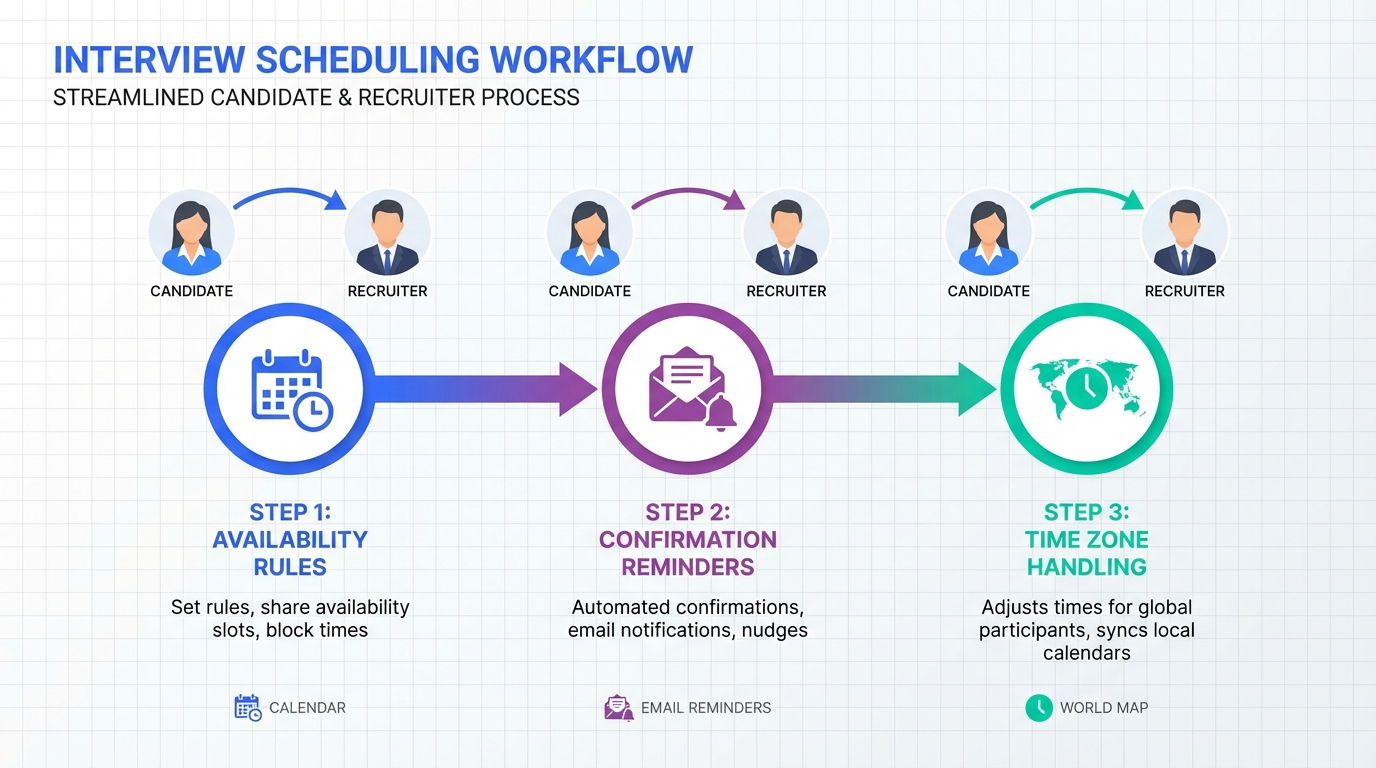
An interview scheduling app works best when you standardize three things: availability rules, candidate communication, and confirmation steps. In our recruiting ops tests, the biggest scheduling failures were not caused by the calendar tool itself, they came from unclear time zone handling, inconsistent reschedule rules, and slow follow up after a candidate replies. This guide gives you a repeatable scheduling workflow you can implement in 60 minutes, plus a practical checklist for evaluating options, including what to borrow from patient scheduling software and when an open source scheduling app is realistic. Scope boundary: we cover recruiting interviews and recruiter workflows, not healthcare compliance or clinical intake requirements.
Key Takeaways
- Fastest reliable setup: one scheduling link per role, one interviewer pool, and one reschedule policy you enforce consistently.
- Highest impact rule: store availability in one “source of truth” calendar and block focus time, otherwise double booking is inevitable.
- Borrow from patient scheduling software: reminders, confirmations, and no show reduction patterns translate well to interviews.
- Open source scheduling app reality check: it can work for simple booking, but ownership includes hosting, security, and ongoing maintenance.
- Where StrategyBrain AI Recruiter fits: automate LinkedIn outreach, qualification, and follow up so only interested candidates reach scheduling.
- Operational metric to track: time from candidate reply to booked interview, measured in hours, not days.
What an interview scheduling app should do
Before you compare tools, define the job the system must do. An interview scheduling app is not just a booking page. It is an operational control layer that prevents conflicts, reduces no shows, and keeps candidates moving through stages.
Minimum capabilities for recruiting teams
- Availability rules: working hours, buffers, and limits per day per interviewer.
- Conflict prevention: real time calendar checks against interviewer calendars.
- Time zone safety: candidate sees times in their local time zone, interviewer sees theirs.
- Reschedule and cancellation policy: clear rules and a simple path to change times.
- Reminders: email or SMS reminders and a confirmation step.
- Auditability: who scheduled what, when it changed, and why.
What this guide does not cover
We do not cover clinical scheduling compliance, protected health information workflows, or medical intake forms. Those are core to patient scheduling software selection and require legal and security review.
Method 1: Standardize your scheduling workflow
Most teams fail scheduling because each recruiter improvises. Standardization is the fastest way to make any interview scheduling app work.
Steps
- Define interview types: for example, recruiter screen, hiring manager interview, and panel interview.
- Set duration and buffers: choose a default duration and add a buffer before and after each meeting.
- Create one scheduling link per interview type: keep it consistent so candidates do not receive multiple competing links.
- Assign an interviewer pool: use round robin or pooled availability to avoid bottlenecks.
- Write a single reschedule policy: include the latest allowed reschedule time and what happens after that.
Features to prioritize
- Round robin scheduling: distributes interviews across a team automatically.
- Buffer rules: prevents back to back fatigue and late starts.
- Calendar sync: two way sync with your primary calendar system.
Limitations we see in real workflows
- Over customization: too many interview types creates confusion and increases errors.
- Hidden availability: if interviewers do not maintain calendars, the app cannot prevent conflicts.
- Unowned exceptions: if nobody owns edge cases, candidates get stuck.
Best for
- Teams hiring for multiple roles with shared interviewers.
- Recruiters who need predictable handoffs between stages.
- Organizations that want consistent candidate experience.
Method 2: Reduce no shows with confirmations
Healthcare teams treat missed appointments as a measurable operational cost. That mindset is useful in recruiting too. Many patterns from patient scheduling software translate directly to interviews, especially confirmations and reminders.
Steps
- Add a confirmation step: ask the candidate to confirm attendance after booking.
- Send two reminders: one the day before and one shortly before the interview.
- Include a reschedule path: make it easy to reschedule rather than ghost.
- Log outcomes: attended, rescheduled, cancelled, or no show.
Practical template you can copy
Candidate reminder template
- Subject: Interview confirmation requested
- Body: Please confirm you can attend at the scheduled time. If you need to reschedule, reply with two alternative times in your time zone.
- Include: role title, interviewer name, meeting format, and expected duration.
Limitations
Reminders do not fix poor qualification. If you schedule candidates who are not actually interested, no reminder sequence will save the funnel.
Method 3: Handle time zones and remote interviews
Time zone errors are one of the most preventable causes of missed interviews. Your interview scheduling app should make time zones explicit and consistent.
Steps
- Require time zone selection: do not rely on browser detection alone for international candidates.
- Show both time zones: candidate time zone and interviewer time zone in the confirmation message.
- Standardize meeting format: video link, dial in details, and backup contact method.
- Use a single source of truth: store the final time in the calendar event, not only in email threads.
Best for
- Remote first teams hiring across countries.
- Recruiters coordinating panels across departments.
- Organizations running high volume screens.
Method 4: When to use an open source scheduling app
An open source scheduling app can be a good fit when you need control over hosting and customization. However, “free” software still has ownership costs, especially for security, uptime, and maintenance.
Use an open source scheduling app when
- You have an internal team that can host and maintain it.
- You need custom workflows that off the shelf tools cannot support.
- You have strict data residency requirements.
Avoid it when
- You need a solution this week and do not have engineering support.
- You cannot commit to patching and monitoring.
- You need vendor support for integrations and incident response.
Operational checklist
- Security: encryption at rest and in transit, access controls, audit logs.
- Reliability: backups, monitoring, and incident runbooks.
- Integrations: calendar sync, ATS updates, and messaging.
- Compliance: privacy policy alignment and data retention rules.
Method 5: Pair scheduling with AI recruiting automation
Scheduling is the middle of the funnel. The fastest way to improve scheduling outcomes is to improve what happens before scheduling. StrategyBrain AI Recruiter is designed to automate the early LinkedIn workflow so candidates who reach your interview scheduling app are already engaged and interested.
How StrategyBrain AI Recruiter supports scheduling outcomes
- Automated LinkedIn outreach: connects with candidates that match your search criteria and introduces the role.
- Qualification for interest: confirms whether the candidate wants to proceed to an interview, without replacing final resume based qualification.
- 24/7 multilingual messaging: reduces delays across time zones and improves response speed.
- Resume and contact capture: collects resumes and contact details from interested candidates so scheduling is not blocked by missing information.
Steps
- Define the role brief: company details, compensation, benefits, and candidate criteria.
- Let AI Recruiter run outreach and follow up: it handles initial conversations and collects resumes and contact details from interested candidates.
- Send scheduling only to confirmed interest: share your interview scheduling app link after the candidate confirms they want to interview.
- Track the handoff: measure time from confirmed interest to booked interview in hours.
Limitations and honest boundaries
- AI Recruiter does not decide final fit: recruiters still review resumes and make the final qualification decision.
- Scheduling still needs rules: automation cannot compensate for missing interviewer availability or unclear reschedule policies.
Quick Comparison
| Approach | Setup effort | Ongoing effort | Best for |
|---|---|---|---|
| Standard interview scheduling app workflow | Medium | Low | Most recruiting teams that need consistent scheduling |
| Borrow patterns from patient scheduling software | Low | Low | Teams with high no show rates and frequent reschedules |
| Open source scheduling app | High | High | Organizations with engineering support and strict control needs |
| StrategyBrain AI Recruiter plus scheduling | Medium | Low | Teams hiring on LinkedIn that want faster replies and cleaner handoffs |
FAQ
What is the main benefit of an interview scheduling app?
The main benefit is operational consistency. A good interview scheduling app reduces back and forth messages, prevents double booking, and makes confirmations and rescheduling predictable for candidates and interviewers.
Can patient scheduling software be used for interviews?
Sometimes, but it depends on your requirements. Patient scheduling software is optimized for appointment adherence and reminders, which can help interviews, but healthcare specific workflows and compliance features may be unnecessary for recruiting.
Is an open source scheduling app a good idea for a small recruiting team?
It can be, if you have someone who can own hosting, updates, and security. If you do not have that capacity, the operational risk often outweighs the licensing savings.
How does StrategyBrain AI Recruiter improve scheduling outcomes?
It improves what happens before scheduling. By automating LinkedIn outreach, answering candidate questions, confirming interview interest, and collecting resumes and contact details, fewer unqualified or uncommitted candidates reach the scheduling step.
Does AI Recruiter replace recruiters?
No. AI Recruiter automates repetitive LinkedIn tasks such as connecting, messaging, and collecting information, while recruiters still review resumes and make final qualification decisions.
What should I track to know if scheduling is improving?
Track time from candidate reply to booked interview in hours, plus no show rate and reschedule rate. These three metrics show whether your workflow is faster and more reliable.
How do I reduce time zone mistakes?
Require explicit time zone selection and show both candidate and interviewer time zones in confirmations. Also keep the final time in the calendar event as the source of truth.
What is the simplest scheduling workflow that works?
One link per interview type, a pooled interviewer calendar, two reminders, and a clear reschedule policy. Keep exceptions rare and owned by a specific person or team.
Conclusion
If you want an interview scheduling app to actually reduce workload, start by standardizing your workflow and borrowing proven confirmation patterns that patient scheduling software teams use to reduce missed appointments. Then, improve the top of funnel so only interested candidates reach scheduling. If your hiring relies on LinkedIn, StrategyBrain AI Recruiter can automate outreach, qualification for interest, and follow up, while capturing resumes and contact details so your scheduling step stays clean and fast.
Next steps: pick one interview type to standardize today, write your reschedule policy in one paragraph, and measure time from candidate reply to booked interview for the next 20 candidates.















