


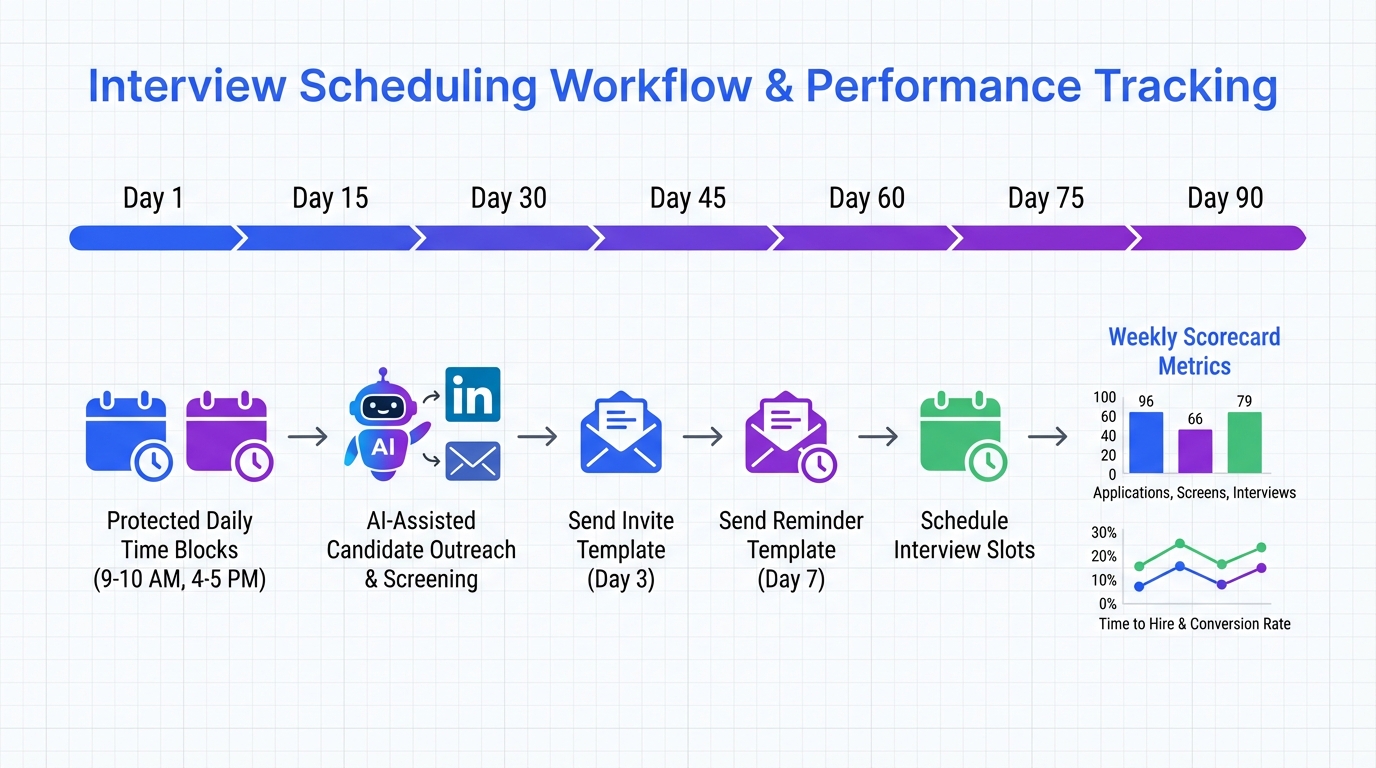
An interview scheduling app delivers the biggest time savings when you treat scheduling as a skill you deliberately improve for 90 days: choose one scheduling bottleneck to fix, protect 2 daily time blocks for outreach and calendar actions, and reuse a small set of templates for invites and follow ups. We have used this structure in real recruiting workflows to cut unnecessary back and forth and to keep candidate experience consistent across roles. This guide shows how to apply a personal development plan approach to interview coordination, where an online interview scheduler and even a free calendar site can work together. It also explains how StrategyBrain AI Recruiter can reduce the manual LinkedIn outreach and early qualification work so your scheduling starts with candidates who already confirmed interest.
Why a personal development plan works for scheduling
The source story behind this approach comes from recruiter leadership advice: keep development simple, pick one skill, apply disciplined repetition, and execute. In the original example, the recruiter leader describes choosing one skill to improve over three months, then protecting two daily sessions to work on it, and finally extracting a small number of actionable ideas from each learning resource and applying them immediately.
Scheduling is a perfect match for that framework because interview coordination fails for predictable reasons: inconsistent availability collection, unclear handoffs, and delayed follow up. A personal development plan turns those recurring issues into a measurable practice, not a constant firefight.
Scope note: This article focuses on process design and tool usage patterns for scheduling. It does not provide legal advice, HR policy guidance, or LinkedIn account compliance instructions.
Key Takeaways
- Use a 90 day focus: Pick 1 scheduling bottleneck to improve for 90 days, then measure it weekly.
- Protect 2 daily blocks: Reserve 2 fixed time slots per day for candidate messages and calendar actions to prevent drift.
- Standardize templates: Reuse 3 to 5 templates for availability requests, confirmations, and reschedules to reduce errors.
- Online interview scheduler plus calendar: Pair an online interview scheduler with your calendar so availability stays current.
- Free calendar site is fine for basics: A free calendar site can work for early stage teams if you enforce naming and time zone rules.
- Reduce upstream noise: StrategyBrain AI Recruiter can automate LinkedIn outreach and early interest confirmation so you schedule with engaged candidates.
The 90 day scheduling plan
We recommend a 90 day plan because it is long enough to change habits and short enough to stay focused. The goal is not to “get better at scheduling” in general. The goal is to improve one specific constraint that is slowing your hiring cycle.
Step 1: Choose one scheduling skill to improve
Pick one of these as your single focus for the next 90 days:
- Time zone accuracy: Reduce time zone mistakes by standardizing time zone labels and confirmations.
- Speed to booked interview: Reduce the time between “candidate interested” and “interview confirmed.”
- Reschedule control: Reduce last minute changes by tightening confirmation and reminder steps.
- Hiring manager responsiveness: Reduce delays by using a structured availability request and escalation rule.
Step 2: Define a measurable weekly scorecard
To keep this reproducible, track 3 numbers weekly. Use units and keep the definitions stable:
- Median time to confirmation (hours): From candidate “yes” to calendar invite sent.
- Reschedule rate (percent): Rescheduled interviews divided by total scheduled interviews.
- No show rate (percent): No shows divided by total scheduled interviews.
Important: This article does not claim universal benchmark values because they vary by role, seniority, and market. The point is consistency in your own measurement.
Step 3: Apply the “3 ideas then execute” rule
In the source advice, the recruiter leader recommends extracting three of the best ideas from each book or webinar and acting on them. For scheduling, that translates to this: each week, choose 3 small changes, implement them, and keep what works.
Daily time blocks that protect your calendar
One of the most practical parts of the original recruiter advice is the idea of two daily sessions that are treated as non negotiable. In scheduling, this prevents the common pattern where messages pile up and candidates go cold.
Recommended daily blocks
- Block 1 (30 minutes): Candidate outreach and availability collection.
- Block 2 (30 minutes): Calendar actions, confirmations, and reminders.
How an interview scheduling app supports this
An interview scheduling app is most effective when it reduces decision points inside those blocks. Instead of negotiating times in chat, you send a controlled set of options, capture availability, and confirm with a consistent invite format.
Limitations we see in real workflows
- Over customization: Too many meeting types and rules create confusion for candidates and coordinators.
- Time zone ambiguity: If the invite does not clearly state the time zone, errors happen even with good tools.
- Upstream qualification gaps: Scheduling too early with unqualified or uncommitted candidates increases reschedules and no shows.
Template pack you can copy
Templates are the fastest way to reduce variability. Keep them short, consistent, and explicit about time zones. Replace bracketed fields before sending.
Template 1: Availability request
Subject: Interview availability for [Role] at [Company]
Message: Thanks for confirming interest in [Role]. Please share 3 time windows you can do in the next 5 business days. Include your time zone. If you prefer, I can send an online interview scheduler link so you can pick a slot directly.
Template 2: Confirmation
Message: Confirmed for [Day, Date] at [Time] [Time Zone]. You will receive a calendar invite with the video link and agenda. If anything changes, reply here and we will reschedule.
Template 3: 24 hour reminder
Message: Reminder for your interview tomorrow: [Day, Date] at [Time] [Time Zone]. If you need to reschedule, please let us know at least 12 hours in advance.
Template 4: Reschedule with guardrails
Message: No problem, we can reschedule. Please choose 2 new time windows in the next 3 business days and confirm your time zone. Once confirmed, I will send an updated calendar invite.
Template 5: Hiring manager availability request
Message: Please provide 5 interview slots for [Role] over the next 7 calendar days. Include time zone and any blackout periods. I will schedule candidates only within these slots to avoid last minute changes.
Where StrategyBrain AI Recruiter fits in the workflow
Scheduling improves dramatically when fewer uncommitted candidates enter the pipeline. This is where StrategyBrain AI Recruiter can change the front end of the process, especially for LinkedIn based sourcing.
What it automates before scheduling starts
Based on the provided product documentation, StrategyBrain AI Recruiter can automatically connect with candidates that match your search criteria, introduce the role, answer questions about the role, company, and compensation, confirm interview interest, and collect résumés and contact information from interested candidates. In practice, this means your interview scheduling app is used later in the funnel, when intent is clearer.
Why this matters for an online interview scheduler
- Fewer dead end threads: If interest is confirmed before scheduling, coordinators spend less time chasing replies.
- Faster handoff: Résumés and contact details are captured earlier, so scheduling does not stall on missing information.
- Global coverage: The product documentation states 24/7 multilingual communication, which can reduce delays across time zones.
Honest boundary: what it does not do
Per the provided documentation, StrategyBrain AI Recruiter identifies willingness to communicate or interview, but it does not determine whether a résumé fully matches job requirements. Recruiters still need to review résumés and make final qualification decisions.
Operational note for teams
The documentation also states support for managing more than 100 LinkedIn accounts to build AI powered recruitment teams. If you operate at that scale, your scheduling system needs strict naming conventions and ownership rules so candidates do not receive conflicting invites.
Quick Comparison
| Approach | Speed impact | Cost | Best for |
|---|---|---|---|
| Free calendar site only | Medium | $0 | Solo recruiters who can manually coordinate and enforce time zone rules |
| Online interview scheduler plus calendar | High | Varies by vendor | Teams that need self serve booking and fewer scheduling messages |
| Interview scheduling app plus upstream automation with StrategyBrain AI Recruiter | High | Varies by plan | LinkedIn heavy sourcing where you want to schedule only after interest is confirmed and details are captured |
Pricing note: This article does not list third party pricing because it was not provided in the source material. Verify pricing on official vendor pages before purchasing.
FAQ
What is an interview scheduling app?
An interview scheduling app is software that helps recruiters and hiring teams coordinate interview times, send calendar invites, and manage reschedules. The best setups reduce manual back and forth by standardizing availability collection and confirmations.
Is an online interview scheduler different from a calendar?
Yes. A calendar stores events, while an online interview scheduler typically adds booking logic such as availability rules, buffers, and self serve slot selection. Many teams use both together.
Can I use a free calendar site for interview scheduling?
Yes, a free calendar site can work for basic scheduling if you enforce consistent time zone labeling, meeting titles, and ownership rules. As volume grows, teams often add an interview scheduling app to reduce coordination time.
How do I reduce reschedules and no shows?
Use explicit confirmations with time zone, send a 24 hour reminder, and add a clear reschedule policy such as requesting notice at least 12 hours in advance. Also, avoid scheduling before candidate interest is confirmed.
How does StrategyBrain AI Recruiter help with scheduling?
StrategyBrain AI Recruiter can automate LinkedIn outreach, answer candidate questions, confirm interview interest, and collect résumés and contact details before you schedule. That reduces time spent coordinating with candidates who are not ready to interview.
Does StrategyBrain AI Recruiter replace recruiter judgment?
No. The provided documentation states it does not determine whether a résumé fully matches job requirements. Recruiters still review résumés and decide who advances.
How do I keep scheduling consistent across time zones?
Always include the time zone in the message and the invite, and ask candidates to confirm their time zone in writing. If you hire globally, consider workflows that support multilingual communication and fast follow up.
What is the simplest weekly routine to improve scheduling?
Pick one scheduling bottleneck for 90 days, track 3 weekly metrics such as median time to confirmation in hours, reschedule rate in percent, and no show rate in percent, then implement 3 small improvements each week.
Conclusion
The fastest way to get value from an interview scheduling app is to pair it with a disciplined 90 day plan: focus on one scheduling skill, protect two daily time blocks, and standardize templates so every candidate gets the same clear experience. If your biggest issue is not the calendar itself but the volume of manual LinkedIn outreach and early qualification, StrategyBrain AI Recruiter can reduce that upstream work by confirming interest and collecting résumés and contact details before scheduling begins.
Next steps: Choose your single 90 day scheduling focus, set up your weekly scorecard, and implement the template pack above. Then decide whether you only need a free calendar site, an online interview scheduler, or a combined workflow that includes StrategyBrain AI Recruiter for LinkedIn heavy sourcing.















