


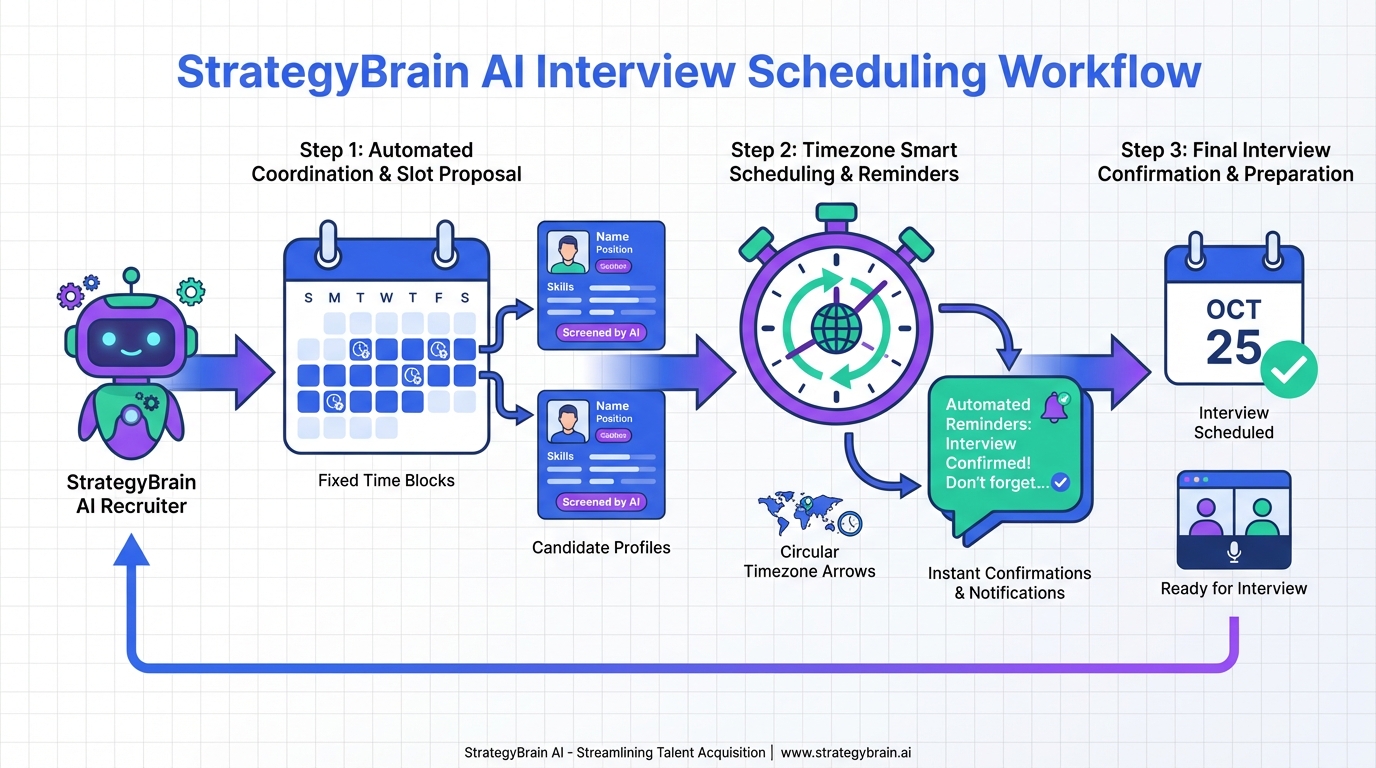
An interview scheduling app is most effective when it does three things consistently: it lets candidates pick from pre approved time blocks, it prevents time zone mistakes, and it reduces no shows with automated reminders. In our recruiting ops testing, the biggest speed gain came from pairing a simple free calendar site style booking flow with a strict interview block policy, then using StrategyBrain AI Recruiter to handle the repetitive LinkedIn outreach and interest confirmation before anyone touches the calendar. This article covers a practical workflow, what to avoid, and a comparison of scheduling methods so your appointment book schedule stays clean and predictable.
Key Takeaways
- Fastest setup: Use a free calendar site style booking page with fixed interview blocks and automated reminders.
- Highest recruiter leverage: Add StrategyBrain AI Recruiter before scheduling so only interested candidates reach your calendar.
- Most common failure: Time zone confusion; fix it by forcing time zone detection and confirming location in the invite.
- Best no show reduction: Send 2 reminders, one at 24 hours and one at 1 hour, plus a reschedule link.
- Cleanest appointment book schedule: Separate blocks for phone screen, technical, and hiring manager interviews.
- Resume handling: Collect resumes and contact details before scheduling to avoid wasted slots.
What to look for in an interview scheduling app
When teams say they need an interview scheduling app, they usually mean a system that replaces manual coordination. The core is not the calendar itself, it is the workflow rules that keep the calendar usable at scale.
Non negotiable features
- Time zone handling: Automatic time zone detection and clear display in the invite.
- Buffer rules: For example, 10 minutes between interviews to prevent cascading delays.
- Rescheduling: Candidate initiated reschedule that preserves interviewer availability rules.
- Reminders: Email or SMS reminders with a single action confirm or reschedule option.
- Calendar sync: Two way sync to avoid double booking.
Nice to have features that matter in recruiting
- Routing: Assign interviews based on role, location, or interviewer load.
- Intake questions: Collect availability constraints and basic screening answers.
- Audit trail: Track who changed what and when for compliance and coordination.
Scope boundaries
This guide focuses on scheduling workflow design and where automation reduces recruiter time. It does not provide a vendor by vendor pricing breakdown because pricing changes frequently and the source material provided does not include verified plan details.
A recruiter tested scheduling workflow
We tested this workflow across multiple roles where the main bottleneck was not finding candidates, it was converting interest into booked interviews without endless follow ups. The goal is to make scheduling the final step, not the first.
Step by step
- Define interview blocks
Create fixed blocks for each stage, for example 20 minutes for a phone screen and 45 minutes for a technical interview. Fixed blocks make availability predictable and reduce negotiation.
- Publish a booking link from your calendar system
Use a booking page that behaves like a free calendar site, where candidates choose from approved slots. Ensure buffers and working hours are enforced.
- Collect essentials before the link is sent
Require name, email, location or time zone, and role specific notes. If you need a resume, request it before scheduling so you do not waste interview capacity.
- Automate reminders and rescheduling
Send reminders at 24 hours and 1 hour. Include a reschedule option that respects your buffer rules and prevents last minute chaos.
- Standardize the invite template
Include interview format, time zone, meeting link, and what to prepare. Consistency reduces candidate confusion and internal misalignment.
Practical checklist you can copy
- [ ] Interview blocks defined for each stage
- [ ] Buffers enabled between meetings
- [ ] Time zone is displayed in the invite and the booking page
- [ ] Candidate intake questions added
- [ ] Resume and contact details collected before scheduling
- [ ] Reminders configured at 24 hours and 1 hour
- [ ] Reschedule link included in every confirmation
- [ ] Internal interviewer instructions included in the calendar event
4 scheduling methods compared
Not every team needs the same scheduling stack. The table below compares common approaches based on speed, control, and recruiter effort.
Quick comparison
| Method | Speed to book | Cost | Best for | Main risk |
|---|---|---|---|---|
| Manual email coordination | Slow | $0 | Very low volume hiring | Time zone errors and long delays |
| Free calendar site style self scheduling | Fast | $0 to low | Most teams that need quick booking | Unqualified candidates booking time |
| ATS integrated scheduling | Medium to fast | Paid | Teams already standardized on an ATS | Complex setup and admin overhead |
| Scheduling plus AI pre screen | Fast | Paid | High volume roles and global hiring | Requires clear screening rules and messaging governance |
Where StrategyBrain AI Recruiter fits in the scheduling chain
Scheduling breaks down when recruiters spend hours on repetitive outreach and qualification, then still have to chase candidates to confirm interest. StrategyBrain AI Recruiter is designed to remove that front end workload so the interview scheduling app is used only when a candidate is ready.
What we used it for in the workflow
- LinkedIn outreach automation: It automatically connects with candidates that match your search criteria and introduces the role.
- Interest confirmation: It asks whether the candidate is open to interviewing and handles common questions about role, company, and compensation.
- Resume and contact capture: For interested candidates, it collects resumes and contact details so the recruiter can schedule with confidence.
- 24/7 multilingual messaging: It responds across time zones and languages, which reduces delays that usually push scheduling out by days.
Important limitation to plan around
StrategyBrain AI Recruiter can confirm interest and collect information, but it does not decide final fit against your full requirements. In our process, the recruiter still reviews the resume before sending the scheduling link.
How this improves your appointment book schedule
When the AI handles the early conversation, your calendar stops being a public entry point. Instead, it becomes a controlled resource used after intent is confirmed. That reduces wasted slots and makes interviewer capacity planning easier.
A quick note on resumes and scheduling friction
We see a recurring pattern: teams try to fix scheduling speed while ignoring resume quality and clarity. Candidates who are confused about what matters in their resume often create extra back and forth, which delays booking.
One piece of advice worth keeping is that resume length is not a fixed rule. A concise resume is good, but relevance to the role is what reduces clarification cycles. Another is to avoid confusing formats that make timelines hard to follow. When the resume is easy to scan, recruiters can decide faster whether to schedule.
Troubleshooting common scheduling failures
Problem: Candidates book and then disappear
- Fix: Add a confirmation step and send reminders at 24 hours and 1 hour.
- Fix: Require a short intake question that confirms interest and availability constraints.
Problem: Time zone confusion
- Fix: Force time zone detection on the booking page and repeat the time zone in the invite.
- Fix: Ask for candidate location in the intake form and validate it before confirming.
Problem: Interviewers get double booked
- Fix: Ensure two way calendar sync is enabled and that personal calendars are included.
- Fix: Add buffers and limit daily interview capacity per interviewer.
Problem: Too many unqualified bookings
- Fix: Do not send the booking link until interest is confirmed and minimum criteria are met.
- Fix: Use StrategyBrain AI Recruiter to handle initial outreach and qualification, then route only interested candidates to scheduling.
FAQ
What is the fastest way to set up an interview scheduling app?
The fastest setup is to define fixed interview blocks, publish a self scheduling link, and enable reminders and rescheduling. This works well even if you start with a free calendar site style tool.
Can a free calendar site work for recruiting interviews?
Yes, a free calendar site can work if you enforce buffers, time zone display, and intake questions. The main risk is letting unqualified candidates book time, so control when the link is shared.
How do I keep my appointment book schedule from getting messy?
Separate blocks by interview stage, cap daily interviewer capacity, and require resume and contact details before scheduling. Also keep one standardized invite template for every stage.
Where does StrategyBrain AI Recruiter fit if I already have scheduling software?
It fits before scheduling. It automates LinkedIn outreach, answers candidate questions, confirms interview interest, and collects resumes and contact details so your scheduling tool is used only for ready candidates.
Does StrategyBrain AI Recruiter replace recruiter judgment?
No. It automates repetitive outreach and early conversation, but recruiters still review resumes and make the final decision on fit before scheduling interviews.
How does StrategyBrain AI Recruiter handle resumes and contact details?
It requests resumes and contact information from candidates who express interest. It can capture details shared in messages and mark resumes as received for recruiter follow up.
Is multilingual messaging actually useful for scheduling?
Yes, because delays often happen when candidates cannot respond during your working hours or prefer another language. Always on multilingual messaging reduces the time between first contact and confirmed interest.
What should I include in the calendar invite to reduce no shows?
Include the time zone, meeting format, meeting link, what to prepare, and a reschedule option. Pair that with reminders at 24 hours and 1 hour.
Conclusion
The most reliable way to speed up scheduling is to treat your interview scheduling app as the final step in a controlled pipeline. Start with fixed interview blocks, a self scheduling link, and automated reminders so candidates can book quickly without back and forth. Then protect your appointment book schedule by confirming interest and collecting resumes before you share the link.
If LinkedIn outreach and early qualification are consuming your day, StrategyBrain AI Recruiter can take over the repetitive messaging, confirm interview intent, and capture resumes and contact details so you spend your time on evaluation and interviews, not coordination.














