


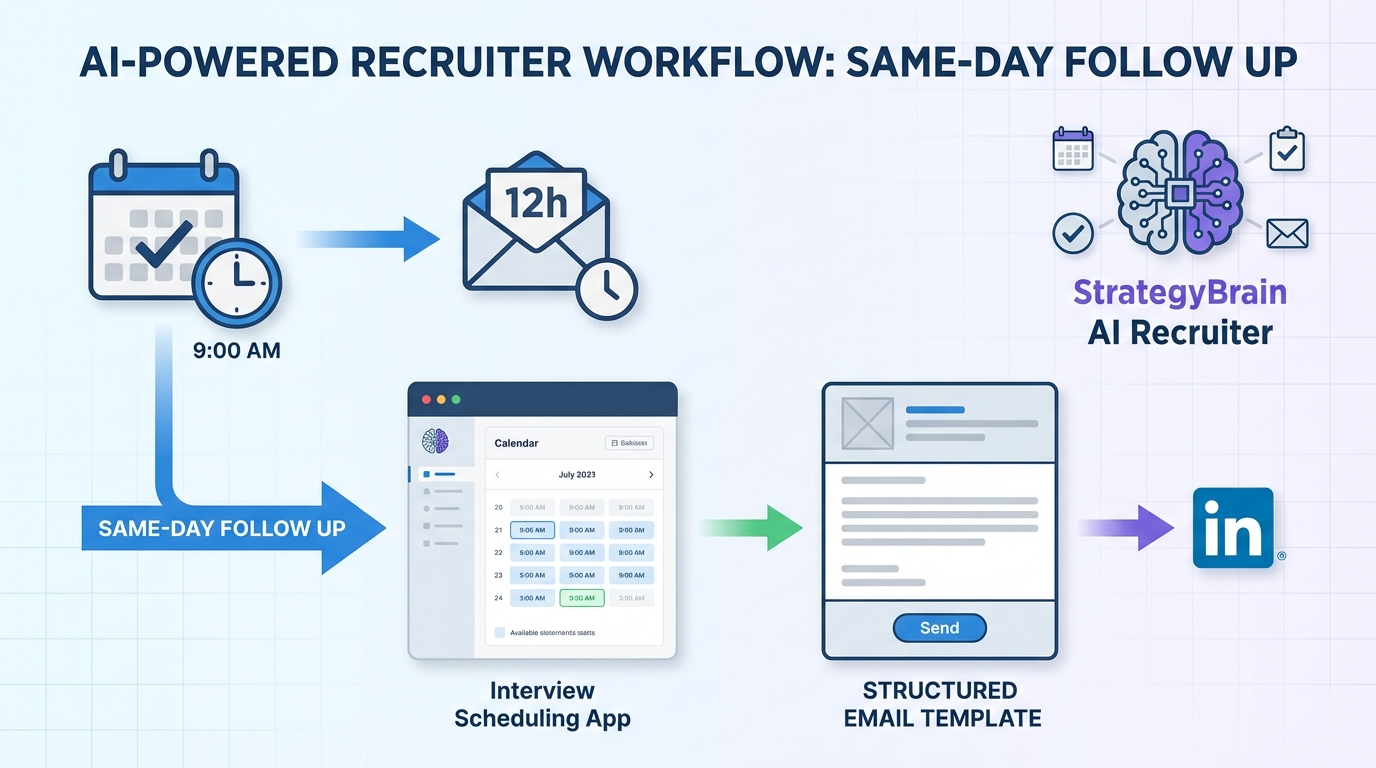
The most reliable way to improve interview outcomes is to pair an interview scheduling app with a same day follow up email workflow: schedule the interview, send a concise thank you within 12 hours, and use one structured template that reinforces fit and next steps. In our recruiting operations, this combination reduces missed handoffs because the appointment calendars lock the time while the follow up message confirms intent, context, and deliverables. This guide shows a practical, recruiter friendly system: what to write, when to send it, and how to coordinate with recruiters and hiring managers. It also explains how StrategyBrain AI Recruiter can automate candidate communication and qualification on LinkedIn so scheduling happens after interest is confirmed, not before.
Table of Contents
- Why follow up matters after the interview is scheduled
- Timing rules: when to send and how long to keep it
- A professional follow up email structure that works
- Copy and paste templates
- If a recruiter scheduled the interview: who to message first
- How to run this workflow inside an interview scheduling app
- Where StrategyBrain AI Recruiter fits before scheduling
- Quick comparison: manual workflow vs automated outreach
- FAQ
- Conclusion
Why follow up matters after the interview is scheduled
Once an interview time is confirmed in an interview scheduling app, many candidates assume the hard part is done. In practice, the follow up email is the moment you turn a calendar event into a clear business conversation. It reminds the interviewer what you discussed, reinforces why you are a fit, and reduces the chance that your interview blends into a busy day of back to back meetings.
One data point that is frequently cited in career coaching is that 68% of hiring managers and recruiters say a thank you message can influence decision making. This figure is attributed to a TopResume survey referenced in the source material we rewrote. Because survey methods can vary, treat it as directional rather than a guarantee of outcome.
Timing rules: when to send and how long to keep it
In the original guidance, email is preferred over typed or handwritten letters, and the recommendation is to send the follow up the same day as the interview. We follow the same rule internally because it is easy to execute and hard to misinterpret.
Timing checklist
- Send window: within 12 hours of the interview end time, ideally the same day.
- Length: 3 to 4 short paragraphs.
- Subject line: include the role title and a simple thank you.
A professional follow up email structure that works
The best follow up emails are personal, thoughtful, concise, and memorable. Below is a structure that keeps you professional while still sounding human. It also maps cleanly to what you can store as templates inside many top scheduling apps or your ATS notes.
1) Ensure professionalism
Your follow up email is part of your work sample. Proofread for spelling, grammar, and punctuation before sending. If you are excited after the interview, pause for 10 minutes, reread, then send.
2) Convey gratitude
Thank the interviewer for their time and consideration. Keep it specific to the conversation so it does not read like a generic template.
3) Demonstrate knowledge gained
Reference something you learned about the company or team during the interview and why it matters. If you discussed a shared interest, you can mention it briefly, but avoid getting overly personal.
4) Express enthusiasm and fit for the role
State your interest directly. Then connect one or two strengths to the problems discussed. Avoid minimizing language such as “just” or “only.”
5) Closing with next steps
Close by stating why you want this specific role, and confirm you are available to provide additional information such as references or a portfolio. If the next step is another interview, you can mention you are happy to coordinate via their appointment calendars.
Copy and paste templates
These templates are adapted from the source material and reorganized for clarity. Replace bracketed text with your details. Keep the final email to 3 to 4 short paragraphs.
Template A: Standard same day thank you
Subject: Thank you, [Interviewer Name] | [Role Title]
Dear [Interviewer Name],
Thank you for taking the time to meet with me today regarding the [Role Title] position with [Company Name].
I enjoyed our discussion about [specific challenge or topic]. In my previous role at [Previous Company], I worked on a similar situation and delivered [specific outcome with a number, if true].
I have been thinking about our conversation and I am excited about the opportunity to contribute through [relevant strength 1] and [relevant strength 2]. Please let me know if you need any additional information as you make your hiring decision. I look forward to hearing from you.
Kind regards,
[Your Name]
Template B: When you want to reinforce alignment with values
Subject: Thank you | [Role Title] interview
Dear [Interviewer Name],
Thank you again for meeting with me today. I appreciated learning more about how your team approaches [initiative or project].
Our conversation reinforced why I am interested in this role, especially your focus on [value 1] and [value 2]. I would welcome the chance to support those priorities through [specific skill or experience].
If it is helpful, I can share [portfolio item, reference, or work sample]. Thank you for your time, and I look forward to next steps.
Kind regards,
[Your Name]
Sample follow up email from the source material
The original article included a full example. We are keeping the identifiable details and the core facts while improving readability.
Dear Priya Agarwal,
Thank you for taking the time to meet with me today regarding the Marketing Manager position with Widget Company.
I enjoyed our discussion about the specific challenges your team is currently facing differentiating your brand in the widget market. I faced a very similar situation in my previous role with Gadget Company, and in my first year led a corporate rebrand that resulted in a 20% increase in overall brand awareness.
I have thought a lot about our conversation and how excited I would be to leverage my experience in competitive market research and project coordination to help you reach your goals. I share your corporate values of sustainability and giving back to the community, and would welcome the opportunity to be a strong contributor on your team.
Please let me know if you need any additional information as you make this hiring decision. I look forward to your response.
Kind regards,
Maria Martin
If a recruiter scheduled the interview: who to message first
If your interview was organized by a recruiter, follow up with the recruiter before messaging the employer directly. In our experience, this prevents mixed signals because some employers prefer the recruiter to act as the intermediary.
What to send the recruiter
- A brief thank you for organizing the interview.
- A one sentence summary of how it went.
- A direct question asking whether they recommend contacting the employer directly.
How to run this workflow inside an interview scheduling app
Most interview scheduling app setups fail for one reason: the scheduling step is treated as the finish line. Instead, treat scheduling as the trigger for two follow up actions: a candidate confirmation and a post interview thank you.
Step by step workflow
- Create a single interview event type with clear duration and location details so your appointment calendars stay consistent.
- Add automated reminders for the candidate and the interviewer. Keep reminders factual and short.
- Store a follow up email template in your email client or ATS notes so it is ready immediately after the interview.
- Send the follow up the same day and log it in your recruiting system.
- Set a decision check in for 48 hours after the interview to avoid stalled loops.
Practical tool: follow up quality checklist
- Does the email mention the exact role title and company name?
- Does it reference one specific topic from the interview?
- Does it include one concrete proof point, such as a metric, only if it is true?
- Is it limited to 3 to 4 short paragraphs?
- Does it end with a clear next step and openness to provide more information?
Where StrategyBrain AI Recruiter fits before scheduling
Scheduling is easiest when interest is already confirmed. This is where StrategyBrain AI Recruiter changes the workflow. Instead of a recruiter manually connecting, introducing the role, answering questions, and chasing replies, AI Recruiter can automate the initial outreach and qualification on LinkedIn, then hand off only interested candidates for interview scheduling.
What we use it for in practice
- Automated LinkedIn outreach and follow up that introduces the opportunity, answers common questions, and confirms interview interest.
- Resume and contact capture from candidates who want to move forward, so scheduling happens with complete details.
- 24/7 multilingual messaging to reduce delays across time zones and languages.
- Scaling with multiple LinkedIn accounts when teams need higher outreach volume without adding headcount.
Two boundaries matter for trust. First, AI Recruiter can confirm willingness to interview, but it does not decide final fit against job requirements. Second, the product documentation states that customer provided data is not used to train AI models and that credentials and candidate data are encrypted and isolated per customer.
Quick comparison: manual workflow vs automated outreach
| Workflow element | Manual recruiter led process | With StrategyBrain AI Recruiter before scheduling | What stays the same |
|---|---|---|---|
| Initial candidate outreach | Recruiter sends connection and messages | AI automates connection, intro, Q and A, and follow up | Recruiter sets the role narrative and criteria |
| Interest confirmation | Manual back and forth | AI confirms interview interest and collects details | Recruiter reviews and decides who advances |
| Scheduling | Often starts before full context is captured | Triggered after interest and details are captured | An interview scheduling app still books the time |
| Post interview follow up | Candidate sends thank you email | Candidate still sends thank you email | Same day follow up remains best practice |
FAQ
Should I send a follow up email the same day if I used an interview scheduling app?
Yes. The scheduling confirmation only secures the time. A same day follow up email reinforces your interest and summarizes the value you can bring while the conversation is still fresh.
How long should a thank you email be?
Keep it to 3 to 4 short paragraphs. That length is long enough to be specific and short enough to be read quickly between meetings.
What if I interviewed through a recruiter?
Thank the recruiter first and ask whether they want you to contact the employer directly. Some employers prefer the recruiter to manage candidate communication.
Can I reuse the same template for every interview?
You can reuse the structure, but personalize at least one sentence with a topic from the interview. Generic messages are easy to spot and less memorable.
Do appointment calendars replace recruiter coordination?
No. Appointment calendars reduce scheduling friction, but recruiters still manage expectations, feedback loops, and next steps. The best process combines both.
How does StrategyBrain AI Recruiter affect scheduling?
It can reduce wasted scheduling by confirming interest and collecting resumes and contact details before an interview is booked. Recruiters then schedule only candidates who want to proceed.
Does AI Recruiter decide whether a candidate is qualified?
No. It identifies willingness to communicate or interview and gathers information. Final qualification against job requirements remains a recruiter decision after reviewing the resume.
Is candidate data used to train AI models?
According to the product information provided, customer data is not used to train AI models and candidate data is encrypted and isolated per customer. Always confirm your own compliance requirements before deployment.
Conclusion
If you want a simple system that works in 2026, do two things consistently. Use an interview scheduling app to remove scheduling friction, then send a same day follow up email that is professional, specific, and limited to 3 to 4 short paragraphs. If you are running recruiting operations, consider moving the heavy lifting earlier in the funnel by using StrategyBrain AI Recruiter to automate LinkedIn outreach, answer candidate questions, confirm interest, and collect resumes before you open up your appointment calendars.
Next step: copy Template A, personalize one sentence from your last interview, and set a 48 hour decision check in on your calendar so the process does not stall.














