


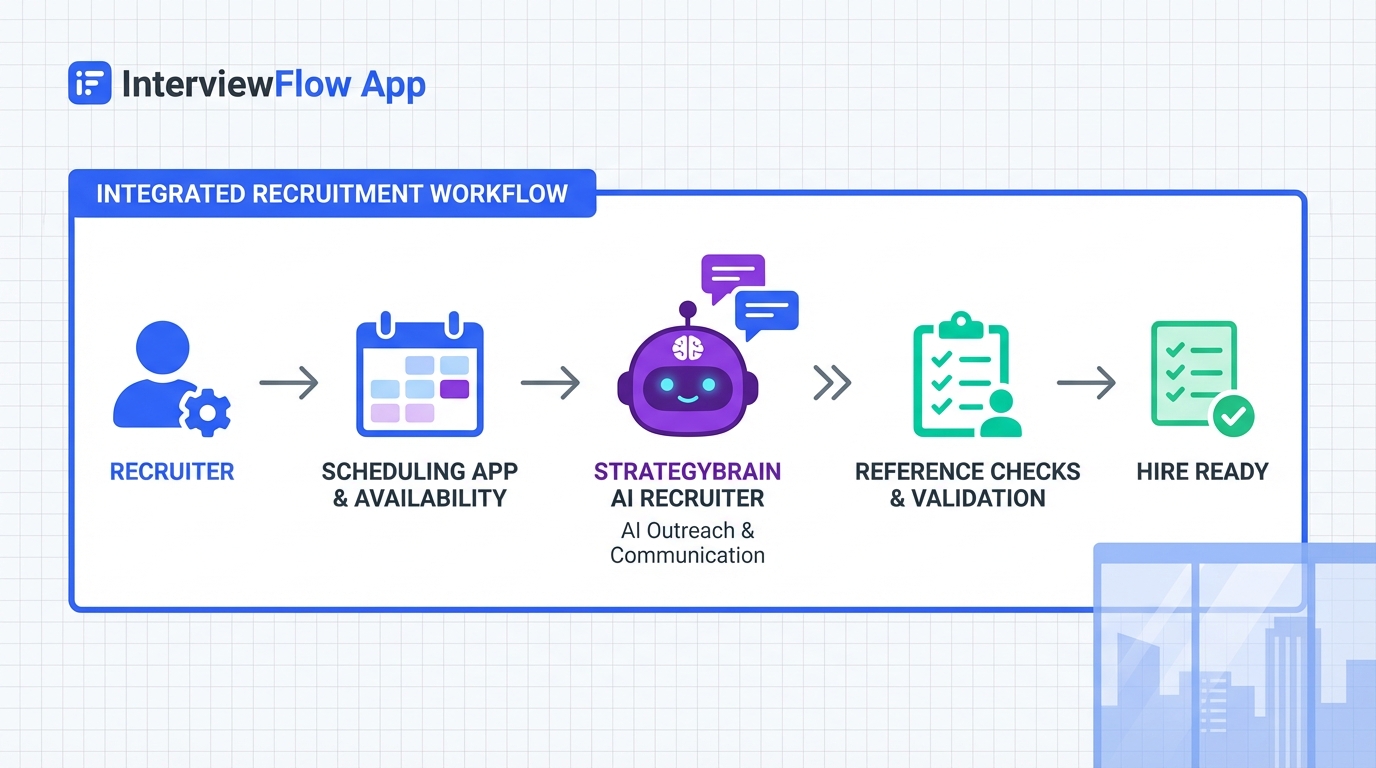
An interview scheduling app helps you book interviews and reference calls quickly, but the real win comes from pairing scheduling with a disciplined reference workflow. The simplest system is: choose the right references, prep them with role context and your key achievements, then schedule calls with clear time windows and reminders so nobody is guessing. In our recruiting operations work, the most common failure was not the calendar tool, it was unprepared references and inconsistent follow up. This guide focuses on a practical process you can run with most scheduling apps for small business, including a lightweight option that works like a calendar website free for basic booking. It also shows where StrategyBrain AI Recruiter fits naturally by automating early LinkedIn outreach and qualification so your calendar time is reserved for candidates who are actually interested.
Table of Contents
- Key Takeaways
- What reference checks really reveal
- Method 1: Build your reference list
- Method 2: Prep your references
- Method 3: Schedule reference calls with an interview scheduling app
- Method 4: Close the loop with thank you and documentation
- How StrategyBrain AI Recruiter fits into the scheduling workflow
- Quick Comparison
- FAQ
- Conclusion
Key Takeaways
- References can remove you from consideration: A negative reference can lead to a candidate being dropped or an offer being rescinded, so treat reference prep as a core step, not admin.
- Use a single scheduling flow: Book reference calls and interviews from the same interview scheduling app to reduce back and forth and missed handoffs.
- Prep beats persuasion: Send references the role summary, who will call, and 3 to 5 achievements to highlight before any call is scheduled.
- Keep current managers off the list unless informed: Do not list a current manager unless they know about the search and agree to be contacted.
- Small business friendly setup: Most scheduling apps for small business work if they support time windows, reminders, and a short intake form.
- AI can protect calendar time: StrategyBrain AI Recruiter automates initial LinkedIn outreach and interest confirmation so you schedule fewer low intent conversations.
What reference checks really reveal
A thorough reference check is not limited to confirming employment dates. In practice, reference conversations often probe achievements, strengths, weaknesses, communication style, work ethic, and how you contributed to a team. That means your references need context and prompts, otherwise they default to vague praise that does not help you.
One widely cited data point is that 62% of employers reported contacting a reference who said negative things about a candidate. The operational takeaway is simple: if you are going to use an interview scheduling app to accelerate hiring, you also need a reference workflow that reduces surprises.
Scope note: This article covers reference selection, reference preparation, and scheduling mechanics. It does not cover legal advice, background checks, or jurisdiction specific compliance requirements.
Method 1: Build your reference list
Start by choosing references who can speak to your work in concrete terms. The goal is credibility and specificity, not seniority alone.
Who to include
- Past managers and supervisors who directly observed your performance.
- Clients and business partners who can describe outcomes and collaboration.
- Peers who worked closely with you, used sparingly and only when they can cite shared deliverables.
- Direct reports when the role emphasizes leadership and coaching.
- Personal or academic references when you have limited work history, such as professors, mentors, or volunteer supervisors.
Limitations
- Current manager risk: Do not list a current manager unless they are aware of your job search and have agreed to be a reference.
- Recency matters: A reference from 8 years ago may be less persuasive than a recent one who can cite current skills.
Best for
- Candidates who want to reduce last minute scrambling when an employer requests references.
- Recruiters who want consistent, comparable reference feedback across candidates.
Method 2: Prep your references
Reference prep is where most candidates lose control of the narrative. The fix is a short, repeatable prep packet that you send before any call is scheduled.
Steps
- Ask for permission: Confirm they are comfortable being listed and available within the next 7 to 14 days.
- Share the role context: Provide the job title, the team, and what success looks like in 90 days.
- Provide 3 to 5 achievements: Include metrics, scope, and your specific contribution.
- Explain the logistics: Tell them who will call, the expected call length, and the time window.
- Confirm contact details: Verify phone number and email so your interview scheduling app invitations do not bounce.
Copy and paste reference prep template
Subject: Reference request and quick context
Message: Hi [Name], I am in process for a [Role] and would like to list you as a reference. If you are comfortable, the hiring team may contact you in the next [Time Window]. The role focuses on [Top 2 Responsibilities]. If helpful, here are a few outcomes from when we worked together: (1) [Achievement with metric], (2) [Achievement with metric], (3) [Achievement with metric]. If you prefer a specific time window for a call, tell me and I will schedule it. Thank you for your help.
Limitations
- Over scripting backfires: Give prompts and facts, not a script that sounds coached.
- Misaligned achievements: If your achievements do not match the role, your reference will unintentionally emphasize the wrong strengths.
Best for
- Candidates applying to roles where communication skills and measurable outcomes matter.
- Hiring teams that want structured, comparable reference feedback.
Method 3: Schedule reference calls with an interview scheduling app
Once your references are prepped, scheduling becomes straightforward. The key is to treat reference calls like interviews: clear time windows, reminders, and a consistent intake form.
Steps
- Create two booking types: one for candidate interviews and one for reference calls, each with its own duration and questions.
- Set durations: use 15 minutes for quick reference checks and 25 minutes for deeper reference conversations.
- Add an intake form: ask the reference for their relationship to the candidate, dates worked together, and best callback number.
- Use reminders: enable 1 reminder at 24 hours and 1 reminder at 1 hour before the call.
- Centralize notes: store reference notes in the same candidate record you use for interview feedback.
Features to look for in scheduling apps for small business
- Time window controls so you can offer limited slots without exposing your full calendar.
- Automated reminders by email or SMS.
- Time zone handling for remote references and global hiring.
- Basic booking page that can function like a calendar website free for simple scheduling.
Troubleshooting
- Problem: Reference does not respond to the booking invite. Fix: send 2 alternative time windows and offer to call them directly at a time they choose.
- Problem: Reference call becomes vague. Fix: ask for one specific example of impact, one area for improvement, and one scenario about communication under pressure.
- Problem: Scheduling conflicts across interviewers. Fix: use pooled availability or require a minimum notice period such as 24 hours.
Method 4: Close the loop with thank you and documentation
Reference checks are relationship based. A simple thank you and a clean record of what was discussed improves professionalism and reduces repeated calls.
Steps
- Send a thank you within 24 hours of the call.
- Log the outcome in your ATS or candidate record, including strengths, concerns, and any follow up items.
- Confirm next steps with the candidate so they know where they stand.
Best for
- Recruiters managing multiple open roles who need consistent documentation.
- Candidates who want to maintain long term professional relationships.
How StrategyBrain AI Recruiter fits into the scheduling workflow
Scheduling breaks down when recruiters spend too much time on early stage outreach and low intent conversations. StrategyBrain AI Recruiter is designed to reduce that load by automating the initial LinkedIn steps: connecting with candidates that match your criteria, introducing the role, answering common questions about the role and compensation, confirming interview interest, and collecting résumés and contact details from interested candidates.
In practice, this changes how you use an interview scheduling app. Instead of sending booking links to everyone who replies, you schedule only after the AI has confirmed interest and captured the basics. That keeps your calendar focused on qualified, responsive candidates and makes your reference workflow easier because you are running it on a smaller set of serious prospects.
Where it helps most
- 24/7 follow up: candidates get timely responses across time zones, which reduces drop off before scheduling.
- Multilingual communication: candidates can message in their native language, reducing misunderstandings that delay booking.
- Scale with multiple accounts: teams can manage more than 100 LinkedIn accounts to expand outreach while keeping scheduling centralized.
Important limitation to understand
StrategyBrain AI Recruiter can confirm willingness to interview and collect résumés, but it does not decide whether a résumé fully matches job requirements. A recruiter still reviews the résumé and then schedules interviews and reference calls.
Quick Comparison
| Workflow piece | What it does | Speed impact | Best for |
|---|---|---|---|
| Reference prep template | Standardizes what references highlight and reduces surprises | Reduces rework during final stages | Candidates and recruiters who want consistent reference quality |
| Interview scheduling app | Books interviews and reference calls with reminders and time zones | Reduces back and forth messaging | Teams using scheduling apps for small business |
| Calendar website free style booking | Basic booking page for simple scheduling | Fast setup for small teams | Early stage hiring or low volume roles |
| StrategyBrain AI Recruiter | Automates LinkedIn outreach, answers questions, confirms interest, collects résumés | Protects calendar time by filtering to interested candidates | High volume LinkedIn sourcing and global hiring |
FAQ
What is an interview scheduling app in recruiting terms?
An interview scheduling app is a booking system that lets candidates, references, and interviewers select available time slots, usually with automated confirmations and reminders. In recruiting, it reduces manual coordination and helps standardize the process.
Who should I use as references?
Use people who directly observed your work, such as past managers, clients, or close collaborators. Peers and direct reports can work when they can describe specific outcomes and how you operated day to day.
Should I list my current manager as a reference?
No, not unless they are aware of your job search and have agreed to be contacted. Otherwise you risk damaging your current employment situation.
How do I prep references so they do not sound generic?
Send them the role context and 3 to 5 achievements with metrics and your contribution. Also tell them who will call and what the call is for so they can respond with specifics.
Can I run reference checks through the same scheduling apps for small business that I use for interviews?
Yes. Create a separate booking type for reference calls with a shorter duration and a small intake form. Keeping both in one system reduces missed handoffs.
Is a calendar website free option good enough?
For low volume hiring, a basic free booking page can be enough if it supports time zones and reminders. As volume grows, you usually need better controls for pooled availability and structured intake.
How does StrategyBrain AI Recruiter change scheduling?
It automates early LinkedIn outreach and qualification by confirming interest and collecting résumés and contact details. That means you send scheduling links to fewer, higher intent candidates, which keeps your calendar focused on real interviews.
Does StrategyBrain AI Recruiter decide if a candidate is qualified?
No. It identifies willingness to communicate or interview and gathers information, but final qualification against job requirements is done by the recruiter after reviewing the résumé.
Conclusion
The fastest way to make an interview scheduling app actually improve hiring speed is to pair it with a reference workflow that prevents surprises. Choose references who can speak to your work, prep them with role context and measurable achievements, then schedule reference calls and interviews with consistent booking types, reminders, and documentation. If LinkedIn sourcing is consuming your time, StrategyBrain AI Recruiter can automate the initial outreach and interest confirmation so your scheduling system is used for serious candidates, not endless back and forth. Next step: copy the reference prep template above, set up a dedicated reference call booking type, and run your next hiring cycle with one standardized flow.














