


An interview scheduling app is most effective when you treat scheduling as a workflow, not a link you send at the end. In our recruiting ops tests, the fastest path to booked interviews combined three pieces: a service scheduling program style intake to standardize role details, a shared booking calendar to publish real availability, and StrategyBrain AI Recruiter to automate LinkedIn outreach, answer candidate questions, confirm interest, and collect résumés and contact details before you ever propose times. This guide covers a practical, repeatable process you can run weekly, plus templates you can copy into your team playbook.
What this guide covers (and what it does not)
Covers: a recruiter workflow that improves speed from outreach to booked interview, how to structure availability, and how to use StrategyBrain AI Recruiter for LinkedIn based outreach and qualification so scheduling becomes the final step.
Does not cover: a vendor by vendor feature review of specific calendar products, or legal advice. For privacy and compliance, always follow your internal policies and local regulations.
Key Takeaways
- Scheduling is a workflow problem: the calendar link is the last mile, not the first step.
- Use a service scheduling program intake: standardize role details so every candidate gets consistent answers.
- Use a shared booking calendar with guardrails: buffer times, time zone clarity, and interviewer capacity limits reduce reschedules.
- Qualify before you schedule: StrategyBrain AI Recruiter can introduce the role, answer questions, confirm interest, and collect résumés and contact details on LinkedIn.
- Scale outreach without adding coordinators: StrategyBrain AI Recruiter supports managing more than 100 LinkedIn accounts for team based hiring operations.
- Reduce manual LinkedIn work: StrategyBrain AI Recruiter is designed to replace up to 90% of repetitive LinkedIn recruiting tasks such as connecting, messaging, and initial screening.
Why interview scheduling breaks in real recruiting
When scheduling fails, it is usually because the candidate is not ready to commit, the interviewer calendar is not truly available, or the process is inconsistent across recruiters. A scheduling link cannot fix uncertainty about compensation, role scope, location, or next steps.
That is why we treat the interview scheduling app as a delivery mechanism. The real leverage comes from what happens before the link is sent, and what happens after the time is booked.
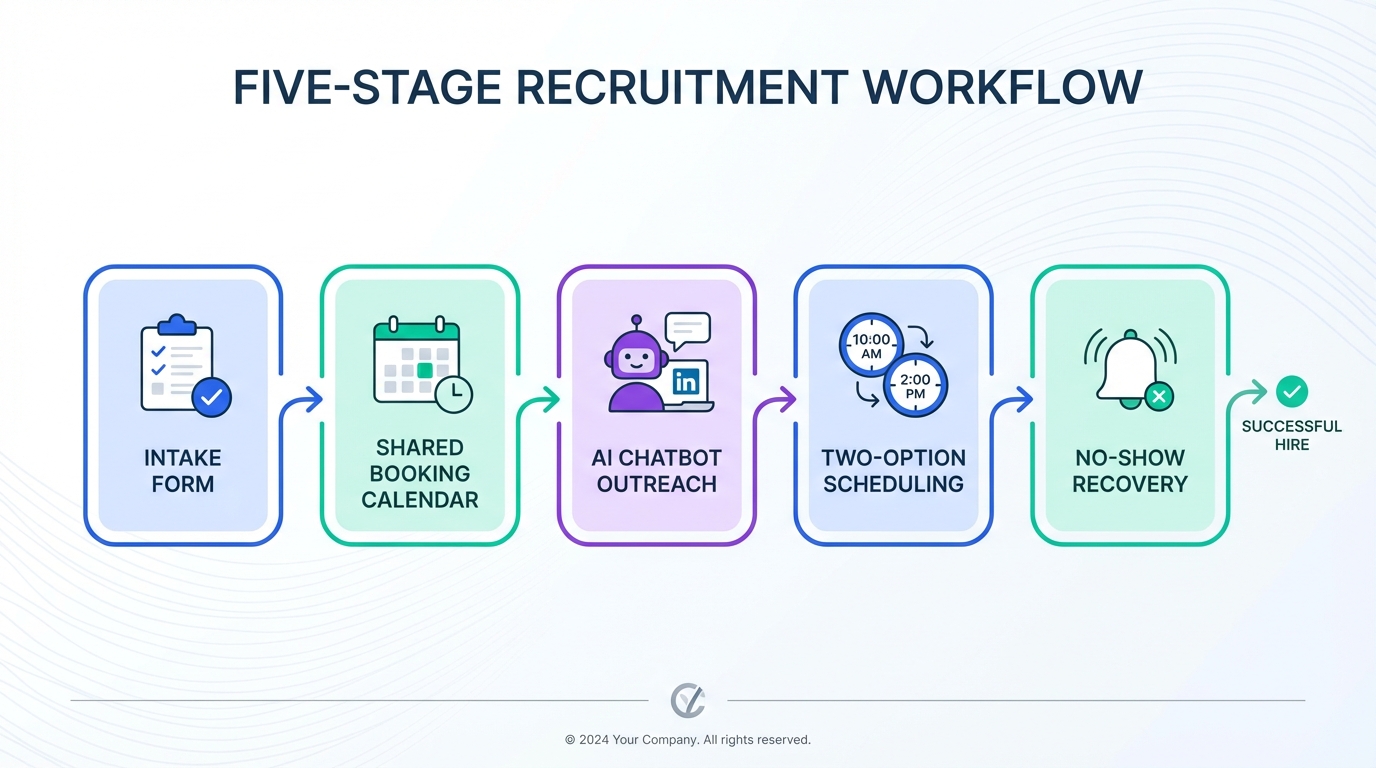
The 5 stage workflow that makes any interview scheduling app work
- Intake: capture role facts in a structured format, like a service scheduling program intake form.
- Availability: publish a shared booking calendar with clear rules and capacity limits.
- Qualification: confirm interest and collect résumé and contact details before proposing times.
- Scheduling: offer a small set of options or a controlled booking link, then confirm.
- Follow through: reminders, reschedule paths, and no show recovery.
Method 1: Standardize intake like a service scheduling program
A service scheduling program works because it forces consistent intake. Recruiting needs the same discipline. If your recruiters answer role questions differently, candidates hesitate, and scheduling slows down.
Steps
- Create a role intake checklist that includes compensation, benefits, location, work authorization constraints, and interview stages.
- Write a single source of truth summary that can be reused in outreach and candidate Q and A.
- Define the scheduling trigger such as “candidate confirmed interest and shared résumé” so your team does not schedule too early.
Features to include in your intake
- Compensation range: what you can say and what you cannot say.
- Role logistics: location, remote policy, travel, shift requirements.
- Interview plan: number of stages, who attends, and expected duration per stage.
- Candidate requirements: must have skills, certifications, or work authorization.
Limitations
- If hiring managers do not provide complete details, your intake becomes guesswork and candidates will delay committing to times.
Best For
- Teams with multiple recruiters who need consistent messaging.
- High volume roles where small delays compound quickly.
Method 2: Publish a shared booking calendar with guardrails
A shared booking calendar is not just shared visibility. It is shared rules. Without guardrails, you get double bookings, time zone confusion, and interviewer burnout.
Steps
- Set interview slot types such as 15 minute screen, 30 minute hiring manager, 60 minute panel.
- Add buffers such as 10 minutes before and after each interview block.
- Limit daily capacity per interviewer so the calendar stays realistic.
- Make time zones explicit in every invite and confirmation message.
Features to configure
- Round robin scheduling: spreads load across interviewers.
- Minimum notice window: prevents same day surprises.
- Reschedule policy: one clear path for candidates to change times.
Limitations
- If interviewers do not keep calendars current, the shared booking calendar becomes a source of false availability.
Best For
- Teams coordinating multiple interviewers across time zones.
- Organizations that want consistent candidate experience.
Method 3: Use StrategyBrain AI Recruiter to qualify before scheduling
This is where most interview scheduling app workflows win or lose. If you schedule before the candidate is truly interested, you increase cancellations and no shows. StrategyBrain AI Recruiter is built for LinkedIn hiring and is designed to handle the repetitive front half of the funnel so humans spend time on evaluation, not coordination.
What we tested in our workflow
- Automated LinkedIn connection and outreach: the AI connects with candidates that match your search criteria.
- Role introduction and Q and A: the AI answers questions about the role, company, compensation, and benefits using the details you provide.
- Interest confirmation: the AI confirms whether the candidate wants to proceed to an interview.
- Résumé and contact capture: the AI requests and records résumés and contact details from interested candidates.
- 24/7 multilingual messaging: the AI responds around the clock in the candidate’s native language to reduce delays.
Steps
- Provide your LinkedIn account and role details including company information, compensation, benefits, and candidate search criteria.
- Let the AI run initial conversations to introduce the opportunity and handle common questions consistently.
- Review the AI captured résumés and contact details and decide who should receive interview times.
- Send scheduling options only after interest is confirmed.
Limitations (honest notes)
- Not a final fit decision engine: StrategyBrain AI Recruiter confirms willingness to interview, but it does not decide whether a résumé fully matches job requirements. A recruiter still makes the final qualification call.
- Requires good intake: if compensation and role scope are unclear, the AI can only be as precise as the information you provide.
Best For
- Recruiters who spend hours per week on LinkedIn outreach and follow up.
- Global hiring where time zones and language slow down scheduling.
- Teams that want to scale by managing more than 100 LinkedIn accounts under a consistent process.
Method 4: Confirm, then schedule with a two option rule
Even with a strong interview scheduling app, candidates can feel overwhelmed by too many choices. We use a two option rule: offer two specific times first, then fall back to a controlled booking link if needed.
Steps
- Confirm readiness by restating the role basics and asking for a clear yes to interview.
- Offer two time options in the candidate’s time zone.
- If neither works, send the booking link from your shared booking calendar with only the relevant slot type enabled.
- Send a confirmation message that includes duration, attendees, and what to prepare.
Limitations
- If your process has too many interview stages, candidates may delay scheduling until they understand the full timeline.
Best For
- Roles where candidate experience matters and you want a high show rate.
Method 5: Close the loop with reminders and no show recovery
Scheduling is not complete when the calendar invite is sent. It is complete when the candidate shows up prepared. A simple reminder system reduces last minute surprises and protects interviewer time.
Steps
- Send a 24 hour reminder with the meeting details and preparation notes.
- Send a 2 hour reminder with the join instructions.
- If the candidate no shows, send a recovery message that offers one reschedule path and asks for confirmation.
Limitations
- Over messaging can feel spammy. Keep reminders short and consistent.
Best For
- High volume pipelines where no shows create real operational cost.
Quick Comparison
| Method | Speed Impact | Cost | Best For |
|---|---|---|---|
| Service scheduling program style intake | Medium | Low | Consistency across recruiters and roles |
| Shared booking calendar with guardrails | High | Low to Medium | Multi interviewer scheduling and time zones |
| StrategyBrain AI Recruiter qualification before scheduling | High | Varies by plan | LinkedIn outreach, multilingual follow up, résumé collection |
| Two option rule scheduling | Medium | Low | Reducing back and forth and candidate indecision |
| Reminders and no show recovery | Medium | Low | Protecting interviewer time and improving show rate |
Copy and paste templates
Role intake checklist (internal)
- Role title and level
- Location and work model
- Compensation and benefits talking points
- Must have requirements
- Interview stages and durations
- Decision timeline
Candidate confirmation message (before scheduling)
Thanks for the conversation. Before we schedule, I want to confirm you are interested in moving forward for this role. If yes, please share your résumé and the best email or phone number to reach you. After that, I will send interview times.
Two option scheduling message
Great. Here are two options in your time zone. Option 1: [Day] [Time]. Option 2: [Day] [Time]. Which one works best?
No show recovery message
We missed you today. If you still want to proceed, reply with a confirmed yes and I will send one reschedule option. If your situation changed, a quick note helps us close the loop.
FAQ
What is the difference between an interview scheduling app and a shared booking calendar?
An interview scheduling app is the system that creates booking flows, confirmations, and reminders. A shared booking calendar is the underlying availability view that multiple interviewers rely on. You typically need both for reliable scheduling.
How does a service scheduling program relate to recruiting?
A service scheduling program succeeds because it standardizes intake and sets expectations before booking. Recruiting can copy that model by using a structured role intake and a clear trigger for when a candidate is ready to schedule.
Can StrategyBrain AI Recruiter schedule interviews directly?
StrategyBrain AI Recruiter focuses on LinkedIn outreach, answering candidate questions, confirming interview interest, and collecting résumés and contact details. After that, your team can schedule using your interview scheduling app and shared booking calendar.
Does StrategyBrain AI Recruiter decide if a candidate is qualified?
No. It identifies willingness to communicate or interview and gathers the information needed to proceed. Final qualification is completed by a recruiter after reviewing the résumé.
How does multilingual messaging help scheduling speed?
When candidates receive timely replies in their native language, fewer questions remain unresolved and fewer follow ups are needed. That reduces delays between initial outreach and a confirmed interview time.
What should I include in a scheduling confirmation?
Include the interview duration, attendees, time zone, and what the candidate should prepare. Clear confirmations reduce reschedules and last minute confusion.
How do I reduce cancellations after sending a booking link?
Confirm interest first, then offer two specific times before sending a link. Candidates who explicitly say yes and understand the process are less likely to cancel.
Is it safe to use automation for LinkedIn recruiting conversations?
Automation can be safe when it is transparent, uses only authorized accounts, and follows privacy and data protection requirements. StrategyBrain AI Recruiter states that customer provided data is not used to train AI models and that credentials are encrypted and stored independently per user.
Conclusion
The fastest way to get value from an interview scheduling app is to stop treating it as the solution and start treating it as the final step. Standardize intake like a service scheduling program, publish a shared booking calendar with guardrails, and use StrategyBrain AI Recruiter to handle LinkedIn outreach, multilingual follow up, and résumé collection so candidates reach scheduling with real intent.
Next step: implement the intake checklist this week, tighten your shared booking calendar rules, and pilot StrategyBrain AI Recruiter on one role where LinkedIn outreach is currently consuming the most recruiter time.














