


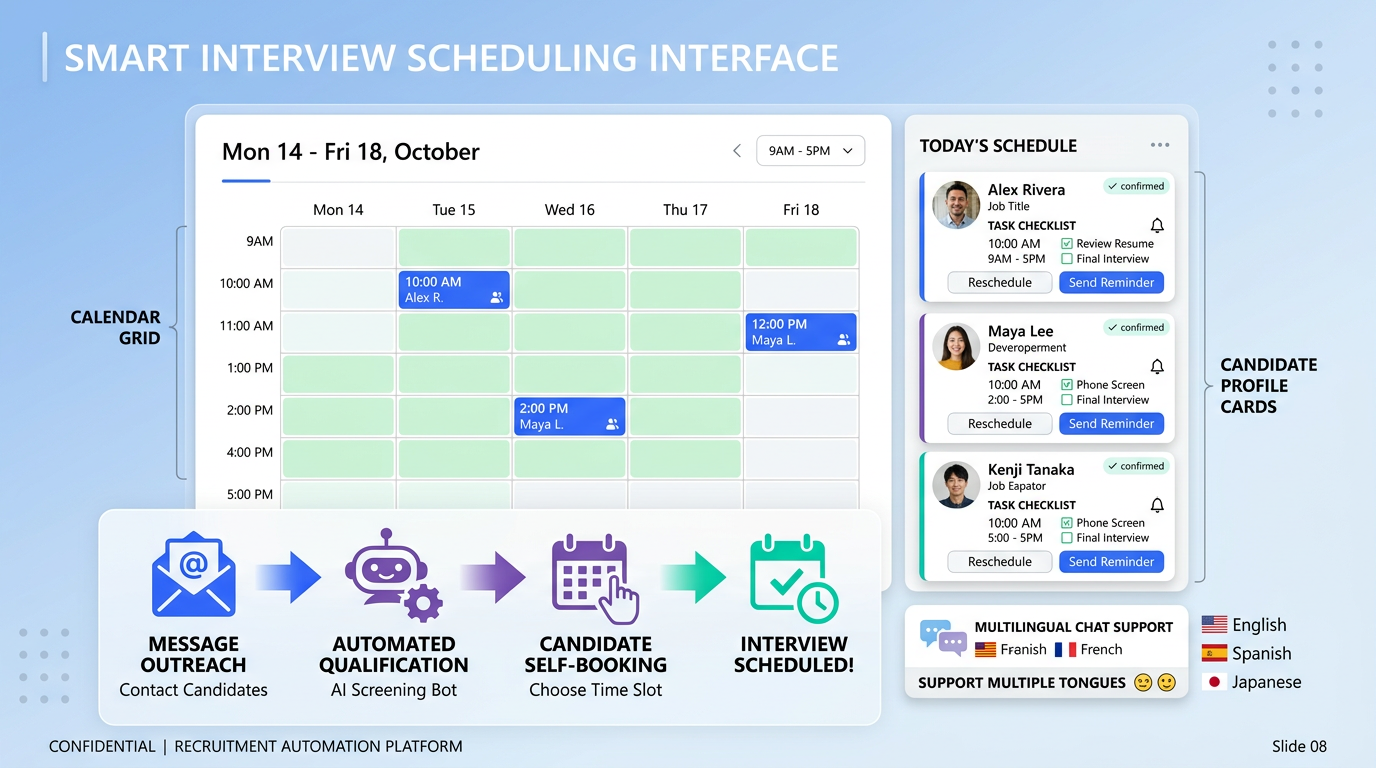
An interview scheduling app improves retention outcomes by reducing candidate friction and recruiter delays: candidates pick a time in seconds, calendars stay in sync, and reminders reduce no shows. The practical win is not the tool itself, but the workflow you build around it: a book calendar app that enforces fast response times, consistent touchpoints, and clear expectations. This guide turns proven retention drivers into scheduling playbooks you can implement today, including an appointment book schedule template and a LinkedIn first workflow that pairs scheduling with StrategyBrain AI Recruiter for automated outreach, multilingual responses, and resume capture before interviews.
Why scheduling affects retention
Retention starts earlier than most teams admit. If your hiring process feels slow, confusing, or inconsistent, you are selecting for candidates who tolerate friction, not necessarily candidates who will thrive long term. Scheduling is one of the first places candidates experience your operating rhythm.
An interview scheduling app is a control point because it standardizes three things that directly influence candidate experience:
- Speed: fewer back and forth messages means shorter time to interview.
- Clarity: confirmations, time zones, and instructions reduce uncertainty.
- Consistency: reminders and follow ups reduce ghosting and no shows.
In our recruiting operations work, the biggest improvement usually comes from removing manual coordination steps that create silent delays. Even a strong recruiter can only do so much when every reschedule requires another email thread.
Cost of turnover and where scheduling helps
Turnover is expensive and disruptive. Gallup reports that replacing an employee can cost 0.5 to 2.0 times the employee’s annual salary, depending on role and complexity. That cost is not only recruiting spend. It includes lost productivity, ramp time, and the internal load placed on the team.
Scheduling does not solve every retention problem, but it reduces avoidable waste in the hiring stage that often leads to poor fit and rushed decisions. Specifically, it helps you:
- Protect recruiter focus by automating coordination, so interviews and evaluation get more attention.
- Reduce candidate drop off by making the next step obvious and immediate.
- Improve hiring quality signals by keeping the process structured, which supports better comparisons across candidates.
Benchmark your process before you change tools
If you want retention improvements, start with a baseline. Otherwise, you will not know whether your new interview scheduling app is actually helping or just “feels faster.”
Use a simple benchmark set for 30 days. Track these metrics with units and clear definitions:
- Time to first interview: median calendar days from application or outreach to first scheduled interview.
- Scheduling cycle time: median hours from “please book” message to confirmed time.
- No show rate: percentage of scheduled interviews where the candidate does not attend.
- Reschedule rate: percentage of interviews moved at least once.
- Offer acceptance rate: percentage of offers accepted.
For retention itself, calculate employee retention rate using a consistent formula and time window. AIHR provides examples and related retention metrics you can add later, but the key is consistency in how you measure.
6 interview scheduling app workflows to implement
Workflow 1: One link, two options, and a clear deadline
This is the simplest workflow that reliably reduces delays. Instead of asking “When are you free,” you send one booking link and give two paths: book now or request an alternative. You also set a deadline so the process does not drift.
- Send the booking link from your book calendar app with time zone detection enabled.
- Offer two interview lengths: 15 minutes for screening and 45 minutes for deep dive.
- Set a deadline: “Please book within 48 hours.”
Where StrategyBrain AI Recruiter fits naturally: if your first touch is on LinkedIn, AI Recruiter can handle the initial outreach, answer role questions, confirm interest, and then hand off to your scheduling link once the candidate is ready to book.
Workflow 2: Pre interview qualification before scheduling
Scheduling too early can waste interviewer time and frustrate candidates who are not aligned. The fix is a short qualification step that happens before the calendar invite is offered.
- Ask 3 qualification questions in a single message or form.
- Confirm compensation alignment and work authorization early.
- Only then send the scheduling link for qualified candidates.
StrategyBrain AI Recruiter is designed for this stage on LinkedIn: it introduces the opportunity, learns the candidate’s situation, answers questions about role, company, and compensation, and collects resumes and contact details from interested candidates. Recruiters then schedule interviews with a cleaner shortlist.
Workflow 3: Appointment book schedule for panel interviews
Panel interviews fail when coordination is manual. Use an appointment book schedule that treats the panel as a single resource with rules.
- Create a panel calendar with shared availability blocks.
- Limit booking windows to specific days and hours to reduce reschedules.
- Auto attach an agenda with roles and evaluation criteria.
Practical note from our testing: the more interviewers involved, the more you should constrain availability. Wide open calendars look flexible but increase coordination failures.
Workflow 4: Reminder sequence that reduces no shows
Reminders are not spam when they are useful. A good interview scheduling app lets you automate reminders with the right timing and content.
Use this sequence:
- T minus 24 hours: confirmation, time zone, and what to prepare.
- T minus 2 hours: join instructions and contact method if they are late.
- T plus 1 hour: follow up if they missed, with a reschedule link.
If you recruit globally, StrategyBrain AI Recruiter’s 24/7 multilingual communication can keep candidates warm between scheduling and the interview, especially across time zones where recruiters are offline.
Workflow 5: Structured onboarding handoff after the offer
Retention is strongly influenced by onboarding quality. The scheduling tool can support this by making the first week feel organized and intentional.
- Schedule Day 1 meetings at offer acceptance, not after start date.
- Book manager check ins weekly for the first 4 weeks.
- Schedule a 90 day review at the start to signal commitment.
SHRM cites research from the Wynhurst Group that structured onboarding is associated with a 58% higher likelihood of employees staying after 3 years. Scheduling is not the whole onboarding program, but it is the backbone that makes it happen consistently.
Workflow 6: Invest in tools that remove daily friction
Outdated systems create frustration. The right interview scheduling app reduces repetitive admin work so recruiters can focus on evaluation, candidate care, and hiring manager alignment. This matches a broader retention principle: people stay when work feels meaningful and systems support them.
Harvard Business Review highlights that meaningful work is a major driver of engagement. In recruiting teams, “meaningful” often means spending time on judgment and relationship building, not calendar coordination.
Quick comparison: manual vs scheduling app vs AI assisted
| Approach | Speed to confirm | Candidate experience | Best for |
|---|---|---|---|
| Manual email and chat coordination | Variable, depends on response time | Inconsistent, higher friction | Low volume hiring with stable schedules |
| Interview scheduling app as a book calendar app | Fast once link is sent | Consistent confirmations and reminders | Most teams hiring weekly |
| Scheduling app plus StrategyBrain AI Recruiter | Fast plus automated pre qualification | 24/7 multilingual messaging and smoother handoff | LinkedIn sourcing, global hiring, high volume outreach |
Scope note: this table compares workflow patterns, not specific third party products. We are not listing competitor tools or prices here because the source material provided does not include verifiable competitor details.
Copy and paste templates
Template 1: Scheduling message (screening)
Subject or first line: Next step: choose a time for a 15 minute call
Message: Thanks for your interest. Please use my scheduling link to pick a 15 minute time that works for you within the next 48 hours. If none of the times fit, reply with 3 options in your time zone and I will adjust availability. You will receive a calendar invite with the agenda and join details.
Template 2: Appointment book schedule rules (panel)
- Booking window: allow bookings only Monday to Thursday.
- Lead time: require at least 24 hours notice.
- Reschedule policy: allow 1 reschedule via link, then manual review.
- Agenda: attach evaluation criteria and interviewer roles to every invite.
Template 3: Recruiter checklist for scheduling quality
- [ ] Time zone is confirmed in the invite title and description.
- [ ] Candidate has join instructions and a backup contact method.
- [ ] Interviewers have a shared scorecard and role clarity.
- [ ] Reminders are enabled at 24 hours and 2 hours before start.
- [ ] Reschedule link is included for missed interviews.
- [ ] If sourcing on LinkedIn, StrategyBrain AI Recruiter has already confirmed interest and captured resume and contact details.
FAQ
What is an interview scheduling app?
An interview scheduling app is software that lets candidates book interview times based on real availability, then automatically creates calendar invites and sends reminders. It reduces manual coordination and helps standardize the candidate experience.
Is a book calendar app the same as an interview scheduling app?
A book calendar app is a broader category that supports appointment booking for many use cases. An interview scheduling app is typically a book calendar app configured with hiring workflows like panel scheduling, reminders, and interview instructions.
What should I automate first in an appointment book schedule?
Automate confirmations, time zone handling, and reminders first because they reduce no shows and reschedules. Next, automate the handoff steps such as attaching agendas and scorecards to every invite.
How does StrategyBrain AI Recruiter fit into scheduling?
StrategyBrain AI Recruiter handles LinkedIn outreach and early qualification, including answering candidate questions and collecting resumes and contact details from interested candidates. Once interest is confirmed, you send the scheduling link so interviews are booked with fewer delays and less back and forth.
Can StrategyBrain AI Recruiter communicate with candidates in different languages?
Yes. StrategyBrain AI Recruiter supports 24/7 multilingual communication, which helps when candidates respond outside recruiter working hours or across time zones.
Does StrategyBrain AI Recruiter decide if a candidate is qualified?
No. It identifies willingness to communicate or interview and collects information, but it does not determine full resume fit against job requirements. Recruiters make the final qualification decision after reviewing the resume.
How do I connect scheduling improvements to retention metrics?
Start by tracking time to first interview, no show rate, and offer acceptance rate for 30 days before and after changes. Then connect those improvements to downstream retention by measuring retention rate consistently over a defined period.
What is one retention practice I can schedule immediately after hiring?
Schedule structured onboarding check ins: weekly manager meetings for the first 4 weeks and a 90 day review. Research cited by SHRM from the Wynhurst Group links structured onboarding with higher 3 year retention.
Conclusion and next steps
The fastest way to make an interview scheduling app improve retention is to treat it as a workflow system, not a calendar link. Use a book calendar app to enforce speed, clarity, and consistency, then add an appointment book schedule that supports panels, reminders, and onboarding check ins. If your sourcing starts on LinkedIn, pairing scheduling with StrategyBrain AI Recruiter can reduce manual outreach, keep candidates engaged with 24/7 multilingual responses, and collect resumes before interviews.
Next steps: pick 2 workflows from this guide, run them for 14 days, and compare your median time to first interview, no show rate, and reschedule rate against your baseline. Then expand to onboarding scheduling so retention support starts on Day 1.














