


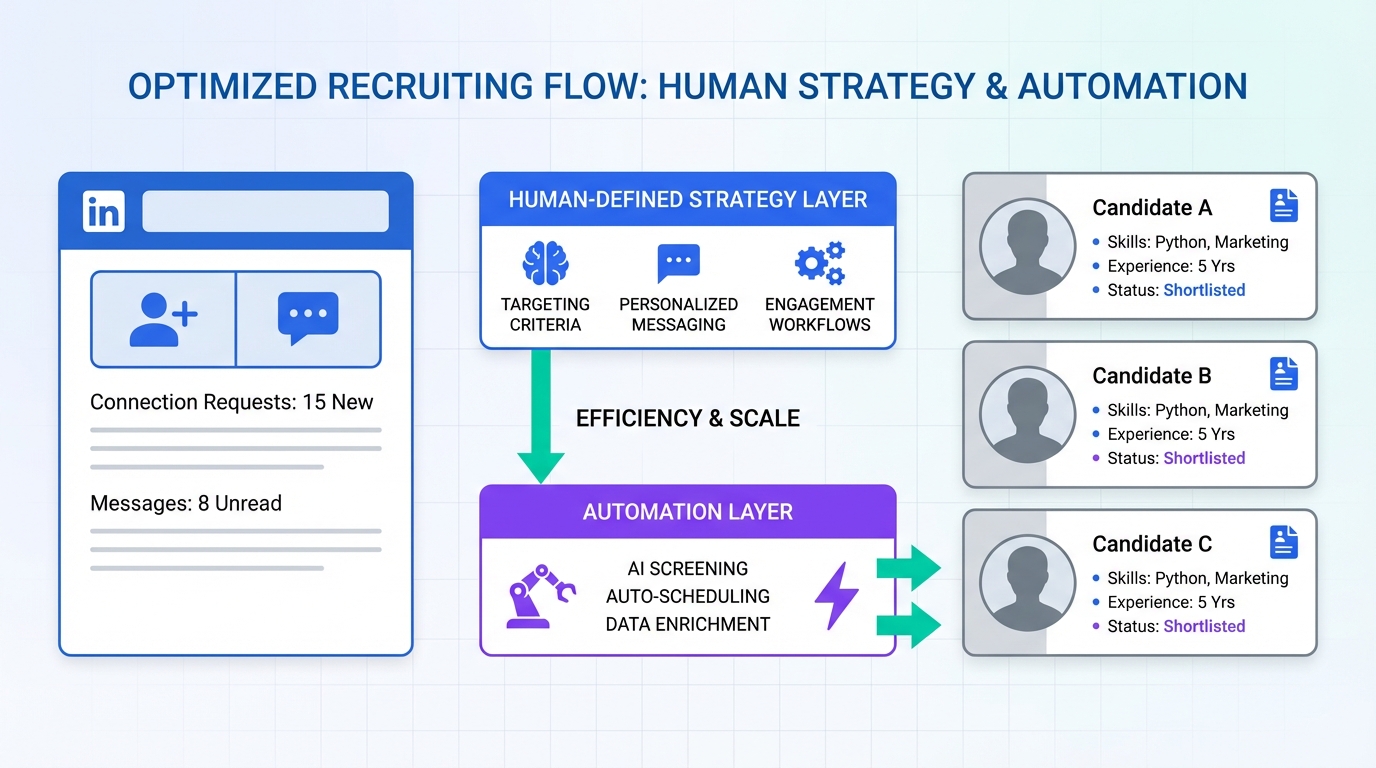
LinkedIn automated outreach works best when you standardize what “good outreach” means, then automate only the repetitive parts: targeting, connection requests, first messages, follow ups, and basic qualification. In practice, we recommend a two layer approach: a human designed LinkedIn outreach strategy that defines who you contact, what you say, and how you measure replies, plus an automation layer that executes consistently and responds fast. In our recruiting workflows, StrategyBrain AI Recruiter is the cleanest way to operationalize this because it can connect with candidates, introduce the role, answer common questions, confirm interview interest, and collect résumés and contact details while you stay focused on final evaluation. This guide covers a practical LinkedIn outreach automation playbook you can implement without turning your outreach into spam.
Key Takeaways
- Automate execution, not judgment: keep targeting and messaging rules human owned, then automate sending and follow ups.
- Speed matters: the “first impression window” in interviews can be 30 seconds to 2.5 minutes, so your outreach should reduce snap judgments by using consistent benchmarks and structured questions.
- Use structured qualification: ask the same 3 to 5 screening questions to every candidate to reduce bias and improve comparability.
- StrategyBrain AI Recruiter can run the front end: it automates connecting, role introduction, Q&A, interest confirmation, and résumé plus contact capture.
- Global hiring needs always on follow up: 24/7 multilingual messaging reduces delays across time zones and languages.
- Scale safely: if you manage multiple LinkedIn accounts, use an account level governance checklist and consistent messaging policies.
Table of Contents
- What LinkedIn automated outreach actually means
- Why “first impression error” matters in outreach
- A practical framework for LinkedIn outreach automation
- Method 1: Manual outreach with a structured benchmark
- Method 2: Semi automated outreach with templates and scheduling
- Method 3: AI led outreach with StrategyBrain AI Recruiter (recommended)
- Quick Comparison
- Copy and paste templates
- Safety and compliance checklist
- FAQ
- Conclusion
What LinkedIn automated outreach actually means
LinkedIn automated outreach is a workflow where software executes repetitive outreach actions on LinkedIn based on rules you define. Those actions typically include sending connection requests, delivering an initial message, running follow ups, and capturing responses into a pipeline.
It is not a license to blast generic messages. If your automation removes context, it increases the risk of low reply rates and damaged employer brand. The goal is consistency and speed, while keeping relevance and ethics intact.
Why “first impression error” matters in outreach
In the source material we reviewed, the author describes “first impression error” as the tendency for interviewers to form a positive or negative judgment very quickly, then spend the rest of the conversation looking for evidence that confirms that initial view. The same bias can show up earlier in the funnel, including in how recruiters interpret short LinkedIn replies.
The article cites research indicating that interview decisions can form in 30 seconds to 2.5 minutes. That is a useful reminder for outreach: if your first message is vague, overly salesy, or unclear, you may lose the candidate before you ever get to the real conversation. A structured LinkedIn outreach strategy helps you reduce bias by asking consistent questions and measuring candidates against the same benchmark.
A practical framework for LinkedIn outreach automation
We use a simple framework to keep LinkedIn outreach automation effective and defensible. It separates what humans should decide from what automation should execute.
Layer 1: Human owned strategy
- Target definition: role titles, seniority, location, industry, and must have skills.
- Value proposition: why this role is relevant, including compensation and benefits ranges when appropriate.
- Benchmark questions: 3 to 5 consistent questions that reduce “gut feel” decisions.
- Success metrics: connection acceptance rate, reply rate, qualified interest rate, and résumé capture rate.
Layer 2: Automated execution
- Connection and first message: sent consistently with personalization tokens.
- Follow up sequence: timed nudges that stop when the candidate replies.
- Basic Q&A: answers to common questions about role, company, and compensation.
- Data capture: résumé and contact details collected and stored for recruiter review.
Method 1: Manual outreach with a structured benchmark
This method is best when you are hiring for a small number of roles and you want maximum control. It is also the best baseline to establish your messaging before you automate anything.
Steps
- Define your benchmark: write 3 to 5 questions you will ask every candidate, such as availability, location constraints, and interest in the compensation range.
- Build a short message library: create 2 connection notes and 2 follow ups that match your tone.
- Track outcomes: log acceptance, replies, and qualified interest in a spreadsheet or ATS notes.
- Review weekly: update one variable at a time, such as the opening line or the role summary.
Features
- Highest control over personalization and candidate experience.
- Lowest tooling risk because you are not automating actions.
- Best for learning what messaging works before scaling.
Limitations
- Time intensive for follow ups and back and forth Q&A.
- Inconsistent speed across time zones and busy periods.
- Hard to scale across multiple roles or multiple LinkedIn accounts.
Best For
- One to three open roles at a time.
- Hard to hire roles where every message needs deep context.
- Teams building their first LinkedIn outreach strategy.
Method 2: Semi automated outreach with templates and scheduling
This approach keeps you in the driver’s seat but reduces repetitive work. You still decide who to contact and you still handle most replies, but you standardize templates and timing.
Steps
- Create a 3 touch sequence: connection note, first message after acceptance, and one follow up.
- Use structured fields: role title, location, compensation range, and one relevant project or skill.
- Batch your outreach: set a daily outreach block and a daily reply block to avoid context switching.
- Standardize qualification: ask the same benchmark questions to reduce first impression error.
Features
- More consistent than fully manual outreach.
- Faster follow ups when you have a repeatable sequence.
- Better reporting because your steps are standardized.
Limitations
- Replies still bottleneck when candidates ask detailed questions.
- Global coverage gaps if you are not available 24/7.
- Scaling remains hard when you add more roles or accounts.
Best For
- Recruiters who want LinkedIn outreach automation benefits without full AI handling.
- Teams that already have strong messaging and want consistency.
- Hiring managers who want a predictable candidate experience.
Method 3: AI led outreach with StrategyBrain AI Recruiter (recommended)
If your main pain is the repetitive front end of recruiting, this is where AI can do real work. We have used StrategyBrain AI Recruiter specifically for LinkedIn hiring workflows where the recruiter needs to scale outreach, keep response times tight, and capture candidate information reliably.
What it automates on LinkedIn
- Automatic connecting with candidates who match your search criteria.
- Automatic role introduction using the job details you provide, including compensation and benefits information you choose to share.
- Candidate Q&A about the role, company, and compensation, handled in conversation rather than in a long first message.
- Interest confirmation by asking whether the candidate is open to interviews.
- Résumé and contact capture by requesting a résumé and collecting details shared in chat.
Steps
- Prepare your inputs: define candidate search criteria and write a clear role brief that includes company context, compensation, and benefits.
- Authorize your LinkedIn account: connect the account you want the AI to operate from, using explicit authorization.
- Set your benchmark questions: choose the 3 to 5 questions that reduce bias and keep evaluation consistent.
- Launch outreach and monitor: let the AI run connection and messaging, then review interested candidates and collected résumés.
- Do the final qualification: the AI confirms willingness to proceed, but you still evaluate résumé fit against job requirements.
Why this improves the candidate experience
Automation often fails when it feels like a broadcast. What we found works better is conversational automation that answers questions quickly and keeps the candidate moving. StrategyBrain AI Recruiter is designed for that front end flow, so candidates can ask about the role and get timely responses, including outside your working hours.
Limitations
- Not a full replacement for recruiter judgment: it does not decide whether a résumé matches the job requirements.
- Requires good inputs: unclear role details lead to unclear conversations, even with AI.
- Governance still matters: if you manage many accounts, you need consistent policies and oversight.
Best For
- Corporate recruiters who need to reduce time spent on repetitive LinkedIn tasks.
- Headhunters who want to handle more job orders without adding staff.
- HR leaders scaling hiring output across regions with multilingual communication.
Quick Comparison
| Method | Speed | Automation Level | Best For |
|---|---|---|---|
| Manual outreach with benchmark | Slow to medium | Low | Small hiring volume and maximum personalization |
| Semi automated templates and scheduling | Medium | Medium | Consistent sequences with recruiter handled replies |
| StrategyBrain AI Recruiter | Fast | High | Scaling outreach, follow ups, Q&A, and résumé capture |
Copy and paste templates
These templates are designed to support a professional LinkedIn outreach strategy. Keep them short, specific, and consistent with your benchmark questions.
Connection note template
Subject: Connection request
Message: Hi {FirstName}, I’m reaching out because your experience in {SkillOrDomain} aligns with a role we’re hiring for in {LocationOrRemote}. If you’re open to a quick chat, I can share the compensation range and what the team is building.
First message after acceptance
Thanks for connecting, {FirstName}. We are hiring a {RoleTitle}. The role is {RemoteOrHybrid} and the compensation range is {CompRange}. Are you open to hearing details this week, and if so, what is your preferred time zone?
Follow up message
Quick follow up, {FirstName}. If now is not the right time, no problem. If you are open to it, I can share the role summary and ask a few quick questions to confirm fit and interest.
Safety and compliance checklist
This checklist is what we use to keep LinkedIn automated outreach aligned with professional standards and to reduce the risk of bias and inconsistent evaluation.
- Benchmark first: define 3 to 5 screening questions before you send any messages.
- One role, one sequence: do not reuse the same sequence across unrelated roles.
- Stop rules: stop follow ups immediately when a candidate replies or declines.
- Disclosure: be clear that you are recruiting for a specific role and company.
- Data minimization: collect only what you need for next steps, typically résumé and contact details.
- Human review: keep final qualification and hiring decisions with a recruiter or hiring manager.
- Security: use encrypted credential storage and explicit authorization for any tool that operates a LinkedIn account.
FAQ
Is LinkedIn automated outreach the same as spam?
No. Spam is high volume and low relevance. LinkedIn automated outreach can be ethical when targeting is specific, messaging is role relevant, and follow ups stop when the candidate responds or declines.
What should I automate first?
Automate follow ups and basic Q&A first, because those are repetitive and time sensitive. Keep targeting and final qualification human owned until your process is stable.
How do I reduce bias in outreach and screening?
Use a consistent benchmark. Ask the same 3 to 5 questions to every candidate and evaluate answers against the same criteria, which helps counter first impression error.
Can StrategyBrain AI Recruiter replace a recruiter?
No. It replaces the initial outreach and qualification workflow, including connecting, role introduction, answering questions, confirming interest, and collecting résumés and contact details. A recruiter still reviews résumés and decides who moves forward.
Does StrategyBrain AI Recruiter support multilingual outreach?
Yes. It is designed for 24/7 multilingual communication so candidates can interact in their native language across time zones.
How does it collect résumés and contact details?
When a candidate expresses interest, the AI requests a résumé and captures contact details shared in the conversation. It supports email submissions and LinkedIn file uploads, and it marks résumés as received when provided.
How many LinkedIn accounts can a team manage?
StrategyBrain AI Recruiter supports managing more than 100 LinkedIn accounts for organizations that want to build an AI powered recruiting team. You should still implement governance policies for messaging and oversight.
What about privacy and data protection?
Based on the provided product information, StrategyBrain AI Recruiter states it complies with privacy regulations in the EU, United States, and Canada, does not use customer provided data to train AI models, and encrypts and isolates customer data.
Conclusion
The most reliable way to succeed with LinkedIn automated outreach is to start with a clear LinkedIn outreach strategy, then automate the repetitive execution while keeping human judgment for final qualification. If you want to scale without sacrificing candidate experience, use automation that can handle fast Q&A, consistent follow ups, and clean data capture. In our workflows, StrategyBrain AI Recruiter fits that role by automating connecting, role introduction, interest confirmation, and résumé plus contact collection, while leaving the final hiring decision where it belongs, with the recruiter and hiring team.
Next step: write your benchmark questions, choose one role to pilot, and run a two week test where you measure acceptance rate, reply rate, and qualified interest rate before scaling to more roles or accounts.














