


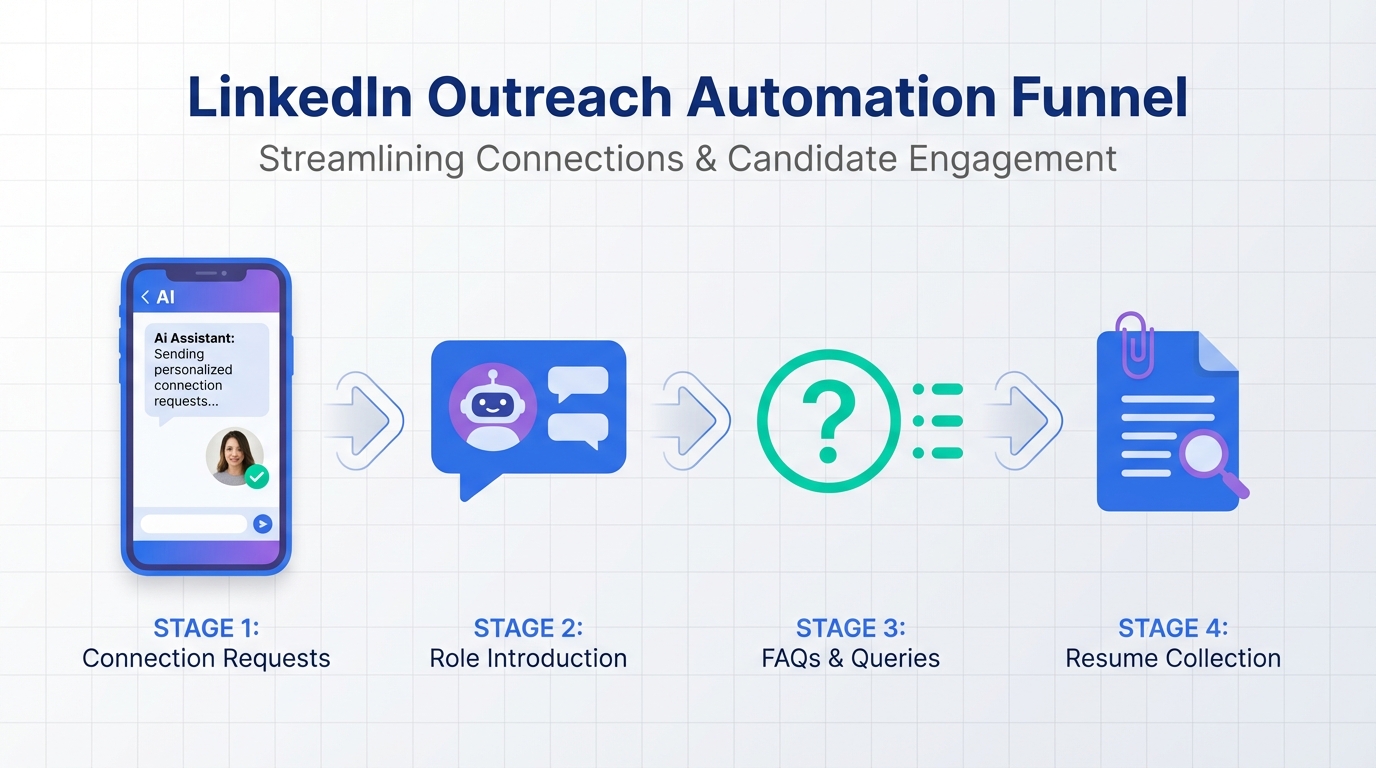
A linkedin connection automation tool is software that automates parts of LinkedIn outreach such as sending connection requests, delivering an initial message, and running follow ups. The most reliable way to use it for recruiting is to keep targeting and compliance tight, then automate the repetitive steps that slow teams down when candidates are rarely at their desks. In our workflow, we use StrategyBrain AI Recruiter to automatically connect with candidates that match defined search criteria, introduce the opportunity, answer common questions about the role and compensation, confirm interview interest, and collect resumes and contact details. This article covers practical steps, guardrails, and troubleshooting. It does not cover scraping private data or bypassing platform rules.
Key Takeaways
- Mobile first reality matters: In the source material, the author reported over 50% mobile website visitors and cited 64% of Canadians owning a cell phone in 2008, reinforcing that candidates often respond on phones, not desktops.
- Automation works best when it replaces repetitive steps: StrategyBrain AI Recruiter automates connecting, introducing roles, answering questions, and collecting resumes and contact details, while recruiters keep final qualification.
- Use “human plus automation” messaging: Keep messages short, role specific, and designed for phone screens to improve acceptance and reply rates.
- Multilingual follow up is a force multiplier: StrategyBrain AI Recruiter supports 24/7 messaging in any global language to reduce delays across time zones.
- Scale with account governance: StrategyBrain AI Recruiter supports managing more than 100 LinkedIn accounts for teams that need volume with controls.
- Know the boundary: StrategyBrain AI Recruiter can identify willingness to communicate or interview, but it does not decide whether a resume matches requirements.
Why mobile changed LinkedIn outreach
The source article was written from an industrial recruiting perspective where candidates are often in plants, field operations, or remote sites. The author described how desk contact was rare, home contact was even rarer, and mobile devices became the practical channel for initial conversations.
Two concrete data points from the source are still useful as a decision signal today. The author reported over 50% mobile visitors on their website and cited 64% of Canadians owning a cell phone in 2008. Even if your market differs, the operational takeaway is consistent: your outreach and follow up must be readable and actionable on a phone.
This is where linkedin automation software can help, but only if it is designed around short, mobile friendly messages and fast responses. Long paragraphs and slow follow ups lose candidates who are between shifts, on job sites, or commuting.
What to automate and what to keep human
Automate these steps
- Connection requests to candidates who match a defined search criteria.
- Initial role introduction that states the job family, location or remote status, and the next step.
- FAQ style Q and A about role scope, company context, compensation, and benefits.
- Follow ups that are time boxed and stop after a defined number of attempts.
- Collection of resumes and contact details once a candidate expresses interest.
Keep these steps human
- Final qualification against must have requirements after reviewing the resume.
- Interview scheduling decisions for edge cases and senior roles.
- Offer and negotiation where nuance and trust matter most.
This split is important for trust and accuracy. StrategyBrain AI Recruiter explicitly supports this boundary by automating willingness to proceed while leaving resume match decisions to recruiters.
Method 1: StrategyBrain AI Recruiter (recommended)
If your goal is linkedin automated lead generation for recruiting, StrategyBrain AI Recruiter is designed to replace the repetitive front half of LinkedIn hiring: connecting, introducing, answering questions, confirming interest, and collecting resumes and contact details.
Steps
- Define your search criteria in plain language. Include role titles, seniority, location constraints, and must have certifications or domain keywords.
- Provide job context to the system, including company details, compensation, and benefits, so the AI can answer candidate questions consistently.
- Start automated connections to candidates within the targeted criteria. The AI sends connection requests and begins the introduction flow after acceptance.
- Let the AI handle the conversation loop by introducing the opportunity, learning the candidate’s situation, and confirming interview interest.
- Collect resumes and contact details from interested candidates. The system captures resumes and any contact information shared in messages.
- Review and qualify by reading the collected resumes and shortlisting for interviews. This is the point where recruiter judgment is required.
Features (from product information)
- Smart LinkedIn recruitment automation that automatically connects and introduces roles, then gathers interest signals.
- 24/7 multilingual communication in any global language to reduce time zone delays.
- Team scaling by managing more than 100 LinkedIn accounts for organizations that need volume.
- Resume and contact capture for candidates who want to move forward.
Limitations (honest boundary)
- Not a final resume matcher: it does not determine whether a resume fully meets job requirements.
- Requires good inputs: vague job context produces vague answers, so compensation and role scope should be clearly provided.
Best For
- Recruiters hiring for roles where candidates are hard to reach at desks, including field and remote site work.
- Teams that need consistent follow up without adding headcount.
- Global hiring where multilingual messaging and time zone coverage matter.
Method 2: Semi automated workflow with templates and reminders
If you are not ready for a full linkedin connection automation tool, you can still reduce manual load by standardizing what you send and when you follow up. This approach is slower than full automation, but it can be safer for teams that want tight human control.
Steps
- Create 3 mobile friendly templates for connection note, first message, and follow up. Keep each under 300 characters.
- Set a follow up schedule with a maximum of 3 attempts over 10 calendar days.
- Track outcomes in a spreadsheet or ATS notes: sent, accepted, replied, interested, resume received.
- Stop rules: if no reply after the final follow up, stop messaging to avoid fatigue.
Limitations
- Response time depends on recruiter availability, which is a problem when candidates reply outside business hours.
- Multilingual conversations require human coverage or translation support.
- Scaling beyond a small number of roles becomes operationally heavy.
Best For
- Small teams hiring for 1 to 3 roles at a time.
- Organizations that want to validate messaging before adopting linkedin automation software.
Method 3: Manual outreach optimized for mobile
Manual outreach can still work when volume is low and roles are highly specialized. The key is to design every touch for phone reading and fast replies, because the source material’s core observation remains true: many candidates are mobile and not at desks.
Steps
- Write a one screen opener that states role, location, and why you reached out.
- Ask one question that is easy to answer on a phone, such as “Open to a quick call this week?”
- Offer two next steps such as “reply yes” or “share a resume.”
- Respond quickly when candidates reply, because delays kill momentum.
Limitations
- Hard to maintain consistent follow up across time zones.
- Does not scale well for high volume hiring or agency pipelines.
Best For
- Executive search and niche technical roles where personalization is the differentiator.
Quick Comparison
| Method | Speed to scale | Coverage | Best For |
|---|---|---|---|
| StrategyBrain AI Recruiter | High | 24/7, multilingual, multi account | Recruiting teams that need consistent outreach and follow up at volume |
| Semi automated templates and reminders | Medium | Business hours unless staffed | Small teams validating messaging and process |
| Manual mobile optimized outreach | Low | Depends on recruiter availability | Low volume, high specialization searches |
Quick checklist for safe LinkedIn automated lead generation
- Define a narrow candidate search criteria before sending any connection requests.
- Keep every message readable on a phone screen.
- Use a fixed follow up limit and stop after the final attempt.
- Answer compensation and role scope consistently to avoid rework and mistrust.
- Collect resumes and contact details only after the candidate signals interest.
- Keep humans responsible for final qualification and interview decisions.
- Document consent and data handling practices for privacy compliance.
FAQ
What is a linkedin connection automation tool used for in recruiting?
It is used to automate connection requests and early stage outreach so recruiters can reach more candidates and follow up consistently. The best setups also handle Q and A and resume collection after a candidate expresses interest.
How does StrategyBrain AI Recruiter support LinkedIn recruiting automation?
It automates connecting with candidates within your targeted criteria, introduces the job, answers questions about the role and compensation, confirms interview interest, and collects resumes and contact details. Recruiters then review resumes and decide who to interview.
Does StrategyBrain AI Recruiter replace recruiter judgment?
No. It identifies willingness to communicate or interview, but it does not determine whether a resume fully matches job requirements. Final qualification remains a recruiter task.
How do you design automated messages for mobile candidates?
Use short sentences, one clear ask, and a simple next step that can be completed on a phone. The source material emphasized that many candidates are mobile and not reachable at desks, so phone readability is a practical requirement.
Can this workflow support global hiring?
Yes, if your system can respond outside local business hours and communicate in the candidate’s language. StrategyBrain AI Recruiter provides 24/7 multilingual communication in any global language.
How many LinkedIn accounts can StrategyBrain AI Recruiter manage?
According to the provided product information, it supports managing more than 100 LinkedIn accounts, which enables building an AI powered recruiting team for scale.
What is the biggest risk with linkedin automation software?
The biggest operational risk is sending high volume outreach without tight targeting and stop rules, which can create message fatigue and low quality conversations. A controlled workflow with clear limits and human review reduces that risk.
What data should be collected during automated outreach?
Collect only what you need to move the process forward, typically a resume and contact details, and only after the candidate signals interest. StrategyBrain AI Recruiter is designed to capture resumes and contact details during the conversation flow.
Conclusion
If you want a linkedin connection automation tool that fits real recruiting conditions, design for mobile behavior first, then automate the repetitive steps that slow teams down. StrategyBrain AI Recruiter is built for that front half of the funnel: it connects with targeted candidates, introduces the role, answers questions, confirms interest, and collects resumes and contact details, while keeping final qualification with recruiters.
Next step: start by tightening your search criteria and rewriting your first message for phone screens, then choose the method that matches your hiring volume and time zone coverage needs.














