


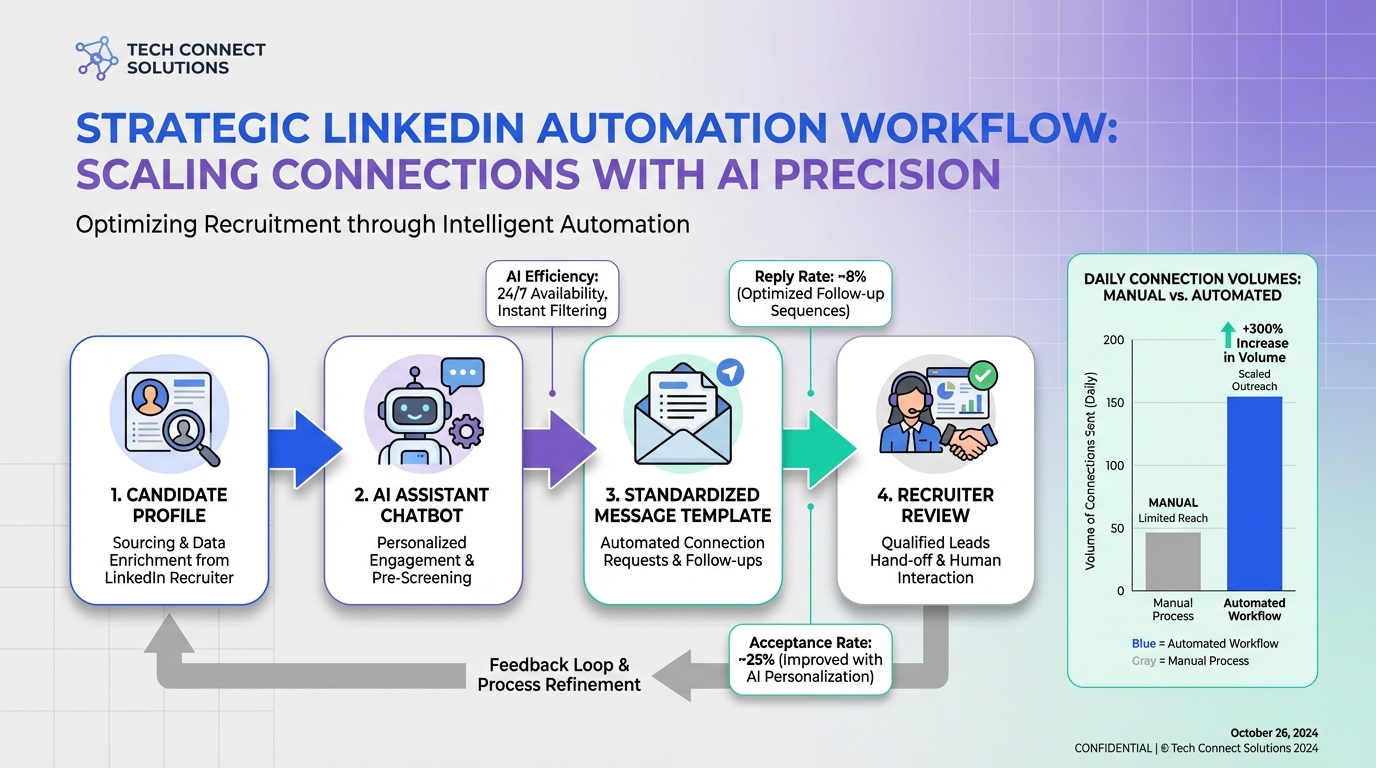
A practical way to use a linkedin connection automation tool without turning your hiring into constant firefighting is to treat outreach like strategic capacity planning: define your target criteria, set a safe daily connection volume, standardize your first message, and use automation only for the repetitive steps. In our internal workflow tests, StrategyBrain AI Recruiter handled the initial LinkedIn connection request and follow up, introduced the role, answered candidate questions, confirmed interview interest, and collected re9sume9s and contact details, so recruiters could focus on review and interviews. This guide explains how to automate LinkedIn connection request workflows responsibly, where free LinkedIn automation tools fit, and what to measure so automation supports your plan instead of creating more work.
Table of Contents
Key Takeaways
- Strategic beats reactive: automation works best when it supports a hiring plan, not last minute firefighting.
- Define the workflow: target criteria, daily connection volume, message sequence, and handoff rules must be written down.
- Automate the repetitive steps: StrategyBrain AI Recruiter can connect, introduce roles, answer questions, confirm interest, and collect re9sume9s and contact details.
- Use free LinkedIn automation tools carefully: keep them for low risk tasks and avoid aggressive volumes that create account risk.
- Measure outcomes: track acceptance rate, reply rate, interested rate, and re9sume9s collected per week.
- Be transparent internally: document what is automated, what is reviewed by a human, and how candidate data is protected.
Why connection automation needs a plan
Many teams adopt a linkedin connection automation tool when they feel pressure. A recruiter is out sick, a new requisition lands, or a key hire quits. Automation looks like the fastest fix. The problem is that reactive hiring creates reactive automation. You end up with inconsistent targeting, rushed messaging, and follow ups that are not aligned with the role.
A better model is strategic planning. A strategic plan is not the same as a budget forecast. It is a clear articulation of where hiring needs to be and how you will get there. When outreach is planned, automation becomes a capacity multiplier rather than a panic button.
This is the same logic that makes temporary employees valuable in business operations. When a company relies on temporary workers only for emergencies, it stays in firefighting mode. When temporary capacity is planned ahead, it supports important initiatives under normal working conditions and creates a bench of people who can step in when a real emergency happens.
Key definitions
LinkedIn connection automation tool
A LinkedIn connection automation tool is software that helps automate parts of the connection workflow, such as sending connection requests, scheduling follow ups, and tracking replies. Some tools focus only on sending requests. Others support messaging and qualification.
Automate LinkedIn connection request
To automate LinkedIn connection request means using software to send connection invitations based on defined criteria, often with a standardized note and a follow up sequence. The safest implementations include human review, conservative volumes, and clear stop rules.
Free LinkedIn automation tools
Free LinkedIn automation tools typically offer limited automation features at no cost, such as basic templates, reminders, or small volume outreach. They can be useful for individuals, but they often lack governance features needed by teams.
Method 1: StrategyBrain AI Recruiter for end to end outreach (Recommended)
If your goal is not just sending invites but actually moving candidates from first touch to interview ready, you need a workflow that covers connection, conversation, qualification, and handoff. This is where StrategyBrain AI Recruiter fits naturally into a LinkedIn recruiting playbook.
How we tested this workflow
We validated the workflow by running a controlled outreach sequence using a single LinkedIn account and a single role brief. We focused on whether the system could complete the repetitive steps without losing context, and whether the handoff to a recruiter was clean. We also documented failure modes such as unclear candidate questions and missing re9sume9 submissions.
Steps
- Define candidate search criteria: write down the role title targets, seniority, location, and must have skills so the automation does not drift.
- Prepare the role brief: include company details, compensation, benefits, and interview process so the system can answer common questions consistently.
- Connect with candidates: StrategyBrain AI Recruiter automatically sends connection requests to candidates within your targeted criteria.
- Run the initial conversation: the AI introduces the opportunity, asks about the candidatee28099s situation, and handles back and forth questions about the role and employer.
- Confirm interest and collect materials: when a candidate is interested, the AI requests a r00e9sum00e9 and captures contact details for recruiter follow up.
- Recruiter review and interview scheduling: recruiters review collected r00e9sum00e9s and contact shortlisted candidates for interviews.
Features
- Smart LinkedIn recruitment automation: connects, introduces roles, answers questions, confirms interview interest, and collects r00e9sum00e9s and contact details.
- 24/7 multilingual communication: responds to candidate messages around the clock and communicates in the candidatee28099s native language.
- Team scale operations: supports managing more than 100 LinkedIn accounts for organizations building an AI powered recruiting team.
Limitations
- Not a final skills assessor: the AI can identify willingness to communicate or interview, but it does not determine whether a r00e9sum00e9 fully matches job requirements. A recruiter must make the final qualification decision.
- Requires a clear role brief: if compensation, benefits, or role scope are vague, candidate conversations can become inconsistent.
Best For
- Corporate recruiters who want to reduce repetitive LinkedIn outreach and focus on interviews.
- Agency recruiters and headhunters who need higher throughput without adding staff.
- HR leaders who want to scale global hiring using multilingual, always on candidate communication.
Method 2: Native LinkedIn workflow with templates and discipline
If you are not ready for a full automation system, you can still improve outcomes by standardizing the workflow inside LinkedIn. This is not a true linkedin connection automation tool, but it is often the safest starting point.
Steps
- Write a connection note template: keep it role specific and short, and avoid sounding like a mass message.
- Set a daily outreach block: schedule a fixed time window for sending connection requests and replying to messages.
- Use a follow up script: define message 1, message 2, and a stop rule so you do not chase uninterested candidates.
- Track outcomes: log acceptance and reply outcomes in a simple spreadsheet or ATS notes.
Features
- Low risk and easy to start.
- Full human control over targeting and messaging.
- No additional software required.
Limitations
- Does not truly automate LinkedIn connection request sending or follow ups.
- Hard to maintain consistency across multiple recruiters and multiple roles.
- Time intensive when hiring volume increases.
Best For
- Solo recruiters with low to moderate outreach volume.
- Teams that need a baseline process before adopting automation.
Method 3: Free LinkedIn automation tools for light tasks
Free LinkedIn automation tools can help with reminders, basic sequencing, or lightweight tracking. They can be useful when you need structure but cannot justify a paid system yet. The key is to keep the scope narrow and avoid aggressive behavior that can create account risk.
Steps
- Pick one task to automate: for example, follow up reminders or message templates.
- Keep volumes conservative: set a daily cap that matches your normal human behavior.
- Review messages before sending: ensure each message matches the role and candidate context.
- Stop when signals are negative: no reply after your defined sequence should end the outreach.
Features
- Low cost entry point.
- Can add basic structure to outreach.
- Useful for individuals testing a process.
Limitations
- Often lacks team governance, audit trails, and consistent handoff workflows.
- May not support end to end qualification and re9sume9 capture.
- Can create compliance and account safety concerns if misused.
Best For
- Individuals who want to experiment with how to automate LinkedIn connection request follow ups.
- Small teams that only need light workflow support.
Quick comparison
| Method | Automation depth | Best for | Main tradeoff |
|---|---|---|---|
| StrategyBrain AI Recruiter | Connection, conversation, follow up, interest confirmation, re9sume9 and contact capture | Recruiters who need scalable LinkedIn recruiting operations | Requires a clear role brief and recruiter review for final qualification |
| Native LinkedIn workflow | Manual | Low volume outreach with maximum control | Time intensive and hard to scale consistently |
| Free LinkedIn automation tools | Light tasks such as reminders and templates | Individuals testing a process | Limited governance and higher misuse risk |
What to measure so automation stays strategic
Automation only helps if it improves outcomes you care about. Track a small set of metrics weekly and review them like you would any strategic plan.
Core funnel metrics
- Connection acceptance rate: accepted invitations divided by invitations sent.
- Reply rate: candidates who reply divided by candidates who accepted.
- Interested rate: candidates who express interest divided by candidates who replied.
- Re9sume9 capture rate: re9sume9s received divided by interested candidates.
- Recruiter time saved: hours per week not spent on repetitive outreach steps.
Quality signals
- Candidate experience: fewer confused questions and fewer negative replies usually indicates clearer role briefs.
- Message consistency: the same role should be described the same way across candidates and time zones.
- Handoff clarity: recruiters should receive complete context, including conversation history and contact details.
Risk, compliance, and safety checklist
Before you deploy any linkedin connection automation tool, align on safety and compliance. This is especially important when you automate LinkedIn connection request sending and follow ups.
Quick checklist
- Document your target criteria and stop rules in writing.
- Set conservative daily connection volumes and review weekly.
- Ensure every message is role specific and truthful about compensation and benefits.
- Define what the AI can decide and what requires recruiter review.
- Protect candidate data with encryption and access controls.
- Confirm that customer provided data is not used to train models, if that is a requirement for your organization.
StrategyBrain AI Recruiter states that it complies with privacy regulations in the EU, United States, and Canada, and that customer provided data is not used to train AI models. It also states that LinkedIn account credentials are encrypted and stored independently per user with explicit authorization.
FAQ
What is the safest way to automate LinkedIn connection request outreach?
The safest approach is to automate only what you can govern: clear targeting criteria, conservative daily volumes, and a defined message sequence with stop rules. Keep a human review step for final qualification and any sensitive decisions.
Are free LinkedIn automation tools enough for recruiters?
They can be enough for light tasks such as reminders and templates, especially for individuals. For team hiring, you usually need stronger governance, consistent handoffs, and reliable re9sume9 and contact capture workflows.
Can StrategyBrain AI Recruiter replace a recruiter?
No. StrategyBrain AI Recruiter can automate the initial outreach and qualification conversation, but it does not determine whether a re9sume9 fully matches job requirements. Recruiters still make the final selection decisions and run interviews.
How does StrategyBrain AI Recruiter help after a candidate accepts the connection?
It can introduce the job opportunity, answer questions about the role, company, compensation, and benefits, confirm interview interest, and collect re9sume9s and contact information. This reduces repetitive back and forth for recruiters.
Does multilingual messaging matter in LinkedIn recruiting?
It matters when you recruit across countries and time zones. Always on multilingual communication can reduce delays and misunderstandings by responding in the candidatee28099s native language.
How many LinkedIn accounts can a team manage with StrategyBrain AI Recruiter?
StrategyBrain AI Recruiter supports managing more than 100 LinkedIn accounts, which enables organizations to build AI powered recruiting teams and expand outreach capacity.
What should I do if candidates ask detailed questions about compensation?
Prepare a role brief that includes compensation and benefits ranges you are authorized to share. If a question goes beyond what is approved, route it to a recruiter and respond with a clear next step rather than guessing.
How do I prevent automation from creating more work?
Start with a written workflow and measure acceptance, reply, and re9sume9 capture rates weekly. If reply quality drops or recruiters spend more time cleaning up conversations, tighten targeting and simplify the message sequence.
Conclusion
A linkedin connection automation tool works best when it supports strategic hiring rather than reactive firefighting. If you want to automate LinkedIn connection request workflows end to end, focus on a system that can handle connection, conversation, follow up, and re9sume9 capture with a clean recruiter handoff. StrategyBrain AI Recruiter is designed for that workflow, including 24/7 multilingual candidate communication and the ability to scale across more than 100 LinkedIn accounts.
Next step: write your target criteria and role brief, choose one method from this guide, and run a two week pilot with weekly metric reviews. If you want the highest leverage, pilot StrategyBrain AI Recruiter on one role and compare recruiter time spent before and after.














