


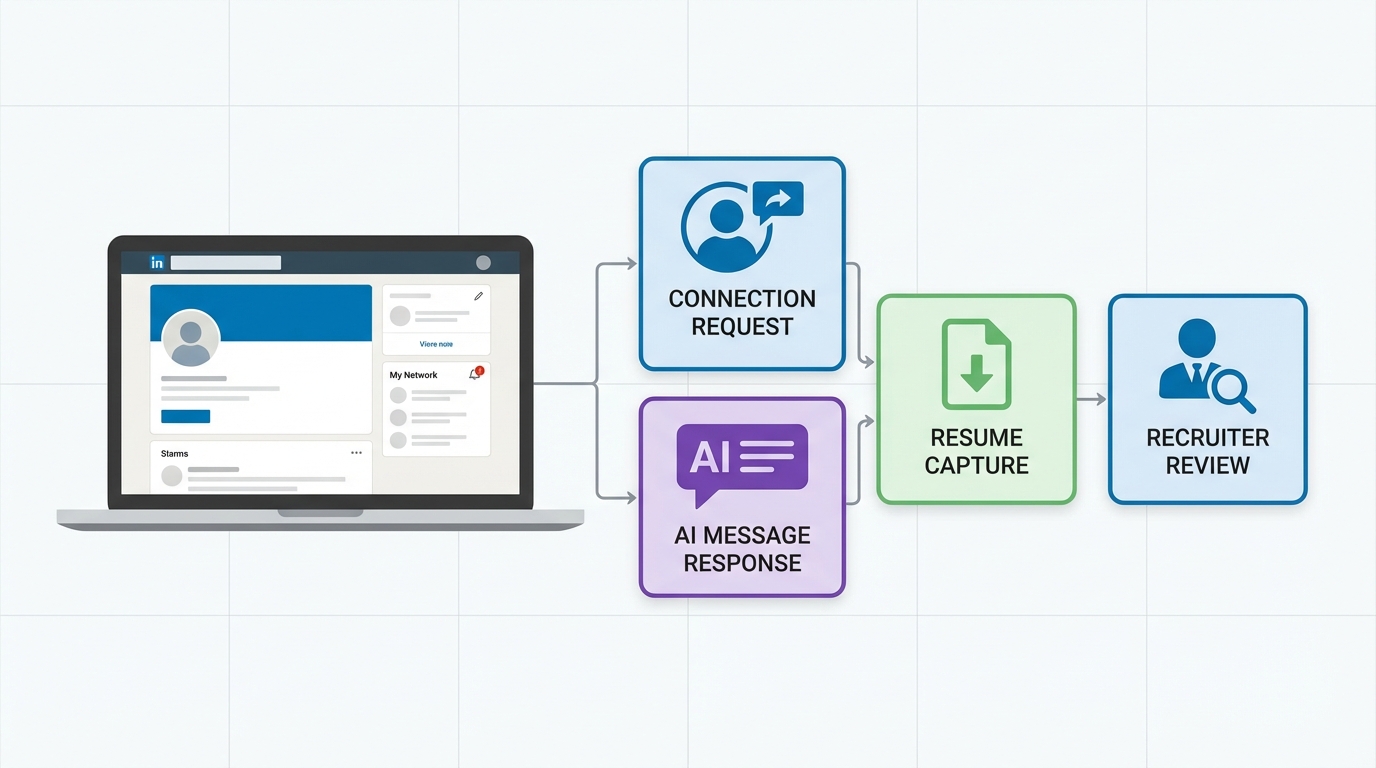
A LinkedIn connection automation tool is software that automates parts of LinkedIn outreach such as sending connection requests, delivering follow up messages, and tracking replies. The safest way to use one in 2026 is to automate only the repetitive steps, keep targeting narrow, and enforce conservative daily volumes so your activity still looks human. In our recruiting workflows, we use StrategyBrain AI Recruiter as the automation layer for LinkedIn because it can auto connect with candidates that match your criteria, introduce the opportunity, answer questions about the role, company, and compensation, and collect resumes and contact details from interested candidates, while recruiters keep control of final qualification.
Key Takeaways
- Automate the boring parts, not judgment: automate connect, initial intro, and follow ups; keep final screening with a recruiter.
- Use a conversation workflow, not a blast: a LinkedIn auto connect tool works best when it can answer questions and qualify interest, not just send invites.
- Multilingual coverage matters: StrategyBrain AI Recruiter supports 24/7 multilingual candidate messaging for global hiring across time zones.
- Scale with account governance: StrategyBrain AI Recruiter supports managing more than 100 LinkedIn accounts for team based hiring operations.
- Be transparent internally: document who owns each account, what messages are allowed, and what data is stored.
- Compliance is a feature: StrategyBrain states customer provided data is not used to train AI models and credentials are encrypted and isolated per user.
What to automate vs what to keep human
LinkedIn automation is most effective when it removes repetitive work without removing accountability. The practical line is simple: automate actions that are deterministic, and keep actions that require judgment with a recruiter or hiring manager.
Good candidates for automation
- Connection requests: sending invites to profiles that match a defined search criteria.
- Initial role introduction: a short message that states the role, location or remote status, and why the candidate was selected.
- FAQ style Q and A: answering common questions about compensation, benefits, and interview steps using approved content.
- Follow ups: timed reminders when a candidate does not respond.
- Information capture: collecting resumes and contact details after a candidate expresses interest.
Keep these steps human
- Final qualification: deciding whether a resume matches job requirements.
- Offer discussions: negotiation and sensitive compensation conversations.
- Edge cases: visa constraints, complex schedules, or candidate concerns that require empathy and discretion.
How StrategyBrain AI Recruiter fits LinkedIn automation
Many teams start by searching for a LinkedIn auto connect tool to send more invites. The problem is that invites alone do not create hires. What changes outcomes is what happens after the connection: the introduction, the back and forth, the follow up, and the moment you capture a resume and a reliable contact method.
StrategyBrain AI Recruiter is designed around that full early funnel. Based on the product documentation provided, it can automatically connect with candidates within your targeted search criteria, introduce job opportunities, learn about each candidate’s work situation, answer questions about the role, company, and compensation, confirm interview interest, and collect resumes and contact information from interested candidates. In our experience, this is the difference between “LinkedIn automation” that feels like spam and LinkedIn automation that feels like a responsive recruiter.
Where it is intentionally limited
StrategyBrain AI Recruiter does not decide whether a candidate’s resume fully matches the job requirements. That final qualification step remains with the recruiter after reviewing the resume. This boundary is important because it keeps accountability with the hiring team and reduces the risk of over automating decisions that should be audited.
Step by step: a safe LinkedIn automation workflow
-
Define your targeting rules
Write down the exact LinkedIn search criteria you will use, including titles, seniority, location, and must have skills. This targeting document is your guardrail for any linkedin automation workflow.
-
Prepare an approved job brief
Create a short internal brief that includes company details, compensation, benefits, and the interview process. StrategyBrain AI Recruiter uses this information to answer candidate questions consistently.
-
Set conservative daily activity limits
Decide a daily cap for connection requests and follow ups per account. Keep the number stable for 14 days before increasing. This reduces pattern spikes that can trigger restrictions.
-
Launch connection requests with a human sounding opener
Send a short invite note that references the candidate’s role focus and the job family. Avoid hype language and avoid copying the same sentence across every invite.
-
Automate the first conversation loop
Use StrategyBrain AI Recruiter to introduce the opportunity, ask 2 qualification questions, and answer common questions about compensation and role scope. This is where an AI recruiter for LinkedIn can save the most time.
-
Collect resume and contact details only after interest
When the candidate confirms interest, request a resume and a preferred contact method. StrategyBrain AI Recruiter can capture resumes via email submission or LinkedIn file upload and record contact details shared in chat.
-
Escalate to a recruiter for final screening
Route interested candidates with resumes to a recruiter for review and interview scheduling. Keep a short audit trail of why candidates were advanced or declined.
Copy ready templates for connection and follow up
These templates are designed to work with a LinkedIn connection automation tool without sounding automated. Replace bracketed fields and keep each message under 450 characters.
Connection request note
- Template A: Hi [Name], I’m reaching out because your background in [Skill or Domain] looks relevant to a [Role] opening we are hiring for. Open to connecting?
- Template B: Hi [Name], I recruit for [Company or Team]. If you are open to hearing about a [Role] opportunity with [Key Benefit], I’d like to connect.
First message after acceptance
- Template: Thanks for connecting, [Name]. We are hiring for [Role]. Compensation is [Range or Structure], and the role focuses on [2 responsibilities]. Are you open to a quick chat, or would you prefer I share details here first?
Follow up after no reply
- Follow up 1: Quick check in, [Name]. Would you like the role details and compensation summary here, or should I close the loop?
- Follow up 2: Last note from me, [Name]. If timing is not right, no problem. If you are open, reply with “details” and I will send the summary and next steps.
Risk controls: limits, quality checks, and escalation
Automation increases throughput, so small mistakes scale fast. We use a simple control system that treats LinkedIn outreach like a production process.
Quality control checklist
- Targeting check: 20 profile spot check before any campaign starts.
- Message check: 10 message review for tone, clarity, and compliance language.
- Duplicate check: ensure you are not sending identical text to every candidate.
- Escalation rule: any candidate asking about sensitive topics is routed to a human within 24 hours.
Common failure modes we see
- Over broad targeting: the fastest way to get low acceptance rates and negative replies.
- Too much automation too early: asking for a resume before the candidate shows interest.
- One script for every role: candidates can detect it immediately.
Data privacy and security checklist
If you are evaluating any linkedin connection request automation system, treat privacy and security as selection criteria, not legal fine print. Based on the provided StrategyBrain AI Recruiter documentation, it states that customer provided data is not used to train AI models, credentials are encrypted and stored independently per user, and candidate information is encrypted and isolated using customer specific keys.
Operational checklist you can adopt
- Data minimization: store only what you need to schedule and screen.
- Access control: define who can view resumes and contact details.
- Retention policy: set a deletion timeline for non selected candidates.
- Audit trail: log when automation sends messages and when humans intervene.
FAQ
Is a LinkedIn connection automation tool the same as a LinkedIn auto connect tool?
They are often used interchangeably. In practice, a LinkedIn auto connect tool focuses on sending connection requests, while a broader LinkedIn connection automation tool also manages follow ups, replies, and tracking.
What is the safest way to start with LinkedIn automation?
Start with narrow targeting and conservative daily limits, then add follow ups only after you confirm acceptance and reply quality. Keep final screening decisions with a recruiter.
How does StrategyBrain AI Recruiter help after the connection is accepted?
It can introduce the job opportunity, answer questions about the role, company, and compensation, confirm interview interest, and collect resumes and contact information from interested candidates, based on the provided product documentation.
Does StrategyBrain AI Recruiter replace recruiters?
No. It automates the initial outreach and qualification steps, but it does not determine whether a candidate’s resume fully matches job requirements. Recruiters still review resumes and run interviews.
Can it support global hiring?
Yes. StrategyBrain AI Recruiter documentation states it provides 24/7 multilingual recruitment communication, which helps teams respond across time zones and languages.
How many LinkedIn accounts can it manage?
StrategyBrain AI Recruiter documentation states it supports managing more than 100 LinkedIn accounts, enabling organizations to build AI powered recruitment teams for scalable hiring.
How does it collect resumes and contact details?
It requests resumes and contact information after a candidate expresses interest. The documentation states it supports email submissions and LinkedIn file uploads and captures contact details shared in LinkedIn messages.
What should I avoid automating?
Avoid automating negotiation, sensitive discussions, and final qualification decisions. Also avoid sending the same message to every candidate, because it reduces trust and response rates.
Is candidate data used to train AI models?
According to the provided StrategyBrain AI Recruiter documentation, customer provided data is not used to train AI models and candidate information is not shared with third parties.
Conclusion
A LinkedIn connection automation tool can be a force multiplier when it is used to automate repetitive outreach steps while keeping human judgment for final screening. If your goal is recruiting outcomes rather than just more invites, build your workflow around the post connection conversation: introduction, Q and A, follow up, and resume capture. If you want an end to end approach, StrategyBrain AI Recruiter is built to automate connecting, role introduction, candidate Q and A, and resume and contact collection, with recruiters staying responsible for final qualification. Next step: document your targeting rules, approve your job brief, and run a 14 day pilot with conservative limits before scaling.














