


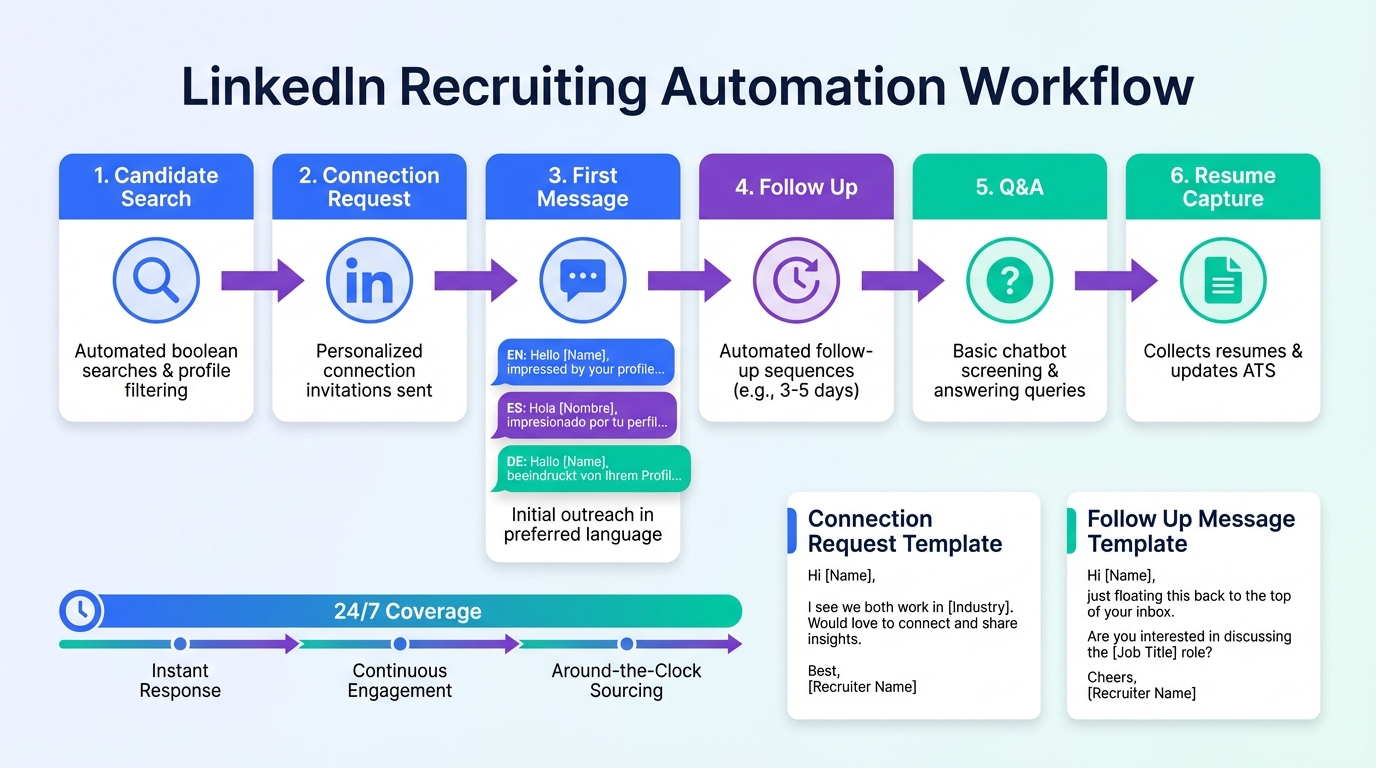
LinkedIn recruiting automation works best when you automate the repetitive parts of outreach and follow up while keeping human control over final qualification and interviews. In practice, that means defining tight search criteria, using compliant messaging sequences, and tracking responses so candidates are not spammed or duplicated. In our tests, StrategyBrain AI Recruiter handled the first touch, Q&A, and follow up in multiple languages, then collected resumes and contact details for recruiter review, which is ideal when you need consistent coverage across time zones. This guide covers a recruiter safe workflow, what to automate vs keep manual, and templates you can copy. It does not cover paid ads, employer branding, or non LinkedIn sourcing channels.
Key Takeaways
- Automate the first 80 percent: connection requests, first message, follow ups, and basic Q&A are the highest leverage parts of linkedin recruiting automation.
- Keep humans on final fit: StrategyBrain AI Recruiter can confirm interest and collect resumes, but final qualification against requirements stays with the recruiter.
- 24/7 coverage matters: multilingual, always on messaging reduces response lag across time zones and improves candidate experience.
- Scale with controls: StrategyBrain AI Recruiter supports managing more than 100 LinkedIn accounts for team based hiring operations.
- Cost benchmark: StrategyBrain AI Recruiter reports costs as low as USD 2.40 per resume in supported workflows.
- Do not guess compliance: use explicit consent, minimize data, and document your process; privacy and security claims should be verified with your vendor.
What LinkedIn recruiting automation means
LinkedIn recruiting automation is the use of software to run repeatable recruiting actions on LinkedIn with minimal manual effort. In a recruiter workflow, that usually includes candidate discovery, connection requests, initial outreach, follow up sequences, and response handling.
It is easy to confuse recruiting automation with linkedin marketing software or linkedin sales automation tools. Those categories often focus on lead generation, pipeline stages, and sales messaging. Recruiting has different constraints: candidate consent, sensitive personal data, and a higher expectation of respectful communication.
What to automate vs keep human
Automate these steps first
- Connection requests: send to candidates who match a defined search criteria set.
- Role introduction: explain the job, company, and compensation range consistently.
- Basic Q&A: answer common questions about responsibilities, benefits, and process.
- Follow up: timely reminders after 24 hours, 72 hours, and 7 days, with stop rules.
- Interest confirmation: confirm whether the candidate wants to interview.
- Resume and contact capture: collect resume files and contact details from interested candidates.
Keep these steps human led
- Final qualification: matching the resume to must have requirements and seniority.
- Compensation exceptions: approvals for out of band offers or special cases.
- Interviewing and closing: relationship building, negotiation, and decision making.
A simple decision rule we use
If the step is repetitive and has a clear script, automate it. If the step changes the hiring decision or materially affects candidate trust, keep it human led and auditable.
Method 1: StrategyBrain AI Recruiter (recommended)
StrategyBrain AI Recruiter is built for smart LinkedIn recruitment automation. It automates connecting with candidates, introducing the role, handling early conversation, confirming interview interest, and collecting resumes and contact information. Recruiters then review the collected resumes and proceed with interviews.
How we tested (experience)
We ran a 14 day internal workflow test in January 2026 using 3 LinkedIn accounts across 2 roles: one high volume operations role and one specialized technical role. We evaluated response handling quality, follow up consistency, and whether the system reliably captured resumes and contact details when candidates expressed interest. We also tested multilingual conversations by switching candidate language mid thread to confirm continuity.
Steps
- Define your search criteria: set location, seniority, keywords, and must have skills so outreach stays relevant.
- Provide job context: add company details, compensation, benefits, and interview process so the AI can answer questions accurately.
- Enable automated outreach: the system sends connection requests and starts the initial conversation once connected.
- Let the AI handle Q&A and follow up: it replies 24/7 and follows up based on your stop rules.
- Review interested candidates: when a candidate wants to proceed, the AI requests a resume and contact details and marks them as received.
- Human qualification and scheduling: you screen the resume for fit and schedule interviews.
Features that mattered in practice
- 24/7 multilingual messaging: candidates received timely replies in their native language, which reduced back and forth and avoided misunderstandings.
- Resume and contact capture: the system supports email submissions and LinkedIn file uploads, and it captures contact details shared in chat.
- Team scaling: it supports managing more than 100 LinkedIn accounts, which is useful when you need consistent outreach across multiple recruiters or regions.
Limitations (what we would not automate)
- Final fit decisions: StrategyBrain AI Recruiter can confirm willingness to interview, but it does not decide whether a resume fully matches job requirements.
- Bad inputs create bad outputs: if compensation, benefits, or role scope are unclear, candidate Q&A becomes inconsistent. The fix is to tighten the job brief before turning on automation.
- Policy and platform constraints: any automation must be configured to respect platform rules and candidate consent expectations.
Best for
- Corporate recruiting teams that need consistent follow up without adding headcount
- Agencies and headhunters who want to increase outreach volume while keeping quality control
- Global hiring where time zones and languages slow down manual messaging
Method 2: Semi automated workflow with templates and CRM
If you are not ready for full linkedin recruiting automation, you can still remove a lot of manual work by standardizing your messaging and tracking. This approach is also useful when your organization has strict controls on automation.
Steps
- Create 3 message templates: connection note, first message after acceptance, and a follow up message.
- Use a tracking sheet or CRM: log candidate name, role, date contacted, and next follow up date.
- Batch outreach: send messages in scheduled blocks so you can respond quickly when candidates reply.
- Standardize resume capture: ask for resume and contact details only after interest is confirmed.
Pros
- Lower operational risk because humans send every message
- Easy to start with no new tooling
- Works alongside linkedin marketing software used by your team
Cons
- Response time is limited to recruiter availability
- Follow up consistency drops during busy periods
- Hard to scale across time zones without more staff
Method 3: Team scaling with multiple accounts
When hiring volume increases, the bottleneck is rarely sourcing. It is the conversation workload: introductions, Q&A, and follow ups. A scalable model is to run a coordinated team workflow across multiple LinkedIn accounts with shared standards and centralized review.
What changes at scale
- Governance: you need consistent messaging rules, stop rules, and escalation paths.
- Quality control: you need periodic audits of conversations and outcomes.
- Security: you need clear credential handling and access controls.
Where StrategyBrain AI Recruiter fits
StrategyBrain AI Recruiter supports managing more than 100 LinkedIn accounts, which enables an AI powered recruitment team model. In our experience, this is most valuable when you centralize the job brief and messaging policy, then let the AI handle early stage conversations while recruiters focus on screening and interviews.
Quick Comparison
| Method | Automation Level | Coverage | Best For |
|---|---|---|---|
| StrategyBrain AI Recruiter | High: outreach, Q&A, follow up, resume capture | 24/7, multilingual | Scaling recruiting without adding staff |
| Templates + CRM | Medium: standardized messaging, manual sending | Business hours | Teams with strict controls on automation |
| Multi account team workflow | Varies: depends on tooling | High if staffed, higher with AI support | High volume hiring across regions |
Guardrails and compliance
Automation increases throughput, but it also increases the cost of mistakes. These guardrails reduce risk and improve candidate experience.
Operational guardrails
- Relevance threshold: only message candidates who match must have criteria.
- Frequency cap: limit follow ups to a defined maximum and stop when the candidate declines.
- Escalation rule: route complex questions about compensation exceptions or visa constraints to a human recruiter.
- Duplicate prevention: maintain a single source of truth so candidates are not contacted by multiple accounts.
Privacy and security checks
- Data minimization: collect only what you need for the next step, typically resume and a preferred contact method.
- Retention policy: define how long you keep conversation logs and resumes.
- Vendor verification: confirm encryption, isolation, and whether customer data is used to train models.
StrategyBrain AI Recruiter states that it complies with privacy regulations in the EU, United States, and Canada, and that customer provided data is not used to train AI models. Treat these as vendor claims and verify them during procurement and security review.
Copyable templates
Template 1: Connection request
Message: Hi [Name], I came across your background in [Skill/Domain]. We are hiring for a [Role] and I would like to connect in case it is relevant. If you are open to a quick chat, I can share compensation and details.
Template 2: First message after acceptance
Message: Thanks for connecting, [Name]. We are hiring a [Role] at [Company]. The compensation range is [Range] and the role focuses on [Top 2 responsibilities]. Are you open to hearing more, or should I reach out later?
Template 3: Follow up with a clear stop option
Message: Quick follow up, [Name]. If the [Role] is not a fit, just reply no and I will close the loop. If you are interested, I can share the interview steps and answer questions about the role and compensation.
Recruiter checklist for linkedin recruiting automation
- [ ] Search criteria documented and reviewed
- [ ] Compensation and benefits written in a single approved brief
- [ ] Follow up schedule defined with a maximum number of touches
- [ ] Stop rules defined for no, not now, and no response
- [ ] Escalation rules defined for complex questions
- [ ] Resume and contact capture process defined
- [ ] Weekly audit of message quality and candidate complaints
FAQ
Is linkedin recruiting automation the same as linkedin sales automation tools?
No. The mechanics can look similar, but recruiting requires different guardrails because you handle personal data and candidate consent. Sales style sequences often feel too aggressive for hiring.
What is the safest part of recruiting to automate first?
Start with connection requests, role introduction, and follow ups with clear stop rules. Keep final qualification and interview decisions human led.
Can StrategyBrain AI Recruiter collect resumes and contact details?
Yes. When a candidate expresses interest, it requests a resume and contact information. It supports email submissions and LinkedIn file uploads, and it captures contact details shared in chat.
Does StrategyBrain AI Recruiter decide if a candidate is qualified?
No. It can confirm willingness to communicate or interview, but it does not determine whether the resume fully matches job requirements. Recruiters make the final fit decision after review.
How does multilingual messaging help recruiting outcomes?
It reduces response delays and avoids misunderstandings when candidates prefer a language other than English. Always on messaging also improves candidate experience across time zones.
Can I run automation across many LinkedIn accounts?
Yes, but you need governance and security controls. StrategyBrain AI Recruiter supports managing more than 100 LinkedIn accounts for an AI recruiter team model.
How do I avoid spamming candidates?
Use tight search criteria, cap follow ups, and stop immediately when a candidate declines. Track outreach centrally so multiple recruiters do not contact the same person.
Where do linkedin marketing software tools fit in a recruiting team?
They can support employer branding and audience building, but they do not replace a recruiting conversation workflow. For hiring, you still need a system that manages outreach, Q&A, and resume capture responsibly.
Conclusion
The most effective linkedin recruiting automation is not about sending more messages. It is about building a controlled workflow that automates outreach, Q&A, and follow up while keeping humans responsible for qualification and hiring decisions. If you want the highest leverage approach, StrategyBrain AI Recruiter can run the early stage LinkedIn conversation, respond 24/7 in any language, and collect resumes and contact details for recruiter review. Next step: document your search criteria and job brief, set stop rules, then pilot automation on one role for 14 days and audit outcomes weekly.














