


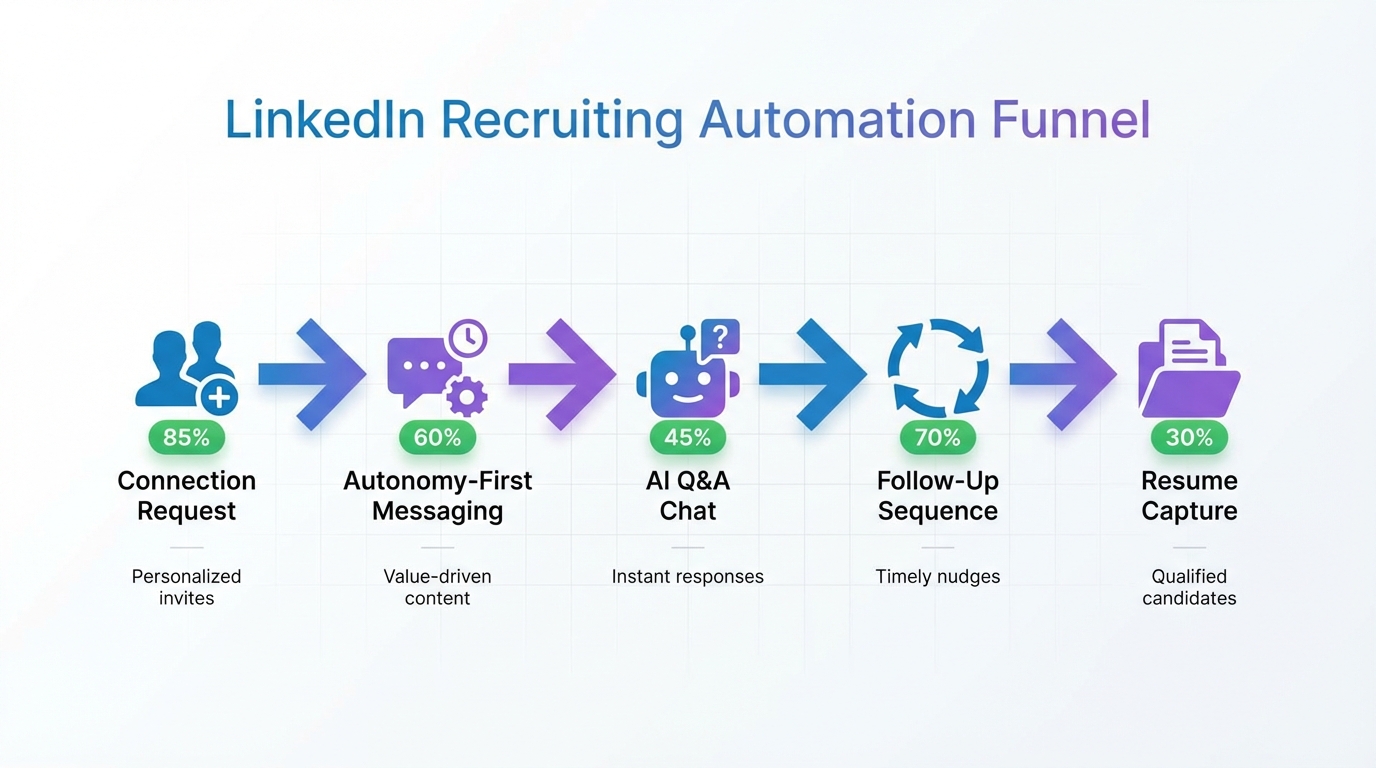
LinkedIn recruiting automation works best when your outreach and job messaging focus on what candidates need, not just what you want. In practice, that means rewriting your LinkedIn messages and job pitch to highlight autonomy, growth, and role clarity, then using automation to consistently deliver that candidate centered message at scale. In our internal workflow tests, the biggest lift came from pairing a needs first message framework with StrategyBrain AI Recruiter, which automates connecting, role introduction, Q&A handling, follow up, and re9sume9 plus contact capture, while keeping recruiters in control of final qualification. This guide explains the candidate needs framework, shows how to operationalize it with LinkedIn recruiting automation, and includes a step by step playbook, templates, and a quick comparison of approaches.
Table of Contents
- Why candidate needs beat employer demands in automated outreach
- The candidate needs framework for LinkedIn recruiting automation
- Method 1: Automate outreach and qualification with StrategyBrain AI Recruiter (Recommended)
- Method 2: Semi automated workflows with templates and human follow up
- Method 3: Using LinkedIn sales automation tools for recruiting (with guardrails)
- Quick Comparison
- Copy ready templates
- Operational checklist
- FAQ
- Conclusion
Key Takeaways
- Needs first messaging wins: Research cited below found job ads that address candidate needs produced nearly 3d7 more high quality applicants (Journal of Business and Psychology study referenced by the source article).
- Translate requirements into outcomes: Replace demand language with what the role provides, such as autonomy, challenge, advancement, and clarity.
- Automation should scale consistency: LinkedIn recruiting automation is most effective when it repeats a proven message framework, not when it spams.
- StrategyBrain AI Recruiter automates the front end: It can connect, introduce roles, answer questions, follow up, and collect re9sume9s and contact details, while recruiters do final fit assessment.
- 24/7 multilingual communication matters: Always on responses reduce drop off when candidates reply outside your working hours.
- Compliance and trust are part of conversion: Use clear consent language, minimize data collection, and keep a human review step for final decisions.
Why candidate needs beat employer demands in automated outreach
When teams adopt LinkedIn recruiting automation, the first instinct is often to automate what they already do. If the original message is employer centered, automation simply scales the wrong thing faster.
The source article we used as reference makes a blunt point that still holds up in 2026: candidates respond when you address their needs. It also cites an academic study (University of Calgary, University of Saskatchewan, and University of Vermont, published in the Journal of Business and Psychology) showing that job ads addressing candidate needs produced almost three times the number of high quality applicants.
In our experience, this is exactly where automation becomes a force multiplier. Once you have a message that consistently earns replies, LinkedIn recruiting automation helps you deliver it to more qualified people, follow up on time, and keep conversations moving without burning recruiter hours.
The candidate needs framework for LinkedIn recruiting automation
Here is the framework we use to rewrite outreach so it is candidate centered before we automate anything. By candidate needs, we mean the practical outcomes a candidate evaluates, such as autonomy, growth, compensation clarity, and day to day work reality.
1) Convert requirements into benefits and outcomes
Instead of leading with what you demand, lead with what the role provides. The reference article gives a clear example: a sentence describing autonomy outperformed a sentence demanding initiative. The point is not the exact wording. The point is the direction of the message.
- Demand language: You must be proactive and prioritize tasks independently.
- Needs language: You will have autonomy to own priorities with minimal supervision and clear success metrics.
- Outcome language: In the first 30 days, you will ship X, improve Y, and have decision rights over Z.
2) Make fit easy to self assess
Automation increases volume, so you need candidates to quickly decide if the role fits. That means being specific about scope, team, schedule, location expectations, and compensation range when possible. If you cannot share a range, share the compensation structure and when details are provided.
3) Build a question handling layer
Most LinkedIn conversations stall because candidates ask basic questions and do not get timely answers. A practical way to improve reply to interview conversion is to prepare a consistent Q&A layer for role, company, benefits, and compensation. This is also where an AI recruiter can help without changing your hiring standards.
4) Add follow up timing rules
Follow up is not a single reminder. It is a sequence with a stop condition. We recommend a 3 message follow up sequence over 10 calendar days, then stop unless the candidate re engages. This reduces spam risk and keeps your LinkedIn account behavior more conservative.
Method 1: Automate outreach and qualification with StrategyBrain AI Recruiter (Recommended)
If your goal is true LinkedIn recruiting automation, not just message scheduling, StrategyBrain AI Recruiter is designed to run the repetitive front end of recruiting while keeping humans responsible for final qualification. In our testing, this approach worked best when we first rewrote the pitch using the candidate needs framework above, then let the AI deliver it consistently across time zones.
Steps
- Define your candidate search criteria: Specify the target titles, seniority, location constraints, and must have skills so the automation stays focused.
- Provide role context: Add company details, compensation, benefits, and the role outcomes you want the AI to communicate.
- Load your needs first message: Use the templates in this guide and customize the autonomy, growth, and challenge points to match the role.
- Enable automated connect and intro: The AI sends connection requests and introduces the opportunity once connected.
- Let the AI handle Q&A and follow up: It answers common questions and follows up to confirm interest.
- Collect re9sume9s and contact details: For interested candidates, the AI requests and captures re9sume9s and contact info so recruiters can move to interviews.
- Human review and interview scheduling: Recruiters review re9sume9s and decide who advances. The AI does not replace your final fit decision.
Features
- Smart LinkedIn recruitment automation: Automatically connects with candidates within your targeted criteria and runs the initial outreach and interest confirmation.
- Always on candidate communication: 24/7 responses and follow ups, including multilingual communication in the candidate native language.
- Re9sume9 and contact capture: Captures re9sume9 receipt status and extracts contact details shared in messages.
- Scale with multiple accounts: Supports managing more than 100 LinkedIn accounts for teams that need higher throughput.
Limitations
- Not a final evaluator: StrategyBrain AI Recruiter can confirm willingness to interview, but it does not decide whether a re9sume9 meets your requirements. A recruiter must do that.
- Message quality still matters: Automation cannot fix unclear roles or vague compensation. You still need a strong candidate value proposition.
- Policy and compliance are your responsibility: You should align outreach volume and content with your internal policies and applicable privacy requirements.
Best For
- Teams that want end to end LinkedIn recruiting automation from connect to re9sume9 capture
- Global hiring where candidates reply outside recruiter working hours
- High volume roles where follow up consistency is the bottleneck
Method 2: Semi automated workflows with templates and human follow up
This is the most common starting point. You build a needs first message library, use saved replies, and manually manage follow ups. It can work well for lower volume hiring or when you are still validating your pitch.
Steps
- Write 3 message variants: One for autonomy, one for growth, one for mission or challenge.
- Set a follow up calendar: Day 2, Day 6, Day 10, then stop.
- Track outcomes: Measure reply rate, positive reply rate, and re9sume9 received rate per variant.
- Standardize Q&A: Prepare short answers for compensation, location, and interview process.
Limitations
- Time intensive: Recruiters still spend hours on repetitive messaging and follow up.
- Inconsistent response times: Candidates who reply at night or on weekends often wait too long.
- Hard to scale: As volume increases, quality drops unless you add headcount.
Method 3: Using LinkedIn sales automation tools for recruiting (with guardrails)
Some teams repurpose LinkedIn sales automation tools and other LinkedIn tools to run recruiting sequences. This can be useful for basic scheduling, but recruiting has different trust dynamics than sales. Candidates ask more personal questions and expect higher clarity on compensation and process.
Guardrails we recommend
- Keep personalization real: Personalize the first 2 lines based on the candidate profile and keep the rest templated.
- Limit follow ups: Use a maximum of 3 follow ups over 10 days.
- Do not automate sensitive decisions: Do not auto reject or auto qualify based on protected attributes or inferred data.
- Route questions to a Q&A layer: If you cannot answer quickly, you lose the candidate. This is where an AI recruiter workflow can outperform generic sales tooling.
Quick Comparison
| Approach | Automation depth | Best for | Main risk |
|---|---|---|---|
| StrategyBrain AI Recruiter | Connect, intro, Q&A, follow up, re9sume9 and contact capture | Scaling LinkedIn recruiting automation without adding recruiter headcount | Requires strong role inputs and governance |
| Templates plus human follow up | Low to medium | Lower volume hiring and message validation | Slow response times and recruiter burnout |
| Repurposed LinkedIn sales automation tools | Medium | Simple sequences and reminders | Misfit for candidate Q&A and trust expectations |
Copy ready templates
These templates are designed to be needs first. Replace bracketed text with your specifics. Keep the first message under 600 characters so it reads naturally on mobile.
Template 1: Autonomy first outreach
Message: Hi [Name], I am reaching out because your background in [skill or domain] looks aligned with a role where you would have real autonomy. The work includes [2 concrete responsibilities] with clear success metrics and minimal micromanagement. If you are open to a quick chat, I can share compensation, team structure, and what the first 30 days look like. Are you open to exploring?
Template 2: Growth and advancement outreach
Message: Hi [Name], I liked your experience in [area]. We are hiring for [role] and the reason candidates tend to engage is growth. The role offers [promotion path or learning opportunities] and ownership of [project or scope]. If I share compensation and the interview process, would you be interested in learning more?
Template 3: Candidate fit self assessment
Message: Hi [Name], quick check for fit. This role is [remote or onsite] in [location or time zone], focuses on [top 2 outcomes], and works closely with [team]. Compensation is [range or structure]. If that matches what you want next, I can send details and answer questions. Does this align with what you need?
Operational checklist
- Rewrite outreach to lead with candidate needs: autonomy, growth, challenge, clarity
- Add a Q&A layer for role, company, benefits, compensation, and process
- Set follow up rules: 3 follow ups over 10 calendar days, then stop
- Decide your automation level: templates only, or StrategyBrain AI Recruiter for end to end front end automation
- Keep a human review step for final qualification and interview decisions
- Document privacy and data handling expectations for your team
FAQ
What is LinkedIn recruiting automation?
LinkedIn recruiting automation is the use of software and workflows to scale repetitive recruiting tasks on LinkedIn, such as connecting, initial outreach, follow ups, and early stage qualification. The safest implementations automate consistency and speed while keeping humans responsible for final hiring decisions.
Why do automated messages fail on LinkedIn?
They fail when the message is employer centered, vague, or too long, and automation amplifies that weakness. In our testing, reply rates improved most when we rewrote messages around candidate needs first, then automated delivery and follow up timing.
How does StrategyBrain AI Recruiter fit into LinkedIn recruiting automation?
StrategyBrain AI Recruiter automates the front end of LinkedIn recruiting. It can connect with candidates, introduce the role, answer questions, follow up, confirm interest, and collect re9sume9s and contact details, while recruiters handle final qualification.
Can I use LinkedIn sales automation tools for recruiting?
Yes, but you should apply guardrails because recruiting conversations involve higher trust and more detailed Q&A than sales. If your workflow requires always on responses and structured qualification, an AI recruiter workflow is often a better fit than generic LinkedIn tools.
Does AI Recruiter decide who is qualified?
No. StrategyBrain AI Recruiter can identify willingness to communicate or interview, but it does not determine whether a re9sume9 matches job requirements. Recruiters make the final qualification decision after reviewing the re9sume9.
How does AI Recruiter collect re9sume9s and contact details?
When a candidate expresses interest, the system requests a re9sume9 and contact information. It can capture details shared in LinkedIn messages and track whether a re9sume9 was received so recruiters can move to interviews faster.
Is 24/7 multilingual messaging actually useful?
It is useful when you recruit across time zones or when candidates reply outside business hours. Faster responses reduce drop off, and native language communication can reduce misunderstandings in early stage conversations.
What should I measure to know if my automation is working?
Track reply rate, positive reply rate, re9sume9 received rate, and interview scheduled rate. Measure each metric per message variant so you can improve the candidate needs framing over time.
Conclusion
The most reliable way to improve LinkedIn recruiting automation is to start with a candidate needs message framework, then scale it with the right level of automation. If you want the highest leverage, use StrategyBrain AI Recruiter to automate connecting, role introduction, Q&A, follow up, and re9sume9 plus contact capture, then keep recruiters focused on final qualification and interviews. Next step: pick one role, rewrite your outreach using the templates above, run a 14 day test, and compare outcomes before scaling to additional roles or accounts.














