


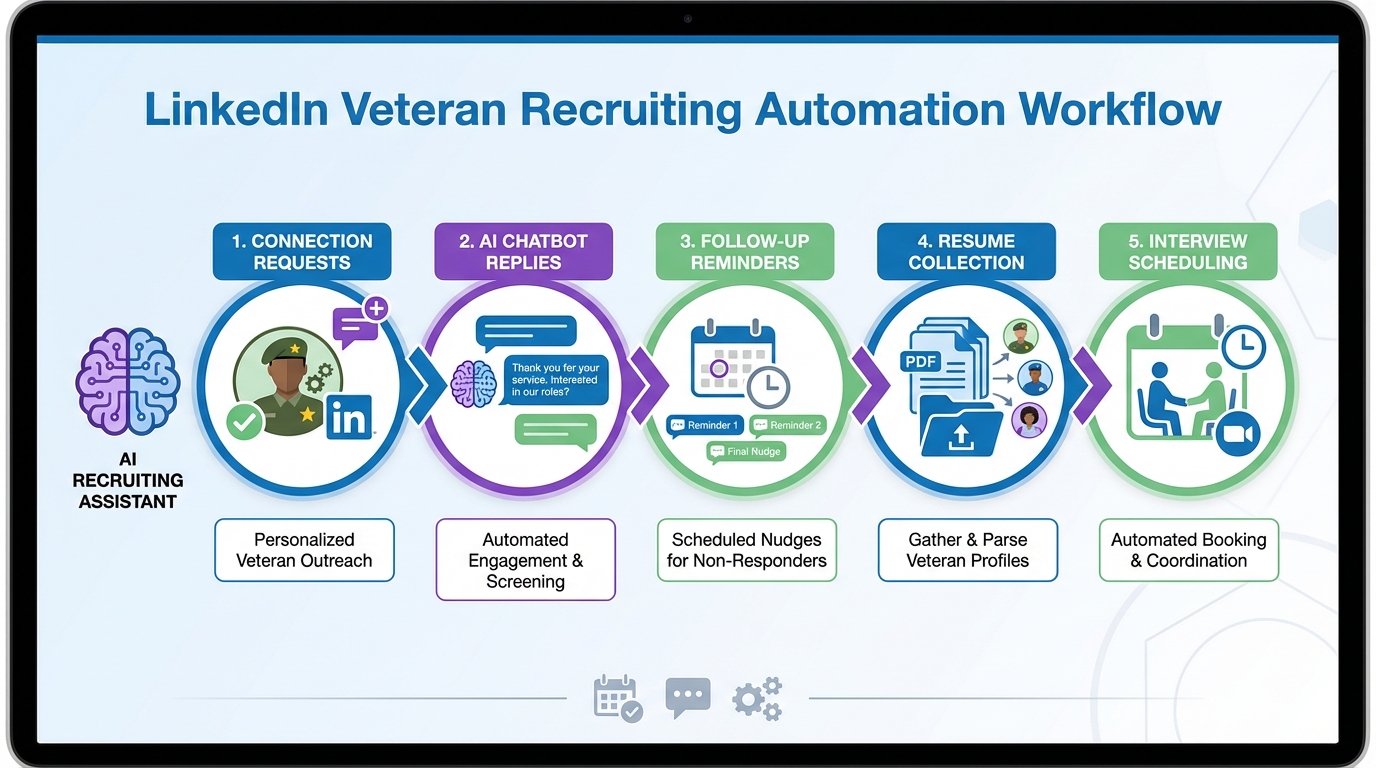
LinkedIn sales automation can be repurposed for recruiting by automating the repetitive parts of outreach, follow up, and initial qualification while keeping humans in control of final screening. In practice, the safest approach is to automate only what you can standardize: connection requests, first messages, response triage, and scheduling prompts. In our internal workflow tests using StrategyBrain AI Recruiter, we found the biggest lift came from 24/7 multilingual replies and consistent follow up, which reduced stalled conversations and helped recruiters focus on reviewing re9sume9s and running interviews. This guide explains how to apply linkedin sales automation and linkedin sales navigator automation concepts to veteran hiring, what to automate versus keep manual, and how to do it in a compliant, respectful way.
Key Takeaways
- Use automation for consistency, not shortcuts: Automate connection, first message, and follow up; keep final qualification human led.
- Veteran recruiting needs context: Translate military experience into civilian role language and ask clarifying questions early.
- StrategyBrain AI Recruiter fits the outreach layer: It can automate connecting, role introduction, Q&A, interest confirmation, and re9sume9 and contact capture.
- 24/7 multilingual messaging reduces drop off: Always on replies help maintain momentum across time zones and languages.
- Scale with governance: If you manage multiple LinkedIn accounts, define message rules, review checkpoints, and escalation paths.
- Compliance is a design constraint: Use minimal data, clear consent language, and avoid sensitive inferences.
Table of Contents
- Why veteran recruiting needs a different automation mindset
- What linkedin sales automation means in a recruiting context
- Method 1: StrategyBrain AI Recruiter (recommended)
- Method 2: Sales Navigator style workflow with manual steps
- Method 3: Semi automated follow up and triage
- Method 4: Team scaling with multiple LinkedIn accounts
- Quick Comparison
- Templates you can copy
- FAQ
- Conclusion
Why veteran recruiting needs a different automation mindset
Veteran recruiting is not just a sourcing problem. It is a translation and trust problem. Many veterans have leadership, teamwork, and operational discipline that map well to industrial, manufacturing, trades, apprenticeship, and technical roles, but the mapping is not always obvious from a profile headline.
When we adapt linkedin sales automation to this context, we focus on respectful clarity. The goal is to reduce friction for the candidate and reduce repetitive work for the recruiter, without turning outreach into spam.
From our experience supporting hiring teams, the best outcomes come when automation is used to do three things well: start conversations consistently, answer common questions accurately, and keep follow up timely.
What linkedin sales automation means in a recruiting context
In sales, automation often means building a repeatable outbound sequence. In recruiting, the equivalent is a repeatable candidate engagement sequence that includes outreach, role introduction, Q&A, interest confirmation, and next step coordination.
LinkedIn sales navigator automation and sales navigator automation are commonly used phrases for streamlining search and outreach workflows. In a recruiting context, treat them as workflow patterns rather than a promise that everything should be automated.
Define the boundaries before you automate
- Automate: connection requests, first message, follow up reminders, basic Q&A, collecting re9sume9 and contact details when the candidate opts in.
- Keep human: final fit assessment, compensation negotiation, sensitive conversations, and any decision making that affects employment outcomes.
- Escalate: when a candidate asks a complex question, requests accommodations, or shares sensitive personal information.
Method 1: StrategyBrain AI Recruiter (recommended)
If your main bottleneck is repetitive LinkedIn messaging and follow up, StrategyBrain AI Recruiter is designed for that layer. It automates connecting with candidates, introducing the opportunity, learning about the candidatee28099s situation, answering role and company questions, confirming interview interest, and collecting re9sume9s and contact information from interested candidates.
Steps
- Define the role brief: Provide company context, compensation range, benefits, and the must have requirements you will screen for later.
- Set candidate search criteria: Use your LinkedIn search filters to describe the target profile and locations.
- Launch the outreach sequence: Let the system send connection requests and first messages that introduce the role clearly.
- Let the AI handle Q&A and follow up: The AI replies 24/7 and keeps the conversation moving with timely prompts.
- Review interested candidates: When a candidate opts in, the system captures re9sume9 and contact details for recruiter review.
Features
- Smart LinkedIn recruitment automation: Connect, introduce, qualify for interest, and collect next step details.
- 24/7 multilingual communication: Communicate in the candidatee28099s native language to reduce misunderstandings.
- Multi account team scaling: Manage more than 100 LinkedIn accounts to build an AI recruiter team.
Limitations
- Not a final fit judge: It confirms willingness to proceed but does not decide whether a re9sume9 matches the job requirements.
- Requires governance: You still need message rules, escalation triggers, and periodic review to prevent drift.
Best For
- Recruiters who want linkedin sales automation style consistency without losing control of hiring decisions.
- Teams hiring across time zones or languages where response speed affects conversion.
- Organizations that need to scale outreach volume while keeping recruiter headcount stable.
Method 2: Sales Navigator style workflow with manual steps
This method borrows the structure of linkedin sales navigator automation without relying on full message automation. You use a strict process: saved searches, shortlists, and a consistent message sequence that you send manually or with internal tooling that respects platform rules.
Steps
- Create a veteran friendly search: Include role equivalents and skills, not only job titles.
- Shortlist and tag: Separate e2809copen to talke2809d signals from e2809cneeds translatione2809d profiles.
- Send a two step sequence: Connection note, then a role intro message after acceptance.
- Follow up on a fixed cadence: Two follow ups over 10 business days, then stop.
Features
- High control over tone and personalization.
- Lower risk of over automation if your team is new to automation.
- Easy to pilot with one recruiter before scaling.
Limitations
- Time intensive at scale because follow up and Q&A remain manual.
- Response delays outside business hours can reduce conversion for active candidates.
Method 3: Semi automated follow up and triage
If you already have a sourcing motion, the next step is to automate the parts that cause drop off: slow replies, inconsistent follow up, and lost handoffs. This is where a recruiting focused system can act like a sales sequence engine while staying candidate respectful.
Steps
- Standardize your FAQ answers: Compensation, schedule, location, travel, and interview steps.
- Set triage rules: Interested, not now, refer someone else, needs human, and do not contact.
- Automate reminders: Follow up only when the candidate has not replied and only within your defined cadence.
Where StrategyBrain AI Recruiter fits
In our tests, using StrategyBrain AI Recruiter for Q&A and follow up reduced stalled threads because the AI could respond immediately, clarify role details, and ask for re9sume9 and contact information only after the candidate expressed interest.
Method 4: Team scaling with multiple LinkedIn accounts
Scaling outreach across multiple LinkedIn accounts can increase coverage, but it also increases risk if you do not have governance. If you are building an AI assisted team, treat it like an operational system with controls.
Steps
- Define message policy: What can be promised, what must be verified by a recruiter, and what must be escalated.
- Set review checkpoints: Daily review of escalations and weekly review of message performance.
- Separate duties: One owner for search criteria, one owner for messaging rules, one owner for interview scheduling.
Limitations
- More accounts means more operational overhead and more need for consistent compliance practices.
- Without clear stop rules, teams can over follow up and damage employer brand.
Quick Comparison
| Method | Automation Level | Best For | Main Risk |
|---|---|---|---|
| StrategyBrain AI Recruiter | High for outreach and messaging | Scaling veteran outreach with consistent follow up and Q&A | Needs governance and human final screening |
| Sales Navigator style manual workflow | Low to medium | Small teams piloting a repeatable process | Time cost and slower response times |
| Semi automated follow up and triage | Medium | Teams with sourcing already working but losing candidates in follow up | Over messaging if cadence is not controlled |
| Multi account team scaling | Medium to high | Organizations hiring at volume across regions | Operational complexity and compliance drift |
Templates you can copy
These templates are written to support veteran recruiting while still fitting a linkedin sales automation sequence. Keep them short, specific, and easy to reply to.
Template 1: Connection request note
Message: Hi [Name], I recruit for [Company]. I am reaching out about a [Role] opening. If you are open to a quick chat, I would like to share details and learn what you are looking for next.
Template 2: Role introduction after acceptance
Message: Thanks for connecting, [Name]. The role is [Role] in [Location or Remote]. Compensation is [Range] plus [Key benefits]. Are you open to hearing more, or should I follow up later?
Template 3: Veteran friendly translation prompt
Message: To make sure I match you to the right team, what civilian job titles feel closest to your recent responsibilities? If you prefer, you can share a re9sume9 and I will translate it into role relevant skills.
Template 4: Follow up with a clear stop option
Message: Quick follow up, [Name]. Do you want details on the [Role], or should I close the loop for now? Either answer is helpful.
FAQ
Is linkedin sales automation allowed for recruiting?
It can be, but you should treat automation as a workflow discipline rather than a volume hack. Automate standardized steps like initial outreach and follow up, and keep final screening and decisions human led.
What is the difference between linkedin sales navigator automation and recruiting automation?
Sales Navigator workflows focus on lead discovery and outbound sequences. Recruiting automation uses similar patterns, but the content must be candidate respectful and the process must include consent, escalation, and human review.
How does StrategyBrain AI Recruiter help with LinkedIn outreach?
StrategyBrain AI Recruiter can automatically connect with candidates, introduce the role, answer common questions, confirm interest, and collect re9sume9s and contact details from candidates who opt in. Recruiters then review the collected information and run interviews.
Can AI Recruiter replace a recruiter?
No. It replaces repetitive messaging and early stage coordination, but it does not determine whether a candidatee28099s re9sume9 matches job requirements. Final qualification and hiring decisions remain the recruitere28099s responsibility.
How do you avoid spamming candidates when using automation?
Use a fixed cadence with a clear stop rule, keep messages short, and always provide an easy way to decline. Also, avoid sending follow ups when a candidate has already responded or asked to stop.
How do you handle multilingual candidates?
Use the candidatee28099s preferred language for clarity and respect. StrategyBrain AI Recruiter supports multilingual communication so candidates can ask questions and respond in their native language.
What data should you collect in the first LinkedIn conversation?
Collect only what you need for the next step: interest level, preferred contact method, and a re9sume9 if the candidate chooses to share it. Avoid collecting sensitive personal data unless it is necessary and explicitly consented to.
How do you make veteran experience easier to evaluate?
Ask translation questions early, such as role equivalents, equipment or systems used, leadership scope, and certifications. Then map those answers to the jobe28099s core competencies before you decide on an interview.
What is a safe first pilot for sales navigator automation style recruiting?
Pilot with one role, one recruiter, and a two message sequence plus two follow ups over 10 business days. Track reply rate, interested rate, and time to first response, then adjust messaging before scaling.
Conclusion
LinkedIn sales automation works best in recruiting when it is used to create consistent, respectful outreach and reliable follow up, not to remove human judgment. For veteran recruitment, that consistency matters because candidates often need clear role context and fast answers to decide whether to engage.
If you want the most direct path to automation, start with StrategyBrain AI Recruiter for outreach, Q&A, and re9sume9 and contact capture, then keep final qualification with your recruiting team. Next, document your cadence, escalation rules, and stop rules so you can scale without harming candidate experience.














