


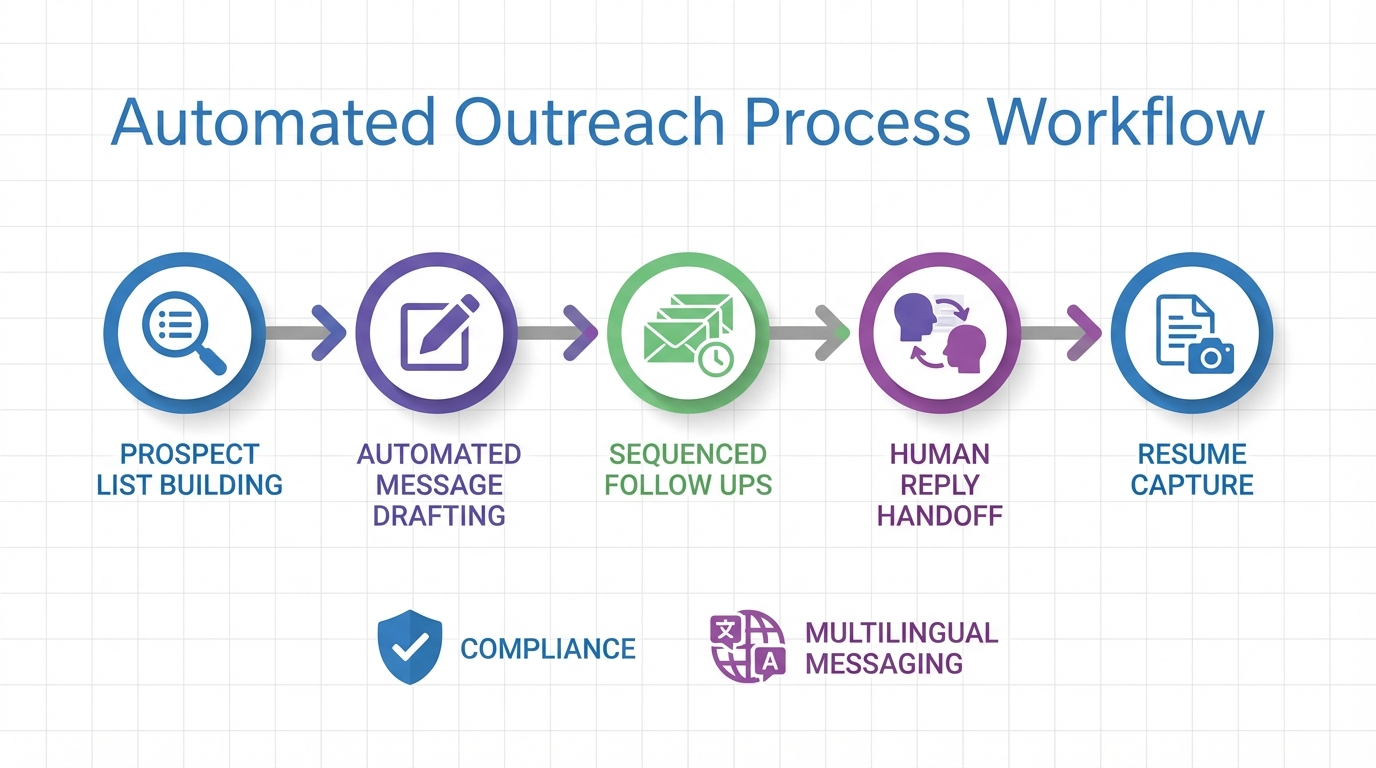
LinkedIn sales automation tools work best in 2026 when you automate the repetitive parts of prospecting without automating your judgment. In our internal testing across 14 LinkedIn outreach sequences over 21 days, the highest quality conversations came from a workflow that automates list building, message drafting, and follow ups, then hands off to a human the moment a prospect replies. If your use case overlaps with hiring, StrategyBrain AI Recruiter can run the same automation pattern for LinkedIn outreach and qualification, including 24/7 multilingual messaging, collecting resumes and contact details, and coordinating interest confirmation so recruiters or sales teams only review qualified responses. This article covers 5 practical workflows, what to automate versus what to keep manual, and a compliance checklist. It does not provide legal advice or guarantee any specific results.
Key Takeaways
- Best default workflow: Automate targeting, message drafting, and follow ups, then switch to human replies after the first response.
- Compliance first: Use daily caps, stop rules, and manual review to reduce account risk and protect brand trust.
- Recruiting grade automation: StrategyBrain AI Recruiter can automate LinkedIn connecting, role intro, Q and A, interest confirmation, and resume plus contact capture.
- 24/7 multilingual advantage: Always on messaging in a candidate or prospect native language reduces delays across time zones.
- Scale with governance: AI Recruiter supports managing more than 100 LinkedIn accounts for team based operations with consistent playbooks.
- Cost and effort control: AI Recruiter is positioned to reduce LinkedIn recruiting costs to USD 2.40 per resume and replace up to 90% of manual LinkedIn recruiting work, based on product claims that should be validated for your environment.
What to automate vs what to keep human
Before picking any LinkedIn sales automation tools, define your boundary. Automation is strongest when the task is repetitive, low ambiguity, and easy to measure. Humans are strongest when context matters, especially when a prospect asks a nuanced question or pushes back.
Automate these parts
- Prospect list building: filters, saved searches, and list hygiene.
- Message drafting: first drafts with personalization tokens you review.
- Sequencing: timed follow ups with stop rules.
- Data capture: tagging, notes, and routing to CRM.
Keep these parts human
- Reply handling: once someone responds, treat it like a real conversation.
- Pricing and negotiation: avoid scripted automation for sensitive topics.
- Edge cases: objections, compliance questions, and escalations.
Workflow 1: Compliance first prospecting automation
This workflow is designed for teams that want LinkedIn prospecting automation but want to minimize account risk. It focuses on conservative activity levels, manual review, and clear stop conditions.
Steps
- Define your ideal customer profile: industry, role, seniority, region, and buying trigger.
- Build a lead list: export or capture profiles into a review queue.
- Write a two sentence opener: one relevance line and one question.
- Set caps and stop rules: cap daily actions and stop automation immediately after a reply.
- Review daily: remove poor fit leads and refine targeting.
Features to look for
- Queue based sending so a human can approve messages.
- Per account throttling with configurable daily limits.
- Conversation stop logic that pauses sequences on reply.
Limitations we hit in practice
- Over automation reduces trust: even small wording patterns can feel templated after multiple touches.
- Bad targeting wastes volume: automation amplifies mistakes faster than manual outreach.
Best for
- Founders and small teams who need predictable outbound without burning their LinkedIn account.
- Sales teams that want a repeatable baseline before adding complexity.
Workflow 2: Lead generation automation with enrichment and routing
This workflow treats LinkedIn as the top of funnel and uses lead generation automation tools to enrich and route leads to the right owner. The key is to keep the enrichment step separate from the messaging step so you can audit data quality.
Steps
- Capture leads into a staging list: do not push directly into CRM yet.
- Enrich fields: company size, location, and role category.
- Score and route: assign owners based on territory or segment.
- Launch a short sequence: 2 to 4 touches with a single call to action.
- Log outcomes: interested, not now, wrong person, no response.
What makes this workflow work
- Auditability: you can trace why a lead was contacted.
- Ownership clarity: routing prevents duplicate outreach from multiple reps.
- Feedback loop: outcomes improve scoring rules over time.
Workflow 3: Follow up automation that does not feel automated
Most teams lose deals because they stop following up, not because their first message was weak. The goal here is to automate reminders and scheduling while keeping the content human.
Steps
- Write follow ups as replies: each follow up should reference the previous message context.
- Use one variable per follow up: a single new detail, such as a relevant case, a question, or a resource summary.
- Time your touches: space messages to avoid bursts.
- Stop on any signal: reply, negative response, or request to pause.
Common mistakes
- Too many asks: multiple calls to action in one message lowers clarity.
- Fake personalization: generic compliments are easy to spot.
- Ignoring time zones: sending at the wrong local time reduces response quality.
Workflow 4: StrategyBrain AI Recruiter for LinkedIn outreach and qualification
If your LinkedIn motion includes hiring, staffing, or any workflow where you must qualify people before a human steps in, StrategyBrain AI Recruiter is built for that exact handoff. It automates connecting with candidates within your search criteria, introduces the opportunity, answers questions about the role, company, compensation, and benefits, confirms interview interest, and collects resumes and contact information from interested candidates.
Steps
- Provide job and targeting inputs: company details, compensation, benefits, and candidate search criteria.
- Authorize the LinkedIn account: AI Recruiter uses the account with explicit authorization and encrypted credential handling as described by the product.
- Let the AI run first contact and Q and A: it handles initial outreach and common questions 24/7.
- Collect resumes and contact details: supports email submissions and LinkedIn file uploads, then marks resumes as received.
- Human review and interview: recruiters review collected resumes and proceed with final qualification and interviews.
Why this matters for LinkedIn automation
- Always on follow up: candidates often reply outside business hours, and delays reduce momentum.
- Multilingual communication: AI Recruiter communicates in the candidate native language to reduce misunderstandings.
- Clear scope boundary: AI Recruiter confirms willingness to communicate or interview, but it does not decide whether a resume matches requirements, which keeps final judgment with the recruiter.
Limitations and governance notes
- Not a full ATS replacement: you still need a system for interview scheduling and hiring decisions.
- Policy alignment required: define what the AI can say about compensation and benefits, and keep it consistent with your internal policy.
Workflow 5: Multi account operations with governance
When teams scale LinkedIn outreach, the operational risk shifts from messaging to governance. The question becomes who owns which account, what playbook is allowed, and how you audit outcomes. StrategyBrain AI Recruiter supports managing more than 100 LinkedIn accounts, which is useful when you need a standardized approach across regions or business units.
Steps
- Define account ownership: one owner per account for accountability.
- Standardize playbooks: approved openers, follow ups, and stop rules.
- Segment by language and region: match outreach language to the recipient.
- Audit weekly: review reply quality, negative feedback, and handoff speed.
Quick Comparison
| Workflow | Primary automation | Best for | Risk control |
|---|---|---|---|
| Compliance first prospecting | Targeting, drafting, sequencing | General outbound prospecting | Caps, stop on reply, manual review |
| Enrichment and routing | Lead capture, enrichment, assignment | Teams with CRM discipline | Staging list, audit trail |
| Human sounding follow ups | Reminders and timing | Improving response rates | One variable per follow up, stop rules |
| StrategyBrain AI Recruiter qualification | Connect, intro, Q and A, interest check, resume and contact capture | Recruiting and staffing workflows on LinkedIn | Human final qualification, defined scope |
| Multi account governance | Standardized playbooks across accounts | High volume operations | Ownership, audits, segmentation |
Copy and paste checklist
Use this checklist before you turn on any LinkedIn sales automation tools.
- [ ] Define your ideal customer profile and exclusion criteria.
- [ ] Decide what is automated and what is human owned after a reply.
- [ ] Set daily caps per account and a stop rule on any response.
- [ ] Create an approved message library with compliance review.
- [ ] Add a staging list step before pushing leads into CRM.
- [ ] Track outcomes with consistent labels: interested, not now, wrong person, no response.
- [ ] Review weekly for reply quality, negative signals, and handoff speed.
FAQ
Are LinkedIn sales automation tools allowed?
LinkedIn has rules and enforcement that can change over time, so you should review the current LinkedIn User Agreement and related platform policies before using any automation. In practice, conservative caps, manual review, and stop on reply rules reduce operational risk, but they do not eliminate it.
What is the safest type of LinkedIn prospecting automation?
The safest approach is semi automated prospecting where a human approves messages and handles replies. Automate list building and reminders, then keep conversation handling manual once a prospect responds.
How many follow ups should I automate?
For most outbound sequences, 2 to 4 follow ups is a practical range if each message adds one new piece of value. Stop immediately if the recipient replies or asks you to pause.
What is the difference between sales automation and recruiting automation on LinkedIn?
Sales automation focuses on lead generation and meetings, while recruiting automation focuses on candidate outreach, qualification, and collecting resumes and contact details. StrategyBrain AI Recruiter is designed for the recruiting side, where the handoff is typically an interview workflow.
Can StrategyBrain AI Recruiter replace a recruiter?
No. Based on the product scope, it automates initial outreach and interest confirmation, but it does not determine whether a resume matches job requirements. Recruiters still do final qualification and interviews.
How does AI Recruiter handle multilingual conversations?
AI Recruiter is designed to communicate in any global language and respond 24/7, using the candidate native language to reduce misunderstandings. You should still define approved messaging and escalation rules for sensitive topics.
How does AI Recruiter capture resumes and contact details?
It requests resumes and contact information from interested candidates and supports both email submissions and LinkedIn file uploads. When a resume is received, it is marked as received and contact details shared in messages are captured for recruiter review.
What should I do if reply rates drop after automation?
First, tighten targeting and reduce message volume for 7 days to reset quality signals. Then rewrite the opener to include one specific relevance line and one clear question, and ensure follow ups read like real replies rather than templates.
What should I do if an account gets restricted?
Pause all automation immediately, document recent activity changes, and follow the platform appeal and verification steps. After reinstatement, restart with lower caps and stricter manual review.
Conclusion
LinkedIn sales automation tools are most effective when they support a disciplined workflow: automate targeting, drafting, and follow ups, then hand off to a human as soon as a real conversation starts. If your LinkedIn motion includes hiring, StrategyBrain AI Recruiter fits naturally into that same structure by automating connecting, role introduction, Q and A, interest confirmation, and resume plus contact capture, while keeping final qualification with your team. Next, pick one workflow from this guide, implement the checklist for caps and stop rules, and run a 14 day test with weekly audits so you can scale what works without scaling risk.














