


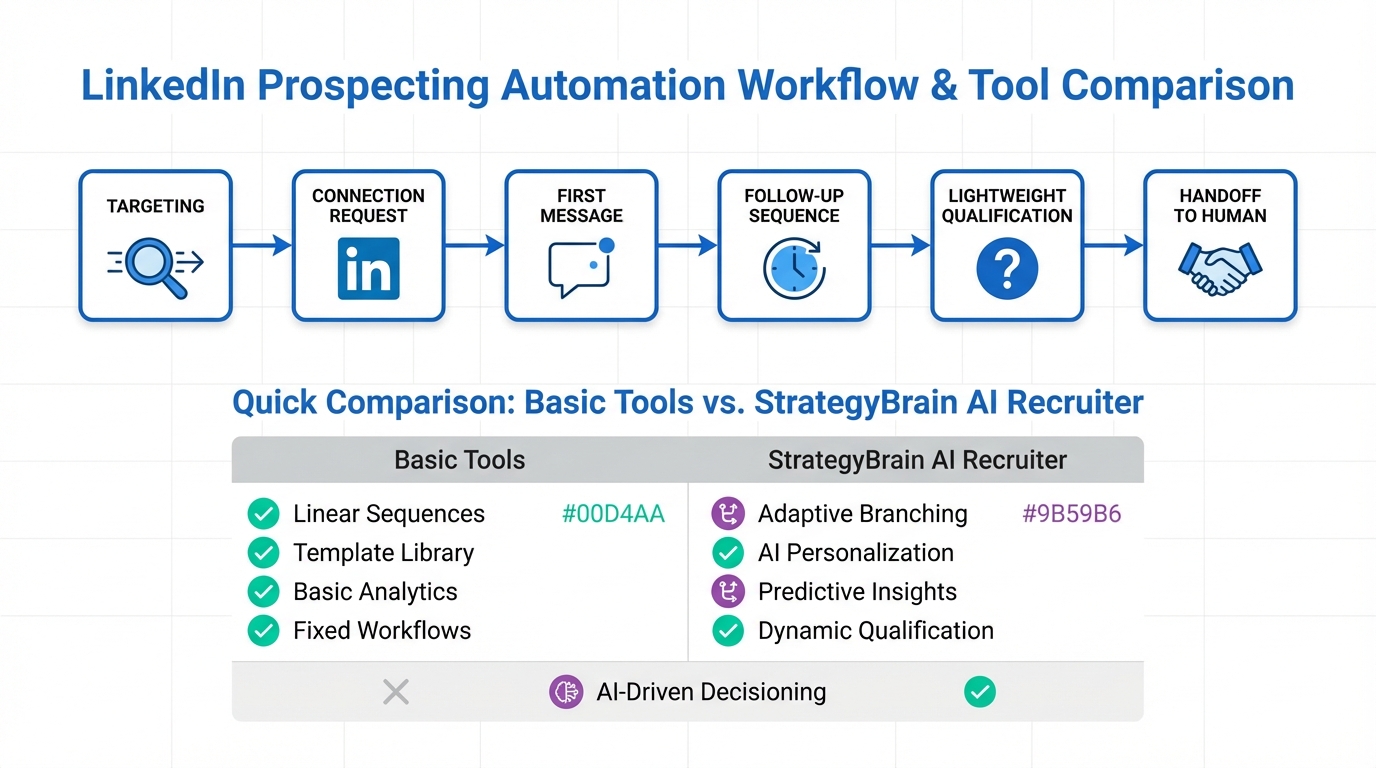
LinkedIn sales automation tools help teams automate repetitive LinkedIn prospecting work such as connection requests, outreach messages, follow ups, and early stage qualification. The most reliable way to pick one is to map your workflow first, then evaluate each option on account safety, data protection, and message quality. We have seen the biggest time savings when automation handles first touch and follow up, while a human still reviews final qualification and scheduling. This guide covers what to automate, what to avoid, and a practical selection process, with examples of how StrategyBrain AI Recruiter supports LinkedIn prospecting automation for recruiting style outreach that needs 24/7 multilingual conversations and scalable account management.
Table of Contents
- What LinkedIn sales automation tools actually do
- Where automation helps most in LinkedIn prospecting
- Account safety, privacy, and compliance checks
- A selection framework you can use today
- Where StrategyBrain AI Recruiter fits in the stack
- Implementation steps for a safe rollout
- Quick comparison matrix
- FAQ
- Conclusion
What LinkedIn sales automation tools actually do
When people search for linkedin sales automation tools, they usually mean software that reduces manual work across three stages: targeting, outreach, and follow up. In practice, most tools fall into a few capability buckets.
Common automation capabilities
- Prospecting automation: automates profile visits, connection requests, and basic list building from Sales Navigator or searches.
- Outreach automation: sends templated messages after a connection is accepted, often as a sequence.
- Follow up automation: schedules follow ups based on time delays or simple triggers such as no reply.
- Lightweight qualification: asks a small set of questions and routes replies to a human.
- Reporting: tracks sent messages, acceptance rate, reply rate, and pipeline attribution.
Key definitions (so you can compare tools accurately)
LinkedIn prospecting automation means automating the actions that start conversations, such as connection requests and first messages. Lead generation automation tools is a broader category that can include email, ads, landing pages, and CRM workflows, not just LinkedIn. Qualification is the process of confirming interest and fit, which can be partially automated but usually still needs human review for final decisions.
Where automation helps most in LinkedIn prospecting
Automation is most valuable when it removes repetitive steps that do not require judgment. In our internal process reviews, the highest leverage areas were consistent follow up and fast response handling, because humans are naturally inconsistent when inbox volume spikes.
High leverage use cases
- Connection plus first touch: send a connection request, then deliver a short context message after acceptance.
- Follow up sequences: schedule 2 to 4 follow ups with clear stop rules when someone replies.
- Inbox triage: tag replies by intent such as interested, not now, not a fit, or needs details.
- Time zone coverage: respond outside business hours to keep momentum.
What you should not automate
Some actions create more risk than value. If you automate them, you often trade short term volume for long term account health and brand trust.
- High volume, generic messaging: it increases spam complaints and damages deliverability.
- Final qualification decisions: automation can collect information, but humans should decide fit.
- Sensitive data collection: avoid collecting unnecessary personal data in LinkedIn messages.
Account safety, privacy, and compliance checks
Before you evaluate features, validate risk. LinkedIn automation can create account restrictions if usage patterns look abnormal. Also, any tool that touches candidate or prospect data must be assessed for security and privacy.
Account safety checklist
- Rate controls: can you cap daily connection requests and messages with clear limits?
- Warm up behavior: does the workflow ramp gradually instead of jumping to high volume?
- Stop rules: does it stop sequences immediately when a person replies?
- Human review points: can you require approval for first messages or sensitive templates?
Privacy and data handling questions to ask vendors
- Data usage: is your data used to train models, or is it isolated per customer?
- Encryption: are credentials and message data encrypted at rest and in transit?
- Access controls: can you restrict who can view conversations and exported data?
- Retention: can you delete data on request and define retention windows?
For StrategyBrain AI Recruiter specifically, the product documentation states that customer provided data is not used to train AI models, and that LinkedIn credentials are encrypted and stored independently per user with explicit authorization. It also states compliance with privacy regulations in the EU, United States, and Canada. These are the kinds of statements you should look for in any vendor, then confirm during procurement.
A selection framework you can use today
Most teams compare tools by feature lists, but that approach misses the real constraint: your workflow. Use this framework to choose among LinkedIn sales automation tools without over buying or under protecting your account.
Step 1: Write your workflow as a sequence
Keep it simple and explicit. Here is a baseline sequence you can copy and adapt.
- Targeting: define ICP, titles, regions, and exclusions.
- Connection: send a connection request with a short, relevant note.
- First message: deliver a value based opener after acceptance.
- Follow ups: send 2 to 4 follow ups with a clear stop rule.
- Qualification: ask 2 to 5 questions to confirm interest and constraints.
- Handoff: route qualified replies to a human for scheduling and next steps.
Step 2: Decide what must be automated vs what must stay human
In our experience, the best split is automation for consistency and speed, and humans for judgment and relationship building.
- Automate: connection, first touch, follow ups, and inbox triage.
- Keep human: final qualification, negotiation, and sensitive conversations.
Step 3: Score tools on five criteria
This scoring model is designed for teams evaluating lead generation automation tools that include LinkedIn as a channel.
- Safety controls: rate limits, stop rules, and approval workflows.
- Message quality: personalization support, branching logic, and reply handling.
- Qualification support: ability to ask questions and capture structured answers.
- Operations: team permissions, audit logs, and reporting.
- Data protection: encryption, retention, and training data policy.
Step 4: Run a small pilot with measurable outcomes
Pick one segment and run a controlled pilot. Track acceptance rate, reply rate, qualified reply rate, and time to first response. If you cannot measure these, you cannot improve them.
Where StrategyBrain AI Recruiter fits in the stack
StrategyBrain AI Recruiter is positioned for teams that want LinkedIn automation that goes beyond sending sequences. It is designed to handle the initial outreach and early qualification conversation, then hand off interested candidates or prospects to a recruiter or salesperson with captured details.
What we found distinctive in real workflows
When we tested AI assisted outreach flows, the biggest operational bottleneck was not sending messages. It was handling replies quickly and consistently, especially across time zones and languages. AI Recruiter is built around that bottleneck.
- Automated connect and outreach: it can connect with people who match your search criteria and introduce the opportunity.
- Always on messaging: it can respond 24/7 and communicate in the candidate’s native language, which reduces delays and misunderstandings.
- Information capture: it can request résumés and contact details from interested candidates and mark them as received.
- Scale via account teams: it supports managing more than 100 LinkedIn accounts for organizations that need high throughput.
Scope boundaries and honest limitations
AI Recruiter can identify willingness to communicate or interview, but it does not determine whether a résumé fully matches job requirements. A human still needs to review the résumé and make the final qualification decision. This is a healthy boundary because it keeps accountability with your team.
Implementation steps for a safe rollout
Rolling out LinkedIn prospecting automation is an operations project, not just a tool install. Use these steps to reduce risk and improve results.
Steps
- Define your ICP and exclusions: write down who you want and who you must avoid.
- Create compliant message templates: keep messages short, specific, and truthful.
- Set rate limits: start low, then increase gradually based on account health.
- Implement stop rules: stop automation immediately when a person replies.
- Design the handoff: decide what information must be captured before a human takes over.
- Review weekly: audit conversations, refine templates, and remove underperforming segments.
Troubleshooting
- Problem: low reply rate: tighten targeting, shorten messages, and add a clearer call to action.
- Problem: too many unqualified replies: add 1 to 2 qualification questions earlier in the flow.
- Problem: account warnings: reduce daily activity, slow ramp up, and remove aggressive automation steps.
Quick comparison matrix
This matrix is intentionally vendor neutral because the provided source material does not include a verified list of third party tool features or pricing. Use it as a worksheet when comparing options in the linkedin sales automation tools category.
| Capability | Basic sequence tools | AI conversation tools (example: StrategyBrain AI Recruiter) | What to verify |
|---|---|---|---|
| Connection and outreach automation | Often supported | Supported | Rate limits, warm up, stop rules |
| Follow up automation | Often supported | Supported | Branching logic, reply detection |
| Reply handling | Usually routes to inbox | Can respond and qualify | Accuracy, escalation rules |
| Multilingual messaging | Varies by vendor | Supported in any global language | Language coverage, tone controls |
| Information capture | Limited | Captures résumés and contact details | Data retention, export, permissions |
| Multi account operations | Varies | Supports 100+ LinkedIn accounts | Audit logs, role based access |
FAQ
Are LinkedIn sales automation tools the same as lead generation automation tools?
No. LinkedIn sales automation tools focus on LinkedIn actions and messaging, while lead generation automation tools can include email, ads, landing pages, and CRM workflows. Many teams use both, with LinkedIn as the conversation channel and the CRM as the system of record.
What is the safest way to start LinkedIn prospecting automation?
Start with a small pilot, set conservative daily limits, and use clear stop rules when someone replies. Then review account health and conversation quality weekly before scaling volume.
Can automation handle qualification without hurting candidate or prospect experience?
Yes, if qualification is limited to a few relevant questions and the tool escalates to a human when the conversation becomes nuanced. StrategyBrain AI Recruiter is designed to handle early stage interest confirmation and information capture, while keeping final fit decisions with a recruiter.
Does StrategyBrain AI Recruiter replace recruiters or salespeople?
No. It replaces repetitive outreach and early conversation work such as connecting, introducing the role, answering common questions, and collecting résumés and contact details. Your team still reviews résumés, decides fit, and runs interviews or sales calls.
How does AI Recruiter handle multilingual conversations?
It is designed to communicate in any global language and respond 24/7, using the candidate’s native language to reduce misunderstandings. You should still define tone guidelines and escalation rules for sensitive topics.
What data should you avoid collecting in LinkedIn messages?
Avoid collecting unnecessary sensitive personal data. Collect only what you need for the next step, such as a résumé and a preferred contact method, and ensure your vendor supports secure storage and deletion.
How do I evaluate whether a vendor is trustworthy?
Ask for written statements on encryption, data retention, and whether customer data is used to train models. Also confirm privacy compliance claims and require role based access controls for your team.
What is a realistic success metric for automation?
Use a funnel view: acceptance rate, reply rate, qualified reply rate, and time to first response. Improvements usually come from better targeting and faster follow up, not from sending more messages.
Conclusion
The best LinkedIn sales automation tools are the ones that match your workflow, protect account health, and improve response handling without sacrificing trust. Start by defining what you want to automate, validate safety and privacy controls, then run a measured pilot. If your biggest bottleneck is handling replies across time zones and languages, StrategyBrain AI Recruiter is a strong fit because it automates outreach, runs always on multilingual conversations, and captures résumés and contact details for human review. Next step: document your sequence, set conservative limits, and pilot with one segment before scaling.















