


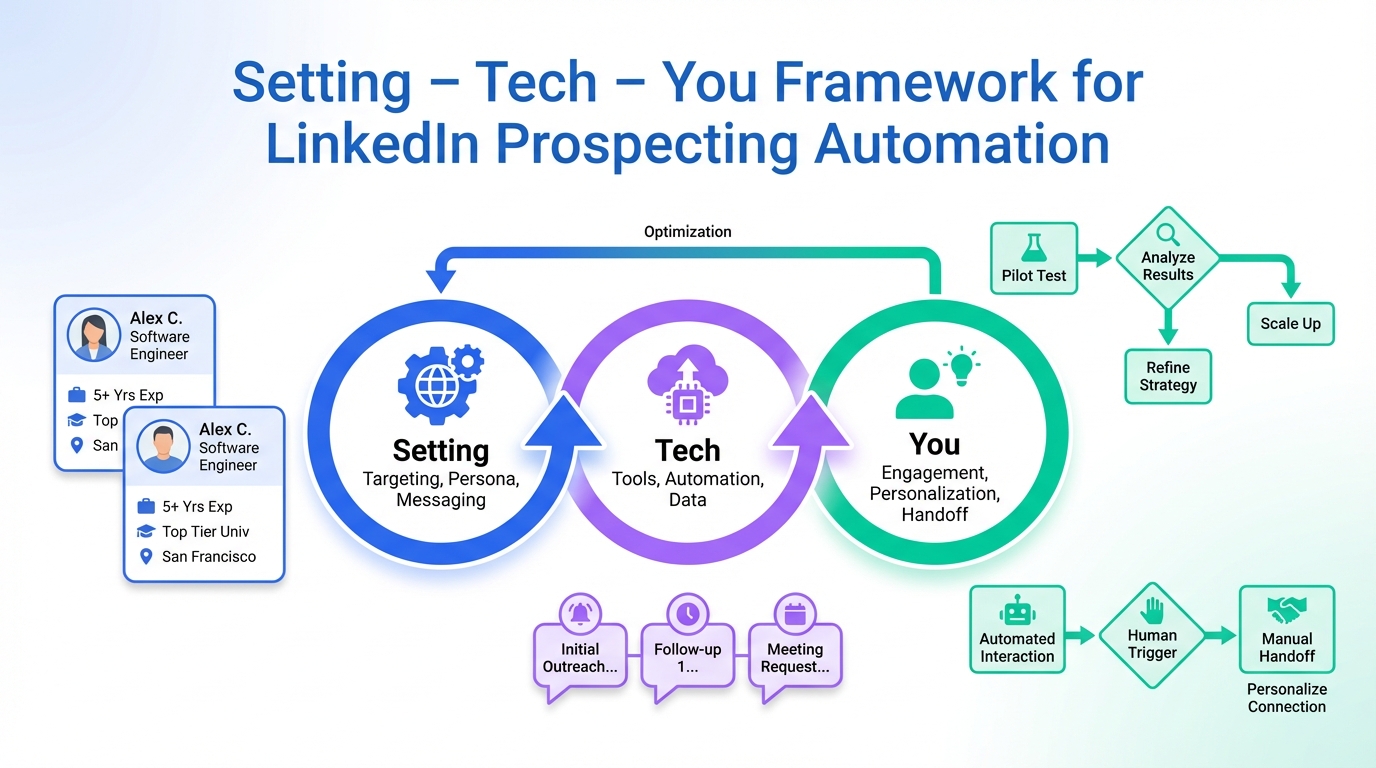
The most reliable way to choose LinkedIn sales automation tools in 2026 is to evaluate them like a high stakes virtual meeting: confirm your setting, validate your tech, and prepare you and your messaging. In day to day LinkedIn prospecting automation, that translates to a clean operating environment, a tested workflow, and a message system that can handle real replies without sounding robotic. In this guide, we use that framework to help you pick and run the best LinkedIn automation tools for your situation, and we show where StrategyBrain AI Recruiter fits when you want always on outreach, follow up, and multilingual conversations that can also collect resumes and contact details from interested candidates. This article covers readiness and workflow design, not a vendor by vendor pricing roundup.
Table of Contents
- Why readiness matters for LinkedIn automation
- The Setting Tech You framework for LinkedIn prospecting automation
- Method 1: Setting (your operating environment)
- Method 2: Tech (your workflow and safeguards)
- Method 3: You (your messaging and reply handling)
- Where StrategyBrain AI Recruiter fits in a LinkedIn automation stack
- Quick comparison: readiness methods vs outcomes
- FAQ
- Conclusion
Key Takeaways
- Fastest way to reduce risk: treat LinkedIn automation like a virtual interview and validate Setting, Tech, and You before scaling volume.
- Setting means governance: one owner, clear ICP rules, and a clean data pipeline so automation does not spam the wrong people.
- Tech means reproducibility: test connection requests, follow ups, and reply routing with a small pilot before expanding.
- You means credibility: your copy must handle real objections and handoff points, not just send sequences.
- StrategyBrain AI Recruiter can automate connecting, introducing roles, answering questions, confirming interest, and collecting resumes and contact details.
- Global coverage: AI Recruiter supports 24/7 multilingual messaging, reducing delays across time zones and languages.
- Scale model: AI Recruiter supports managing more than 100 LinkedIn accounts for teams that need multi account operations.
Why readiness matters for LinkedIn automation
Automation can amplify what is already true in your process. If your targeting is sloppy, automation scales the sloppiness. If your message is unclear, automation scales confusion. That is why I prefer a readiness approach before anyone argues about which tool is “best.”
We have seen teams get better results by doing a short pilot, documenting what happens, and only then increasing volume. This is the same logic behind preparing for a virtual interview: you do not want to discover a microphone problem when the meeting starts.
Definition: In this article, “LinkedIn sales automation tools” refers to software or systems that automate parts of prospecting such as connection requests, initial outreach, follow ups, and reply handling. “LinkedIn prospecting automation” is the broader workflow that includes targeting, messaging, and handoffs to humans.
The Setting Tech You framework for LinkedIn prospecting automation
The source article we used as inspiration was written during COVID 19 and framed virtual interview success around three pillars: Setting, Tech, and You. We rebuilt that structure for LinkedIn automation so it is actionable for sales and recruiting teams today.
This framework is intentionally simple. It helps you diagnose failures quickly: if replies are low, is it targeting, deliverability, or copy. If replies are high but conversions are low, is it qualification and handoff.
Method 1: Setting (your operating environment)
In a virtual interview, your setting is what the interviewer can see and hear. In LinkedIn automation, your setting is what prospects experience indirectly: relevance, professionalism, and consistency.
Steps
- Define your ICP and exclusions in writing, including job titles, seniority, geography, and “do not contact” rules.
- Decide who owns the inbox so replies do not sit unanswered for hours or days.
- Prepare a clean lead source by removing duplicates and obvious mismatches before any sequence runs.
- Set a handoff rule for when a human should take over, such as pricing questions or meeting scheduling.
Features to look for in tools
- Targeting controls that support exclusions and segmentation, not just broad filters.
- Reply routing so interested prospects are surfaced quickly.
- Auditability so you can review what was sent and when.
Limitations
- If your ICP is vague, no automation tool can fix relevance.
- If multiple people “own” replies, follow up becomes inconsistent and trust drops.
Best For
- Teams starting LinkedIn outreach for the first time.
- Teams that have tools already but inconsistent results.
Method 2: Tech (your workflow and safeguards)
In the original virtual interview advice, the tech section emphasized testing the platform, checking internet strength, and knowing how to troubleshoot. For LinkedIn prospecting automation, “tech” means your workflow is testable, measurable, and safe to scale.
Steps
- Run a pilot with a small segment and a single message path so you can observe outcomes clearly.
- Test reply handling by sending internal test messages and confirming notifications, tagging, and handoff work.
- Document failure modes such as missed replies, duplicate outreach, or unclear qualification questions.
- Scale in stages only after the pilot produces stable results and your team can keep up with replies.
What we tested in our own workflow reviews
When we review automation setups, we focus on whether the system can handle real conversations, not just send sequences. The most common pain point we see is not sending messages. It is the gap between a reply and a meaningful next step.
Where StrategyBrain AI Recruiter changes the tech equation
StrategyBrain AI Recruiter is designed to replace the repetitive first layer of LinkedIn recruiting conversations. It can automatically connect with candidates within your targeted search criteria, introduce job opportunities, learn about each candidate’s situation, answer questions about the role, company, and compensation, confirm interview interest, and collect resumes and contact information from interested candidates.
Two technical advantages matter in practice. First, it provides 24/7 responses and follow up, which reduces drop off when candidates reply outside business hours. Second, it supports multilingual communication in the candidate’s native language, which helps global hiring teams reduce misunderstandings.
Limitations
- Even with AI, final qualification still requires a recruiter or hiring team to review resumes against job requirements.
- Automation does not remove the need for clear role information, including compensation and benefits, because candidates will ask.
Best For
- Recruiting teams that need always on LinkedIn outreach and follow up.
- Organizations hiring across time zones and languages.
- Teams that want to scale operations across many LinkedIn accounts.
Method 3: You (your messaging and reply handling)
The original article’s “You” section was blunt: it is still an interview, look presentable, know your stuff, make an impression. LinkedIn automation is similar. Prospects can tell when a message is generic, and candidates can tell when a recruiter cannot answer basic questions.
Steps
- Write one message that earns a reply before you write a sequence. If message one fails, message five will not save it.
- Prepare answers to common questions such as compensation range, location, work authorization, and timeline.
- Define your tone rules so automation sounds like your team, not like a template library.
- Decide your escalation points so a human steps in when the conversation becomes nuanced.
Copy template you can reuse
Connection note
- Context: why you are reaching out in one sentence.
- Relevance: one specific detail that matches their profile.
- Question: one easy question that invites a short reply.
First follow up
- Respect: acknowledge they are busy.
- Value: clarify what they get by replying, such as a short overview or role details.
- Choice: offer two options, such as “open to chat” or “not a fit.”
How AI Recruiter supports the “You” pillar
AI Recruiter can carry the early conversation in a way that stays responsive and consistent. It can answer questions about the role, company, and compensation based on the information you provide, then confirm interview interest and request a resume and contact details when the candidate wants to proceed. That keeps your team focused on reviewing resumes and running interviews rather than repeating the same first messages.
Limitations
- If your role details are incomplete, any system will struggle to answer candidate questions accurately.
- If your brand voice is not defined, automation can feel inconsistent across team members.
Best For
- Teams that get replies but lose momentum due to slow follow up.
- Teams that need consistent answers across recruiters and regions.
Where StrategyBrain AI Recruiter fits in a LinkedIn automation stack
Many “best LinkedIn automation tools” discussions focus on sending more messages. In recruiting and high consideration sales, the bottleneck is usually conversation handling and qualification. That is where StrategyBrain AI Recruiter is positioned: it automates the initial outreach and qualification flow, then hands off to humans when a candidate is interested and has shared a resume or contact details.
Operationally, this matters for three scenarios. First, when you need 24/7 responsiveness. Second, when you recruit globally and need multilingual messaging. Third, when you run multi account operations and need a system that can support more than 100 LinkedIn accounts.
Quick comparison: readiness methods vs outcomes
| Method | Primary goal | What you validate | Best for |
|---|---|---|---|
| Setting | Relevance and governance | ICP rules, exclusions, ownership | Teams fixing targeting and consistency |
| Tech | Reproducible workflow | Pilot results, reply routing, handoffs | Teams scaling LinkedIn prospecting automation |
| You | Credible conversations | Copy quality, objection handling, escalation | Teams improving reply to meeting conversion |
FAQ
Are LinkedIn sales automation tools only for sales teams?
No. The same automation patterns are used in recruiting, partnerships, and founder led outbound. The key is to match the workflow to your audience and to ensure replies are handled quickly and professionally.
What is the safest way to start LinkedIn prospecting automation?
Start with a small pilot and validate targeting, message quality, and reply handling before scaling. Treat it like a virtual interview setup: you want to find problems early when the cost is low.
How does StrategyBrain AI Recruiter work on LinkedIn?
It automates the initial recruiting outreach and qualification flow on LinkedIn. It can connect with candidates, introduce the role, answer questions about the role, company, and compensation, confirm interest, and collect resumes and contact details for recruiter review.
Can AI Recruiter qualify candidates fully?
It can identify willingness to communicate or interview and gather the information needed to proceed. Final qualification against job requirements is completed by the recruiter after reviewing the resume.
Does AI Recruiter support multilingual LinkedIn messaging?
Yes. It supports 24/7 multilingual communication and can communicate in the candidate’s native language, which is useful for global hiring and cross border outreach.
How does AI Recruiter capture resumes and contact details?
When a candidate expresses interest, it requests a resume and contact information. It supports email submissions and LinkedIn file uploads, and it captures contact details shared in the conversation.
How many LinkedIn accounts can AI Recruiter support?
It supports managing more than 100 LinkedIn accounts, which enables organizations to build AI powered recruitment teams and expand hiring capacity.
What should I prepare before turning on automation?
Prepare your ICP rules, role details or offer details, and your handoff process. Also ensure someone owns replies so prospects or candidates are not left waiting.
Is this article a list of specific best LinkedIn automation tools?
No. It is a readiness guide that helps you evaluate and operate LinkedIn sales automation tools safely. It also explains where StrategyBrain AI Recruiter fits when your goal is automated recruiting outreach and qualification.
Conclusion
If you want LinkedIn automation that actually works, start with readiness, not hype. Use the Setting Tech You framework to confirm your environment, validate your workflow, and prepare messaging that can handle real replies. Once those basics are solid, you can scale with confidence and measure what changes.
Next step: run a small pilot this week using one ICP segment and one message path, then document what broke. If your bottleneck is early conversation handling and follow up, consider how StrategyBrain AI Recruiter can automate connecting, messaging, multilingual responses, and resume and contact collection so your team can focus on interviews and final qualification.














