


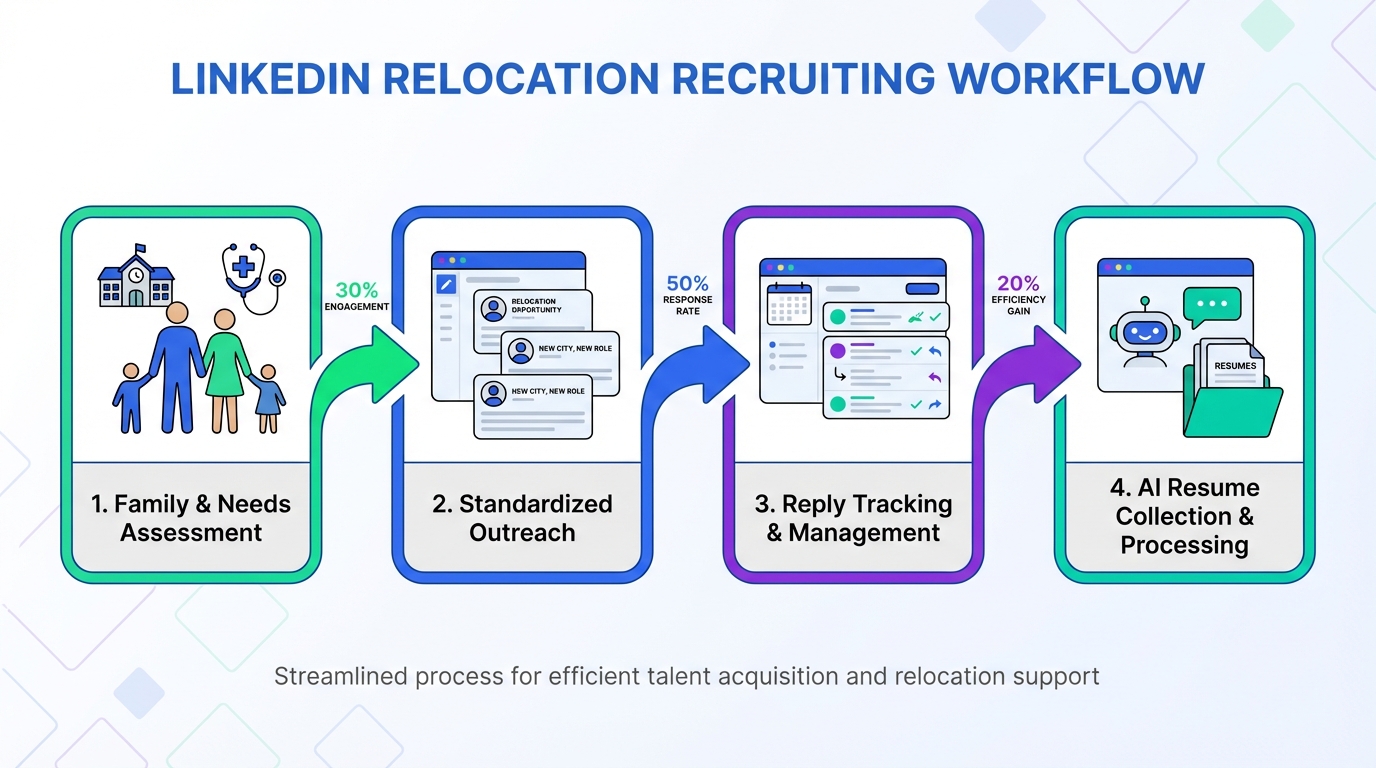
To use LinkedIn tools effectively for relocation recruiting, start by capturing what candidates want in a community, then reflect those priorities in your outreach and job messaging. In our recruiting conversations, the most common relocation driver we hear is family, so your workflow should consistently surface family relevant details such as schools, recreation, healthcare access, and community fit. The practical approach is simple: use LinkedIn content tools to standardize your message, use LinkedIn management tools to track replies and follow ups, and use StrategyBrain AI Recruiter to automate the repetitive first touch, answer role questions, confirm interview interest, and collect resumes and contact details so recruiters can focus on final qualification and interviews.
Table of Contents
- Why family shows up in relocation decisions
- Key Takeaways
- Method 1: Build a family first intake question set
- Method 2: Turn community details into reusable LinkedIn content
- Method 3: Use a structured outreach and follow up workflow
- Method 4: Automate first touch and qualification with StrategyBrain AI Recruiter
- Quick Comparison
- Compliance and trust notes for relocation messaging
- FAQ
- Conclusion
Why family shows up in relocation decisions
When we ask candidates what they are looking for in a community and why they moved in the past, we learn their motivation and whether the role we are discussing can realistically meet their needs. More often than not, candidates tell us the reason they moved was for their family.
That pattern is easy to miss if your LinkedIn workflow is built only around job titles and compensation. A candidate can like the role and still decline if the location does not work for children, parents, or grandparents. In other words, relocation recruiting is not only a job pitch. It is also a community pitch.
One example that stuck with us came from a couple in their 80s who described moving to Canada from California in the late 1960s because they valued that children could play sports regardless of wealth or skill level. The details will differ by candidate, but the theme is consistent: family and community fit are decision drivers that deserve a place in your LinkedIn recruiting process.
Key Takeaways
- Ask community questions early: We consistently get better signal when we ask what candidates want in a community before we sell the role.
- Make family relevant info visible: Many job ads omit community and family context even though it influences relocation decisions.
- Use LinkedIn content tools for consistency: Standardize community highlights so every recruiter message covers the same essentials.
- Use LinkedIn management tools for follow up discipline: Track replies, next steps, and timing so warm candidates do not go cold.
- Automate repetitive outreach carefully: StrategyBrain AI Recruiter can handle initial outreach, Q and A, and resume collection while recruiters keep final qualification.
- Do not ask about family status in interviews: Keep messaging focused on community information, not protected personal details.
Method 1: Build a family first intake question set
This is the simplest upgrade you can make to your LinkedIn tools stack because it does not require new software. It requires better questions and a place to store the answers.
Steps
- Ask what they want in a community: Use a consistent opener that invites specifics such as schools, outdoor access, commute, and healthcare proximity.
- Ask why they moved previously: This reveals what they optimize for and what they avoid.
- Record the answer as structured notes: Save it as tags or fields so it can be reused in follow ups and handoffs.
- Reflect it back in your next message: Confirm you understood their priorities before pushing for an interview.
What to capture (copyable template)
- Community priorities: schools, recreation, commute, safety, healthcare access
- Family context they volunteer: children activities, partner work needs, proximity to parents or grandparents
- Deal breakers: travel frequency, shift patterns, housing constraints
- Decision timeline: target move date, notice period, interview availability
Limitations
- It only works if you actually reuse the notes: If the information stays in a chat thread, it will not improve your process.
- It must stay compliant: Do not turn family related discussion into hiring criteria.
Best For
- Recruiters hiring for roles that require relocation
- Teams that want better candidate experience without changing their tech stack
Method 2: Turn community details into reusable LinkedIn content
Many teams rely on a single job description and assume candidates will infer what life looks like in the location. In practice, candidates often need explicit context. This is where LinkedIn content tools help because they let you reuse a consistent set of community highlights across posts, messages, and recruiter profiles.
Steps
- Write a community highlight library: Create 6 to 10 short blocks you can reuse, each focused on one theme such as trails, lakes, schools, or community feel.
- Match highlights to candidate priorities: If a candidate mentions children activities, lead with family friendly recreation and community programs.
- Use the same language across touchpoints: Keep your recruiter message, job post, and follow up aligned so it feels credible.
Example highlight blocks (rewrite in your own words)
- Outdoor and community: kilometers of trails, swimming lakes, and a community where people know each other.
- Raising children: an environment many families describe as ideal for kids to grow up.
- Multi generation considerations: proximity to hospitals or care facilities for grandparents who want to live nearby.
Limitations
- Generic content gets ignored: If your highlights read like tourism copy, candidates will not trust it.
- Overpromising backfires: Only share what you can stand behind in real conversations.
Best For
- Teams that recruit into smaller cities or remote regions
- Recruiters who want consistent messaging across multiple roles
Method 3: Use a structured outreach and follow up workflow
LinkedIn management tools are most valuable when they enforce a repeatable cadence. Relocation candidates often need time to discuss with family, so your follow up should be helpful, not pushy.
Steps
- Initial message: Ask what they want in a community and what would make a move worthwhile.
- Second message: Share 1 to 2 community highlights that match what they said, then confirm interest in learning about the role.
- Qualification message: Answer role questions, confirm interview interest, and request a resume and best contact details if they want to proceed.
- Handoff: Summarize the candidate priorities and next steps for the hiring team.
What we look for in a workflow tool
- Conversation tracking: clear status for each candidate thread
- Follow up reminders: scheduled nudges based on last reply date
- Notes and tags: structured capture of community priorities
- Team visibility: easy handoff without losing context
Limitations
- Process drift: without a shared template, each recruiter will improvise and results will vary.
- Manual load: high volume outreach can overwhelm even a good system if every message is typed by hand.
Best For
- Recruiting teams that need consistent follow up across many open roles
- Agency recruiters managing multiple client searches at once
Method 4: Automate first touch and qualification with StrategyBrain AI Recruiter
If your biggest bottleneck is the repetitive early stage work, this is where automation can be a practical advantage. StrategyBrain AI Recruiter is built for LinkedIn hiring workflows and is designed to replace the initial outreach and qualification steps while keeping the recruiter in control of final screening.
Steps
- Provide the role context: share company details, compensation, benefits, and candidate search criteria so the AI can communicate accurately.
- Let the AI run initial outreach: it automatically connects with candidates within your targeted criteria and introduces the opportunity.
- Use always on messaging: the AI responds 24 hours a day and can communicate in the candidate’s native language to reduce misunderstandings.
- Collect resumes and contact details: when candidates express interest, the AI requests a resume and captures contact information for recruiter follow up.
- Recruiter completes final qualification: the AI confirms willingness to proceed, but the recruiter still evaluates resume fit against requirements.
Where it fits with LinkedIn tools
- With LinkedIn content tools: you can standardize community and family relevant messaging so the AI stays consistent with your brand voice.
- With LinkedIn management tools: you can keep a clean pipeline view while the AI handles the first layer of conversations.
- For scale: it supports managing more than 100 LinkedIn accounts to build an AI powered recruiting team for higher outreach capacity.
Limitations we communicate clearly
- Not a final screening engine: AI Recruiter does not decide whether a resume fully matches the job requirements.
- Quality depends on inputs: if compensation, benefits, or role details are vague, candidate conversations will be less effective.
Best For
- Corporate recruiters who want to reduce time spent on manual LinkedIn outreach
- Headhunters who need multilingual candidate engagement without adding staff
- HR leaders scaling hiring output across regions and time zones
Quick Comparison
| Method | Speed to implement | Cost | Best For |
|---|---|---|---|
| Family first intake questions | 1 day | $0 | Any recruiter doing relocation hiring |
| Reusable community content library | 2 to 5 days | $0 to tool dependent | Consistent messaging across roles and recruiters |
| Structured outreach and follow up workflow | 3 to 7 days | Tool dependent | Teams that need pipeline discipline |
| StrategyBrain AI Recruiter automation | 1 to 2 weeks | Tool dependent | High volume outreach, multilingual engagement, resume collection |
Compliance and trust notes for relocation messaging
There is a practical line between sharing community information that helps families evaluate a move and using family status as a hiring factor. In our experience, the risk shows up when interview questions drift into personal territory and decisions appear tied to that information.
Keep your LinkedIn messaging focused on what the community offers and what the role requires. If a candidate volunteers family context, use it to provide relevant location information and to improve the candidate experience, not to influence selection decisions.
For data handling, StrategyBrain AI Recruiter is designed so customer provided data is not used to train AI models, and candidate information such as resumes, contact details, and conversation history is treated as protected data with encryption and isolation controls.
FAQ
What are LinkedIn tools in a recruiting context?
LinkedIn tools are the systems and workflows you use to source candidates, manage conversations, publish recruiting content, and track follow ups. In practice, teams combine LinkedIn content tools for consistent messaging and LinkedIn management tools for pipeline discipline.
Why should I talk about family and community in relocation recruiting?
Because many candidates describe family as a primary reason for relocating, and community fit can be a deciding factor even when the role is attractive. Sharing relevant community information helps candidates self qualify and reduces late stage drop off.
Should job ads include community information for families?
Yes, when it is factual and relevant. Many ads omit it, but highlighting community opportunities for children, parents, and grandparents can improve attraction for relocation candidates.
What should I avoid asking candidates about?
Avoid questions that probe family status or could be interpreted as selection criteria. Keep the conversation centered on the role, the location, and the candidate’s stated preferences about community features.
How does StrategyBrain AI Recruiter work with LinkedIn recruiting?
It automates the initial outreach and early qualification flow by connecting with candidates, introducing the opportunity, answering questions about the role and company, confirming interview interest, and collecting resumes and contact details. Recruiters then review resumes and complete final qualification.
Can AI Recruiter communicate in multiple languages?
Yes. It supports multilingual communication and can respond around the clock, which is useful when recruiting across time zones and regions.
Does AI Recruiter decide if a candidate is qualified?
No. It identifies willingness to proceed and gathers information, but it does not determine whether the resume fully matches job requirements. Recruiters make the final fit decision.
How does AI Recruiter handle resumes and contact details?
When a candidate expresses interest, it requests a resume and captures contact details shared in the conversation. It supports both email submission and LinkedIn file upload workflows, depending on what the candidate uses.
Is candidate data used to train AI models?
No. The system is designed so customer provided data is not used to train AI models, and candidate information is treated as protected data with encryption and customer specific isolation.
Conclusion
The best use of LinkedIn tools for relocation recruiting is to treat community fit as first class information. Ask what candidates want in a community, reflect those priorities in your messaging, and make family relevant details visible in your outreach and content. Then, if volume is the constraint, use StrategyBrain AI Recruiter to automate the repetitive first touch, multilingual Q and A, and resume collection so recruiters can spend their time on final qualification and interviews.
Next step: pick one open role, build a short community highlight library, and run the structured outreach cadence for 14 days. If response handling becomes the bottleneck, evaluate where AI Recruiter can take over the early stage workflow without changing your hiring standards.















