


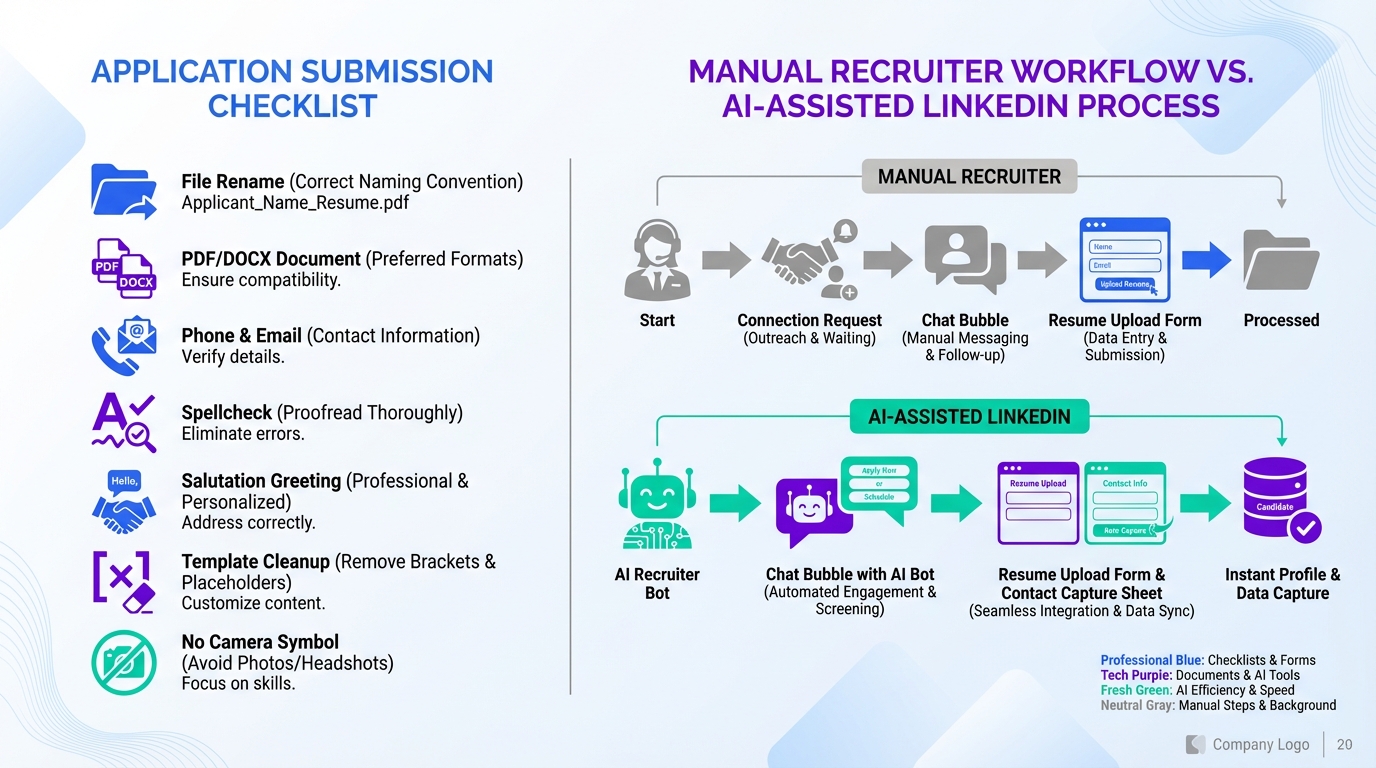
If you use open source recruitment software as a hiring team, or you apply through an open source recruitment workflow, the fastest way to avoid an instant rejection is to submit a clean, readable application package: rename your files, attach a PDF or DOCX, confirm your contact details, proofread, address the right person, remove template placeholders, and never attach a photo. We see these mistakes in real applications every year, and they are easy to prevent with one checklist. This article explains the seven blunders, why they break in an open source hiring platform pipeline, and how to fix them. We also show where StrategyBrain AI Recruiter fits into the process on LinkedIn by handling initial outreach, answering candidate questions, confirming interview interest, and collecting resumes and contact details consistently.
Key Takeaways
- File naming is a screening signal: use “First Last – Role – Resume” so recruiters can find the right document fast.
- Stick to PDF or DOCX: unusual formats and file sharing permissions are common failure points in hiring pipelines.
- Contact details must match everywhere: resume, email footer, and any form fields should be consistent.
- Proofreading is not optional: spelling errors undermine “detail oriented” claims immediately.
- Templates need a final pass: placeholders like “Dear [Name]” are an avoidable credibility hit.
- No photos: photos increase discrimination risk and many employers discard them to reduce legal exposure.
- AI can standardize early conversations: StrategyBrain AI Recruiter can answer role and compensation questions, confirm interest, and collect resumes and contact details on LinkedIn.
Why these mistakes matter in open source recruitment software
Most hiring teams use an applicant tracking system, often called an ATS. An ATS is software that stores applications, routes them to reviewers, and keeps an audit trail of decisions. Many organizations choose an ATS that is configurable, self hosted, or integrates well with internal systems, which is where open source recruitment software and open ecosystems show up.
Regardless of whether the stack is proprietary or open source, the failure modes are similar. If a recruiter cannot open your file, cannot confirm who you are, or sees obvious quality issues, your application may be rejected before anyone evaluates your experience. In our experience reviewing applications, the seven mistakes below are “fast no” triggers because they create friction and risk.
The 7 real world application blunders
1) Sending a resume file name that makes no sense
We still receive files named like “Resume 25 v4”. Versioning is useful for you, but it is not useful for the hiring team. In an open source hiring platform workflow, files may be downloaded, re uploaded, or forwarded internally. A vague name increases the chance your resume gets separated from your profile.
Fix: rename the file before you send it. A practical format is: First Last – Target Role – Resume. If you include a cover letter, use the same pattern.
2) Using unusual file formats or file sharing permissions
We have seen candidates share a cloud file that returns a “no permission” message. We have also seen uncommon formats that require extra steps to open. Even if the recruiter could troubleshoot it, they usually will not, because they have other applicants who submitted clean attachments.
Fix: attach your resume directly as PDF or DOCX. If you must share a portfolio, include it as plain text in the body of your email or application form, not as a gated file share.
3) Listing the wrong contact details
This happens more often than most people expect. A single wrong digit in a phone number or an outdated email address can end the process. In any recruitment system, open source or not, recruiters rely on the contact fields to move you forward quickly.
Fix: verify your phone number and email address in three places: the resume header, the application form fields, and the email footer. Then send yourself a test email and call your own number to confirm it works.
4) Spelling mistakes that contradict your claims
We have seen “detail oriented” spelled incorrectly in the same sentence that claims attention to detail. That is a credibility problem, not a grammar problem. It signals that you did not review your own work.
Fix: do a two pass proofread. First pass is for content and clarity. Second pass is for spelling and formatting. If possible, ask a second person to review it, because fresh eyes catch what you will miss.
5) Addressing the wrong person or misspelling their name
When a job post includes a contact name, candidates sometimes guess the salutation or copy the wrong name from another application. We have also seen incorrect assumptions about gender based on a first name. These errors are avoidable and they create a negative first impression.
Fix: if a name is provided, copy it carefully and double check spelling. If you are not sure about the salutation, use a neutral greeting such as “Hello” plus the full name, or address the team.
6) Leaving template placeholders in your cover letter
We have received cover letters that still say “Dear [Name]” or “I wish to apply at [Company]”. Templates are fine, but placeholders tell the reader you did not complete the most basic customization. In a high volume pipeline, that can be enough to end consideration.
Fix: before you submit, search your document for bracket characters like [ and ], and for placeholder words like “Company” and “Role”. Then read the first paragraph out loud to confirm it is specific to the job.
7) Attaching a photo of yourself
We have seen photos attached in many forms, including personal photos and family photos. Many employers discard applications with photos to reduce discrimination risk. This is not a place to be creative.
Fix: do not attach a photo unless the employer explicitly requests one and it is legally appropriate in your jurisdiction. If you are unsure, leave it out.
Pre submit checklist you can copy
Use this checklist before you click submit in any ATS, including open source recruitment software setups.
- File names: Resume and cover letter renamed to “First Last – Role – Resume” and “First Last – Role – Cover Letter”.
- File format: Attachments are PDF or DOCX and open correctly on a second device.
- Contact details: Phone and email match on resume, application form, and email footer.
- Proofread: Two pass review completed and at least one other person reviewed it if possible.
- Greeting: Correct name spelling and neutral salutation if uncertain.
- Template cleanup: No placeholders remain, including bracketed fields.
- No photo: No headshot or personal images attached.
How StrategyBrain AI Recruiter reduces back and forth on LinkedIn
Even when candidates submit clean applications, the next bottleneck is usually messaging. Candidates ask about role scope, compensation, benefits, and timing. Recruiters then repeat the same answers across dozens of conversations. That is where StrategyBrain AI Recruiter can complement an ATS, including an open source hiring platform, by standardizing the early LinkedIn workflow.
Based on our product testing and customer onboarding patterns, AI Recruiter is designed to do three things consistently on LinkedIn:
- Automate initial outreach and introductions: it connects with candidates that match your search criteria and introduces the opportunity.
- Handle Q and A in real time: it answers questions about the role, company, and compensation using the information you provide.
- Confirm interest and collect materials: when a candidate is interested, it requests a resume and captures contact details so a recruiter can move to interviews.
This does not replace final qualification. AI Recruiter can confirm willingness to proceed, but the recruiter still reviews the resume for fit. The practical benefit is that the early stage becomes more consistent, which reduces the chance that a strong candidate drops off due to slow replies or unclear next steps.
Quick comparison: manual process vs AI assisted workflow
| Stage | Manual recruiter workflow | With StrategyBrain AI Recruiter on LinkedIn |
|---|---|---|
| Initial outreach | Recruiter sends connection and first message one by one | Automated connections and introductions based on recruiter provided criteria |
| Candidate questions | Repeated answers across many chats, often delayed by time zones | 24/7 multilingual responses using recruiter provided role and company details |
| Interest confirmation | Recruiter manually follows up and tracks replies | AI confirms interview interest and moves interested candidates forward |
| Resume and contact capture | Recruiter requests files and copies contact info into systems | AI requests resumes and captures contact details for recruiter review |
| Final qualification | Recruiter reviews resume and decides next step | Recruiter still reviews resume and decides next step |
FAQ
Do these mistakes matter if the company uses open source recruitment software?
Yes. The software choice does not change the basics: recruiters still need readable files, correct contact details, and a professional first impression. These mistakes create friction in any pipeline.
What file format is safest for an open source hiring platform?
PDF and DOCX are the safest options in most workflows. They are widely supported and reduce the risk of formatting or permission issues.
Is it ever okay to share a resume through a cloud link?
It is risky because permissions can block access. If you must share a link, also attach a PDF or DOCX so the recruiter can open it immediately.
Why do employers reject applications with photos?
Photos can increase discrimination risk. Many employers discard them to reduce legal exposure and keep evaluation focused on qualifications.
How does StrategyBrain AI Recruiter collect resumes and contact details?
When a candidate expresses interest, AI Recruiter requests a resume and captures contact details shared in the LinkedIn conversation. It supports both email submissions and LinkedIn file uploads, then surfaces the received materials for recruiter review.
Does StrategyBrain AI Recruiter decide if a candidate is qualified?
No. It confirms willingness to proceed and gathers information, but the recruiter still evaluates whether the resume matches the job requirements.
Can AI Recruiter communicate with candidates in different languages?
Yes. It is designed for 24/7 multilingual communication so candidates can get timely answers in their native language, which can reduce misunderstandings and drop off.
How should I name my resume file if I apply to multiple roles?
Use a consistent pattern and include the role name each time, for example “First Last – Data Analyst – Resume”. This helps recruiters keep documents organized across roles.
Conclusion
The simplest way to improve outcomes in any open source recruitment software workflow is to remove preventable friction: clear file names, standard formats, correct contact details, careful proofreading, accurate greetings, complete templates, and no photos. Start by using the pre submit checklist above for every application.
If you are hiring and your bottleneck is LinkedIn messaging volume, consider adding StrategyBrain AI Recruiter to standardize early outreach, answer common questions, confirm interest, and collect resumes and contact details so recruiters can focus on evaluation and interviews.














