


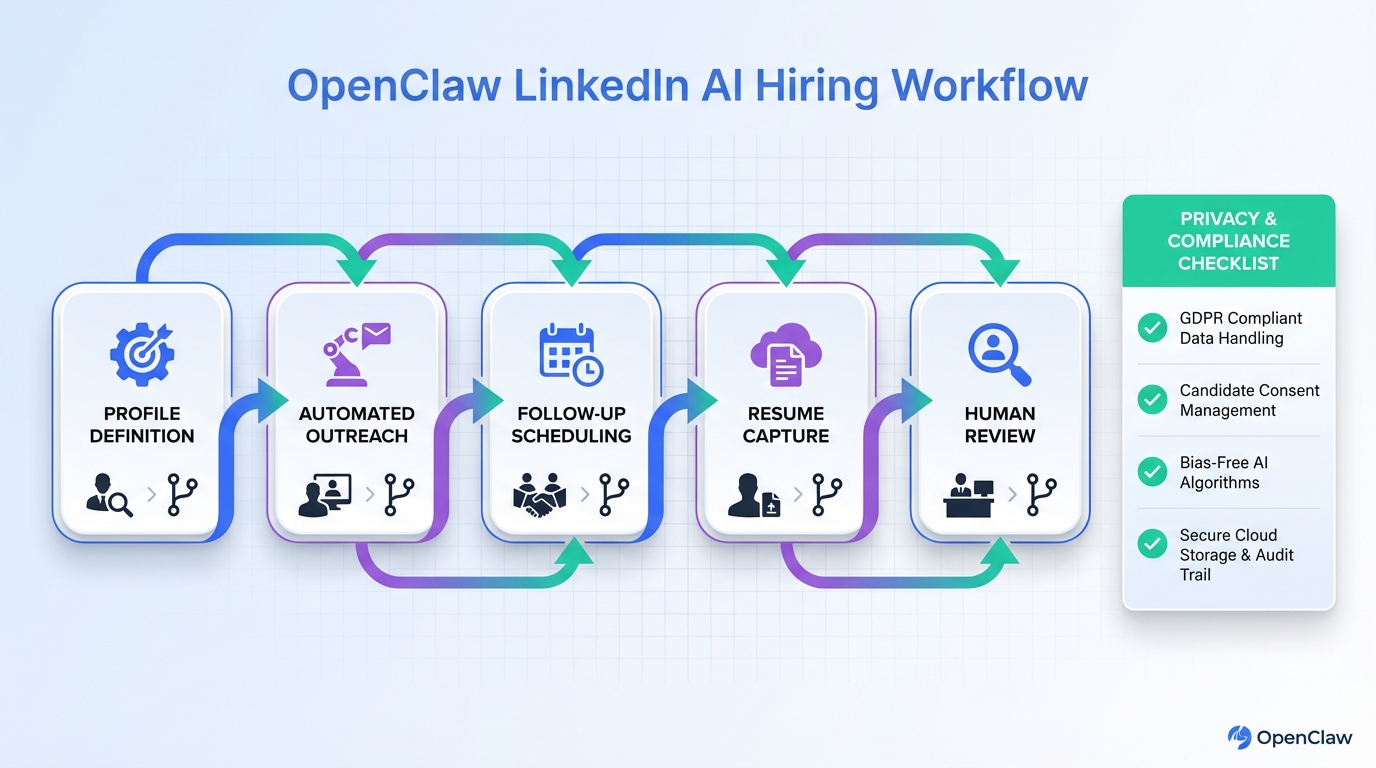
OpenClaw LinkedIn AI hiring is most effective when you use OpenClaw as the execution layer that plans and runs repeatable recruiting tasks, and use StrategyBrain AI Recruiter as the LinkedIn facing automation that connects with candidates, introduces roles, answers questions, confirms interview interest, and collects resumes and contact details. The practical outcome is simple: recruiters spend less time on manual outreach and follow up, and more time reviewing qualified, interested candidates. This article covers a workflow you can reproduce, plus guardrails for privacy, compliance, and message quality. It does not cover building a custom LinkedIn scraper or bypassing platform rules.
Table of Contents
- What OpenClaw means in LinkedIn AI hiring
- A reproducible OpenClaw LinkedIn AI hiring workflow
- Where StrategyBrain AI Recruiter fits in the workflow
- What to automate vs what to keep human
- Quality control checklist for AI outreach
- Limitations and honest tradeoffs
- FAQ
- Conclusion and next steps
What OpenClaw means in LinkedIn AI hiring
OpenClaw is an execution and orchestration platform for AI agents. In plain terms, it upgrades a language model from “answering questions” to “executing tasks” by combining three layers: an LLM layer for planning, a tool layer for actions, and a channel layer for interacting with people in chat systems.
In an OpenClaw LinkedIn AI hiring setup, that orchestration matters because recruiting is not one prompt. It is a sequence: define the role, identify a target profile, run outreach, handle replies, follow up, capture resumes, and hand off to a human recruiter for final qualification and interviews.
A reproducible OpenClaw LinkedIn AI hiring workflow
Below is a workflow we recommend because it is auditable, easy to iterate, and keeps humans in control of high risk decisions. “Auditable” here means you can review what the agent did, what it said, and what data it captured.
Step 1: Define the candidate profile and the non negotiables
- Write a target profile that includes must have skills, nice to have skills, location or time zone constraints, and seniority.
- Define disqualifiers such as work authorization constraints or required certifications.
- Define what the AI is allowed to promise about compensation, benefits, and process. If you cannot verify it, do not let the AI claim it.
Step 2: Prepare a structured outreach script with branching
Instead of one generic message, use a short script with branches based on candidate responses. For example, if the candidate asks about compensation, the AI should answer using your approved range and then ask whether they want to proceed.
- Intro: why you are reaching out and what role it is.
- Qualification question: one question that confirms fit without interrogating.
- Interest check: confirm whether they want an interview.
- Resume and contact capture: request resume and preferred contact method only after interest is confirmed.
Step 3: Run outreach and follow up as a managed workflow
This is where OpenClaw’s orchestration is useful. You can treat outreach as a job that runs on a schedule, logs actions, and escalates exceptions. A practical pattern is to run daily batches and review outcomes at a fixed time.
- Launch a batch for a defined segment, such as one geography or one seniority band.
- Monitor replies and route edge cases to a human, such as candidates asking legal or policy questions.
- Trigger follow ups at a consistent cadence, such as 24 hours and 72 hours after the first message, only if there is no reply.
Step 4: Capture resumes and contact details only after explicit interest
In StrategyBrain AI Recruiter’s workflow, the AI requests resumes and contact information from candidates who express interest in the role. If a resume is sent, it is marked as received. If contact details are shared in messages, they are captured and displayed for recruiter review.
Step 5: Human review and final qualification
StrategyBrain AI Recruiter can identify willingness to communicate or interview, but it does not determine whether a resume fully matches job requirements. That final qualification step stays with the recruiter, which is a healthy boundary for trust and hiring quality.
Where StrategyBrain AI Recruiter fits in the workflow
StrategyBrain AI Recruiter is built specifically for LinkedIn hiring automation. In an OpenClaw LinkedIn AI hiring stack, it functions as the LinkedIn execution unit for the highest volume tasks that typically consume recruiter time.
- Automated connections and introductions: connects with candidates within your targeted search criteria and introduces the opportunity.
- Two way Q&A: answers questions about the role, company, compensation, and process using the information you provide.
- Interest confirmation: confirms whether the candidate wants to proceed to interview.
- Resume and contact capture: collects resumes and contact details from interested candidates so recruiters can move directly to screening and scheduling.
- Multilingual, always on messaging: supports 24/7 responses in the candidate’s native language to reduce delays across time zones.
- Scale via multiple accounts: supports managing more than 100 LinkedIn accounts for organizations that run team based sourcing.
In our experience, the biggest operational win is not “AI writes messages.” It is that the system keeps conversations moving, handles routine questions consistently, and produces a clean handoff package for the recruiter: interested status, conversation context, resume received status, and contact details.
What to automate vs what to keep human
AI recruiting works best when you automate the repetitive steps and keep humans responsible for decisions that affect fairness, risk, and final selection.
Good candidates for automation
- Initial outreach with approved messaging and tone.
- Follow up when there is no response.
- FAQ style candidate questions about process, timeline, and role basics, using your approved answers.
- Interest confirmation and routing to scheduling.
- Resume and contact collection after the candidate opts in.
Keep these human led
- Final qualification against job requirements and hiring rubric.
- Compensation exceptions and negotiation.
- Legal, immigration, and policy questions that require precise, jurisdiction specific answers.
- Any adverse decision communication such as rejections after interviews.
Quality control checklist for AI outreach
Use this checklist to keep OpenClaw LinkedIn AI hiring trustworthy and consistent. It is designed to be copied into your internal runbook.
- Message accuracy: every claim about compensation, benefits, and location is approved and current.
- Consent and timing: resume and contact requests happen only after the candidate expresses interest.
- Escalation rules: the AI routes sensitive topics to a human within 1 message turn.
- Audit trail: you can review conversation history and the exact prompts or templates used.
- Data minimization: capture only what you need for the next step, not everything you can.
- Human override: recruiters can pause outreach, stop follow ups, and take over a conversation at any time.
Limitations and honest tradeoffs
There are real constraints you should plan for.
- AI does not replace hiring judgment: StrategyBrain AI Recruiter can confirm interest, but resume fit still requires a recruiter.
- Bad inputs create bad outputs: if the role brief is vague, the AI will be vague and candidates will disengage.
- Compliance is a process: you need clear rules for data retention, access control, and what is logged.
- Candidate experience varies: some candidates prefer human contact early, so you should offer an easy handoff path.
FAQ
What does “OpenClaw LinkedIn AI hiring” actually mean in practice?
It means using OpenClaw to orchestrate an agent workflow that can plan steps and execute tasks, while LinkedIn specific actions such as outreach, follow up, and resume capture are handled by an automation layer like StrategyBrain AI Recruiter.
Can StrategyBrain AI Recruiter qualify candidates end to end?
No. It identifies willingness to communicate or interview and collects resumes and contact details, but it does not decide whether a resume fully matches job requirements. Recruiters make the final qualification decision.
When should the AI ask for a resume or contact details?
Only after the candidate explicitly expresses interest in the role. This keeps the interaction respectful and reduces unnecessary data collection.
How does multilingual messaging help LinkedIn hiring?
It reduces delays and misunderstandings when candidates are in different time zones or prefer communicating in their native language. StrategyBrain AI Recruiter supports always on multilingual communication.
Can this approach scale across multiple recruiters or business units?
Yes, if you standardize role briefs, approved answers, and escalation rules. StrategyBrain AI Recruiter supports managing more than 100 LinkedIn accounts for organizations that need team based scaling.
How do you keep AI outreach from sounding spammy?
Keep the first message short, personalize only with verified details, ask one clear question, and stop follow ups after a defined limit. Also ensure the AI can hand off to a human quickly when the candidate asks for it.
What security and privacy commitments should I look for?
At minimum, you want encrypted credential storage, customer data isolation, and a clear statement that customer provided data is not used to train AI models. StrategyBrain AI Recruiter states that customer provided data is not used to train AI models and that data is encrypted and isolated per customer.
Is this the same as scraping LinkedIn?
No. This guide focuses on workflow automation for outreach and conversation handling. It does not cover scraping, bypassing restrictions, or any method intended to evade platform controls.
Conclusion and next steps
OpenClaw LinkedIn AI hiring works when you design recruiting as a controlled workflow: clear role inputs, structured outreach, consistent follow up, and a clean handoff to humans for final qualification. Pairing OpenClaw’s orchestration with StrategyBrain AI Recruiter’s LinkedIn automation lets you reduce repetitive messaging work while keeping trust, privacy, and hiring judgment in the right place.
Next steps: document your approved role facts, define escalation rules, run a small outreach batch, and review transcripts weekly to improve message quality. If your team needs higher throughput, expand gradually by adding more LinkedIn accounts and standardizing playbooks across roles.














