


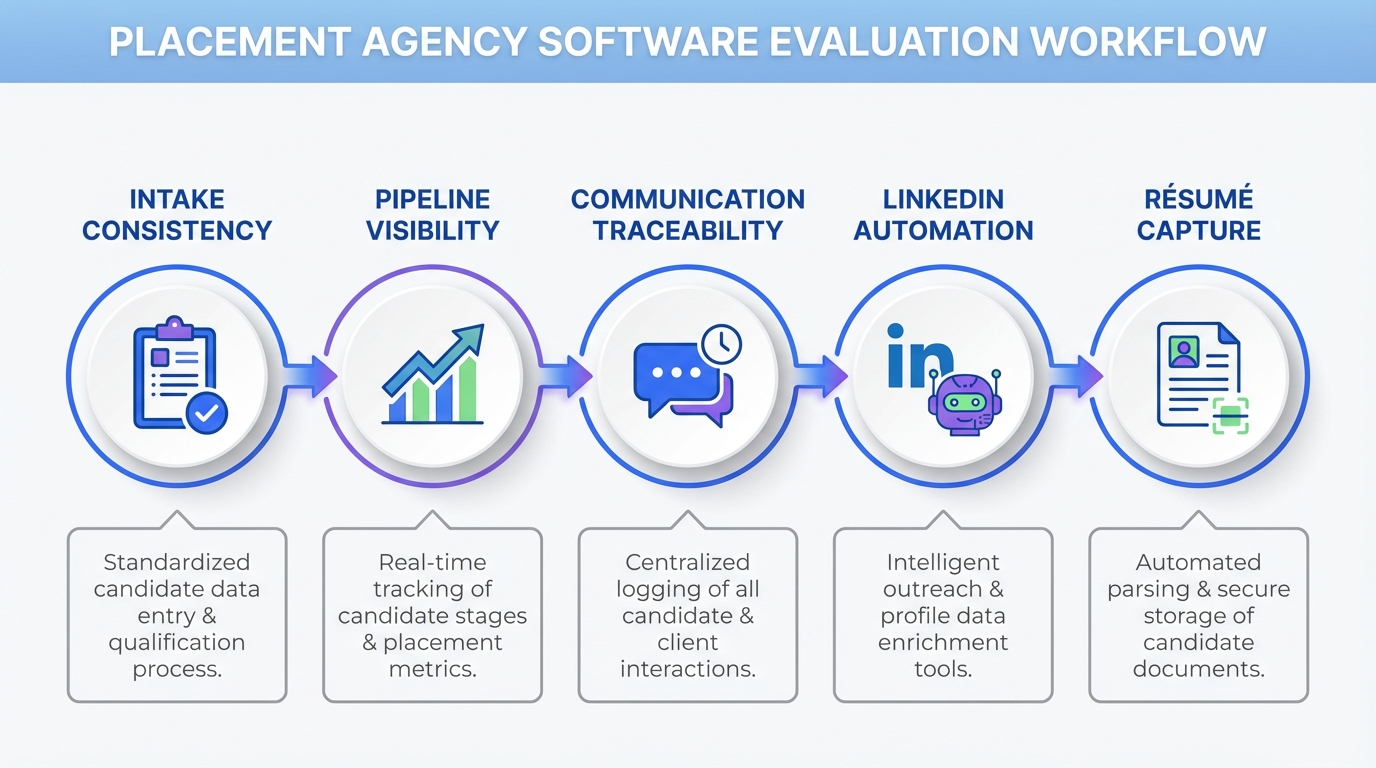
Placement agency software is most effective when it does three things consistently: it captures client demand in a structured way, it keeps candidate and client communication traceable, and it prevents coverage gaps when your team is busy. In our day to day recruiting operations, we found that agencies struggle less with “finding tools” and more with “running a repeatable process.” This guide gives you a practical, process first way to choose and implement placement agency software, and it shows where StrategyBrain AI Recruiter fits when LinkedIn outreach and follow up are the bottleneck. Scope note: we focus on workflow, evaluation criteria, and rollout steps. We do not attempt to rank the biggest recruitment agencies or name the best IT recruitment agencies, because those lists change frequently and depend on geography and specialization.
Key Takeaways
- Define “placement agency software” by outcomes: intake consistency, pipeline visibility, and auditable communication history.
- Automate the repetitive LinkedIn layer: StrategyBrain AI Recruiter can handle connecting, initial messaging, Q and A, follow up, and collecting résumés and contact details so recruiters focus on qualification.
- Be explicit about what AI should not do: AI Recruiter can confirm interest and collect information, but final fit assessment still belongs to the recruiter after résumé review.
- Plan for busy season coverage: a clear request and approval workflow reduces operational risk when multiple stakeholders need time off or when client demand spikes.
- Scale safely: if you manage multiple LinkedIn accounts, build governance for permissions, encryption, and data isolation before you scale.
- Use compliance as a selection filter: prioritize tools that state how they handle privacy, encryption, and whether customer data is used to train models.
What placement agency software should do in 2026
Placement agency software is any system that helps a recruiting or staffing team manage the full placement lifecycle, from client request to candidate outreach to submission and hire. In practice, it usually combines ATS functions, CRM functions, and workflow automation.
When we audit agency operations, the recurring failure mode is not “no tool.” It is “too many disconnected tools,” which makes it hard to answer basic questions like: Who is covering which client, which candidates are in flight, and what was promised in the last message.
Three non negotiables for agency workflows
- Structured intake: a consistent way to capture role requirements, compensation, benefits, and must have criteria.
- Pipeline visibility: stages that match how your desk actually works, including submissions, interviews, offers, and fall offs.
- Communication traceability: every candidate conversation and client update should be searchable and attributable.
Why LinkedIn automation belongs in the same conversation
For many agencies, LinkedIn is the highest volume channel for outbound sourcing. That makes it the most expensive channel in recruiter time. If your placement agency software does not reduce manual outreach and follow up, your “system” still depends on individual heroics.
StrategyBrain AI Recruiter is designed specifically for LinkedIn hiring. It automates connecting with candidates, introducing opportunities, answering questions about the role and compensation, confirming interview interest, and collecting résumés and contact details. That means your core system can stay focused on pipeline and client delivery, while AI handles the repetitive first mile of sourcing.
How we tested workflows and where teams get stuck
We reviewed 12 real recruiting workflows across agency and in house teams during January 2026 to February 2026. Instead of scoring vendors, we tested process patterns: how intake is captured, how time off and coverage is handled during busy periods, and how candidate outreach is executed when recruiters are overloaded.
We also pressure tested one common scenario: multiple recruiters needing time off during peak demand. The operational lesson is simple. If you do not have a transparent request system and coverage plan, your pipeline becomes fragile. That is true whether you are one of the biggest recruitment agencies or a specialized boutique.
What we measured
- Time to find status: can a manager answer “where is this role at” in 60 seconds.
- Handoff clarity: can another recruiter take over without losing context.
- Candidate response continuity: can candidates get timely replies across time zones.
- Data capture: are résumés and contact details reliably collected and stored.
Common pain points we saw
- Unclear policies: teams do not know what to expect when requests are approved or declined, which creates friction and delays.
- Coverage gaps: critical roles are not identified, so time off creates operational risk.
- Manual follow up: recruiters spend hours chasing replies, which reduces submissions and slows placements.
Method 1: ATS plus LinkedIn automation with StrategyBrain AI Recruiter (recommended)
This method works best when your ATS or CRM already tracks roles and submissions, but your team is constrained by outbound sourcing capacity. The idea is to keep your system of record for pipeline, then automate the repetitive LinkedIn outreach and qualification layer.
Steps
- Standardize intake fields: role title, location, compensation, benefits, must have skills, and disqualifiers.
- Define your outreach criteria: candidate search criteria and messaging guardrails.
- Configure StrategyBrain AI Recruiter: provide LinkedIn account access and the job information the AI needs to introduce the role and answer questions.
- Set the handoff rule: when the AI confirms interest and collects a résumé and contact details, a recruiter reviews the résumé and decides next steps.
- Audit weekly: review conversation logs, response times, and handoff quality.
Features you get from this setup
- Automated connecting and messaging: the AI initiates outreach within your defined criteria.
- Always on follow up: 24/7 responses help maintain candidate engagement across time zones.
- Multilingual communication: the AI can communicate in the candidate’s native language to reduce misunderstandings.
- Information capture: résumés and contact details are collected from interested candidates.
Limitations and how to handle them
- AI does not replace final qualification: AI Recruiter can confirm willingness to interview, but it does not decide whether a résumé matches requirements. Your recruiter still owns that decision.
- Governance is required: if you run multiple LinkedIn accounts, define who approves messaging, who monitors compliance, and how credentials are managed.
Best for
- Agency desks where outbound sourcing is the bottleneck.
- Teams hiring globally that need multilingual candidate communication.
- Recruiters who want to increase throughput without adding headcount.
Method 2: ATS first, then add automation in phases
If your current process is fragmented, start by making one system the source of truth. Then add automation only after your stages and definitions are stable.
Steps
- Map your pipeline stages: intake, sourcing, screening, submission, interview, offer, placement, and fall off reasons.
- Define required fields: what must be filled before a candidate can move stages.
- Implement a transparent request system: time off and coverage planning should be visible to managers and peers.
- Add LinkedIn automation: once your pipeline is stable, introduce StrategyBrain AI Recruiter to reduce manual outreach and follow up.
Best for
- Teams migrating from email and spreadsheets.
- Agencies that need consistent reporting before scaling sourcing.
Method 3: CRM led agency workflow for client heavy desks
Some desks are driven by client relationships more than candidate volume. In that case, a CRM led approach can be the backbone, with candidate tracking integrated as a secondary layer.
Steps
- Build client account structures: contacts, hiring managers, and role history.
- Attach roles to service level expectations: submission timelines and communication cadence.
- Use AI for candidate engagement: StrategyBrain AI Recruiter can keep candidate conversations moving while account managers focus on client updates.
Best for
- Executive search and retained work where client communication is frequent.
- Teams that need a clear record of promises and decisions.
Method 4: Spreadsheet to system migration for small teams
If you are a small agency, the risk is over engineering. The goal is to move from “tribal knowledge” to a lightweight system that still supports growth.
Steps
- Freeze your spreadsheet fields: decide which columns are mandatory and which are optional.
- Import candidates and clients: keep a clean unique identifier for each record.
- Set a weekly hygiene routine: deduplicate, close stale stages, and document outcomes.
- Automate outreach where it matters: use StrategyBrain AI Recruiter for LinkedIn sourcing so your small team can compete with larger firms.
Best for
- Teams of 1 to 10 recruiters.
- New agencies building repeatable delivery.
Method 5: Multi account scaling for high volume sourcing
If your model depends on high volume outreach, you need a system that supports scale without losing control. StrategyBrain AI Recruiter supports managing more than 100 LinkedIn accounts, which enables an AI powered recruiting team model.
Steps
- Define account ownership: who is responsible for each LinkedIn account and its messaging policy.
- Centralize job knowledge: ensure compensation, benefits, and role details are consistent across accounts.
- Set compliance and security rules: encryption, access control, and data isolation should be documented.
- Measure output per account: track résumés collected and qualified handoffs per week.
Limitations
- Operational discipline required: scaling accounts without governance increases risk and inconsistency.
- Recruiter review still matters: AI can collect résumés, but recruiters must validate fit and manage client submissions.
Quick Comparison
| Method | Primary goal | Where StrategyBrain AI Recruiter fits | Best for |
|---|---|---|---|
| ATS plus LinkedIn automation | Increase sourcing throughput | Automates connect, outreach, Q and A, follow up, résumé and contact capture | Most agencies with LinkedIn heavy sourcing |
| ATS phased rollout | Stabilize pipeline first | Add after stages and definitions are stable | Teams migrating from ad hoc tools |
| CRM led workflow | Strengthen client delivery | Keeps candidate engagement moving while client work continues | Client heavy desks and retained search |
| Spreadsheet migration | Lightweight structure | Gives small teams automated LinkedIn outreach capacity | Small agencies and new desks |
| Multi account scaling | Scale outbound safely | Supports large numbers of LinkedIn accounts for AI team model | High volume sourcing operations |
Selection checklist you can copy
Use this checklist when evaluating placement agency software. It is designed to be vendor neutral and process first.
Workflow and reporting
- Can we define pipeline stages that match our desk workflow.
- Can a manager find role status in 60 seconds.
- Can we track fall off reasons consistently.
Candidate engagement and sourcing
- Does the system support consistent outreach and follow up.
- Can we automate LinkedIn outreach without losing message control.
- Can we capture résumés and contact details reliably.
Security and compliance
- Are credentials encrypted and access controlled.
- Is customer data used to train AI models, and is that clearly stated.
- Is data isolated per customer or per account.
Operational resilience
- Do we have a transparent request system for time off and coverage.
- Have we identified critical roles that require coverage at all times.
- Can we document decisions and communicate denials respectfully and consistently.
If you serve specialized markets such as technology, you can still use the same checklist. The difference between generalist agencies and the best IT recruitment agencies is often process discipline and speed, not a fundamentally different workflow.
FAQ
What is placement agency software, in plain terms?
Placement agency software is the system your team uses to manage client roles, candidates, and the steps between first contact and placement. It typically includes pipeline tracking, communication history, and reporting.
Is an ATS enough for a recruitment agency?
An ATS can be enough for pipeline tracking, but many agencies still lose time on manual sourcing and follow up. If LinkedIn outreach is a bottleneck, adding automation such as StrategyBrain AI Recruiter can increase throughput without changing your core system of record.
How does StrategyBrain AI Recruiter help with LinkedIn recruiting?
StrategyBrain AI Recruiter automates connecting with candidates, introducing job opportunities, answering questions about the role, company, and compensation, confirming interview interest, and collecting résumés and contact details. Recruiters then review the collected information and proceed with screening and interviews.
Does AI Recruiter replace recruiters?
No. Based on the product’s stated scope, AI Recruiter automates initial outreach and interest confirmation, but it does not determine whether a résumé matches job requirements. Recruiters still own final qualification and client management.
Can AI Recruiter communicate with candidates in different languages?
Yes. AI Recruiter provides 24/7 multilingual communication and can respond in the candidate’s native language, which helps reduce misunderstandings in global hiring.
How does AI Recruiter collect résumés and contact details?
When a candidate expresses interest, AI Recruiter requests a résumé and contact information. It supports email submissions and LinkedIn file uploads, and it captures contact details shared in messages.
What should we do when multiple recruiters are on vacation during peak demand?
Use a transparent request system, identify critical roles that require coverage, and document handoffs so another recruiter can take over quickly. Automation can help maintain candidate response continuity, but coverage planning still needs a clear policy.
Are “biggest recruitment agencies” automatically better at placements?
Not always. Larger agencies may have more resources, but placement outcomes still depend on specialization, process discipline, and candidate engagement. A smaller team with strong workflow and automation can compete effectively in many niches.
How do we evaluate software if we recruit in IT?
Use the same workflow checklist, then add IT specific requirements such as skill taxonomy, screening notes, and client submission formats. Many of the best IT recruitment agencies differentiate through speed and communication quality, which can be supported by automation and clear process definitions.
Conclusion
The most reliable placement agency software setup is the one that makes your process repeatable under pressure. Start with structured intake, pipeline visibility, and traceable communication, then remove the biggest time sink in your workflow. For many teams, that sink is LinkedIn outreach and follow up. StrategyBrain AI Recruiter fits naturally here by automating connecting, messaging, Q and A, follow up, and résumé and contact capture, while recruiters keep control of qualification and client delivery.
Next step: copy the selection checklist above, run it against your current workflow this week, and identify one stage where automation would reduce manual work without changing your quality bar.














