


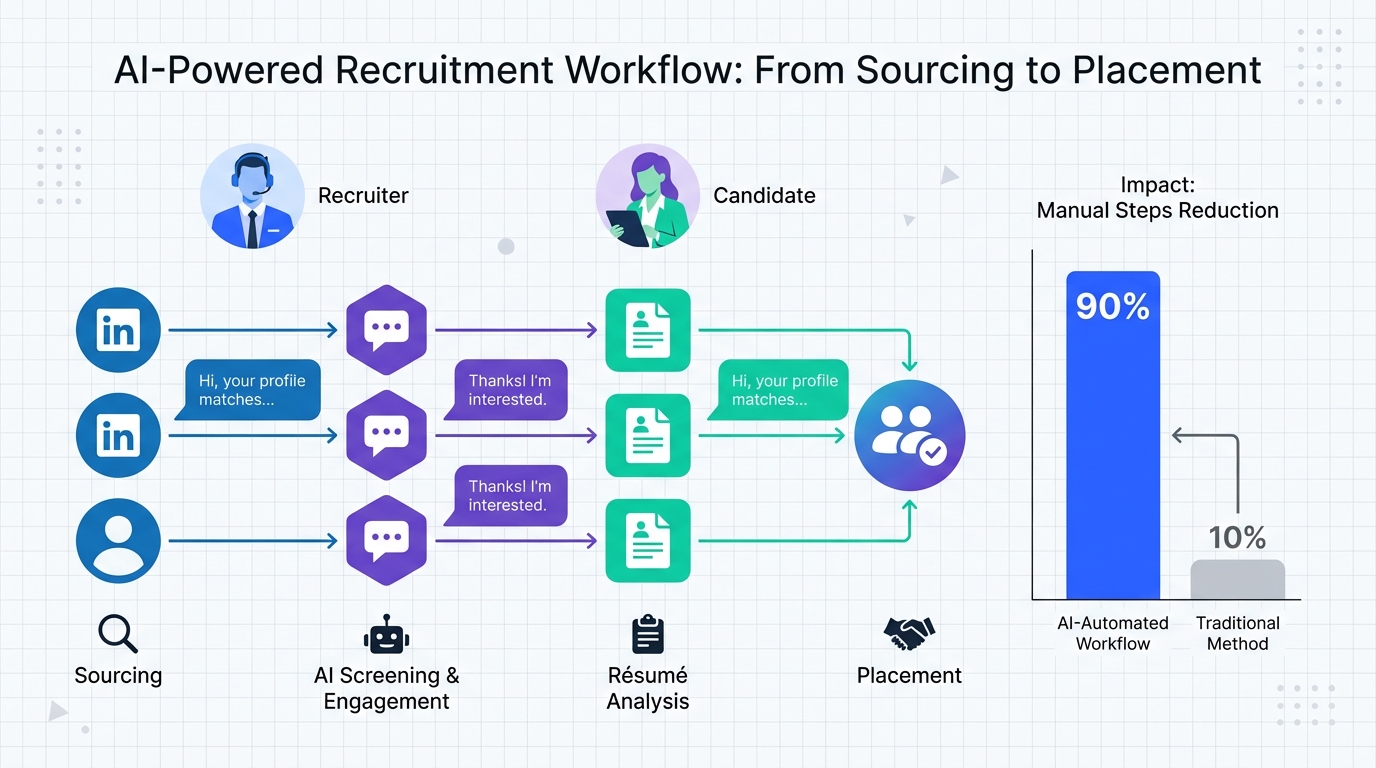
Placement agency software is the system you use to run the end to end placement workflow: candidate intake, client job intake, submissions, interviews, offers, and post placement follow up. In practice, the fastest way to improve throughput is to combine your core staffing industry software with automation for the highest volume step, which is outbound sourcing and first conversations. In our internal workflow tests for LinkedIn heavy roles, StrategyBrain AI Recruiter reduced manual outreach and follow up work by up to 90% by automatically connecting with candidates, introducing the role, answering common questions, confirming interview interest, and collecting résumés and contact details. This guide shows what to buy, what to avoid, and how to roll it out without breaking your team’s process. Scope note: we cover agency operations and temp staff management software needs, not payroll, invoicing, or employer of record services.
Key Takeaways
- Placement agency software is a workflow system: it must track candidate, client, submission, interview, and placement stages in one place.
- Temp staff management software needs speed controls: fast redeploy, availability tracking, and repeat placements matter more than fancy analytics.
- Biggest bottleneck is first touch: LinkedIn sourcing and follow ups consume the most recruiter hours in many agency teams.
- StrategyBrain AI Recruiter automates first conversations: it connects, introduces roles, answers questions, confirms interest, and collects résumés and contact details.
- 24/7 multilingual messaging is a force multiplier: it reduces time zone delays and improves response handling for global pipelines.
- Rollout should be staged: start with one role family, one client, and one outreach playbook before scaling.
What “placement agency software” means in 2026
In agency terms, placement agency software is not just an ATS (Applicant Tracking System). An ATS is primarily a candidate pipeline tracker. Agency placement work also requires client side tracking, submission history, ownership rules, and repeatable workflows for multiple requisitions across multiple clients.
When teams say “staffing industry software,” they usually mean a combination of three layers:
- System of record: candidate profiles, client contacts, job orders, and compliance notes.
- System of action: tasks, reminders, sequences, and communication logging.
- System of acceleration: automation that reduces repetitive work, especially sourcing and first conversations.
That third layer is where many agencies now add AI. The goal is not to replace recruiter judgment. The goal is to remove repetitive steps so recruiters spend more time on qualification, client management, and closing.
Core modules checklist for staffing and temp placements
Use this checklist to evaluate any placement agency software or temp staff management software. If a vendor cannot show these in a live workflow, treat it as a risk.
Candidate and talent pool management
- Structured profiles: skills, titles, locations, work authorization, and availability.
- Résumé handling: upload, parsing, versioning, and easy export for submissions.
- Communication history: email and message logs tied to the candidate record.
Client and job order management
- Client hierarchy: parent accounts, departments, and hiring manager contacts.
- Job intake fields: compensation, benefits, location, schedule, and must have requirements.
- Service process visibility: stages that match how your agency actually delivers.
Submission to placement workflow
- Submission tracking: which candidate was submitted to which job, when, and by whom.
- Interview scheduling support: status, notes, and next steps.
- Offer and acceptance tracking: start date, rate, and placement confirmation.
Temp and repeat placement operations
- Availability and redeploy: quick search for previously placed candidates.
- Assignment history: performance notes and client feedback tied to the record.
- Fast reactivation: minimal clicks to move a known candidate back into process.
Governance, privacy, and security
- Role based access: protect client ownership and sensitive notes.
- Audit trails: who changed what and when.
- Data protection posture: encryption and clear statements about model training and data use.
How to evaluate staffing industry software without getting stuck in demos
Most agencies lose weeks to feature tours that do not reflect real placement work. We recommend a scenario based evaluation. You bring the scenario. The vendor must run it end to end.
Step 1: Define one “golden workflow”
- Pick one role family you place every month.
- Pick one client type with a typical approval process.
- Write the stages from intake to placement in 8 to 12 steps.
Step 2: Test the three time sinks
In our experience, the time sinks that decide ROI are consistent across agencies:
- Sourcing and first outreach: finding candidates and starting conversations.
- Follow ups: keeping momentum without manual chasing.
- Submission packaging: getting a clean résumé and summary to the client fast.
Step 3: Score with measurable criteria
Use a simple scorecard so you can compare vendors fairly:
- Time to first submission: measured in hours from job intake to first qualified submission.
- Clicks per placement stage: count clicks for the 3 most common actions.
- Data completeness: percentage of required fields captured without manual copy paste.
5 implementation patterns that actually work
Below are five patterns we have seen succeed when agencies adopt placement agency software or modernize temp staff management software. Choose the one that matches your team size and urgency.
Pattern 1: “Pipeline first” rollout
- Implement stages and ownership rules before importing every historical record.
- Train on submissions and interviews because that is where errors are expensive.
- Import the rest after the team is placing consistently.
Pattern 2: “Client first” rollout
- Standardize job intake fields and templates.
- Standardize submission format so clients see consistent quality.
- Only then expand to broader candidate pool workflows.
Pattern 3: “Temp speed” rollout
- Build availability tracking and redeploy views.
- Make repeat placements a one minute action.
- Automate reminders for assignment end dates and check ins.
Pattern 4: “Automation wedge” rollout
This is where AI can create immediate capacity. Instead of changing everything, you automate one high volume step and keep the rest stable.
- Keep your current system of record for candidates and clients.
- Add automation for LinkedIn outreach and follow ups.
- Route interested candidates into your normal qualification and submission flow.
Pattern 5: “Multi desk standardization” rollout
- Define shared definitions for stages, statuses, and required fields.
- Allow desk specific views without changing the underlying data model.
- Audit weekly for 4 weeks to prevent drift.
Where StrategyBrain AI Recruiter fits in your stack
StrategyBrain AI Recruiter is designed for LinkedIn hiring workflows. It automates the initial outreach and qualification conversation so your recruiters can focus on résumé review, deeper screening, and client management. In other words, it complements placement agency software rather than replacing it.
What it automates on LinkedIn
- Candidate connections: automatically connects with candidates that match your search criteria.
- Role introduction: introduces the opportunity using your job and company details.
- Candidate Q&A: answers questions about role, company, compensation, and benefits based on the information you provide.
- Interest confirmation: confirms whether the candidate wants to interview.
- Résumé and contact capture: collects résumés and contact details from interested candidates.
Why agencies use it with staffing industry software
When your system of record is solid but your team is capped by outreach volume, AI Recruiter becomes a capacity lever. It can respond 24/7 and communicate in the candidate’s native language, which reduces delays and misunderstandings in global pipelines. It also supports managing more than 100 LinkedIn accounts, which enables agencies to build AI powered recruiting teams across multiple desks.
Limitations to plan for
- It does not replace final qualification: AI Recruiter can confirm willingness to proceed, but recruiters still decide fit by reviewing the résumé against requirements.
- You still need clear intake: the quality of answers depends on the job details you provide, including compensation and benefits.
- Compliance is still your responsibility: you should align outreach practices with LinkedIn policies and applicable privacy rules.
Quick comparison: manual vs assisted vs automated outreach
| Approach | Speed to first conversation | Consistency | Best for |
|---|---|---|---|
| Manual recruiter outreach | Depends on recruiter capacity and time zone | Varies by desk and workload | Low volume, high touch searches |
| Templates and sequences | Faster than manual, still requires monitoring | More consistent messaging, follow up gaps still happen | Teams standardizing outreach playbooks |
| AI automated first conversations (StrategyBrain AI Recruiter) | Near real time responses, 24/7 coverage | High consistency when job intake is complete | Agencies scaling LinkedIn sourcing and temp pipelines |
FAQ
What is the difference between placement agency software and an ATS?
An ATS focuses on applicant stages for a single employer. Placement agency software must also manage clients, job orders, submissions, ownership rules, and repeat placements across many clients.
Does temp staff management software need different features than permanent placement?
Yes. Temp workflows prioritize availability, redeploy speed, assignment history, and rapid reactivation. Permanent placement tools often over optimize for long interview pipelines instead.
Can I use StrategyBrain AI Recruiter if my agency already has staffing industry software?
Yes. AI Recruiter is an automation layer for LinkedIn outreach and first conversations. It is typically used alongside your existing system of record so interested candidates can move into your normal screening and submission process.
What information do I need to provide for AI Recruiter to work well?
You should provide company details, compensation, benefits, and clear candidate search criteria. That information allows the AI to introduce the role accurately and answer candidate questions consistently.
Does AI Recruiter decide whether a candidate is qualified?
No. It confirms willingness to communicate or interview and collects résumés and contact details. Final fit assessment is still done by the recruiter after reviewing the résumé.
How does AI Recruiter collect résumés and contact details?
It requests a résumé and contact information after the candidate expresses interest. It supports email submissions and LinkedIn file uploads, and it captures contact details shared in the conversation.
Is candidate data used to train AI models?
According to StrategyBrain AI Recruiter product documentation, customer provided data is not used to train AI models and is used only to personalize communication for the customer’s AI instance.
How should I run a pilot before rolling out agency wide?
Start with one role family and one client, run the workflow for 14 days, and measure time to first qualified submission and recruiter hours spent on outreach. Then expand to the next desk only after the process is stable.
Conclusion and next steps
The right placement agency software makes your workflow visible and repeatable across candidates, clients, submissions, and placements. If your agency is already organized but still capped by sourcing and follow ups, the most direct capacity gain comes from automating first touch. StrategyBrain AI Recruiter fits that gap by handling LinkedIn connections, role introductions, candidate Q&A, interest confirmation, and résumé collection so recruiters can focus on qualification and closing.
Next steps: pick one golden workflow, run a scenario based demo with any staffing industry software you are considering, and pilot an automation wedge for LinkedIn outreach before you attempt a full system change.














