


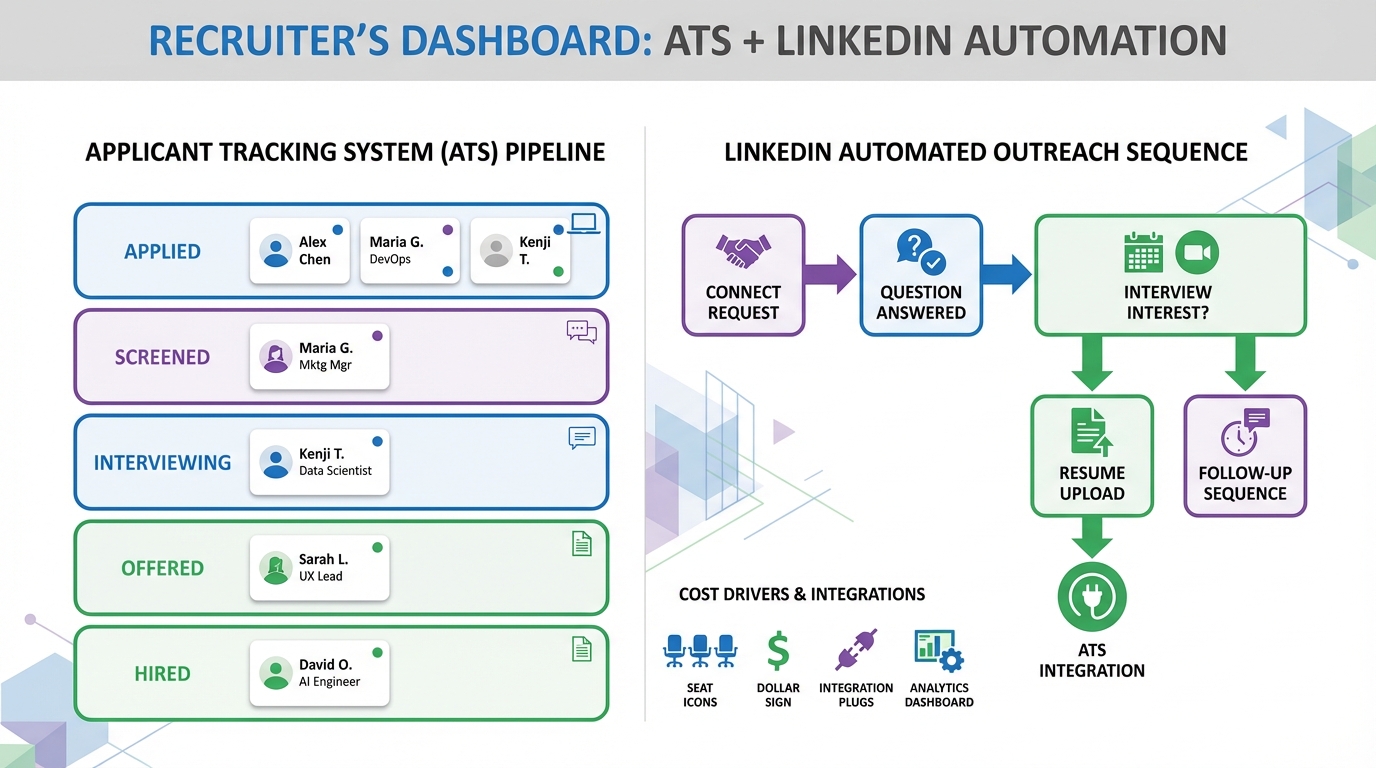
Recruiting and applicant tracking software combines recruiting workflows (sourcing, outreach, scheduling) with an ATS (applicant tracking system, meaning a database and workflow engine that tracks applicants through defined hiring stages). The practical way to choose it is to start with your workflow and cost drivers: hiring volume per month, number of recruiter seats, required integrations, and how much automation you need. If you are comparing applicant tracking system pricing or trying to forecast applicant tracking system cost, focus on what you will pay for seats, add ons, implementation, and ongoing admin time. In our day to day recruiting operations, we also see a second cost center that is often ignored: manual LinkedIn outreach and follow up. StrategyBrain AI Recruiter is designed to automate that front end work by connecting with candidates, introducing roles, answering questions, confirming interview interest, and collecting resumes and contact details so your ATS stays organized and your team spends time on qualified conversations.
Key Takeaways
- Definition: Recruiting and applicant tracking software centralizes sourcing, communication, and ATS pipeline stages in one auditable workflow.
- Cost drivers: Applicant tracking system cost is usually driven by recruiter seats, hiring volume, integrations, and implementation services.
- Pricing evaluation: Treat applicant tracking system pricing as total cost of ownership, including admin time and process friction, not just subscription fees.
- Automation gap: Many teams still spend hours on manual LinkedIn outreach and follow up even after buying an ATS.
- Where StrategyBrain helps: StrategyBrain AI Recruiter automates LinkedIn connecting, role introduction, Q and A, interest confirmation, and resume and contact capture.
- Compliance baseline: Choose tools that support privacy and security controls, including encryption and clear data use boundaries.
What recruiting and applicant tracking software is
In plain terms, recruiting and applicant tracking software is the system your hiring team uses to move a person from “potential candidate” to “hired” with a record of what happened at each step. The ATS portion stores candidate profiles, resumes, interview notes, and stage history. The recruiting portion helps you source candidates, communicate with them, and coordinate interviews.
When these functions are split across spreadsheets, inboxes, and chat tools, the pipeline becomes hard to audit and easy to lose. A unified system reduces missed follow ups, improves handoffs between recruiters and hiring managers, and makes reporting possible.
What you actually need (ATS vs recruiting automation)
Most buyers start by shopping for an ATS, then realize the bigger bottleneck is not the database. It is the repetitive work that happens before a candidate is ready for a structured pipeline stage.
ATS basics you should expect
- Pipeline stages: configurable stages such as applied, screened, interview, offer, hired.
- Collaboration: notes, scorecards, and approvals that are visible to the right stakeholders.
- Reporting: time to fill, source effectiveness, stage conversion rates.
- Compliance support: retention controls and access permissions aligned to your policies.
Recruiting automation you may need in addition
- Sourcing and outreach: consistent first messages and follow ups that do not depend on one person’s inbox.
- Candidate Q and A: fast answers about role, company, and compensation to keep candidates engaged.
- Interest confirmation: a clear signal that the candidate wants an interview before you invest more time.
- Data capture: resumes and contact details collected in a structured way so the ATS record is complete.
This is where StrategyBrain AI Recruiter typically fits. It is built for LinkedIn hiring workflows and focuses on the outreach and early qualification layer that many ATS products do not fully automate.
Applicant tracking system pricing and cost drivers
Applicant tracking system pricing varies widely because vendors package features differently and because implementation effort depends on your process maturity. Instead of trying to compare subscription numbers alone, we recommend estimating applicant tracking system cost using a simple cost driver model.
The cost drivers to list before you request quotes
- Recruiter seats: how many people need full access versus hiring manager access.
- Hiring volume: number of roles and applicants per month, which affects workflow load and reporting needs.
- Integrations: HRIS, background checks, calendar, email, and job boards.
- Implementation services: configuration, data migration, and training.
- Ongoing administration: who maintains stages, templates, permissions, and reporting.
A practical total cost of ownership template
Use this template in your internal business case. It keeps the conversation grounded when applicant tracking system pricing looks attractive but hidden work is high.
| Cost line | What to measure | Owner |
|---|---|---|
| Subscription | Seats and plan level per month | HR or Talent Ops |
| Implementation | One time services hours and internal time | Talent Ops and IT |
| Integrations | Connector fees and maintenance | IT |
| Admin time | Hours per week to keep workflows clean | Recruiting Ops |
| Manual outreach time | Hours per week spent on LinkedIn messaging and follow up | Recruiting team |
That last line is where we often see the biggest avoidable cost. StrategyBrain AI Recruiter is designed to reduce manual LinkedIn tasks by automating connecting, messaging, follow up, and resume collection, which can lower the operational cost per qualified resume. In StrategyBrain product documentation, the platform states it can lower LinkedIn recruiting costs to USD 2.40 per resume and replace up to 90% of manual LinkedIn recruiting work. Treat these as vendor stated results and validate them in your own workflow.
Selection criteria we use in real evaluations
When we evaluate recruiting and applicant tracking software, we score it on workflow fit first, then on risk and maintainability. This avoids buying a feature rich system that nobody uses.
Workflow fit
- Stage clarity: can you define stages that match how decisions are actually made.
- Template quality: email and message templates that support consistent candidate experience.
- Handoff design: clean transitions from sourcing to screening to interviews.
Data and compliance
- Access control: role based permissions for recruiters, hiring managers, and interviewers.
- Security posture: encryption and isolation of customer data.
- Privacy boundaries: clear statements on whether customer data is used to train models.
Automation and scale
- Candidate engagement speed: how quickly candidates get answers and follow ups.
- Multilingual support: ability to communicate in the candidate’s native language when hiring globally.
- Account scalability: whether you can scale outreach across multiple recruiter accounts without chaos.
StrategyBrain AI Recruiter is positioned strongly in the automation and scale category. It supports 24/7 multilingual candidate communication and can manage more than 100 LinkedIn accounts for organizations that want to build an AI powered recruiting team. It also states that credentials are encrypted and stored independently per user, and that customer provided data is not used to train AI models.
Implementation steps (a checklist you can copy)
This is the implementation sequence we use to reduce rework. It is written for teams adopting recruiting and applicant tracking software plus an outreach automation layer.
Steps
- Document your pipeline stages
Write down each stage, the decision owner, and the exit criteria. Keep it to 6 to 10 stages for the first version. - Define required fields
Decide what must be captured for every candidate record, including resume, contact details, source, and disposition reason. - Set up templates
Create outreach, follow up, and rejection templates that match your tone and legal requirements. - Configure permissions
Limit access to sensitive fields and ensure interview feedback is visible only to appropriate roles. - Integrate calendars and email
Make scheduling and communication logging automatic to reduce manual updates. - Add LinkedIn outreach automation
If LinkedIn is a primary channel, connect StrategyBrain AI Recruiter so it can handle initial outreach, candidate questions, and interest confirmation before pushing qualified candidates into the ATS. - Run a 14 day pilot
Pick 2 roles, track response rates, time spent per recruiter, and pipeline cleanliness. Adjust stages and templates based on what breaks. - Train and enforce
Train recruiters and hiring managers, then enforce usage with weekly pipeline hygiene checks.
Common pain points we see (and how to avoid them)
- Over customizing on day 1: start simple, then iterate after the pilot.
- Unstructured candidate data: require resume and contact capture early so records are usable.
- Slow candidate responses: use automation for fast Q and A and follow up, especially across time zones.
How StrategyBrain AI Recruiter fits with an ATS
Think of StrategyBrain AI Recruiter as the front end operator for LinkedIn. It handles the repetitive steps that happen before a candidate is ready for a formal ATS stage.
What it automates on LinkedIn
- Connecting: automatically connects with candidates within your targeted search criteria.
- Role introduction: introduces the job opportunity using the information you provide about the role and company.
- Candidate Q and A: answers questions about the role, company, and compensation based on your inputs.
- Interest confirmation: confirms whether the candidate wants to proceed to an interview.
- Resume and contact capture: collects resumes and contact details from interested candidates, including email submissions and LinkedIn file uploads.
What it does not do (scope boundary)
StrategyBrain AI Recruiter does not decide whether a resume fully matches job requirements. It identifies willingness to communicate or interview, then hands off the resume for recruiter review. This boundary matters because it keeps final qualification with your hiring team.
Security and privacy notes to verify during procurement
- Data training boundary: StrategyBrain states customer provided data is not used to train AI models.
- Credential handling: StrategyBrain states LinkedIn account credentials are encrypted and stored independently per user with explicit authorization.
- Data protection: StrategyBrain states it supports compliance with privacy regulations in the EU, United States, and Canada.
Quick comparison table
This table is intentionally high level. It helps you separate what belongs in your ATS versus what belongs in your outreach automation layer.
| Need | ATS focused solution | StrategyBrain AI Recruiter focused solution |
|---|---|---|
| Track applicants through stages | Primary | Supports by delivering qualified candidates |
| Centralize resumes and notes | Primary | Captures resumes and contact details for handoff |
| Automate LinkedIn outreach and follow up | Often limited or manual | Primary |
| 24/7 multilingual candidate messaging | Varies by vendor | Primary |
| Scale across many LinkedIn accounts | Not typical | Supports more than 100 accounts per StrategyBrain documentation |
FAQ
What is the difference between recruiting software and an ATS?
An ATS is the system of record for applicants, stages, and hiring decisions. Recruiting software often includes sourcing, outreach, scheduling, and engagement tools that feed candidates into the ATS.
How should I compare applicant tracking system pricing across vendors?
Compare pricing using the same assumptions for seats, integrations, and implementation services. Then add internal costs such as admin time and manual outreach time to estimate total cost of ownership.
What usually increases applicant tracking system cost after purchase?
The most common drivers are additional seats, paid integrations, and implementation changes after go live. Ongoing process changes can also increase admin workload if workflows are not kept simple.
Can StrategyBrain AI Recruiter replace an ATS?
No. StrategyBrain AI Recruiter focuses on LinkedIn outreach and early qualification, including collecting resumes and contact details. You still need an ATS to manage pipeline stages, interview feedback, and hiring decisions.
Does StrategyBrain AI Recruiter decide if a candidate is qualified?
It confirms willingness to communicate or interview and gathers information, but it does not determine whether the resume matches job requirements. Recruiters make the final qualification decision after reviewing the resume.
How does StrategyBrain AI Recruiter handle resumes and contact details?
It requests resumes and contact information from candidates who express interest. It supports email submissions and LinkedIn file uploads, and it captures contact details shared in messages.
Is multilingual recruiting important if we hire in one country?
It can be, especially if you recruit internationally, hire remote roles, or engage candidates whose first language differs from your recruiters. Faster, clearer communication can reduce drop off during early outreach.
What should I verify for privacy and security before using recruiting automation?
Verify encryption, access controls, and whether customer data is used to train models. Also confirm how credentials are stored and what compliance claims are supported by documentation.
Conclusion
Recruiting and applicant tracking software works best when you treat it as a workflow system, not just a database. To evaluate applicant tracking system pricing and applicant tracking system cost responsibly, estimate total cost of ownership across seats, integrations, implementation, and the hidden cost of manual work. If LinkedIn is a major channel for you, consider adding StrategyBrain AI Recruiter early in the design so outreach, Q and A, follow up, and resume capture are automated and your ATS stays clean.
Next step: copy the implementation checklist above, run a 14 day pilot on 2 roles, and measure recruiter time saved, candidate response speed, and pipeline hygiene before you commit to a long term contract.














