


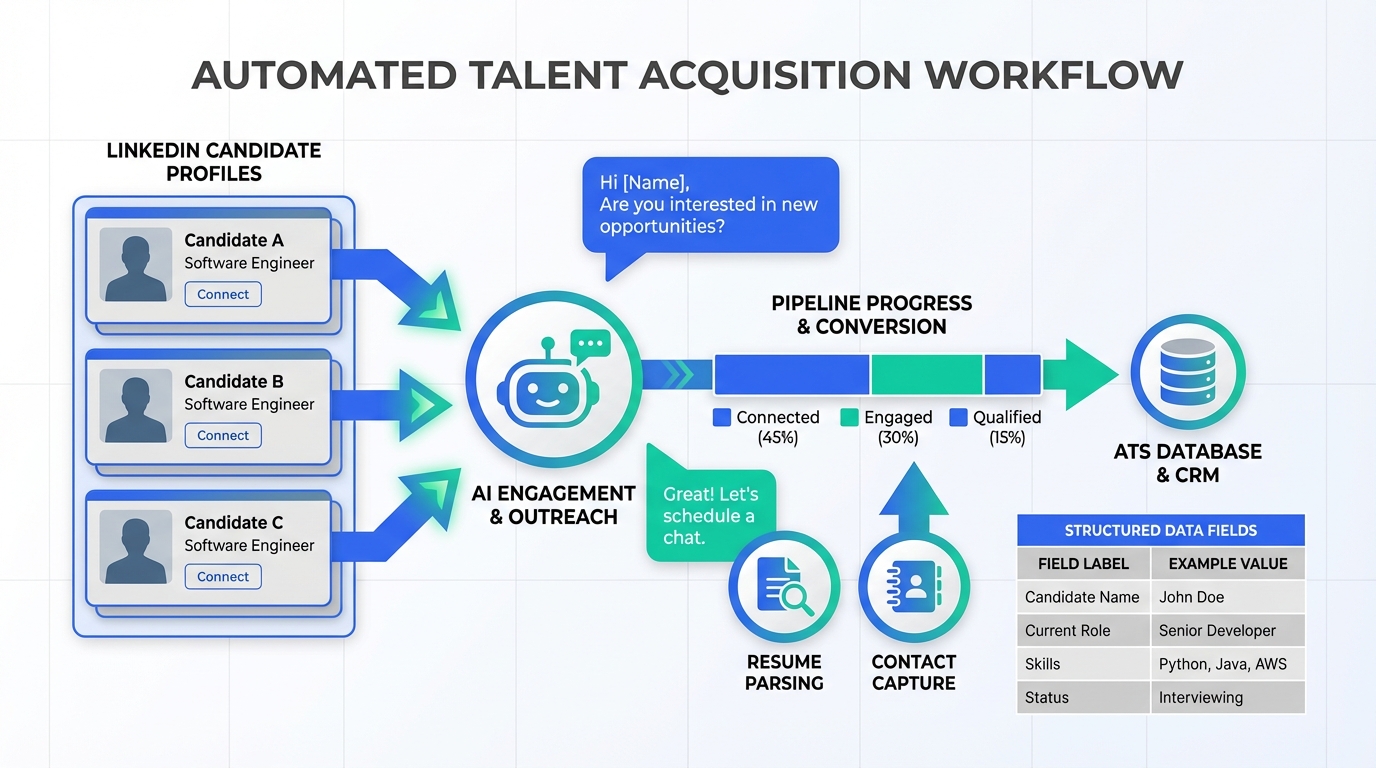
If you are evaluating recruiting and applicant tracking software for HR hiring in Canada, the fastest way to make the CPHR designation actionable is to turn it into a consistent workflow: define when CPHR is required versus preferred by role level, map interview questions to the CPHR competency areas, and record the rationale in your recruitment applicant tracking notes for repeatable decisions. Based on our experience recruiting for HR positions and working closely with HR professionals, CPHR is rarely a hard requirement for junior roles, but it increasingly shows up for HR Manager and above, and we have also seen it appear more often in HR Generalist requirements. To reduce time spent on early outreach and résumé chasing, StrategyBrain AI Recruiter can automate LinkedIn connection, initial messaging, Q and A about role and compensation, and résumé and contact capture so your team can focus on assessment and selection.
What CPHR is and why it shows up in hiring
CPHR stands for Chartered Professional in Human Resources, a Canadian HR designation that signals formal HR capability and commitment to professional standards. In practical hiring terms, it is a shorthand for “this candidate has invested in HR mastery and professional ethics,” which is why it often appears in job requirements for roles that carry higher risk, broader scope, or leadership expectations.
This matters inside recruitment applicant tracking because the designation can be treated as a structured data point, not just a line on a résumé. When you standardize how you interpret it, you reduce inconsistent screening and improve auditability of hiring decisions.
Benefits of CPHR for candidates and employers
From the candidate side, the designation is commonly associated with proven expertise, ongoing learning, access to an HR network, and adherence to a professional code of ethics. Those themes are described by CPHR Canada and are useful when you build evaluation rubrics and interview scorecards.
From the employer side, in our recruiting work we see three recurring reasons hiring teams value CPHR:
- Credibility signal that can increase confidence in a hire for HR roles with sensitive employee data and policy impact.
- Broader HR coverage because the designation is tied to competency areas that span multiple HR functions.
- Commitment to current practice which can matter when HR teams are adopting new systems, including recruiting and applicant tracking software and automation.
How to operationalize CPHR in recruiting and applicant tracking software
The goal is to make CPHR a consistent, searchable, and decision relevant attribute in your process. Below is a workflow we have used to reduce ambiguity and keep hiring teams aligned.
Step by step workflow
- Define role policy: For each HR job family, set CPHR as “required,” “preferred,” or “not required,” and document the reason in your hiring plan.
- Standardize intake fields: Add a structured field for “CPHR status” with values such as “holds CPHR,” “in progress,” and “not indicated.”
- Map interview questions: Build a question bank aligned to HR competency areas so CPHR and non CPHR candidates are assessed on the same job relevant criteria.
- Record evidence: In the candidate profile, capture examples that demonstrate HR judgment, ethics, and applied knowledge, not just the credential itself.
- Close the loop: After the hire, review whether CPHR status correlated with performance in the first 90 days and adjust your policy.
What this changes in day to day recruiting
When CPHR is treated as a structured signal, your team spends less time debating what it “means” and more time evaluating job relevant evidence. It also improves reporting, because you can segment pipeline conversion by CPHR status without manual spreadsheet work.
Note on applicant tracking system cost
Applicant tracking system cost varies widely by vendor, contract terms, and seat counts, so we do not provide pricing numbers here. What you can do immediately, regardless of cost tier, is implement the structured fields and scorecards above because they are process changes, not vendor specific features.
Role level guidance: when CPHR is required vs preferred
In our experience recruiting for HR roles, the designation tends to matter differently depending on seniority and scope. Use the guidance below as a starting point, then calibrate to your industry and risk profile.
Junior HR roles
- Typical stance: CPHR is rarely a strict requirement for roles such as HR Coordinator or HR Assistant.
- How to use it: Treat it as a differentiator, but watch for misalignment between credential driven salary expectations and the compensation band for the role.
- ATS setup: Mark as “preferred” and require evidence of core execution skills such as scheduling, documentation quality, and service mindset.
Mid level HR roles
- Typical stance: For HR Generalist roles, we have noticed more postings asking for CPHR in recent years.
- How to use it: If you do not require it, use structured interviews to test breadth across employee relations, policy, and compliance.
- ATS setup: Use a scorecard that weights applied judgment and stakeholder management, not just credential presence.
Senior HR roles
- Typical stance: For HR Manager and higher, CPHR is often required by employers.
- How to use it: Combine credential screening with scenario based interviews and reference checks focused on ethics and decision making.
- ATS setup: Require a documented rationale when a candidate without CPHR is advanced, to keep decisions consistent and defensible.
Where you want to work: mobility across Canada
If a candidate plans to move across provinces or territories, the designation can support portability. CPHR Canada describes a national standard approach and transfer recognition through member associations, which is useful context when you are hiring for multi province operations or remote teams.
From a recruiting operations perspective, this is another reason to capture CPHR status as structured data. It helps workforce planning when you need HR coverage across regions.
How StrategyBrain AI Recruiter fits into the workflow
Even with strong screening design, HR hiring often slows down at the top of the funnel: sourcing, outreach, follow up, and collecting résumés and contact details. StrategyBrain AI Recruiter is designed to automate that early stage on LinkedIn while keeping recruiters in control of final qualification.
What we found most useful in practice
- Automated LinkedIn outreach: It can connect with candidates that match your search criteria and introduce the opportunity in a consistent voice.
- Role Q and A at scale: It can answer common questions about the role, company, and compensation, which reduces repetitive recruiter messaging.
- Résumé and contact capture: For interested candidates, it can request and capture résumés and contact details so the recruiter can move directly to review and interview scheduling.
- 24/7 multilingual communication: It can respond across time zones and languages, which is especially helpful when your HR team is hiring globally.
Scope boundary: what it does not do
StrategyBrain AI Recruiter can identify willingness to proceed and collect materials, but it does not decide whether a résumé fully matches job requirements. That final assessment remains with the recruiter or hiring manager, which is important for quality control and fairness.
How to combine it with recruiting and applicant tracking software
A practical pattern is to let StrategyBrain AI Recruiter handle LinkedIn top of funnel conversations, then move qualified and interested candidates into your recruiting and applicant tracking software with consistent notes. This keeps your pipeline clean and reduces manual copy and paste work.
Quick comparison: workflows
| Workflow | Speed | Operational cost driver | Best for |
|---|---|---|---|
| Manual LinkedIn outreach plus manual ATS updates | Slower for high volume roles | Recruiter time per candidate | Low volume hiring with highly specialized messaging |
| Structured ATS workflow with CPHR fields and scorecards | Faster screening consistency | Process design and adoption | Teams that need repeatable evaluation and reporting |
| StrategyBrain AI Recruiter for LinkedIn outreach plus ATS for tracking | Faster top of funnel response and follow up | Automation setup and governance | Teams hiring across time zones or managing multiple LinkedIn accounts |
FAQ
Is CPHR required for all HR jobs in Canada?
No. In our experience, it is rarely a strict requirement for junior HR roles, but it is often required for HR Manager and more senior positions, and it appears increasingly in HR Generalist postings.
How should we store CPHR information in recruitment applicant tracking?
Use a structured field such as “holds CPHR,” “in progress,” and “not indicated,” then pair it with evidence notes from interviews. This makes reporting and decision consistency easier.
Does CPHR automatically mean a candidate is better?
No. It is a signal, not a substitute for job relevant evidence. Use scenario questions and scorecards to evaluate applied judgment, ethics, and stakeholder management.
How does StrategyBrain AI Recruiter help if we already have recruiting and applicant tracking software?
It focuses on LinkedIn top of funnel work: connecting, introducing the role, answering common questions, confirming interest, and collecting résumés and contact details. Your ATS remains the system of record for evaluation and hiring decisions.
Can StrategyBrain AI Recruiter communicate with candidates in different languages?
Yes. It supports multilingual communication and can respond 24/7, which helps when candidates are in different time zones and reduces delays caused by limited recruiter availability.
Does StrategyBrain AI Recruiter decide who is qualified?
No. It identifies interest and gathers information, but it does not determine whether a résumé matches the job requirements. Recruiters make the final qualification decision.
How should we think about applicant tracking system cost when improving our process?
Separate tool cost from process quality. Even if applicant tracking system cost is a constraint, you can still implement structured fields, scorecards, and consistent decision notes, which usually deliver immediate quality gains.
Where can candidates learn more about CPHR requirements and mobility?
CPHR Canada and provincial or territorial member associations publish guidance on the designation, competency areas, and transfer recognition. Candidates can also review job postings for target roles to see how often CPHR is listed as required or preferred.
Conclusion
CPHR becomes most valuable when you treat it as an operational signal inside your recruiting and applicant tracking software: define when it is required, capture it as structured data, and evaluate candidates with consistent scorecards tied to HR competencies. For teams that want to move faster without sacrificing quality, StrategyBrain AI Recruiter can automate LinkedIn outreach, follow up, and résumé collection so recruiters spend their time on assessment and hiring decisions. Next step: pick one HR role family, set a CPHR policy for that level, and implement the structured field and scorecard in your recruitment applicant tracking workflow this week.














