


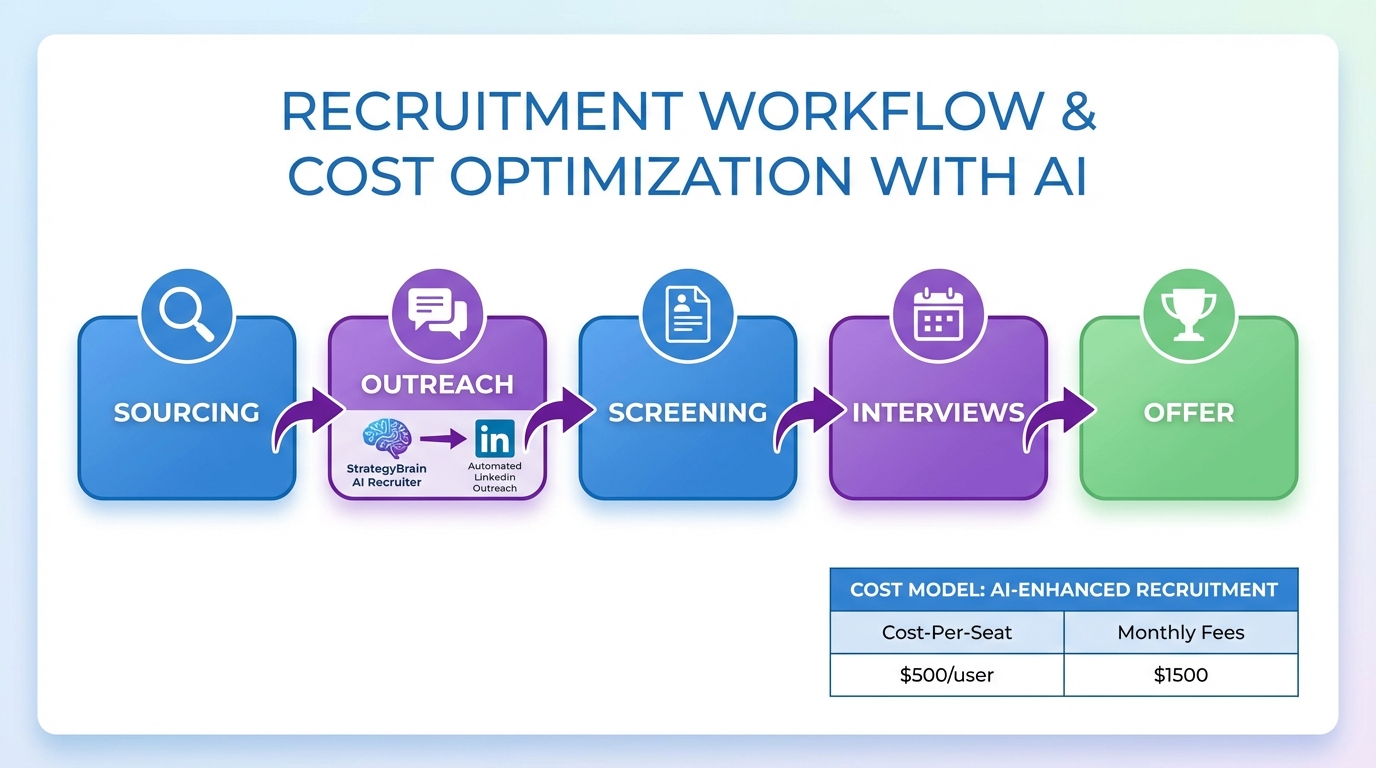
The fastest way to pick recruiting and applicant tracking software that actually fits your team is to document your hiring steps, then evaluate tools against that workflow in a short, repeatable test. In practice, we see teams get stuck when they compare feature lists instead of measuring outcomes like time to shortlist, response speed to candidates, and how reliably the system captures résumés and contact details. This guide focuses on a workflow first approach, explains how to think about applicant tracking system cost and applicant tracking system pricing without guessing, and shows where an AI layer like StrategyBrain AI Recruiter can remove repetitive LinkedIn outreach and follow up so recruiters can focus on final qualification and interviews.
Key Takeaways
- Start with workflow, not features: define stages from sourcing to offer, then score tools on how well they support each stage.
- Separate ATS from sourcing automation: an ATS tracks applicants, while LinkedIn automation can handle first touch messaging and follow up at scale.
- Applicant tracking system pricing varies by scope: compare vendors using the same unit, such as cost per recruiter seat, cost per month, and implementation fees.
- Use a short proof test: run a 7 day evaluation with 10 to 20 sample candidates to validate pipeline, reporting, and data export.
- StrategyBrain AI Recruiter reduces manual LinkedIn work: it can automate connecting, introducing roles, answering candidate questions, and collecting résumés and contact details.
- Plan for privacy and security: confirm encryption, data isolation, and whether customer data is used to train models.
What you actually need from recruiting and applicant tracking software
Recruiting and applicant tracking software usually combines two jobs. First, it helps you attract candidates through job postings and intake forms. Second, it helps you manage the candidate pipeline, meaning the stages a candidate moves through from application to interview to offer.
An applicant tracking system (ATS) is the part that stores candidate records, tracks stage changes, and supports collaboration and reporting. It is not always designed to do high volume outbound sourcing on LinkedIn. That is where a dedicated automation layer can be useful, especially when recruiters spend hours on repetitive first messages and follow ups.
Core capabilities to confirm in any ATS
- Pipeline stages: customizable stages and clear ownership for each step.
- Candidate record quality: résumé storage, contact fields, notes, and activity history.
- Search and filtering: find candidates by skills, location, and stage.
- Reporting: time in stage, source tracking, and conversion rates.
- Exports: ability to export candidate data for audits or migrations.
- Privacy controls: access control, retention policies, and security posture.
Method 1: Build a workflow scorecard before you shop
When we review hiring operations, the biggest improvement comes from writing down the real workflow and then scoring tools against it. This prevents buying software that looks impressive but does not match how your team actually hires.
Steps
- List your roles and hiring volume: include permanent versus temporary hiring, and whether you do executive search style recruiting.
- Map your stages: sourcing, outreach, screening, interviews, references, offer, and onboarding handoff.
- Define decision points: who moves a candidate forward, and what evidence is required.
- Write must have requirements: for example, résumé capture, interview scheduling support, and reporting.
- Run a short proof test: use 10 to 20 sample candidates and complete the full workflow end to end.
Features
- Comparable evaluations: every vendor is scored on the same workflow steps.
- Faster stakeholder alignment: hiring managers see the process, not just a demo.
- Lower implementation risk: gaps show up before you sign a long contract.
Limitations
- Requires internal clarity: if your stages are inconsistent across teams, you must standardize first.
- Does not replace sourcing: a scorecard helps select an ATS, but it does not generate candidates.
Best For
- Teams buying their first ATS.
- Organizations replacing a legacy system with unclear requirements.
- Recruiting leaders who need a defensible selection process.
Method 2: Validate applicant tracking system pricing with a cost model
Most confusion around applicant tracking system pricing comes from comparing different pricing units. One vendor prices per recruiter seat, another prices by employee count, and another bundles features into tiers. To compare fairly, you need a simple cost model that normalizes the numbers.
Steps
- Choose a comparison unit: cost per month, cost per recruiter seat, and any one time implementation fees.
- List required add ons: integrations, reporting modules, or additional user types.
- Estimate usage: number of recruiters, hiring managers, and monthly openings.
- Calculate total cost: monthly subscription plus one time costs, then divide by expected hires if that helps your finance team.
Practical template you can copy
- Applicant tracking system cost per month: subscription + required add ons.
- One time costs: implementation, data migration, training.
- Internal time cost: hours spent on setup and process change.
- Cost per hire support: total monthly cost divided by hires per month.
Limitations
- Pricing changes: vendors update packaging, so you must verify quotes at purchase time.
- Hidden operational costs: slow workflows and low adoption can cost more than the subscription.
Best For
- HR teams building a business case.
- Procurement teams comparing multiple vendors.
- Recruiting leaders who want predictable budgeting.
Method 3: Add LinkedIn automation with StrategyBrain AI Recruiter
If your hiring relies on LinkedIn, an ATS alone often leaves a gap. Recruiters still spend time connecting with candidates, introducing roles, answering basic questions, and chasing résumés. StrategyBrain AI Recruiter is designed to automate that front end workflow on LinkedIn so your team can focus on final qualification and interviews.
What we see this solve in real workflows
- First touch outreach: consistent introductions that match your role and company details.
- Follow up discipline: timely responses and continued engagement without manual reminders.
- Résumé and contact capture: collecting documents and details from interested candidates so the recruiter can review and proceed.
Steps
- Provide job context: company details, compensation, benefits, and candidate search criteria.
- Connect and start conversations: the system reaches out to candidates that match your targeting.
- Handle Q and A: it answers questions about the role and employer and confirms interview interest.
- Collect résumés and contact details: it requests documents and captures details shared in messages.
- Recruiter reviews and qualifies: the recruiter completes final qualification by reviewing the résumé and scheduling interviews.
Features
- 24/7 multilingual communication: supports candidate messaging in any global language to reduce misunderstandings across time zones.
- Scalable account management: supports managing more than 100 LinkedIn accounts for teams that need high volume outreach.
- Clear scope boundary: it identifies willingness to communicate or interview, but it does not decide final fit against job requirements.
Limitations
- Not a full ATS replacement: you still need recruiting and applicant tracking software to manage pipeline stages, approvals, and reporting.
- Final qualification remains human: résumé review and hiring decisions stay with the recruiter and hiring manager.
Best For
- Teams sourcing heavily on LinkedIn and losing time to repetitive outreach.
- Organizations hiring across multiple countries that need multilingual candidate communication.
- Agencies and corporate teams that want to scale outreach without adding headcount.
Method 4: Decide when to use a recruitment agency versus software
Software and agencies solve different problems. Recruiting and applicant tracking software improves consistency, visibility, and reporting inside your organization. A recruitment agency can be valuable when you need specialized search, fast access to networks, or support across multiple role types.
In the Edmonton market, a practical approach is to start by clarifying your staffing needs. Decide whether you need permanent or temporary employees, whether you are short staffed or building for growth, and whether the search requires headhunting. Then evaluate whether your internal team can execute with the right tools, or whether an agency partner is needed for specific roles.
Steps
- Define the hiring need: permanent versus temporary, volume, and seniority.
- Assess internal capacity: recruiter bandwidth, hiring manager availability, and sourcing channels.
- Choose the operating model: internal hiring with an ATS, agency support, or a hybrid.
- Standardize the process: even with an agency, keep a consistent pipeline and documentation.
How software and AI automation fit this decision
- ATS: keeps candidate records, stages, and reporting consistent across roles.
- LinkedIn automation: reduces time spent on outreach and follow up so internal teams can handle more searches.
- Agency support: adds specialized search capability when internal sourcing is not enough.
Quick Comparison
| Approach | Speed Impact | Cost Model | Best For |
|---|---|---|---|
| Workflow scorecard selection | Improves selection speed by reducing rework | Internal time investment | Choosing or replacing recruiting and applicant tracking software |
| ATS cost model for pricing validation | Improves budget approval speed | Normalizes applicant tracking system pricing | Procurement and finance comparisons |
| StrategyBrain AI Recruiter for LinkedIn | Reduces manual outreach and follow up workload | Value tied to productivity and résumé capture | LinkedIn heavy sourcing and global hiring |
| Recruitment agency support | Can accelerate hard to fill searches | Service fees vary by engagement | Specialized or senior roles, urgent hiring |
FAQ
What is recruiting and applicant tracking software?
Recruiting and applicant tracking software is a system that helps you attract candidates, store applicant data, and manage the hiring pipeline from application through interviews and offers. The applicant tracking system portion focuses on records, stages, collaboration, and reporting.
How do I compare applicant tracking system pricing without getting misled?
Compare using the same unit across vendors, such as cost per recruiter seat per month plus any one time implementation fees. Then add required add ons so you are comparing total cost, not a base tier.
What drives applicant tracking system cost the most?
The biggest drivers are the number of recruiter seats, required integrations, reporting needs, and implementation services. Internal adoption also matters because a low adoption rollout can create hidden operational costs.
Do I still need an ATS if I use StrategyBrain AI Recruiter?
Yes. StrategyBrain AI Recruiter automates LinkedIn outreach, candidate conversations, and résumé and contact collection, but it is not a full replacement for an ATS that manages pipeline stages, approvals, and reporting.
Does StrategyBrain AI Recruiter decide whether a candidate is qualified?
No. It identifies willingness to communicate or interview and collects information from interested candidates. Final qualification against job requirements is completed by the recruiter after reviewing the résumé.
Can StrategyBrain AI Recruiter communicate with candidates in different languages?
Yes. It supports 24/7 multilingual candidate communication and can respond in the candidate’s native language, which helps reduce misunderstandings across time zones.
How does the system handle privacy and data security?
StrategyBrain AI Recruiter states that customer provided data is not used to train AI models and that data is encrypted and isolated per customer. For any vendor, confirm encryption, access controls, and retention policies during procurement.
When should an Edmonton employer use a recruitment agency instead of software?
Use an agency when you need specialized search, fast access to networks, or support for senior and hard to fill roles. Use recruiting and applicant tracking software to keep your internal process consistent and measurable, and consider LinkedIn automation to expand internal capacity.
What is a simple way to test an ATS before committing?
Run a 7 day proof test with 10 to 20 sample candidates. Validate stage movement, reporting, exports, and how reliably the system captures résumés and contact details.
Conclusion
Choosing recruiting and applicant tracking software is easiest when you treat it like a workflow decision, not a feature contest. Start with a scorecard, validate applicant tracking system pricing with a normalized cost model, and then decide whether you need an additional layer for LinkedIn sourcing. If LinkedIn outreach and follow up are consuming recruiter time, StrategyBrain AI Recruiter can automate the front end conversations and résumé collection while your ATS keeps pipeline control and reporting. Next step: run a 7 day proof test, document gaps, and only then finalize vendor selection and rollout planning.














