


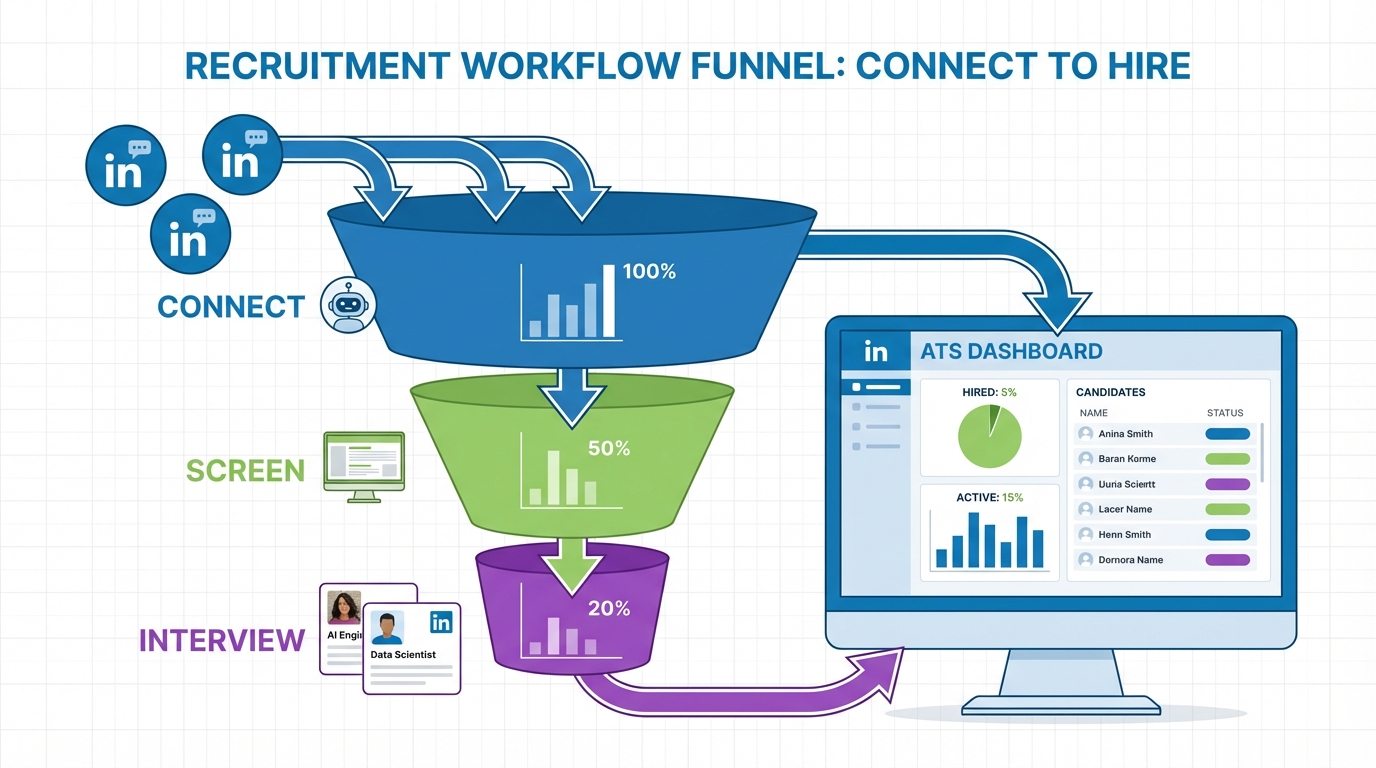
Recruiting and applicant tracking software is a system that helps teams attract candidates, manage applications, and track every hiring step in one workflow. An ATS, short for applicant tracking system, centralizes job postings, resumes, interview notes, and hiring decisions so recruiters can move faster and stay consistent. If you are asking why use an applicant tracking system, the practical answer is that it reduces manual coordination, improves visibility across the pipeline, and creates a repeatable process that scales. This guide explains what is ATS, what it typically includes, where it helps most, and how StrategyBrain AI Recruiter can extend recruiting workflows by automating early LinkedIn outreach and candidate conversations while your ATS remains the system of record.
Key Takeaways
- What is ATS: An applicant tracking system is software that stores candidate data and manages hiring stages from application to offer.
- Why use an applicant tracking system: It standardizes hiring steps, improves pipeline visibility, and reduces manual handoffs between recruiters and hiring managers.
- Recruiting and applicant tracking software works best when your ATS is the system of record and automation handles repetitive outreach and follow up.
- StrategyBrain AI Recruiter can automate LinkedIn connecting, role introduction, Q and A, interest confirmation, and resume and contact capture, then pass qualified leads to recruiters.
- Multilingual coverage: AI Recruiter supports 24/7 candidate messaging in any global language, which helps when hiring across time zones.
- Scope boundary: AI Recruiter can confirm willingness to interview, but final fit assessment against job requirements still belongs to the recruiter.
Table of Contents
- What is ATS
- What recruiting and applicant tracking software typically includes
- Why use an applicant tracking system
- Where ATS workflows often break down
- How StrategyBrain AI Recruiter fits with an ATS
- Selection checklist for recruiting and applicant tracking software
- Quick comparison: ATS vs LinkedIn automation vs both
- FAQ
- Conclusion
What is ATS
An ATS is an applicant tracking system that stores candidate profiles and tracks hiring progress through defined stages such as applied, screened, interviewed, and offered. In practice, it becomes the operational backbone for recruiting and applicant tracking software because it creates a single place for the team to see status, ownership, and next steps.
When I audit hiring workflows, I treat the ATS as the system of record. That means it should hold the authoritative version of candidate data, stage history, and decision notes, even if sourcing and outreach happen elsewhere.
What recruiting and applicant tracking software typically includes
Most recruiting and applicant tracking software bundles several capabilities. The exact names vary by vendor, but the functions are consistent across modern ATS products.
Core ATS functions
- Job and requisition management: Create roles, define hiring teams, and control approvals.
- Candidate intake: Collect applications and resumes, then normalize candidate profiles.
- Pipeline stages: Move candidates through stages with clear ownership and timestamps.
- Collaboration: Interview feedback, scorecards, and internal notes in one place.
- Compliance support: Retention rules, consent tracking, and audit trails where applicable.
Common add ons that affect outcomes
- Sourcing tools: Candidate search, talent pools, and CRM style nurturing.
- Scheduling: Calendar coordination and interview logistics.
- Reporting: Funnel conversion, time to stage, and recruiter workload views.
Why use an applicant tracking system
If you are hiring more than a handful of roles per year, the main reason to adopt an ATS is process control. Without it, recruiting becomes a set of disconnected spreadsheets, inbox threads, and ad hoc decisions that are hard to repeat or improve.
Here are the most defensible reasons teams give when they ask why use an applicant tracking system.
- Consistency: Every candidate goes through the same stages and evaluation steps.
- Visibility: Hiring managers can see where candidates are stuck and why.
- Speed: Less time is spent chasing updates, files, and approvals.
- Accountability: Ownership is clear for each stage and next action.
- Better handoffs: Recruiters, coordinators, and interviewers work from one record.
Where ATS workflows often break down
Even strong recruiting and applicant tracking software cannot fix a workflow that is missing consistent top of funnel activity. In real teams, the bottleneck is often not the ATS itself. It is the manual work required to start conversations, follow up, and keep candidates engaged.
In other words, an ATS is excellent at tracking candidates once they are in the system, but it does not automatically create qualified conversations. That is where automation can complement the ATS without replacing it.
Common pain points we see in practice
- Slow outreach: Recruiters cannot message enough candidates consistently across roles.
- Follow up gaps: Candidates go cold because follow up is delayed or forgotten.
- Time zone friction: Global candidates reply outside business hours and wait too long.
- Language barriers: Misunderstandings reduce response rates and trust.
How StrategyBrain AI Recruiter fits with an ATS
StrategyBrain AI Recruiter is designed for LinkedIn hiring workflows. It automates the early stage work that typically happens before a candidate is fully qualified in your ATS. The goal is not to replace recruiting and applicant tracking software, but to feed it with better, faster candidate conversations.
What AI Recruiter automates on LinkedIn
Based on the product capabilities provided, AI Recruiter can do the following with recruiter authorization and job context.
- Automatically connects with candidates that match your search criteria.
- Introduces the role and answers questions about the role, company, compensation, and benefits.
- Confirms interest in interviewing and keeps the conversation moving.
- Collects resumes and contact details from interested candidates.
24/7 multilingual candidate communication
AI Recruiter provides round the clock responses and can communicate in any global language. In my experience, this matters most when you are hiring across multiple regions because response time and clarity directly affect candidate drop off.
Scaling with multiple LinkedIn accounts
AI Recruiter supports managing more than 100 LinkedIn accounts so teams can build an AI powered recruiting team. This is useful when your organization needs higher outreach volume without adding recruiter headcount.
Important limitation to plan for
AI Recruiter can identify willingness to communicate or interview, but it does not determine whether a resume fully matches job requirements. You should keep final qualification inside your recruiting team and record the decision in your ATS.
Selection checklist for recruiting and applicant tracking software
Use this checklist to evaluate recruiting and applicant tracking software in a way that matches how hiring actually happens. I recommend scoring each item as Must Have, Nice to Have, or Not Needed before you talk to vendors.
Workflow and collaboration
- Stage definitions that match your hiring process and can be customized.
- Role based permissions for recruiters, hiring managers, and interviewers.
- Structured feedback with scorecards and clear decision logging.
Data and compliance
- Audit trail for stage changes and key decisions.
- Retention controls and candidate consent handling where required.
- Security basics such as encryption and access controls.
Automation fit
- Clear system of record: Decide what must live in the ATS versus what can live in sourcing tools.
- Outreach coverage: If LinkedIn is a primary channel, plan for automation that can handle connecting, messaging, and follow up.
- Handoff design: Define when a candidate becomes an ATS record, for example after interest confirmation and resume capture.
Quick comparison: ATS vs LinkedIn automation vs both
| Approach | Primary strength | Main limitation | Best for |
|---|---|---|---|
| ATS only | Central tracking and collaboration | Does not create outreach volume by itself | Teams with strong inbound applicants |
| LinkedIn automation only | High volume outreach and fast conversations | Needs a system of record for hiring decisions | Teams sourcing heavily on LinkedIn |
| ATS plus StrategyBrain AI Recruiter | Tracked pipeline plus automated outreach and follow up | Requires clear handoff rules and recruiter review | Teams scaling hiring without adding headcount |
FAQ
What is ATS in recruiting?
ATS means applicant tracking system. It is recruiting and applicant tracking software that stores candidate records and tracks progress through hiring stages, including feedback and decisions.
Why use an applicant tracking system instead of spreadsheets?
An ATS reduces manual coordination by keeping candidate status, notes, and next steps in one place. Spreadsheets can list names, but they do not reliably manage collaboration, stage history, or consistent evaluation.
Is an ATS the same as a recruiting CRM?
No. An ATS is typically the system of record for applicants in an active hiring process, while a recruiting CRM focuses on sourcing and nurturing talent pools before they apply. Some platforms combine both, but the intent is different.
Where does StrategyBrain AI Recruiter fit if we already have an ATS?
AI Recruiter can handle early LinkedIn steps such as connecting, introducing the role, answering questions, confirming interview interest, and collecting resumes and contact details. Your ATS can then track the candidate through interviews and offer stages.
Can AI Recruiter communicate with candidates in different languages?
Yes. StrategyBrain AI Recruiter supports 24/7 multilingual communication in any global language, which helps reduce delays and misunderstandings when hiring internationally.
Does AI Recruiter decide if a candidate is qualified?
No. AI Recruiter can confirm willingness to communicate or interview, but it does not determine whether the resume matches job requirements. Recruiters should review resumes and make the final qualification decision.
How is candidate data handled?
Based on the provided product information, candidate information is encrypted, isolated per customer, and not used to train AI models. Access to LinkedIn credentials is encrypted and used only with explicit authorization.
What is the simplest way to start improving our recruiting workflow?
First, define your ATS stages and decision points so everyone follows the same process. Next, if LinkedIn is a major sourcing channel, add automation for outreach and follow up so your ATS receives more interview ready candidates.
Conclusion
Recruiting and applicant tracking software works best when it does two things well: it keeps a clean system of record for candidates, and it supports a repeatable workflow that hiring teams actually follow. That is the core answer to what is ATS and why use an applicant tracking system.
If your bottleneck is top of funnel conversations, consider pairing your ATS with StrategyBrain AI Recruiter so LinkedIn outreach, follow up, and multilingual candidate messaging run continuously while recruiters focus on evaluation and interviews. Next step: map your current hiring stages, decide your handoff point from LinkedIn conversation to ATS record, and pilot the workflow on one role before scaling.















