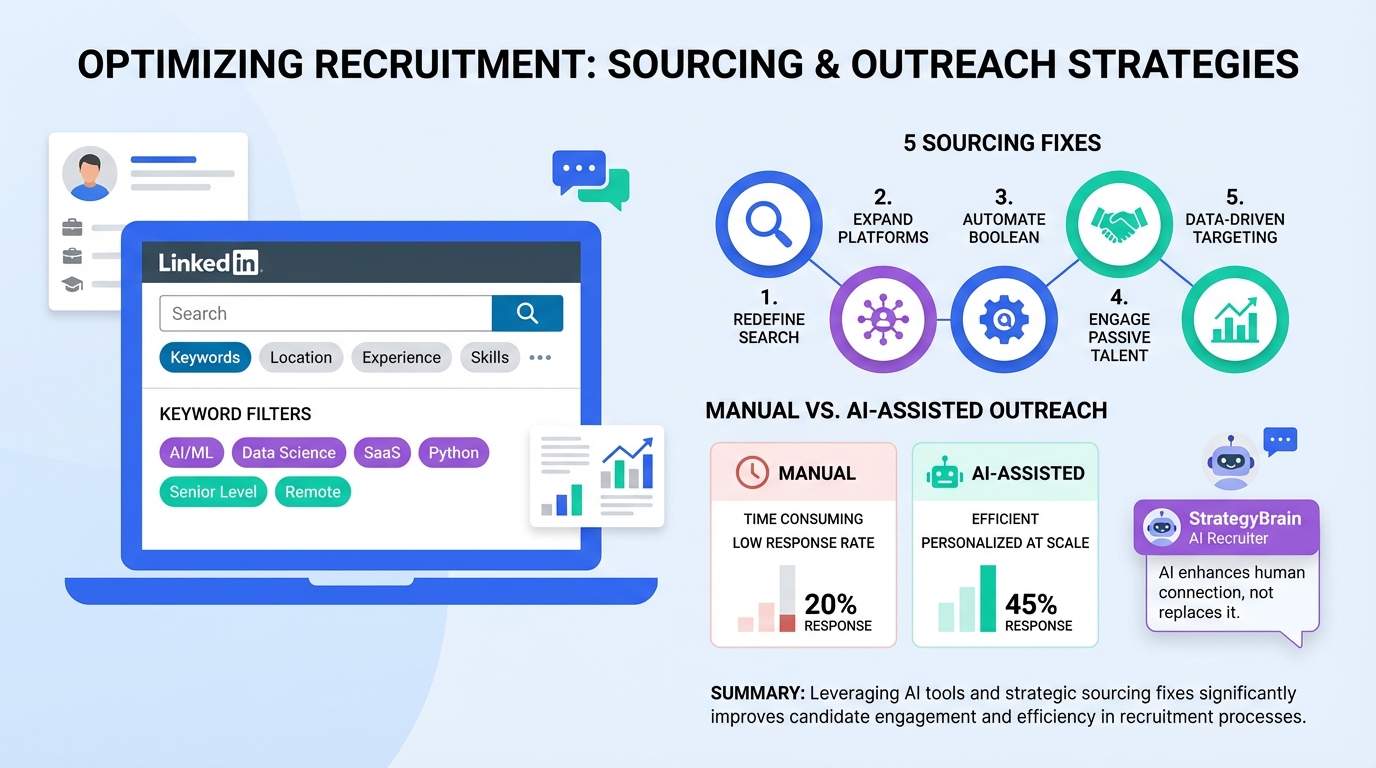
Recruiting sourcing on LinkedIn improves quickly when you stop treating the platform like a static resume and start using it as a searchable database for candidate discovery and outreach. The five fixes that move the needle fastest are: align your profile to search keywords, engage in groups instead of lurking, write a concise summary under 250 words, fully optimize your profile sections for scanning, and quantify accomplishments with specific numbers. In our day to day sourcing work, we also see the biggest time savings when repetitive outreach and follow up are automated, which is where StrategyBrain AI Recruiter can handle initial LinkedIn connecting, role introduction, Q and A, interest confirmation, and resume collection while recruiters keep control of final qualification and interviews.
What recruiting sourcing means on LinkedIn
Recruiting sourcing is the process of finding and engaging potential candidates before they apply, using search, networking, and outreach to build a qualified pipeline. On LinkedIn, sourcing typically includes keyword based searching, profile review, connection requests, messaging, follow up, and collecting resumes and contact details from interested people.
This article focuses on LinkedIn behaviors that directly affect sourcing outcomes. It does not cover job board sourcing, campus recruiting, or full interview design.
Mistake 1: Ignoring that LinkedIn is a search engine
LinkedIn behaves like a search engine because recruiters and hiring teams use keywords to find profiles. If your profile or your target candidates’ profiles do not contain the right terms, you miss matches even when the experience is relevant.
What to do instead
- Extract role keywords from job postings you are hiring for, then list the top skills, tools, and titles that repeat.
- Place keywords where LinkedIn search and humans look first: headline, About section, and the first lines of each experience entry.
- Keep wording natural so it reads like a professional profile, not a keyword list.
Practical sourcing note for recruiters
When we build candidate sourcing strategies for hard to fill roles, we treat the first 2 lines of a profile as “search plus scan” real estate. If the role keywords are not visible there, response rates usually drop because candidates do not immediately see relevance.
Where StrategyBrain AI Recruiter fits
Once your search criteria are defined, StrategyBrain AI Recruiter can automate the repetitive first touch steps on LinkedIn by connecting with candidates who match your criteria and introducing the opportunity. That means your sourcing time shifts from manual outreach to higher value work like refining search filters and reviewing interested candidates.
Mistake 2: Not reaching out to people in groups
Groups are not just for reading posts. They are a place to build credibility and create warm context for outreach. The original guidance also highlights a concrete constraint: LinkedIn allows 15 free one to one messages per month across all groups, not per group.
What to do instead
- Participate weekly by commenting with useful, role relevant insights.
- Message with context by referencing a discussion the person joined or a detail from their profile.
- Plan around the 15 message limit by prioritizing the highest fit candidates and using connection requests strategically.
Message template you can reuse
Connection note
Hello [Name]. I saw your comment in [Group topic] about [specific point]. I recruit for [role] and your experience with [skill] stood out. Would you be open to connecting so I can share a role that matches your background.
Where StrategyBrain AI Recruiter fits
If your workflow involves high volume outreach, StrategyBrain AI Recruiter can handle connecting and the initial back and forth, including answering candidate questions about role, company, and compensation based on the information you provide. This is especially useful when you are balancing multiple requisitions and cannot respond quickly across time zones.
Mistake 3: You have not spent time on your summary
Your summary, often called the About section, is the largest block of “white space” on a profile. The original recommendation is clear: keep it succinct, with less than 250 words as a strong target, include a clear title, and end with a call to action.
What to do instead
- Write a one line positioning statement that includes your role keyword.
- Add 3 proof points that show scope, tools, and outcomes.
- Close with a call to action that tells the reader what to do next.
About section template (under 250 words)
[Role title] focused on [domain]. I help [type of team or company] achieve [outcome] by using [tools or methods].
- Strengths: [skill 1], [skill 2], [skill 3]
- Industries: [industry 1], [industry 2]
- Results: [measurable outcome with unit], [measurable outcome with unit]
If you are hiring for [role keyword] or want to compare notes on [domain], send me a message or connect.
Recruiter angle: why this matters for ways of sourcing candidates
When you are sourcing, the About section is often the fastest way to confirm fit before you message. Profiles with clear role keywords and quantified outcomes reduce screening time and improve outreach relevance.
Mistake 4: You have not maximized your profile
Many people stop at experience bullets, but recruiters also scan for signals like volunteer work, organizations, languages, and recommendations. The original content also notes that LinkedIn allows some sections to be rearranged to improve scanability, and it recommends getting a personalized public profile URL.
What to do instead
- Add volunteer experience if it demonstrates leadership, governance, or domain expertise.
- List organizations that reflect credible involvement in your field.
- Collect at least 1 recommendation per role when possible.
- Reorder sections for scanning so the most relevant proof appears above less relevant history.
- Set a personalized public profile URL so it is easier to share and looks professional.
How this helps recruiting sourcing
For candidate sourcing strategies, these sections act as secondary filters. They help you identify candidates with community leadership, multilingual ability, or consistent performance validation, which can be decisive for client facing or global roles.
Mistake 5: You have not quantified your accomplishments
Job duties help match keywords, but accomplishments create credibility. Quantifying outcomes makes it easier for recruiters to assess impact and for candidates to stand out in search and in human review.
What to do instead
- Rewrite each role with 2 to 4 accomplishment bullets that include a number and a unit.
- Use consistent units such as dollars, percent, days, hours, or counts.
- Keep the context so the number is meaningful, for example “reduced close time by 6 days” is clearer than “improved close time.”
Examples of quantified bullets
- Reduced month end close from 10 business days to 6 business days by standardizing reconciliations.
- Built dashboards used by 12 stakeholders to track weekly revenue and pipeline health.
- Improved forecast accuracy from 85% to 93% by revising assumptions and review cadence.
Quick comparison: manual sourcing vs AI assisted sourcing
| Workflow area | Manual LinkedIn sourcing | With StrategyBrain AI Recruiter |
|---|---|---|
| Initial connection requests | Recruiter sends requests one by one | AI automatically connects with candidates within your search criteria |
| Role introduction and Q and A | Recruiter replies during business hours | AI responds 24/7 and can communicate in any global language |
| Interest confirmation | Recruiter follows up manually | AI confirms interview interest and captures intent signals |
| Resume and contact collection | Recruiter requests and tracks files | AI requests resumes and captures contact details from interested candidates |
| Final qualification | Recruiter reviews resumes and decides fit | Recruiter still performs final qualification, AI does not decide full match |
Copy and paste tools for better candidate sourcing strategies
Weekly recruiting sourcing checklist (1 hour)
- Review 5 new profiles and note the top 10 recurring keywords for the role.
- Comment on 3 group discussions with role relevant insights.
- Send connection requests to 10 high fit candidates with personalized context.
- Rewrite 2 outreach messages based on reply patterns and objections.
- Update your role scorecard so outreach stays consistent across the team.
Role intake mini template for outreach consistency
- Must have skills: [skill 1], [skill 2], [skill 3]
- Nice to have skills: [skill 1], [skill 2]
- Non negotiables: [location or time zone], [work authorization], [schedule]
- Compensation facts you can share: [range], [bonus], [equity]
- Candidate motivators: [growth], [mission], [team], [tech stack]
When you provide these inputs to StrategyBrain AI Recruiter, it can answer common candidate questions consistently and reduce back and forth.
FAQ
Is LinkedIn really important for recruiting sourcing?
Yes. LinkedIn is widely used for professional search and outreach, so treating it like a search engine and optimizing keywords directly supports sourcing. The impact is strongest for roles where candidates maintain detailed profiles.
What is the fastest way to improve ways of sourcing candidates on LinkedIn?
Update your headline and About section with role keywords, then rewrite experience bullets to include quantified accomplishments. After that, engage in groups weekly and send personalized connection notes.
How many group messages can I send for free?
The source content notes a limit of 15 free one to one messages per month across all groups. Plan outreach so those messages go to the highest fit candidates and use connection requests thoughtfully.
Should I keep my summary under 250 words?
Yes. A concise About section under 250 words is easier to scan and forces clarity. Include a role keyword, 3 proof points, and a clear call to action.
What does StrategyBrain AI Recruiter automate in LinkedIn sourcing?
It automates connecting with candidates, introducing the opportunity, answering questions about the role and company based on your inputs, confirming interest, and collecting resumes and contact details. Recruiters still make the final fit decision after reviewing resumes.
Can StrategyBrain AI Recruiter communicate with candidates in other languages?
Yes. It supports multilingual communication and can respond around the clock, which helps when sourcing across time zones and regions.
How does AI Recruiter handle resumes and contact details?
It requests resumes and captures contact details from candidates who express interest. It supports email submissions and LinkedIn file uploads, and it marks resumes as received when candidates send them.
Does AI Recruiter replace recruiters?
No. It replaces repetitive outreach and early conversation steps, but it does not determine full qualification against job requirements. Recruiters remain responsible for screening decisions and interviews.
How should I measure whether my candidate sourcing strategies are improving?
Track response rate, interested rate, and resume received rate per 100 connection requests, plus median time to first reply. Use the same message templates for 2 weeks before changing variables so results are comparable.
Conclusion
Recruiting sourcing on LinkedIn becomes more predictable when you fix five fundamentals: treat LinkedIn as search, use groups actively, write a concise summary under 250 words, optimize your profile for scanning, and quantify accomplishments with clear numbers. If your bottleneck is time, the next step is to automate the repetitive outreach and follow up work while keeping human control over final qualification. StrategyBrain AI Recruiter is designed for that LinkedIn workflow, so you can scale sourcing volume, maintain consistent messaging, and focus your recruiter hours on the candidates who are ready for interviews.