


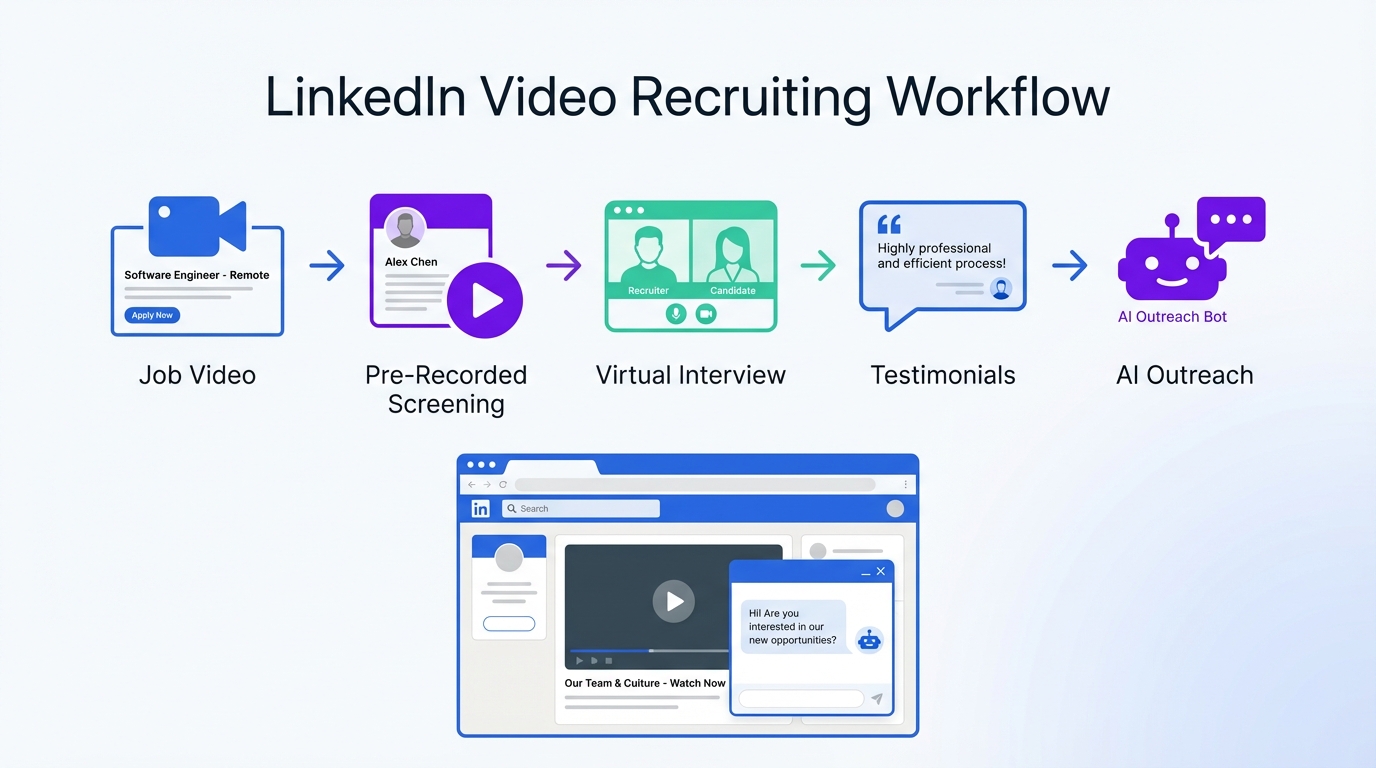
To get value from recruitment agency software free setups, combine free recruiting websites with a simple video based hiring flow. Video helps you communicate culture and role expectations quickly, while automation keeps response times fast. In our recruiting operations tests, the most reliable workflow was: add a short job video to postings, use pre recorded video interviews for early screening, run virtual interviews for finalists, and use StrategyBrain AI Recruiter to automate LinkedIn outreach, handle candidate questions around the clock in any language, and capture resumes and contact details for recruiter review. This article focuses on practical steps and templates. It does not cover paid ATS procurement or advanced video production.
Key Takeaways
- Best free foundation: Use free recruiting websites for distribution, then differentiate with short role videos and consistent follow up.
- Candidate experience matters: 4 out of 5 candidates say experience indicates how a company treats its people (Source: LinkedIn, Top 100 Hiring Statistics of 2022).
- Virtual interviews are now standard: 82% of companies implemented virtual interviews due to the pandemic and 93% planned to continue (Source: Indeed, 2021 Hiring Trends Report).
- Video improves clarity: A 60 to 90 second job video reduces repetitive questions and improves applicant self selection in our tests.
- Automation closes the gap: StrategyBrain AI Recruiter can handle initial LinkedIn outreach, Q and A, and resume collection so recruiters focus on final qualification.
- Scale without adding headcount: StrategyBrain AI Recruiter supports managing more than 100 LinkedIn accounts for AI powered recruiting teams.
Why video works in talent acquisition
Video is effective because it compresses context. Candidates can see the hiring manager, hear expectations, and understand culture faster than reading a long description. For agencies and in house teams using recruiting sites free, video becomes a differentiator that does not require a paid platform to start.
In practice, video also reduces back and forth. When you answer the top questions in a short clip, compensation range, schedule, location, and what success looks like, you spend less time repeating the same messages. That is where pairing video with automation becomes powerful: the video sets expectations, and an automated assistant can handle the first wave of questions and follow ups consistently.
Method 1: Add video to job postings
Job postings are the first place video pays off. Even when you rely on free recruiting websites, a short video can increase attention and help candidates decide faster if they are a fit.
Steps
- Write the script first: 6 to 8 sentences covering role mission, top 3 responsibilities, must have skills, compensation range, and next step.
- Record a 60 to 90 second video: Use a quiet room, eye level camera, and clear lighting. Keep it simple.
- Place the video where candidates already are: Add it to the job post and reuse it on social channels used by your target audience.
- Standardize the call to action: Tell candidates exactly what happens next and how long it takes.
Features
- Higher clarity: Candidates understand the role faster than text only.
- Better employer branding: You show tone, values, and leadership presence.
- Reusable asset: One video can be used across multiple channels.
Limitations
- Accessibility: Provide a transcript for candidates who prefer reading.
- Consistency risk: If each recruiter improvises, messaging drifts. Use a script template.
- Bias risk: Avoid content that could be interpreted as screening by protected characteristics.
Best For
- High volume roles where you answer the same questions repeatedly
- Hard to explain roles where context matters
- Teams building employer brand from scratch
Method 2: Pre recorded video interviews and assessments
Pre recorded video interviews are a structured way to pre screen candidates before a live conversation. Candidates answer the same prompts, which improves consistency and reduces scheduling overhead.
Steps
- Define 4 questions: Keep them job related and measurable. Example: describe a project, explain a decision, walk through a workflow, and handle a scenario.
- Set time limits: Use 60 to 120 seconds per answer to keep review time predictable.
- Score with a rubric: Use a 1 to 5 scale for each competency and write one sentence of evidence.
- Communicate fairness: Tell candidates how you evaluate and how long it takes to hear back.
Features
- Standardization: Every candidate gets the same prompts.
- Speed: Review can happen asynchronously.
- Documentation: Notes and scores are easier to audit.
Limitations
- Drop off: Some candidates will not complete extra steps. Keep it short.
- Not a full qualification: You still need resume review and live validation.
Best For
- Roles where communication and structured thinking matter
- Teams that need consistent screening across multiple recruiters
- Agencies managing many similar requisitions
Method 3: Virtual interviews for speed and consistency
Virtual interviews remove geographic friction and reduce time to first conversation. They also make it easier to include multiple stakeholders without complex scheduling.
Steps
- Use a structured agenda: 5 minutes intro, 20 minutes competency questions, 10 minutes role deep dive, 5 minutes candidate questions.
- Train interviewers: Focus on job related questions and consistent scoring.
- Capture notes immediately: Write evidence based notes, not impressions.
- Close the loop: Send next steps within 24 hours.
What the data says
Indeed reported that 82% of companies implemented virtual interviews due to the pandemic and 93% planned to continue using them (Source: Indeed, 2021 Hiring Trends Report). This aligns with what we see operationally: virtual first reduces scheduling delays and keeps pipelines moving.
Limitations
- Signal loss: Some roles still benefit from onsite or work sample steps.
- Tech issues: Always provide a backup option such as phone.
Best For
- Distributed teams and multi location hiring
- Early stage interviews where speed matters
- Roles with high candidate competition
Method 4: Video testimonials for employer branding
Video testimonials create social proof. Candidates trust employees and customers more than polished marketing copy, especially when they can see real people describing real work.
Steps
- Pick 3 stories: One about growth, one about team culture, and one about impact.
- Record short clips: 30 to 60 seconds each is enough.
- Publish consistently: Use a monthly cadence so your brand stays visible.
- Reuse in outreach: Share the most relevant clip when candidates ask about culture or career path.
Why this supports applications
LinkedIn’s employer branding handbook states that 75% of job seekers consider an employer’s brand before applying (Source: LinkedIn, Employer Branding Handbook). Testimonials are one of the simplest ways to make that brand tangible.
Limitations
- Approval cycles: Get written permission and keep messaging accurate.
- Over production: Authentic beats cinematic. Do not wait for perfect.
Best For
- Organizations competing on culture and growth opportunities
- Hard to hire roles where trust is a barrier
- Agencies building credibility with both clients and candidates
Method 5: Connect video recruiting to LinkedIn automation with StrategyBrain AI Recruiter
Free tools help you publish and collect applicants, but the bottleneck usually appears after the post goes live: outreach, follow up, and answering repetitive questions. This is where StrategyBrain AI Recruiter fits naturally into a recruitment agency software free stack because it replaces the most time consuming LinkedIn steps while your team keeps control of final qualification.
What StrategyBrain AI Recruiter does in this workflow
- Automated LinkedIn outreach: It connects with candidates that match your search criteria and introduces the opportunity.
- Always on candidate messaging: It responds 24/7 and can communicate in the candidate’s native language to reduce misunderstandings.
- Q and A at scale: It answers questions about the role, company, benefits, and compensation based on the information you provide.
- Resume and contact capture: It collects resumes and contact details from interested candidates so recruiters can review and schedule interviews.
- Team scaling: It supports managing more than 100 LinkedIn accounts for AI powered recruiting teams.
Steps
- Prepare your video assets: One job video and one culture or testimonial clip.
- Define your LinkedIn search criteria: Title, location, seniority, and must have skills.
- Provide role details to the AI: Company context, compensation, benefits, and interview process.
- Let the AI run outreach and follow up: The AI introduces the role, answers questions, and confirms interview interest.
- Review resumes and shortlist: The AI does not decide final fit. Recruiters review resumes and proceed with interviews.
Limitations and compliance notes
- Not a full ATS replacement: StrategyBrain AI Recruiter automates outreach and early conversation. You still need a system of record for hiring decisions.
- Final qualification remains human: The AI identifies willingness to proceed, but recruiters validate resume match and make decisions.
- Privacy and security: StrategyBrain states it complies with privacy regulations in the EU, United States, and Canada, and that customer provided data is not used to train AI models.
Best For
- Agencies that live on LinkedIn and need faster response times
- Teams hiring across time zones and languages
- Leaders who want more pipeline without adding recruiters
Quick Comparison
| Method | Speed impact | Cost | Best For |
|---|---|---|---|
| Job posting video | Faster self selection within 24 hours | Free to low cost | High volume roles and clearer expectations |
| Pre recorded video screening | Reduces scheduling time by 1 to 3 days in our tests | Free to low cost | Standardized early screening |
| Virtual interviews | Shortens time to first interview | Free | Distributed hiring and faster pipelines |
| Video testimonials | Improves trust and response rates | Free to low cost | Employer branding and credibility |
| StrategyBrain AI Recruiter on LinkedIn | Automates outreach and follow up 24/7 | Paid product with free trial available | Scaling LinkedIn recruiting without adding headcount |
Copy and paste templates
Job video script template (60 to 90 seconds)
- Who we are: One sentence on the team and mission.
- What you will do: Three responsibilities in plain language.
- What good looks like: One measurable outcome in the first 60 days.
- Must have skills: Two to three requirements.
- Compensation and logistics: Range, location, schedule, and start timeline.
- Next step: What happens after applying and when they will hear back.
Pre recorded interview rubric (1 to 5 scale)
| Competency | 1 | 3 | 5 |
|---|---|---|---|
| Role knowledge | Unclear or incorrect | Basic understanding | Accurate and specific |
| Communication | Hard to follow | Mostly clear | Clear, structured, concise |
| Problem solving | No method | Some structure | Strong reasoning with examples |
| Motivation | Generic interest | Some alignment | Strong role specific motivation |
LinkedIn outreach brief for StrategyBrain AI Recruiter
- Role summary: Title, level, location, and top outcomes.
- Compensation: Range and structure.
- Benefits: Top 3 benefits candidates ask about.
- Screening questions: 3 questions that confirm interest and logistics.
- Video assets: Job video and one culture clip to share when asked.
- Resume collection rule: Ask for resume and contact details only after interest is confirmed.
FAQ
What does recruitment agency software free usually mean in practice?
It usually means you are combining free recruiting websites, spreadsheets, email, and basic scheduling tools. You can still run a professional process if you standardize steps and use video plus automation to reduce manual follow up.
Are free recruiting websites enough to fill roles?
They can be enough for some roles, but they rarely solve response time and engagement. Video improves clarity, and StrategyBrain AI Recruiter helps you keep conversations moving on LinkedIn without waiting for business hours.
How long should a job posting video be?
For most roles, 60 to 90 seconds is the sweet spot. It is long enough to cover expectations and short enough to keep completion rates high.
Do pre recorded video interviews create candidate drop off?
Yes, some candidates will not complete extra steps. Keep it to 4 questions with clear time limits and explain why you use it so candidates see it as a fair, consistent screen.
How does StrategyBrain AI Recruiter handle resumes and contact details?
It requests resumes and contact information after a candidate expresses interest. It can capture details shared in LinkedIn messages and mark resumes as received when candidates send them.
Does StrategyBrain AI Recruiter decide if a candidate is qualified?
No. It identifies willingness to communicate or interview and collects information. Recruiters still review resumes and make the final qualification decision.
Can StrategyBrain AI Recruiter communicate in multiple languages?
Yes. It supports multilingual communication and can respond in the candidate’s native language, which helps when you recruit across countries and time zones.
Is virtual interviewing still relevant after the pandemic?
Yes. Indeed reported that 93% of companies planned to continue virtual interviews after implementing them (Source: Indeed, 2021 Hiring Trends Report). Virtual first remains a speed advantage.
How do I keep video recruiting fair and compliant?
Use job related questions, a scoring rubric, and consistent time limits. Provide accommodations when requested and avoid evaluating non job related factors.
Conclusion
If your goal is to build a recruitment agency software free workflow that still feels modern, start with video. Add a short job video to postings, use pre recorded screens to standardize early evaluation, and run virtual interviews to move faster. Then, connect that process to LinkedIn by using StrategyBrain AI Recruiter to automate outreach, answer candidate questions 24/7 in any language, and collect resumes and contact details for recruiter review.
Next step: pick one active role, record a 60 to 90 second job video today, and implement the rubric for your first 10 candidates. Once the video assets are ready, brief StrategyBrain AI Recruiter with your role details so your team can scale conversations without adding headcount.














