


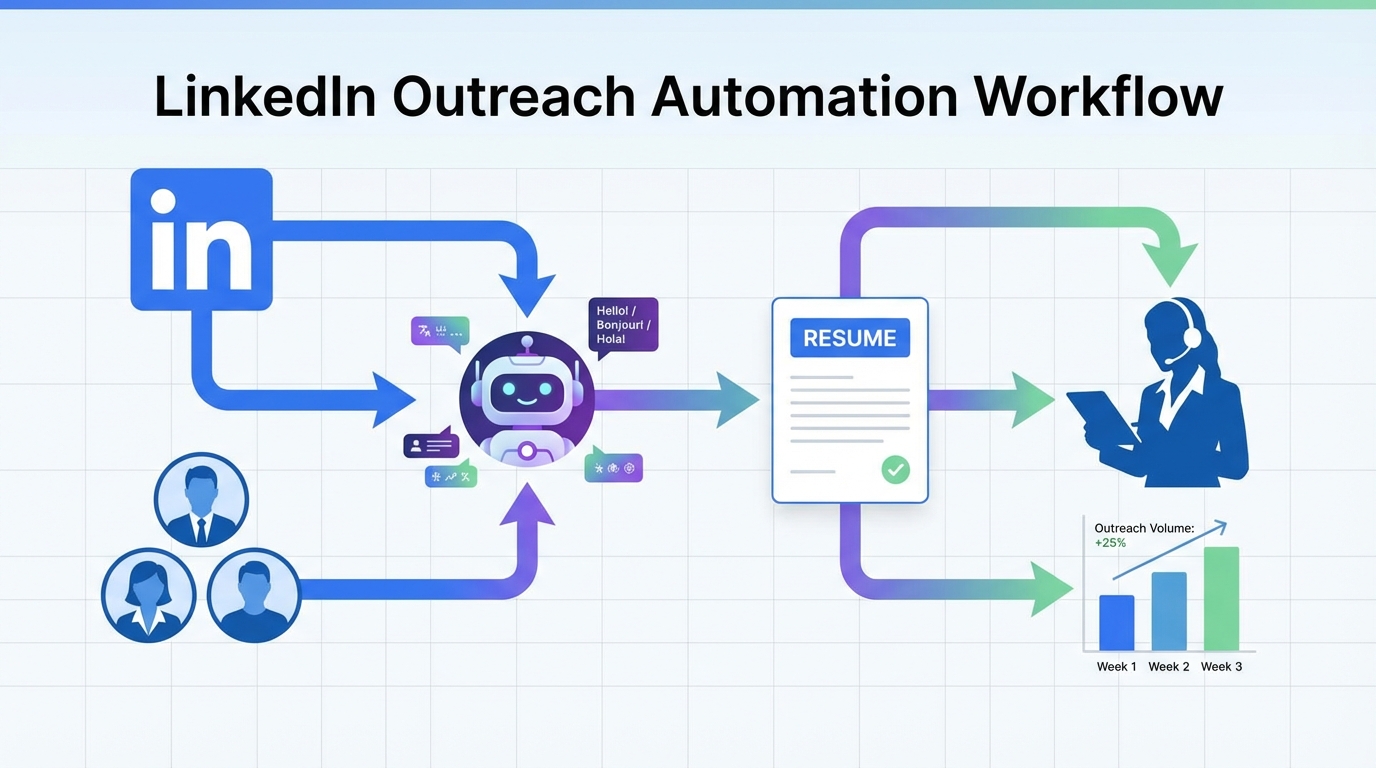
Recruitment automation software helps small businesses attract and engage high quality candidates faster by automating repetitive steps like outreach, follow up, and initial screening. The most reliable approach in 2026 is to combine a strong hiring message with recruitment automation tools that keep candidate conversations moving on LinkedIn, capture resumes and contact details, and respond quickly across time zones. In this guide, we refresh the classic “hire rock star talent” playbook for today’s market and show where StrategyBrain AI Recruiter fits into the workflow so you can scale outreach without adding recruiter headcount.
Key Takeaways
- Start with a clear value pitch: automation amplifies your message, it does not fix a vague role or unclear compensation.
- Use LinkedIn as the top funnel: for many small businesses, LinkedIn outreach is the fastest path to passive candidates, especially when follow up is automated.
- Automate the first mile: StrategyBrain AI Recruiter can handle connecting, introducing the role, answering common questions, and collecting resumes and contact details.
- Keep humans for final qualification: AI Recruiter confirms interest and gathers materials, while recruiters make the final fit decision after resume review.
- Scale with account teams: AI Recruiter supports managing more than 100 LinkedIn accounts for organizations that need higher outreach volume.
- Plan for privacy: prioritize tools that encrypt credentials, isolate customer data, and do not use customer data to train models.
Why small business hiring feels harder than it should
Small businesses compete with larger employers that can offer brand recognition, broader benefits, and more visible career paths. That reality does not mean you cannot win great candidates. It means you need a tighter process and faster execution.
In our experience implementing recruiting workflows, the biggest small business bottleneck is not sourcing alone. It is the time gap between first contact and a real conversation. When response time stretches into days, candidates move on, and your pipeline decays.
This is where corporate recruiting automation tools can be useful even for smaller teams. The goal is not to remove the human element. The goal is to automate the repetitive steps so humans spend time on judgment, relationship building, and closing.
A 2026 version of the “rock star talent” playbook
One classic resource many recruiters reference is a LinkedIn SlideShare presentation titled “15 Small Business Tips to Hiring Rock Star Talent.” The core idea still holds. Small businesses can attract top talent by being specific about impact, culture, and growth, and by running a disciplined hiring process.
What changed in 2026 is the execution layer. Candidates expect quick answers about role scope, compensation, and flexibility. If you cannot respond quickly, you lose momentum. Recruitment automation software is now the practical way to keep that momentum without burning out your team.
What to keep from the classic playbook
- Sell the mission and impact: explain what the hire will own in the first 30 days and 90 days.
- Be transparent on compensation: ambiguity increases drop off and back and forth messaging.
- Move fast: speed is a competitive advantage when you cannot outspend larger employers.
What to modernize
- Candidate communication: treat response time like an SLA, not an afterthought.
- Outreach consistency: standardize messaging so every candidate gets the same clarity.
- Follow up: automate it so you do not rely on memory or spreadsheets.
Where recruitment automation software actually helps
Recruitment automation software is most valuable when it targets high volume, low judgment tasks. That includes outreach, initial Q and A, scheduling coordination, and collecting candidate materials.
To keep this guide practical, here is a simple framework we use when evaluating recruitment automation tools for small teams. If a step is repetitive and rules based, automate it. If a step requires nuanced judgment, keep it human led.
Automate these steps first
- Connecting and first message: consistent introduction and role summary.
- Common questions: role, company, compensation, benefits, and process.
- Interest confirmation: identify who wants to proceed to interview.
- Resume and contact capture: collect what your team needs to move forward.
Keep these steps human led
- Final qualification: determine fit against requirements after reviewing the resume.
- Offer strategy: compensation decisions and negotiation.
- Closing: relationship building and addressing nuanced concerns.
Method 1: LinkedIn outreach automation with StrategyBrain AI Recruiter (recommended)
If LinkedIn is a meaningful sourcing channel for you, the fastest way to operationalize recruitment automation software is to automate the initial outreach and qualification conversation. StrategyBrain AI Recruiter is designed specifically for LinkedIn hiring and focuses on the first mile of recruiting.
Steps
- Define your search criteria: clarify target titles, seniority, location, and must have skills.
- Prepare the role facts: provide company details, compensation, benefits, and what success looks like.
- Connect AI Recruiter to your LinkedIn account: authorize the system to run outreach on your behalf.
- Let the AI run conversations: it connects with candidates, introduces the opportunity, answers questions, and confirms interest.
- Review interested candidates: AI Recruiter collects resumes and contact details from candidates who want to proceed.
Features
- Smart LinkedIn recruitment automation: automatic connect, introduction, Q and A, and interest confirmation.
- Resume and contact capture: supports email submissions and LinkedIn file uploads, and captures contact details shared in messages.
- 24/7 multilingual communication: responds around the clock and communicates in the candidate’s native language.
- Team scaling: supports managing more than 100 LinkedIn accounts for high volume outreach programs.
Limitations
- Not a final fit decision engine: AI Recruiter confirms willingness to proceed, but it does not decide whether a resume fully matches requirements.
- Requires clear inputs: if compensation, role scope, or benefits are unclear, automation can amplify confusion.
Best For
- Small teams that need consistent LinkedIn outreach without adding recruiter headcount.
- Corporate recruiting teams that want to scale outbound sourcing across multiple LinkedIn accounts.
- Global hiring where time zones and language slow down response speed.
Method 2: Automated follow up and response SLA
Many hiring teams lose candidates because follow up is inconsistent. Recruitment automation tools are effective when they enforce a response SLA, meaning a defined maximum time to respond to candidate messages.
With StrategyBrain AI Recruiter, follow up is built into the conversation flow. The system can respond 24/7, which reduces the dead time that often happens after a candidate asks a question or requests details.
Steps
- Set a response target: decide the maximum time you want candidates to wait for answers.
- Standardize answers: document role facts so responses are consistent across candidates.
- Automate reminders and nudges: ensure candidates who did not respond get a polite follow up.
Common mistakes
- Over messaging: too many nudges can feel spammy and reduce trust.
- Inconsistent compensation info: conflicting answers create drop off and reputational risk.
- No handoff point: define when a human recruiter steps in for scheduling and closing.
Method 3: Structured intake and screening questions
Automation works best when your screening is structured. A structured screen is a consistent set of questions that every candidate receives, with answers captured in a repeatable format.
In LinkedIn based workflows, AI Recruiter can ask candidates about their work situation and job search intentions, then collect resumes and contact details from those who want to proceed. Your team can then apply a consistent rubric during resume review.
Copyable screening checklist
- Role expectations explained in 3 sentences or fewer.
- Compensation range stated clearly.
- Work model stated clearly: onsite, hybrid, or remote.
- Candidate confirms interest in interviewing.
- Resume received and contact details captured.
Method 4: Build a repeatable hiring funnel
Small businesses often hire in bursts. That makes it tempting to reinvent the process each time. A better approach is to build a simple funnel that you can reuse, then let recruitment automation software run the repetitive parts.
Recommended funnel stages
- Target list: define who you want to reach on LinkedIn.
- Outreach: automate connect and introduction messaging.
- Conversation: answer questions and confirm interview interest.
- Capture: collect resume and contact details.
- Human review: recruiter reviews resume and decides next step.
- Interview: structured interview and decision.
This is also where corporate recruiting automation tools can help you scale. If you manage multiple LinkedIn accounts, AI Recruiter supports building an AI powered recruiting team that can run outreach at higher volume while keeping messaging consistent.
Quick Comparison
| Method | What it automates | Primary benefit | Human involvement |
|---|---|---|---|
| LinkedIn outreach automation with StrategyBrain AI Recruiter | Connect, introduce role, Q and A, confirm interest, collect resumes and contact details | Faster pipeline creation with consistent messaging | Human reviews resumes and runs interviews |
| Automated follow up and response SLA | Follow up timing and candidate response coverage | Reduced candidate drop off due to slow replies | Human defines handoff and final decisions |
| Structured intake and screening questions | Consistent question flow and answer capture | Comparable candidate data for faster review | Human applies rubric and evaluates fit |
| Repeatable hiring funnel | Process standardization across roles | Less reinvention and fewer missed steps | Human owns hiring strategy and closing |
FAQ
What is recruitment automation software?
Recruitment automation software is a system that automates repetitive recruiting tasks such as candidate outreach, follow up, initial screening questions, and data capture. It is most effective when it speeds up communication while keeping humans responsible for final hiring decisions.
Are recruitment automation tools only for large companies?
No. Small teams often benefit more because they have less time for repetitive outreach and follow up. The key is choosing automation that supports your workflow rather than adding complexity.
How does StrategyBrain AI Recruiter work on LinkedIn?
StrategyBrain AI Recruiter automates the initial LinkedIn recruiting workflow by connecting with candidates, introducing the job opportunity, answering questions about the role, company, and compensation, and confirming interview interest. For interested candidates, it collects resumes and contact information so recruiters can proceed with review and interviews.
Does AI Recruiter decide whether a candidate is qualified?
No. AI Recruiter identifies willingness to communicate or interview and gathers candidate materials, but it does not determine whether the resume fully matches job requirements. Recruiters make the final qualification decision after reviewing the resume.
Can AI Recruiter communicate with candidates in different languages?
Yes. AI Recruiter supports 24/7 multilingual communication and can use the candidate’s native language to reduce misunderstandings and improve response speed across time zones.
How does AI Recruiter capture resumes and contact details?
AI Recruiter requests resumes and contact information from candidates who express interest. It supports email submissions and LinkedIn file uploads, and it captures contact details shared in LinkedIn messages so recruiters can follow up directly.
Is candidate data used to train AI models?
According to StrategyBrain’s product information, customer provided data is not used to train AI models. Data is used to personalize communication for the customer’s AI instance, with encryption and customer specific isolation controls.
What should I prepare before using corporate recruiting automation tools?
Prepare a clear role summary, compensation details, benefits, and candidate search criteria. Automation performs best when the inputs are consistent and accurate, because the system will repeat what you provide at scale.
Conclusion
If you want to hire “rock star talent” as a small business in 2026, speed and clarity matter as much as sourcing. Recruitment automation software is the practical way to keep candidate conversations moving, especially on LinkedIn, where follow up and responsiveness often decide who wins the candidate.
Next steps: write a one page role brief with compensation and success outcomes, then choose recruitment automation tools that automate outreach and early conversations while keeping humans responsible for final qualification. If LinkedIn is your primary channel, StrategyBrain AI Recruiter is a strong fit for automating connect, messaging, Q and A, and resume capture so your team can focus on interviews and closing.














