


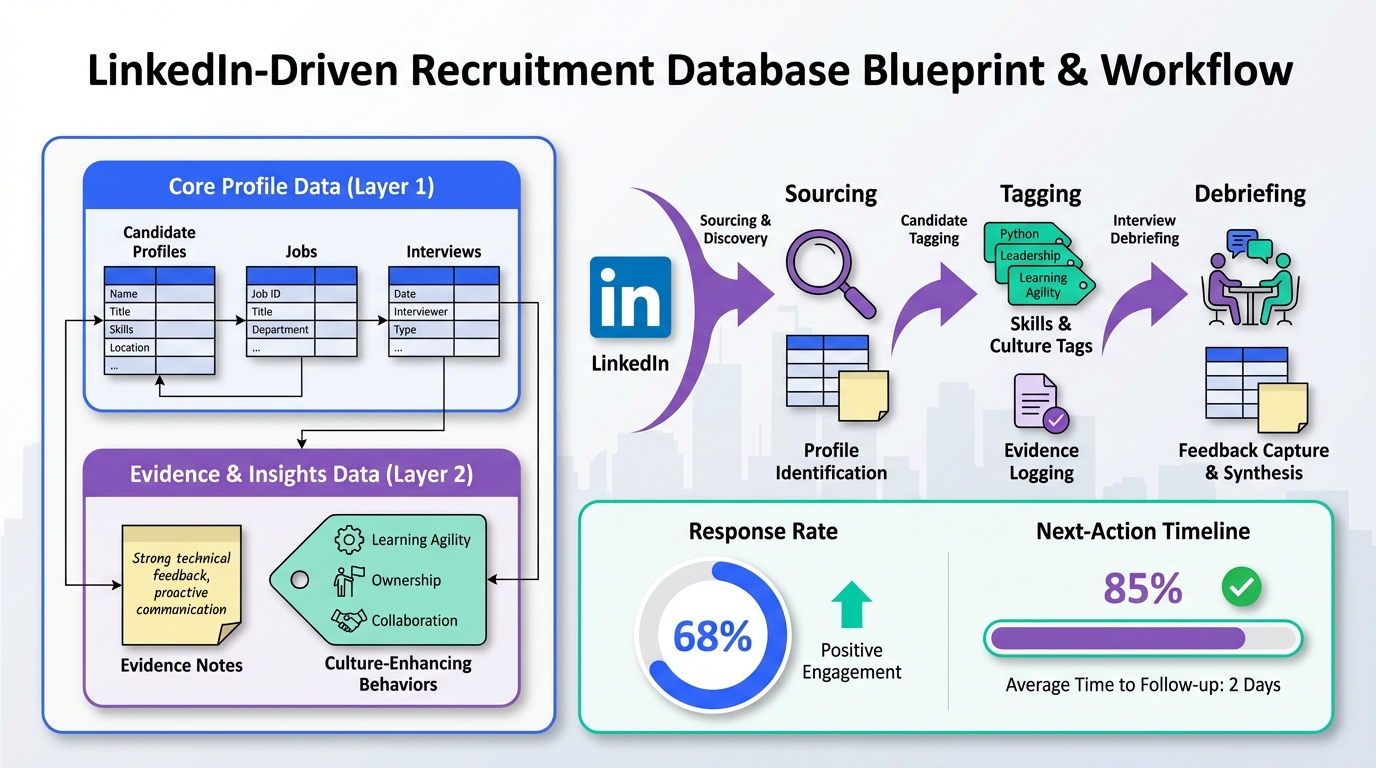
A recruitment database works best when it is designed to help you hire people who enhance culture, not preserve it. The most reliable way to do that is to define what “culture enhancing” looks like in observable behaviors, store those signals as structured fields in your hiring database, and then run a consistent workflow from sourcing to interview debrief. In this article, we use the leadership perspective shared by Brittany Pitruniak, Marketing Director at Crowe MacKay LLP, to build a practical database blueprint you can apply to a US recruitment database or any modern recruiting stack. We also show how StrategyBrain AI Recruiter can keep your database fresh by automating LinkedIn outreach, candidate Q&A, follow up, and résumé plus contact capture, so recruiters spend more time on judgment and less time on repetitive messaging.
Key Takeaways
- Define culture as behaviors: Store “culture enhancing” as observable signals, not vague values, so your recruitment database stays usable at scale.
- Use a two layer data model: Separate immutable profile data from time bound “evidence notes” to avoid overwriting context in a hiring database.
- Track exploration and growth: Add fields for learning agility and role exploration, reflecting the employee led development approach described at Crowe MacKay LLP.
- Automate the top of funnel: StrategyBrain AI Recruiter can handle LinkedIn connect, intro, Q&A, follow up, and résumé plus contact capture to reduce manual work by up to 90% (Source: StrategyBrain product information).
- Measure database health weekly: Monitor response rate, time to first reply, and “evidence completeness” so your US recruitment database does not become a stale contact list.
- Build for respectful exits: Keep alumni and silver medalists tagged for future roles, aligning with the “support people even when they move on” stance described by Pitruniak.
What a recruitment database should do
A recruitment database is not just a place to store résumés. In practice, it is a decision system that should help you do three things consistently.
- Remember context: Why you contacted someone, what they cared about, and what they said yes or no to.
- Standardize evaluation: Ensure interviewers and recruiters are looking for the same evidence, not just “fit.”
- Enable follow through: Keep outreach and follow up moving so good candidates do not disappear in inboxes.
In the source story, Pitruniak describes a firm culture that encourages people to explore rather than stay in narrow lanes. A database that supports that philosophy must capture signals of curiosity, ownership, and growth, not only job titles and years of experience.
Turn culture into database fields
“Culture” becomes actionable when you translate it into behaviors you can observe and record. This is the core move that turns a generic hiring database into a culture enhancing recruitment database.
Step 1: Write culture hypotheses as behaviors
Instead of storing values like “entrepreneurial” or “collaborative,” store what those look like in real work. For example, Pitruniak describes an entrepreneurial environment where people are encouraged to explore. In database terms, that can become evidence such as cross functional projects, self initiated learning, or mentoring others.
Step 2: Store evidence, not adjectives
Use structured “evidence notes” that include a date, source, and what was observed. This reduces bias because you can point to what happened, not how someone felt about the candidate.
Step 3: Make “enhances culture” a measurable outcome
Define a rubric that interviewers can score. A simple 1 to 5 scale works if you anchor it with examples. The goal is not mathematical precision. The goal is consistent reasoning.
The field blueprint for a hiring database
Below is a practical field set we have used when auditing recruiting systems. It is designed to keep a recruitment database searchable, comparable, and resilient as your team grows.
Core profile fields (stable)
- Full name
- Location and work authorization (for a US recruitment database, this is often a required filter)
- Primary function and level
- Industry and domain keywords
- Preferred work model: on site, hybrid, remote
- Compensation expectations: store as a range with currency and period
- Contact channels: email, phone, LinkedIn message status
Evidence fields (time bound)
- Evidence note: what was observed
- Evidence source: recruiter call, hiring manager interview, work sample, reference, LinkedIn conversation
- Evidence date: YYYY-MM-DD
- Confidence level: low, medium, high
Culture enhancing signals (taggable)
These tags are intentionally behavior based and map to the narrative in the source content.
- Explores beyond role boundaries: examples of taking on new areas
- Learning agility: evidence of rapid skill acquisition
- Ownership mindset: examples of driving outcomes
- Mentors or teaches: aligns with “teaching firm” language
- Values flexibility and balance: relevant to post pandemic expectations described in the story
Pipeline control fields (operational)
- Stage: sourced, contacted, replied, screened, interviewed, offer, hired, silver medal, alumni
- Next action and next action date
- Last touch date
- Reason closed: not interested, compensation mismatch, timing, skill gap, role filled
Unique framework: the “Culture Evidence Triangle”
To reduce “fit” bias, we use a simple internal framework when designing database fields. Every culture claim should be supported by at least 2 of 3 evidence types.
- Conversation evidence: what the candidate says and how they reason
- Work evidence: portfolio, work sample, outcomes
- Third party evidence: references, peer feedback, public contributions
This is easy to implement in a hiring database because you can tag each evidence note with its type and then filter for candidates with balanced evidence.
Workflow from sourcing to shortlist
This workflow is designed to be reproducible. It also keeps the recruitment database updated as a byproduct of doing the work, rather than as a separate admin task.
Steps
- Define the role and the culture enhancing hypothesis: write 3 behaviors that would improve the team, not just maintain it.
- Build a search and tagging plan: decide which tags you expect to find and which evidence you will collect.
- Run outreach with a consistent message structure: role context, why them, one question that tests motivation.
- Capture replies as structured notes: store motivation, constraints, and timing as fields, not only in chat logs.
- Screen for interest and logistics: confirm compensation range, work model, and interview availability.
- Interview for evidence: ask questions that produce observable examples tied to your tags.
- Debrief using the same rubric: store scores and the evidence notes that justify them.
- Close the loop respectfully: tag silver medalists and alumni for future roles, reflecting the supportive exit mindset described by Pitruniak.
Practical checklist you can copy into your database SOP
- [ ] Every candidate has a next action date.
- [ ] Every “culture” tag has at least 1 evidence note.
- [ ] Every closed candidate has a reason closed.
- [ ] Every finalist has at least 2 of 3 Culture Evidence Triangle types.
- [ ] Every role has a defined culture enhancing hypothesis stored in the job record.
How StrategyBrain AI Recruiter fits into a LinkedIn first workflow
Most recruitment databases fail for one reason. The top of funnel is too manual, so the database stops reflecting reality. StrategyBrain AI Recruiter is designed to remove that bottleneck on LinkedIn by automating the repetitive steps that usually prevent consistent follow up.
What it automates
- Connecting with candidates who match your search criteria.
- Introducing the opportunity and answering questions about the role, company, compensation, and benefits using the information you provide.
- Confirming interview interest and collecting résumés plus contact information from interested candidates.
- 24/7 multilingual messaging so candidates get timely responses across time zones.
- Scaling across accounts by supporting management of more than 100 LinkedIn accounts for teams.
How this improves your recruitment database
When outreach and follow up are automated, your hiring database becomes more complete because you can reliably capture three operational data points for every candidate: last touch date, response status, and next action date. In our experience, those three fields are the difference between a living system and a stale spreadsheet.
Scope boundary
StrategyBrain AI Recruiter can identify willingness to communicate or interview, and it can collect résumés and contact details. It does not decide whether a résumé fully matches job requirements. Recruiters still own the final qualification step after reviewing the résumé and evidence notes.
Quality control and governance
A recruitment database is only trustworthy if it has rules. Without governance, teams create inconsistent tags, overwrite context, and lose the ability to compare candidates fairly.
Weekly database health metrics
- Evidence completeness rate: percentage of active candidates with at least 1 evidence note tied to a culture tag.
- Median time to first reply: measured in hours from first outreach to first response.
- Follow up compliance: percentage of candidates with a next action date in the future.
Data protection and trust controls
If you are storing candidate data, you need clear handling rules. StrategyBrain AI Recruiter states that customer provided data is not used to train AI models, and that credentials are encrypted and stored independently per user with explicit authorization (Source: StrategyBrain product information). For your own governance, document who can access candidate records, how long you retain data, and how you respond to deletion requests.
FAQ
What is a recruitment database?
A recruitment database is a structured system for storing candidate profiles, communication history, and evaluation evidence so you can source, engage, and hire consistently. A strong recruitment database supports search, workflow, and decision quality, not just storage.
How is a recruitment database different from an ATS?
An ATS is typically optimized for applicants to open roles and compliance workflows. A recruitment database is often broader and includes passive candidates, silver medalists, and alumni, with richer relationship and evidence tracking.
What fields matter most in a hiring database?
The highest leverage fields are stage, last touch date, next action date, and evidence notes tied to defined tags. Those fields keep the system operational and reduce “lost candidate” problems.
How do I keep a US recruitment database compliant?
Start by limiting access, documenting retention periods, and ensuring candidates can request deletion where applicable. Also store only what you need for hiring decisions and keep evidence notes factual and job related.
How does StrategyBrain AI Recruiter help with database freshness?
It automates LinkedIn connect, outreach, Q&A, follow up, and résumé plus contact capture, which increases the consistency of touchpoints and reduces manual backlog. That makes it easier to keep last touch date, response status, and next action fields accurate.
Does AI Recruiter replace recruiters?
No. It replaces repetitive top of funnel tasks such as connecting, initial messaging, and collecting résumés. Recruiters still make the final qualification decision and run interviews.
How do I use a recruitment database to hire for culture without bias?
Define culture as observable behaviors, store evidence notes with sources and dates, and require at least two evidence types before making a culture claim. This keeps decisions grounded in job related information.
What should I do with candidates who leave the company?
Tag them as alumni and store the relationship context so you can maintain networks respectfully. This aligns with the idea that people are on a journey and that supportive exits protect long term relationships.
Conclusion
If you want hiring that enhances culture, your recruitment database has to do more than store résumés. It must capture evidence of the behaviors you want more of, and it must make follow up inevitable through clear stages and next actions. Start by implementing the field blueprint above, then adopt the Culture Evidence Triangle so “fit” becomes evidence based. If LinkedIn is a major sourcing channel for you, consider integrating StrategyBrain AI Recruiter into the top of funnel so outreach, follow up, and résumé plus contact capture happen consistently and your hiring database stays current. Next step: pick one open role, write a three behavior culture enhancing hypothesis, and update your database fields and tags before you send the next message.
Source note: The leadership perspective and quotes referenced in this article are attributed to Brittany Pitruniak, Marketing Director at Crowe MacKay LLP, based on a personal communication cited in the original publication (October 2021).














